

If you’ve tried to complete Discord Quests—whether it’s watching quest videos, earning rewards, or even seeing the quests themselves—and nothing seems to work, you’re not alone. Many users have reported various Discord Quest issues, from quests not showing up to videos not loading or progress not registering.
Understanding why these problems happen and how to fix them is essential, not only for unlocking rewards but also for maintaining a smooth Discord experience.
In this comprehensive guide, we’ll walk through common Discord Quest problems, explain their causes, and provide practical solutions—including using network optimization tools like LagoFast to reduce issues caused by poor connectivity.
Part 1: Common Discord Quest Not Working Issues Explained
Part 2: Why Can’t I See Discord Quest?
Part 3: Why Aren’t Discord Quest Videos Loading?
Part 4: How to Fix Discord Quest Not Progressing
Part 5: Using LagoFast to Accelerate Discord & Fix Quest Issues
Part 6: Additional Tips to Prevent Discord Quest Issues
Part 1: Common Discord Quest Not Working Issues Explained
Discord Quests allow users to earn rewards such as profile decorations, avatars, or in-game perks by completing tasks like watching short videos or streaming gameplay. However, many users encounter problems that prevent them from participating or claiming rewards.
Quest Panel Is Missing
The Quests section does not appear in the Discord sidebar or interface, even when active campaigns are running.
No Quests Displayed
The Quest Home screen shows empty lists under “Available Quests” or “Completed Quests,” despite the account being eligible.
Video Quests Fail to Play
Quest videos may fail to load, get stuck buffering, or never start, especially in the Discord desktop application.
Progress Does Not Track
After completing a task such as watching a video, the progress bar may not update, or the “Claim Reward” button remains inactive.
Quests Only Visible on Certain Devices
Quests may appear in the browser version of Discord but not in the desktop or mobile app, or vice versa.
Part 2: Why Can’t I See Discord Quests?
If Discord Quests are not appearing at all, several factors may be responsible.
Limited Feature Rollout
Discord Quests are still in beta, particularly on mobile devices. Availability varies by platform, and some quests are limited to desktop or browser versions.
Regional Availability Restrictions
Although designed to be global, certain quests or sponsored content may be unavailable in specific regions due to local regulations or ISP restrictions.
Outdated Discord Version
Older versions of the Discord app may not support newer Quest features. Updating the app via the official website or app store often restores access.
Hidden or Dismissed Quest Displays
Previously dismissed Quest notifications can affect visibility. Active quests can still be accessed manually through Discover → Quests.
Part 3: Why Aren’t Discord Quest Videos Loading?
Video-based quests are one of the most common sources of user frustration.
Desktop App Playback Issues
Quest videos sometimes fail to start in the desktop app. Switching to Discord’s browser version often resolves the issue immediately.
Mobile Compatibility Limitations
Some Video Quests are not optimized for mobile devices and may freeze or crash. These quests are typically intended for desktop or browser use.
Corrupted App Cache
Damaged local cache files can prevent videos from loading properly. Clearing the Discord cache or reinstalling the app usually fixes this problem.
Broken Redirects or Links
Some quests lead to incorrect redirects or infinite loading screens. Accessing the quest through the browser version can bypass this issue.
Part 4: How to Fix Discord Quest Not Progressing
If your quest is visible but progress is not being tracked, the following steps can help.
Restart Discord
Completely close Discord rather than minimizing it, then relaunch the app to clear temporary tracking issues.
Update the Discord App
Ensure the latest version is installed. Progress tracking often fails on outdated builds.
Use the Browser Version
Many tracking issues are app-specific. Using Discord through a web browser can bypass these bugs.
Clear Cache or Reinstall Discord
Removing corrupted app data restores proper progress updates and quest detection.
Confirm Quest Requirements
Some quests require uninterrupted video playback or active gameplay detection. Switching windows, muting videos, or tabbing out can pause progress.
Part 5: Using LagoFast to Accelerate Discord and Fix Quest Issues
Many Discord Quest issues—such as videos not loading or progress failing to register—are caused by unstable network connections. High latency, packet loss, or routing issues can disrupt Discord’s real-time communication with its servers.
LagoFast Game Booster is designed to optimize network routing and stabilize connections, making it effective not only for gaming but also for Discord Quests, streaming, and voice chat.
How LagoFast Helps with Discord
LagoFast intelligently optimizes the path between your device and Discord servers, reducing connectivity problems that interfere with quests.
Key benefits include smoother quest loading, reduced latency and packet loss, stable voice communication, consistent quest tracking, and improved access in restricted regions.
How to Use LagoFast to Fix Discord Quest Issues
Step 1: Download LagoFast
Download the LagoFast application from the official website and start the free trial.
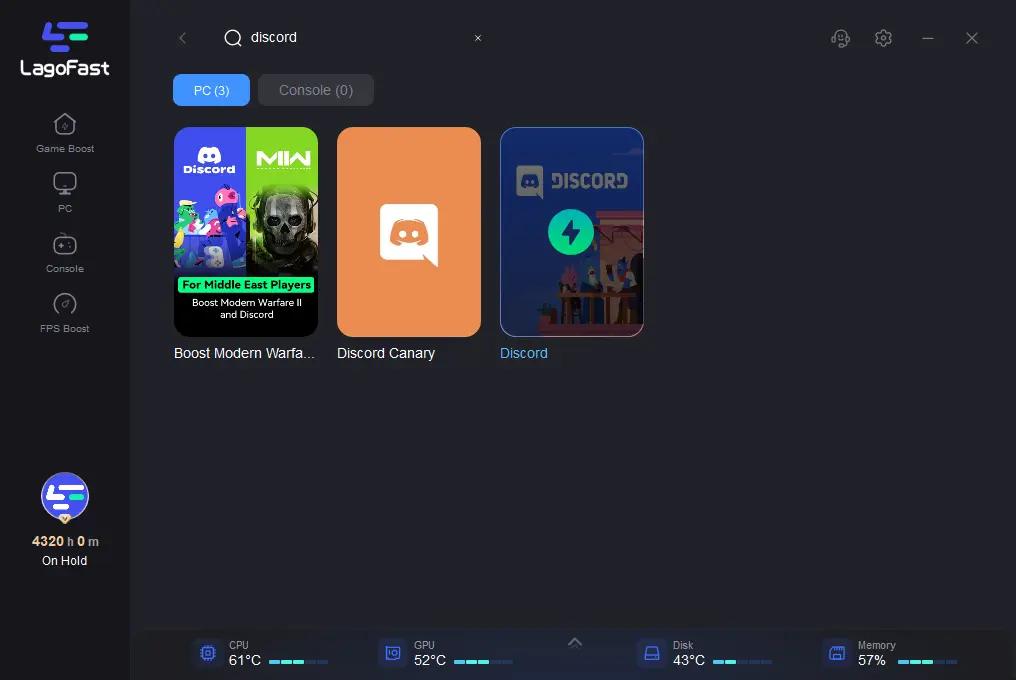
Step 2: Open LagoFast, search for “Discord”.
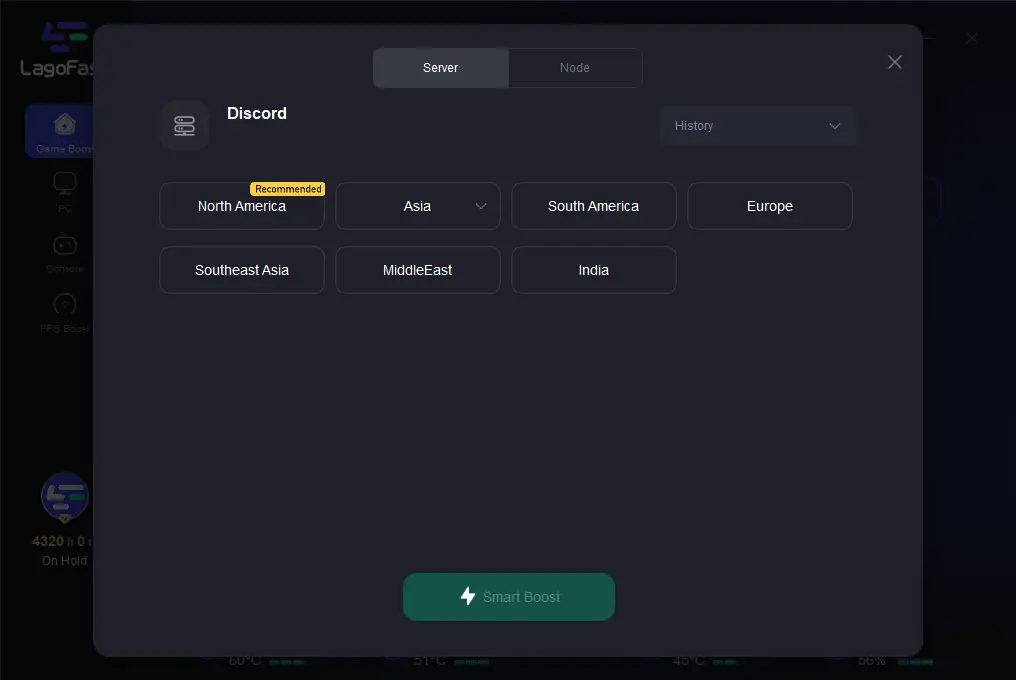
Step 3. Choose the best server.
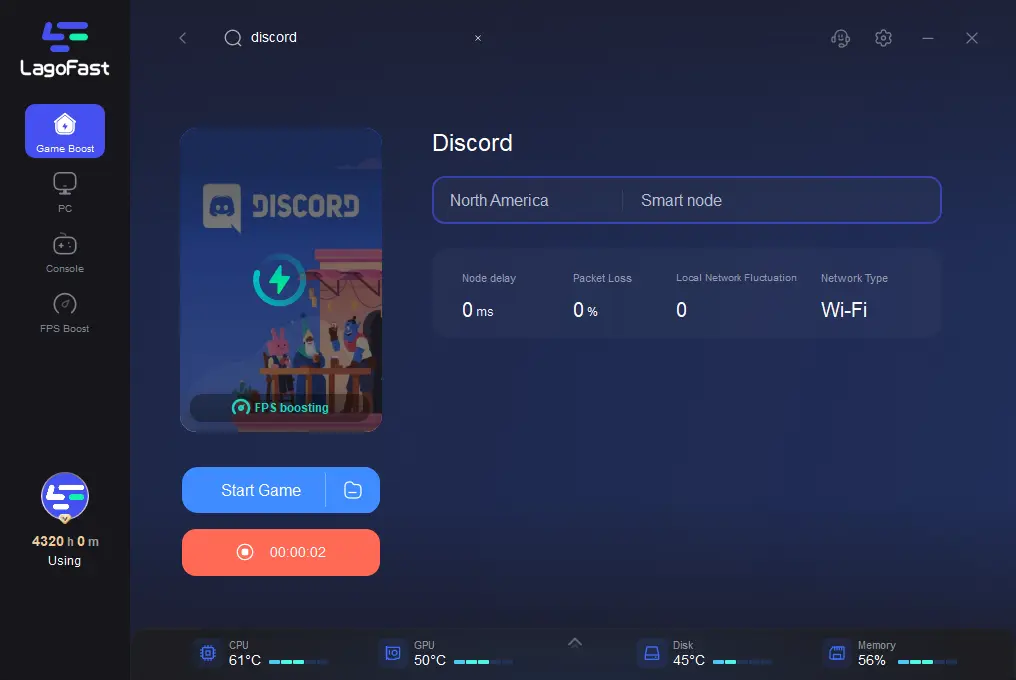
Step 4. Enable boosting and launch Discord.
Discord Quest Completer
LagoFast includes a Discord Quest Completert hat helps complete play- and stream-based quests without launching the actual game.
How the Discord Quest Completer Works
The tool simulates gameplay activity, allowing Discord to detect an active game session for eligible quests.
Steps to Use the Discord Quest Completer
Step 1. Launch LagoFast and search your game.
Step 2. Click Discord Quest Assistant
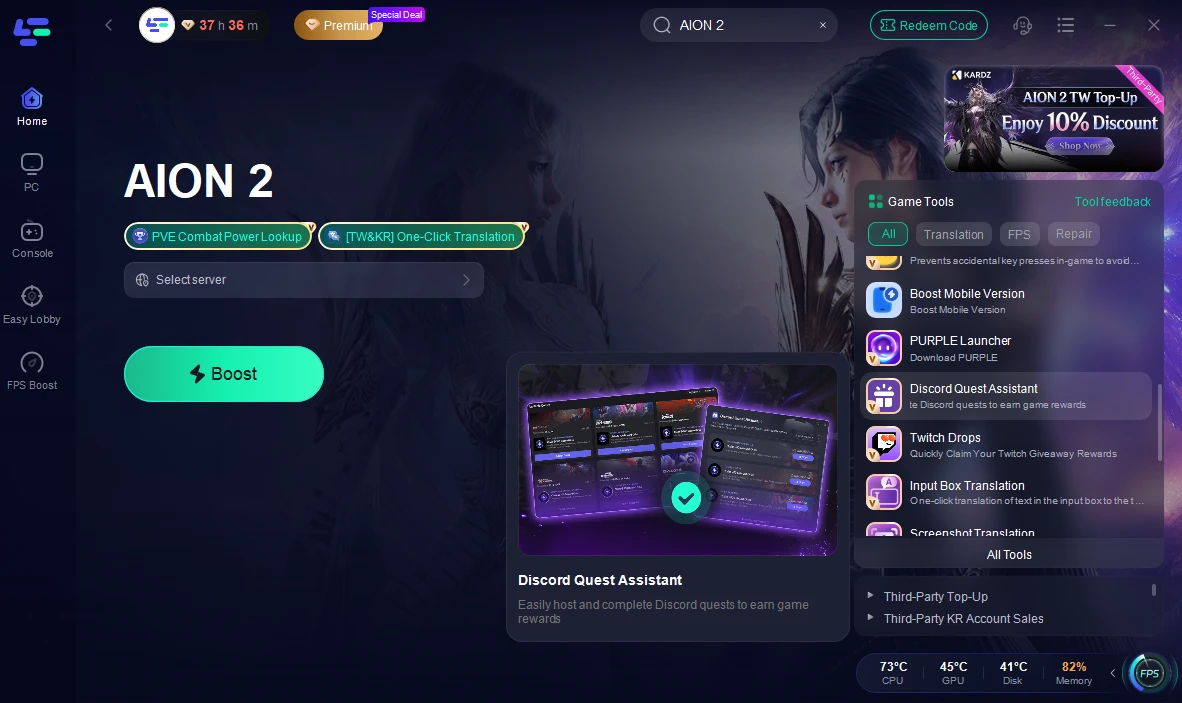
Step 3. Select the corresponding quest and start.
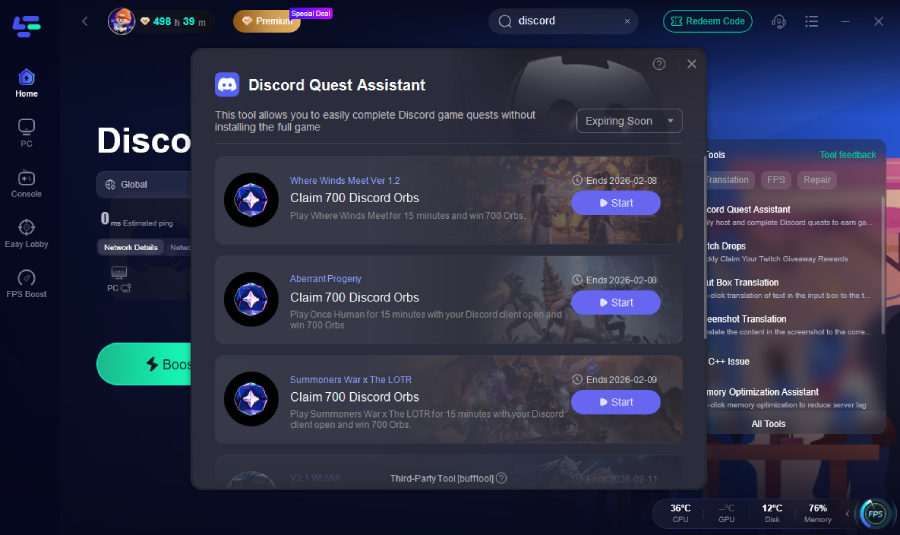
That’s it. No massive downloads, no waiting hours just to unlock a cosmetic.
Important Notes
This feature works only for game-based quests and requires the Discord desktop client.
Optimizing Discord Voice Chat with LagoFast
If your voice calls cut out or lag during gaming or streaming, you can use LagoFast to stabilize your connection.
How to Set It Up
In LagoFast, search for and select Discord and click Voice Call.
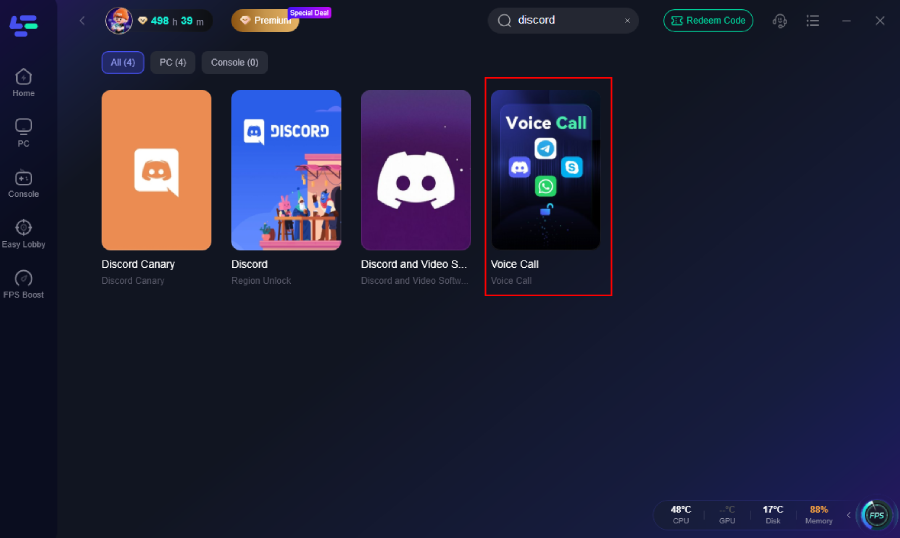
Select the server and enable boost just like boosting a game.
Part 6: Additional Tips to Prevent Discord Quest Issues
Keep Discord Updated
Regular updates ensure compatibility with evolving Quest features.
Use the Browser When Necessary
Many video and progress issues are resolved instantly in the browser version.
Avoid Regional Network Blocks
If quests are missing entirely, ISP restrictions or routing issues may be the cause. Switching networks or using optimization tools can help.
Check Daily Quest Limits
Some users are subject to daily caps, which reset after a certain period.
Claim Rewards Promptly
Unclaimed rewards can occasionally block new quests from appearing.
Part 7: FAQs
Why don’t I see any quests in my Discord?
Quests may be region-limited, in beta, or previously dismissed. Access them manually through Discover → Quests.
Why won’t my video quest play even with fast internet?
This is usually caused by app bugs or corrupted cache rather than bandwidth speed. The browser version often works better.
Why didn’t my quest progress update after completion?
Discord requires the quest window to stay in focus. Ensure the quest is accepted and the task is completed without interruptions.
Do Discord Quests expire?
Yes. Quests are time-limited and disappear once their campaign ends.
Conclusion
Discord Quests offer a fun way to earn rewards, but technical issues such as missing quests, non-loading videos, and untracked progress can disrupt the experience. Most problems stem from app limitations, platform differences, or temporary glitches and can be resolved through updates, cache clearing, or using the browser version.
For persistent network-related issues, tools like LagoFast Game Booster provide a stable, optimized connection that helps Discord load quest content reliably and maintain smooth performance across quests, streaming, and voice chat.

Boost Your Game with LagoFast for Epic Speed
Play harder, faster. LagoFast game booster eliminates stutter and lags on PC, mobile, or Mac—win every match!
Quickly Reduce Game Lag and Ping!
Boost FPS for Smoother Gameplay!