

If you’ve played Destiny 2 long enough, you’ve probably seen Bungie’s infamous zoo of error codes—Weasel, Centipede, Baboon, you name it. But lately, one of the nastiest ones creeping up in different regions is Error Code: TAPIR. Players across Iran, Russia, and the wider CIS community are finding themselves locked out of the game completely, sometimes for days or even weeks.
Here’s everything you need to know about Tapir, why it shows up, and what you can actually do to get back in.

- ✅ Reduce Lag and High Ping.
- ✅ Boost FPS at the Same Time.
✅ Support 2000+ Popular Online Games.
✅ Change Server without Latency.
✅ Boost Game Loading Speed.
Part 3: How to Fix Tapir Right Now
Part 1: What Tapir Looks Like
- You launch Destiny 2, hit the login screen, and instead of orbit you get slapped with TAPIR.
- It can appear instantly or right after the “verifying game files” step.
- Some players found that other accounts on the same PC worked fine, while their main account always hit Tapir.
As one frustrated player put it:
“Thousands of us in CIS can’t log in for days. Bungie says nothing. With stabilizers it works, without it’s Tapir nonstop.”
Part 2: Why Tapir Happens
After combing through Steam, Reddit, and Bungie’s help forums, the community pieced together several causes. Tapir isn’t just one error — it’s a whole family of login failures.
1. Scheduled Maintenance
Sometimes Tapir is simple: servers are down for updates. Bungie throws Tapir during the handshake when maintenance is active.
2. Region & Provider Restrictions
This is the big one in 2024–2025. Bungie changed its login process to rely on specific Steam/Destiny IP ranges. Unfortunately, some ISPs and regulators already blacklist those ranges. The result: your login traffic gets blocked before it reaches Bungie.
- A player from Iran: “I could play fine before. After the update, it only works if I reroute my traffic through an accelerator.”
- A CIS Guardian: “Same problem across Russia, Kazakhstan, Belarus. Normal connection = Tapir. With tunneling tools, game logs in fine.”
3. Closed Ports
Destiny 2 needs a big list of UDP/TCP ports open. Some ISPs shut them down, especially UDP 443, breaking the connection completely.
4. Account-Specific Bugs
One rare case: a player tested multiple accounts on the same machine.
- Brother’s account = works fine.
- New test account = works fine.
- His main account = Tapir every time.
That points to Bungie’s backend authentication glitching on certain accounts.
5. Legacy Destiny 1 Issue
Back in 2020, Tapir also hit Destiny 1. The cause then? Bungie accounts linked with Twitch Prime. The fix was simply unlinking Twitch. This shows Tapir has always been about login verification failing, just for different reasons over time.
Part 3: How to Fix Tapir Right Now
The fixes depend on which flavor of Tapir you’re dealing with. Here’s the community-tested toolbox:
1. Check Maintenance First
- Go to @BungieHelp on Twitter.
- If servers are down, that’s it. You just have to wait.
2. Fix It Faster with LagoFast Connection Booster
One of the easiest ways to handle Tapir right now is using LagoFast, a connection booster designed for games like Destiny 2. Unlike generic tunneling tools, LagoFast is built for gaming traffic, which means:
- Smart Routing: Finds the fastest, least-blocked path to Bungie’s servers.
- Port Optimization: Keeps all the critical Destiny 2 ports open and stable.
- Login Stabilization: Gets you past the “verifying game files” step without disconnects.
- Lower Ping vs. Regular Boosters: Because it routes only game traffic, you don’t get the massive lag spikes of full rerouting.
How to use LagoFast for Tapir:
1. Download and install LagoFast.
2. Search for Destiny 2 inside the app.
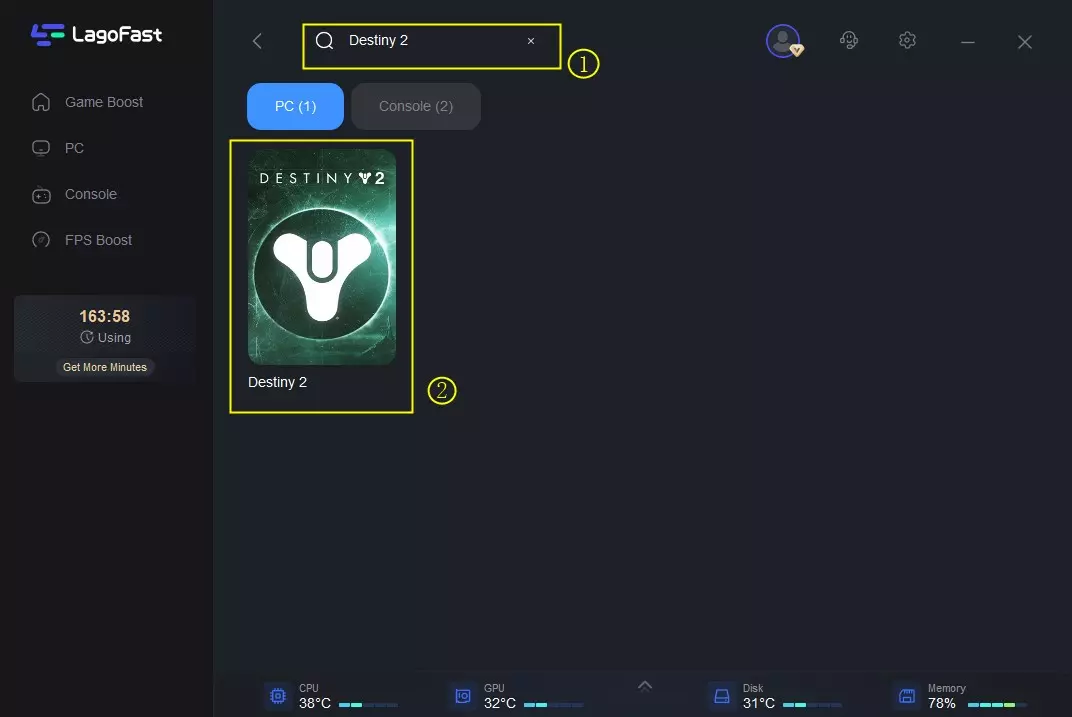
3. Select the recommended server route.
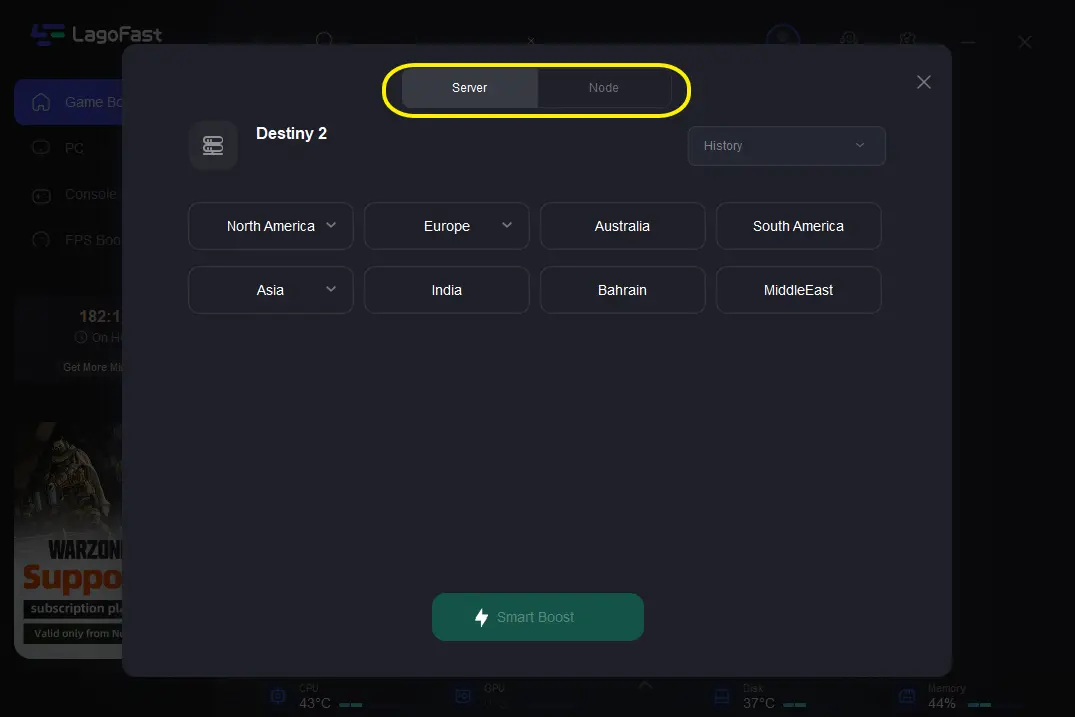
4. Enable “Smart Boost” and launch the game.
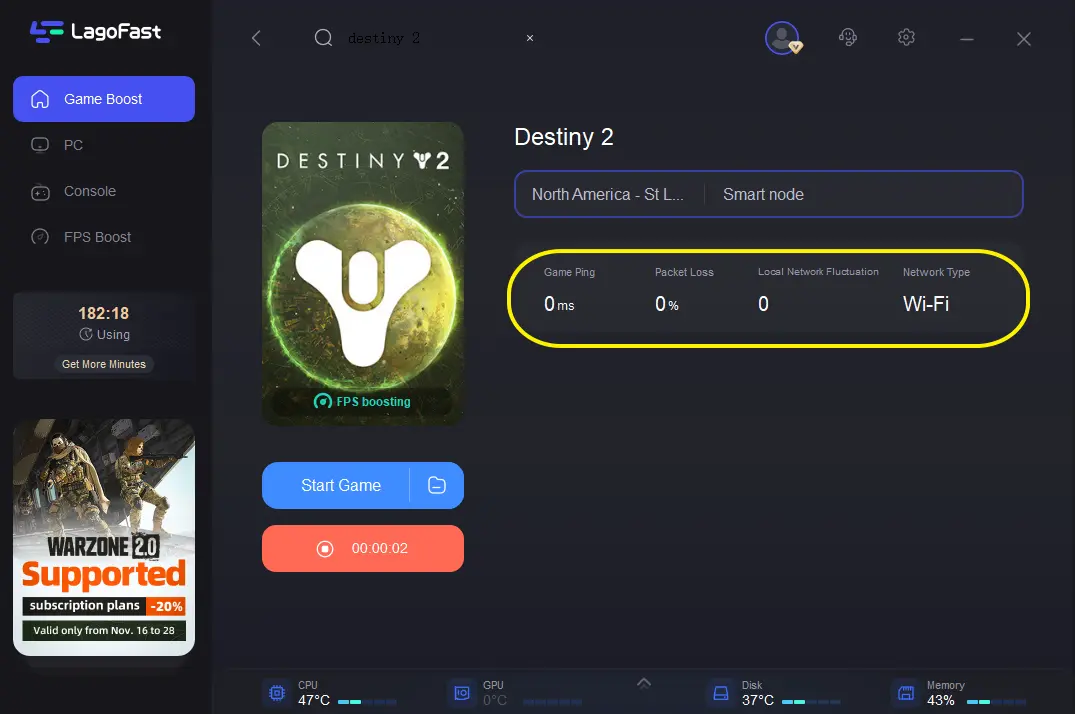
5. Once past login, LagoFast continues to keep traffic stable during gameplay.
3. Custom Routing for Lower Ping
Advanced players tunnel only the required Steam/Destiny IP ranges instead of the whole connection. Confirmed ranges include:
Steam:
23.52.29.0/24
81.198.165.0/24
155.133.224.0/24
155.133.226.0/24
162.254.196.0/24
162.254.197.0/24
Destiny:
172.97.59.0/24
This keeps login stable while avoiding PvP lag from full rerouting.
4. Open the Right Ports
If you have access to your router settings, make sure these are not blocked:
- UDP: 80, 443, 1119–1120, 3074, 3097–3196, 3724, 4000, 6112–6114, 27015–27200
- TCP: 80, 44
5. If It’s Account-Specific
- Test another Bungie account.
- If only yours is broken, it’s likely backend-side. Open a ticket with Bungie Support.
6. Destiny 1 Only
- If you’re still on Destiny 1, unlink Twitch Prime from your Bungie profile. That was the cause back in 2020.
Will Bungie Fix It?
That’s the hard part. In Iran, Tapir became a permanent headache. Now in Russia and CIS, players report the same silence:
“Almost a week without info. Cool support.”
“Bungie doesn’t care, they just take money.”
Unless Bungie changes how they route logins, or providers lift the restrictions, accelerators and boosters may remain the only way to play.
Final Thoughts
Tapir = login failure. That’s the root cause, but why it fails depends on your situation:
- Servers down? → Wait.
- ISP blocked traffic? → gaming booster.
- Ports blocked? → Forward or switch ISPs.
- Account cursed? → Bungie Support ticket.
For now, connection boosters are the community’s go-to workaround. Not perfect, but better than staring at Tapir every night.

Boost Your Game with LagoFast for Epic Speed
Play harder, faster. LagoFast game booster eliminates stutter and lags on PC, mobile, or Mac—win every match!
Quickly Reduce Game Lag and Ping!
Boost FPS for Smoother Gameplay!