
In Delta Force, many valuable resources and hidden rooms are protected by daily codes, fingerprint prompts, or Morse signals. Trying to figure them out manually can be frustrating—you might miss rare loot, waste time, or even risk running into enemies.
Delta Force Password Assistant helps you quickly identify these cues. It unlocks secured areas, collects valuable resources, and lets you focus on combat and strategy rather than decoding mechanics.
This guide explains why daily codes matter, the challenges they present, and how Delta Force Password Assistant solves them—along with answers to common questions.

- ✅ Reduce Lag and High Ping.
- ✅ Boost FPS at the Same Time.
- ✅ Support 2000+ Online Games
- ✅ Change Server Without Latency.
- ✅ Multiplatform: PC, Console, Mobile.
Part 1: What is Delta Force Password Assistant?
Part 2: Why You Need Delta Force Password Assistant
Part 3: How LagoFast Delta Force Password Assistant Solves the Problem
Part 1: What is Delta Force Password Assistant?
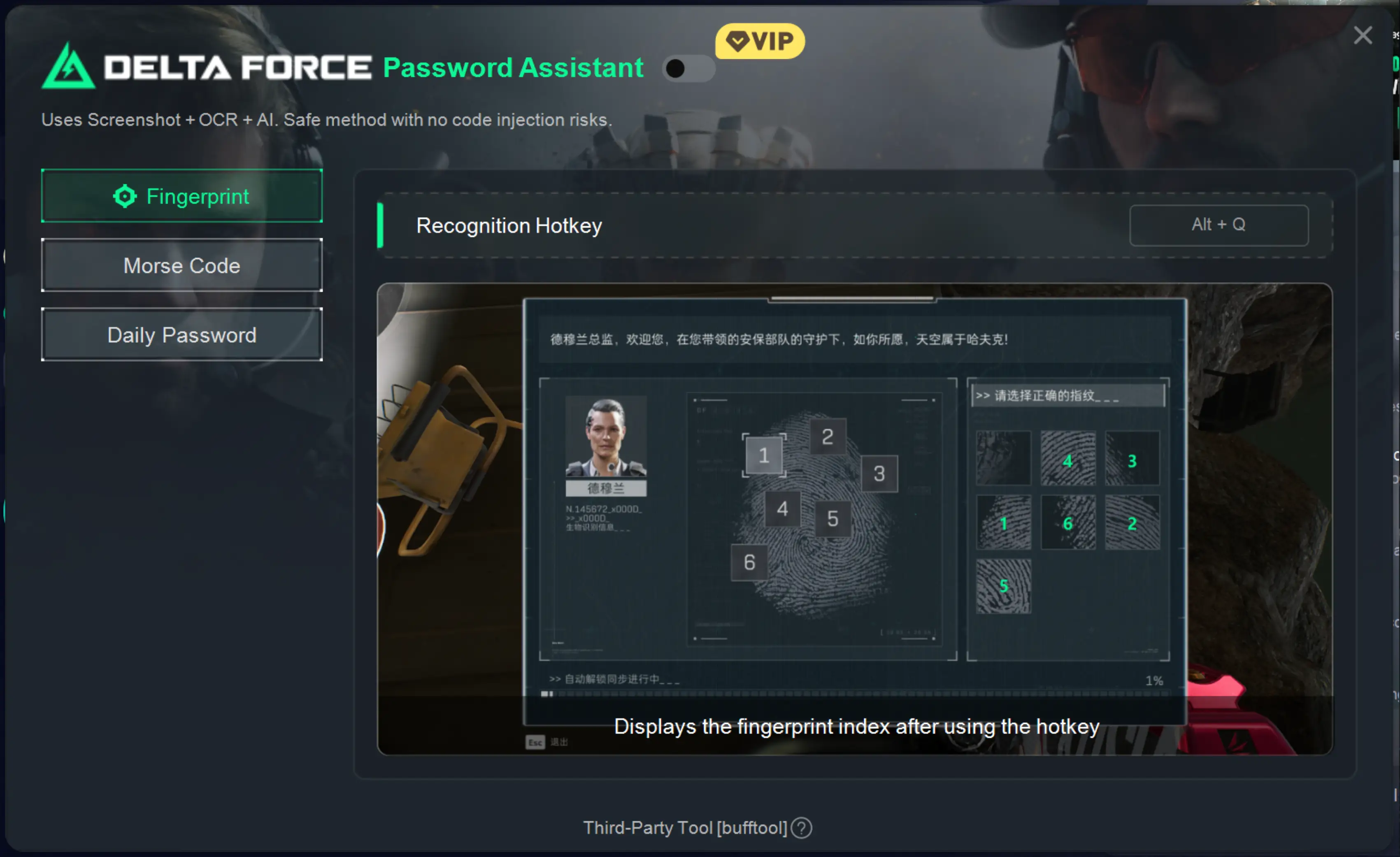
Delta Force Password Assistant is a handy tool that quickly identifies codes, fingerprint hints, and Morse signals protecting key rooms and missions. Instead of guessing or checking repeatedly, you get clear hints for:
- Daily codes to unlock rooms and treasures
- Fingerprint hints that reveal password patterns
- Morse signals or audio cues for puzzles and special locations
By providing clear, actionable information, the assistant lets players focus on gameplay rather than decoding mechanics.
Part 2: Why You Need Delta Force Password Assistant
High-value areas in Delta Force often change their passwords daily. Without a reliable assistant, you risk missing rare rewards or wasting precious gameplay time.
Manual decoding can be tricky because:
- One small mistake can lock you out of important areas
- Guessing codes in contested zones is risky
- Outdated information quickly becomes useless
Delta Force Password Assistant solves these problems by reading the game screen and giving you the current codes and hints instantly. You can move faster and focus on actual gameplay.
Part 3: How LagoFast Delta Force Password Assistant Solves the Problem
LagoFast DF Password Assistant makes decoding fingerprint hints, Morse signals, and daily codes quick and painless.
Key features include:
- Fast code recognition: Reads daily codes, fingerprint hints, and Morse signals directly from the game screen
- Safe & non-intrusive: Works via screenshots, OCR, and AI—no game modifications needed
- Multi-language support: English, Russian, Portuguese, French, German, Arabic, Turkish, Traditional Chinese, Vietnamese
Tips: Play the game in windowed or borderless mode for the assistant to capture the screen accurately.
With LagoFast DF Password Assistant, your missions become faster, smoother, and more rewarding.
How to Use LagoFast DF Password Assistant
Step 1: Click the Free Trial button to download and install LagoFast.
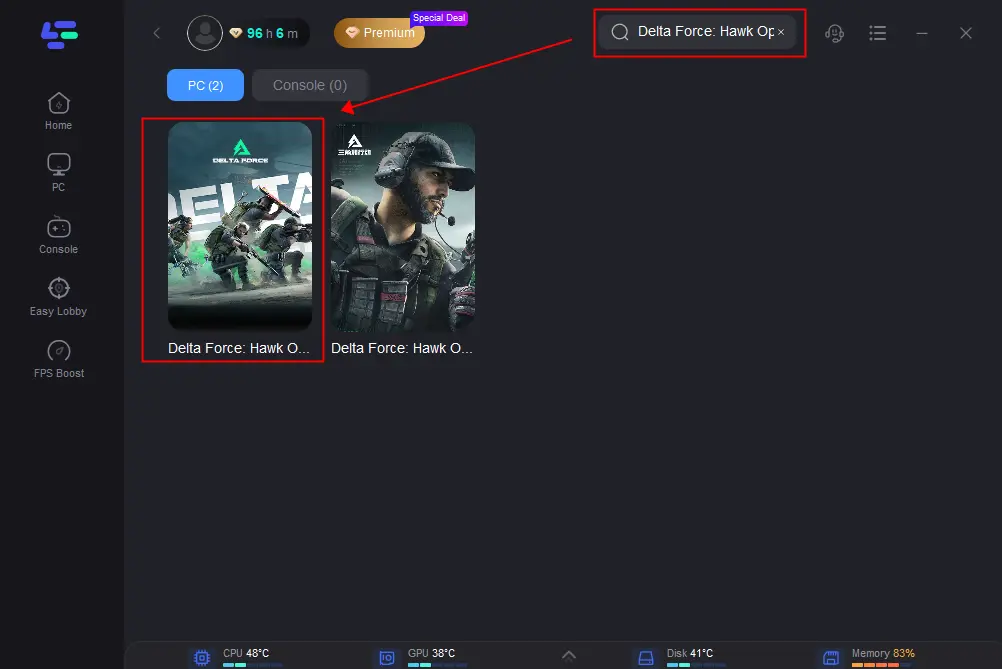
Step 2: Open LagoFast and search for Delta Force in the search bar.
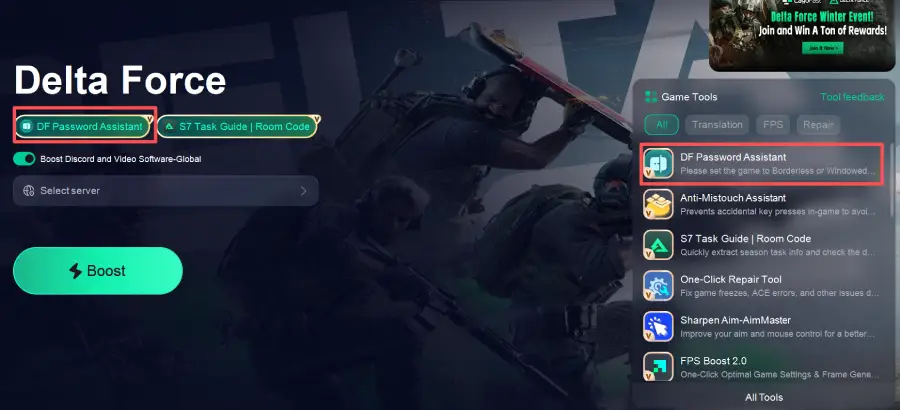
Step 3: Click the DF Password Assistant tool on the right.
LagoFast’s Basic Gaming Optimization Features
Beyond the DF Password Assistant, LagoFast provides several core features to improve your Delta Force experience:
- Low-Latency Acceleration: Reduces ping for smoother matches, ensuring stable performance in Hot Zone or warfare modes.
- Connection Stability: Addresses packet loss and disconnections, a common issue for overseas players.
- Cross-Platform Support: Works on PC and compatible devices, fully matching Delta Force’s platform requirements.
- One-Click Repair Tool: Quickly detects and fixes common game issues, letting you get back into action without hassle.
Here’s the tutorial to use LagoFast to boost game for lower ping and no-lag gameplay:
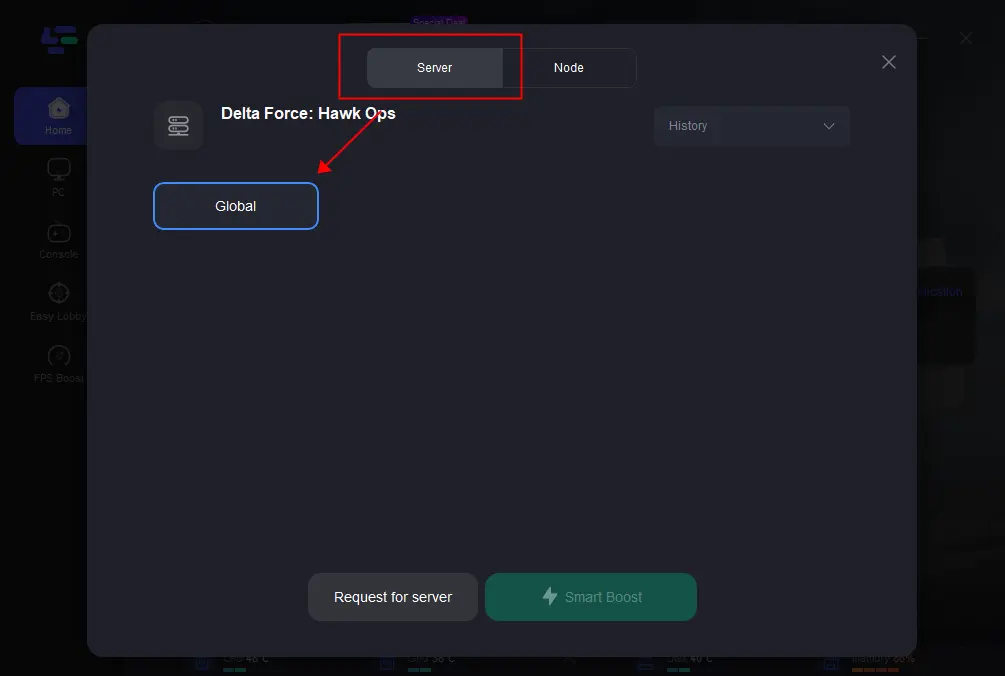
1. Click on “Server” to change to a better server for smooth gaming, then click on “Smart Boost.”
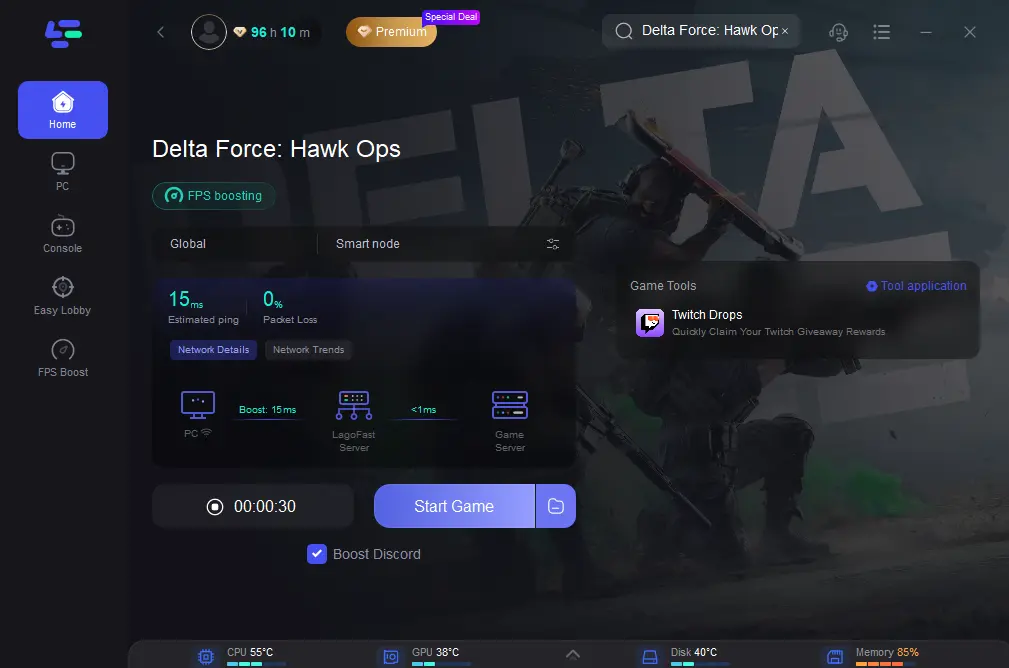
2. Check the specific game ping, packet loss, and multiple path connection on the right side. Finally, click “Start Game” to play the game.
Part 4: FAQs
Is Delta Force Password Assistant safe to use?
Yes! It only reads the game screen using screenshots, OCR, and AI recognition—so nothing is changed or modified in your game.
Does it support daily code changes?
Absolutely. The assistant picks up the current codes and hints directly from the game each day.
What types of hints can it recognize?
It can detect daily codes, fingerprint hints, and Morse signal cues in rooms and missions.
Do I need special settings to use it?
Yes, for best results, run the game in windowed or borderless mode so the assistant can read the screen accurately.
Will using the assistant get me banned?
No. The assistant doesn’t modify the game in any way—it only reads information from your screen. It’s completely safe to use.
Conclusion
Daily codes and hints are essential for reaching valuable areas in Delta Force. Doing it manually wastes time and risks missing loot.
Delta Force Password Assistant helps you spot them fast, so you can focus on strategy and enjoy the game. Combined with LagoFast’s optimization features, you get smoother, faster, and more reliable gameplay.
Boost Your Game with LagoFast for Epic Speed
Play harder, faster. LagoFast game booster eliminates stutter and lags on PC, mobile, or Mac—win every match!
Quickly Reduce Game Lag and Ping!
Boost FPS for Smoother Gameplay!