
Delta Force Mobile has emerged as a premier free-to-play team-based first-person shooter, offering an immersive experience across PC, consoles, and mobile platforms. With its global release scheduled for April 21, 2025, players can anticipate engaging in Warfare and Operations modes, featuring 7 Warfare maps, 4 Operations maps, 10 Operators, 12 vehicle types, and 55 weapons equipped with comprehensive attachment systems.
To gain a competitive edge, optimizing your aim assist settings and customizing your crosshair are crucial. This guide delves into the best aim assist configurations, crosshair customization techniques, and how LagoFast can enhance your gameplay experience.
Korean Version: 델타포스 모바일 크로스헤어 도구 완벽 마스터: 전체 가이드

- ✅ Reduce Lag and High Ping.
- ✅ Boost FPS at the Same Time.
- ✅ Support 2000+ Popular Online Games.
- ✅ Support Easy Lobby in all Cod Games without Lag
Part 1: Delta Force Mobile Introduction
Part 2: Understanding Delta Force Aim Assist
Part 3: Delta Force Mobile Aim and Combat Settings
Part 4: Delta Force Mobile Crosshair Tool
Part 5: How to Enhancing Gameplay with LagoFast
Part 1: Delta Force Mobile Introduction
Delta Force Mobile delivers a dynamic and strategic FPS experience, emphasizing tactical team-based gameplay. Players can engage in various modes, including Warfare and Operations, each offering unique challenges and objectives. The game's extensive arsenal, diverse operator classes, and vehicular combat elements contribute to its depth and replayability. With cross-platform support, Delta Force Mobile ensures that players can enjoy seamless gameplay across different devices.
Part 2: Understanding Delta Force Aim Assist
Aim assist is a pivotal feature in Delta Force Mobile, designed to enhance aiming precision, especially for players using touch controls or controllers. It subtly adjusts the crosshair to stay on target, facilitating more accurate shots. Understanding the different types of aim assist can help players tailor their settings to their playstyle:
- Standard Aim Assist: Provides balanced assistance, suitable for most players.
- Precision Aim Assist: Ideal for long-range engagements, offering finer control.
- Strong Aim Assist: Offers significant assistance, beneficial for close-quarters combat.
- Dynamic Aim Assist: Adjusts assistance based on movement and speed, catering to aggressive playstyles.
Part 3: Delta Force Mobile Aim and Combat Settings
Delta Force Mobile provides a wide array of aim and shooting configuration options designed to cater to players of all skill levels, especially given the challenges of touch-screen controls. Fine-tuning these settings can significantly impact your gameplay precision and responsiveness.
Aim Assist
- Enabled:
With this setting turned on, the game helps guide your crosshair toward enemy targets, offering a "sticky" aim experience that makes it easier to track moving opponents. This is especially useful on mobile where fine aiming can be difficult due to screen sensitivity and control limitations.
- Disabled:
Disabling aim assist removes all artificial assistance, placing full responsibility for aiming accuracy on the player. While this offers a greater challenge, it can be more rewarding for experienced players seeking full control.
- Recommendation:
For the majority of players—particularly casual or intermediate mobile gamers—keeping aim assist enabled will improve aim consistency, compensate for recoil, and help maintain target lock during high-pressure encounters.
Scope Magnification Adaptation
- Enabled:
When enabled, this feature dynamically adjusts your ADS (Aim Down Sight) sensitivity based on the magnification level of your equipped scope. A higher-zoom scope will result in a lower, more controlled sensitivity, giving you finer precision when aiming at long distances.
- Disabled:
Disabling this option keeps your aiming sensitivity uniform across all scopes, meaning a 1x red dot sight and an 8x sniper scope will feel the same. This consistency may suit players who prefer to train muscle memory for a single sensitivity.
- Recommendation:
Enable this option to ensure a smoother and more natural aiming experience across different zoom levels. Only consider disabling it if you want to manually fine-tune and master individual sensitivity settings per scope type.
Firing Mode Options
Delta Force Mobile offers multiple firing mode configurations to suit different weapon types and playstyles:
- Enable:
Automatically activates ADS when firing, regardless of the weapon you're using. This provides quicker engagements and is especially useful for beginners who want fewer actions during combat.
- Disable:
Firing your weapon doesn’t engage ADS, giving you full manual control. This mode is better suited to experienced players who prefer separating aim and fire actions for strategic purposes.
- Custom:
A hybrid setup that lets you choose which weapon types auto-ADS and which require manual input. For example, you might prefer auto-ADS for SMGs but manual ADS for sniper rifles.
Part 4: Delta Force Mobile Crosshair Tool
Customizing your crosshair can enhance visibility and aiming precision. LagoFast offers tools for mobile players to tailor their crosshair settings. In addition, LagoFast will soon launch a crosshair tool and built-in map tool, as well as cross regional acceleration and ping reduction. Everyone can look forward to it to the fullest.
Delta Force Custom Crosshair on Mobile
For mobile gamers, while customization options for crosshairs are somewhat limited, you can still enhance your setup with these recommended settings:
- Crosshair Color: Choose bright colors such as cyan or magenta for better visibility.
- Crosshair Thickness: Set it to 2-3 for a good balance between visibility and accuracy.
- Opacity: Keep it between 75-100% to ensure the crosshair is visible in various environments.
- Center Dot: Enable this feature to assist in tracking smaller targets.
Additionally, using LagoFast on mobile can enhance touch sensitivity and minimize lag, resulting in a smoother aiming experience.
Follow the Tutorial for Using the LagoFast Mobile Booster:
1. Search and download LagoFast Mobile Booster from the App Store or Google Play.
Or scan the QR code below to start a free trial.

2. Open the app and locate Delta Force in the game list.
3. Access the FPS Aiming Aid Tool.
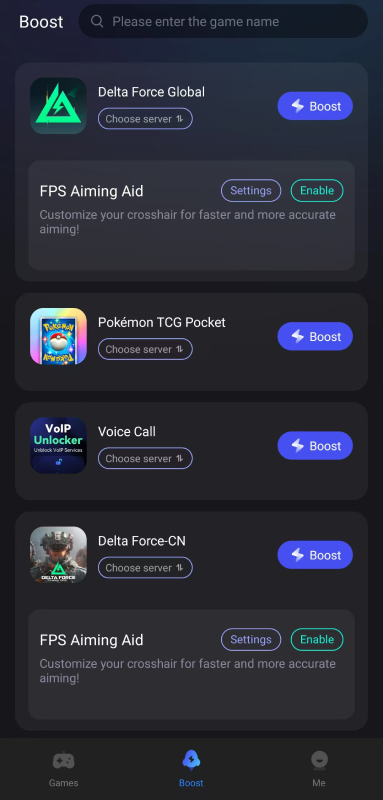
4. Customize your crosshair settings, including color (e.g., cyan or magenta for visibility), thickness (2-3), and opacity (75-100%).
5. Enable the customized crosshair for improved aiming.
Utilizing these tools can lead to better target acquisition and overall shooting accuracy.
Part 5: How to Enhancing Gameplay with LagoFast
LagoFast is more than just a crosshair customization tool; it's a comprehensive game booster designed to optimize your gaming experience:
- Lag Reduction: Minimizes latency and ping issues, ensuring smoother gameplay.
- FPS Boost: Optimizes system performance to maintain consistent frame rates.
- Server Selection: Allows connection to optimal servers for reduced lag.
Get Better Gaming on Mobile in Delta Force Now:
How to use LagoFast Game Booster on Mobile
Step 1: Download LagoFast Mobile Booster
Step 2: Search Delta Force: Hawk Ops Global and click the result.
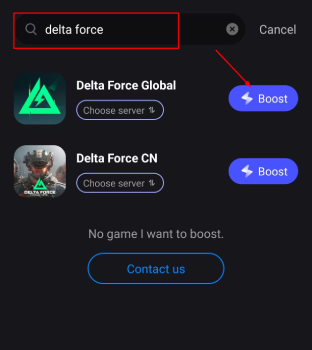
Step 3: Choose the Server you like, then click the Boost button.
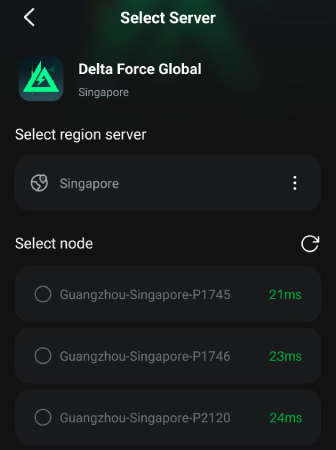
Step 4: After completing the above network optimization settings, the FPS drops issue will be easily resolved.
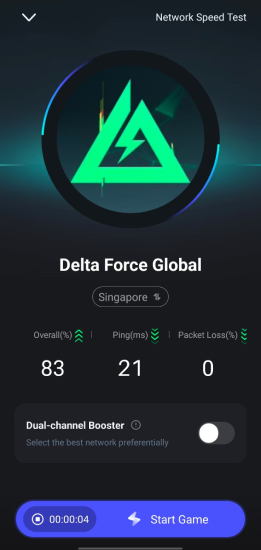
By integrating LagoFast into your gaming setup, you can achieve a more responsive and enjoyable Delta Force Mobile experience.
Part 6: FAQs
Q1: Is aim assist available for all control methods in Delta Force Mobile?
A1: Aim assist is primarily designed for touch controls and controllers. PC players using a mouse typically do not have aim assist enabled.
Q2: Can I use third-party crosshair overlays in Delta Force Mobile?
A2: While some third-party tools offer crosshair overlays, it's recommended to use trusted applications like LagoFast to avoid potential conflicts with the game's anti-cheat systems.
Q3: How can I improve my aiming accuracy in Delta Force Mobile?
A3: Optimizing aim assist settings, customizing your crosshair for better visibility, and ensuring a stable internet connection can collectively enhance your aiming accuracy.
Q4: Does LagoFast support other games besides Delta Force Mobile?
A4: Yes, LagoFast supports a wide range of games across various platforms, offering performance optimization and customization tools.
Conclusion
By fine-tuning your aim assist settings, customizing your crosshair, and leveraging the capabilities of LagoFast, you can elevate your Delta Force Mobile gameplay to new heights. Stay ahead of the gameplay in Delta Force!

Boost Your Game with LagoFast for Epic Speed
Play harder, faster. LagoFast game booster eliminates stutter and lags on PC, mobile, or Mac—win every match!
Quickly Reduce Game Lag and Ping!
Boost FPS for Smoother Gameplay!