
Two years have passed since its official release, yet the popularity of Dead Island 2 shows no signs of waning. As of February 2025, it has sold a total of 4 million copies globally. This action role-playing game seamlessly blends survival horror, thrilling combat, and waves of the undead, immersing players in a life-or-death struggle on the quarantined streets of dead bodies-Los Angeles.
Alongside the unwavering enthusiasm of both new and veteran players comes a persistent demand for enhancing the gaming experience, which is why the demand for mods for Dead Island 2 has remained consistently high. This article will guide you through relevant information about Dead Island 2 Mods, offering a list of practical and effective mods, as well as the best ways to install Dead Island 2 mods and elevate your gaming experience.

- ✅ Reduce Lag and High Ping.
- ✅ Boost FPS at the Same Time.
- ✅ Support 2000+ Popular Online Games.
- ✅ Support Game Tools.
Part 1: Does Dead Island 2 Support Mods
Part 2: Top Dead Island 2 Mod List
Part 3: How to Get Dead Island 2 Mods on Epic - LagoFast
Part 4: How to Optimize Gaming Experience in Dead Island 2
Part 1: Does Dead Island 2 Support Mods
Yes, if you want to maximize your chances of survival and excel in your escape attempts in Dead Island 2, using mods is an essential move. Meanwhile, Dead Island 2 enjoys a high search volume within the modding community. These mods can help you enhance your weapons' attack power, inflict more severe damage on zombies, prolong your lifespan in the game, and offer you a diversified gaming experience.
Part 2: Top Dead Island 2 Mod List
After the launch of Dead Island 2, numerous practical mods have emerged within the modding community. Below is the Top Dead Island 2 Mod List:
No Weapon Degradation
Using this mod while playing Dead Island 2 allows you to edit the game's memory to disable weapon degradation. It supports use on Steam, Epic, and Xbox platforms.
No-Intro (Skip Startup - Splash Videos)
This mod helps players automatically bypass or skip intro videos, reducing the time spent on these cutscenes and improving the game's startup and loading speeds.
DLSS 3 MOD
Provides players with DLSS 3 tools to help achieve the highest level of game fidelity and performance.
modded starter save for all characters
Allows players with OP (overpowered) modded weapon characters to access modded starter saves.
Deadland Reshade
Improves the contrast, sharpness, and color perception of Dead Island 2's graphics, enhancing the overall visual quality for players.
DI2 - SPF
Improves low game performance and addresses stuttering issues while maintaining the game's visual quality.
More corpse
Allows players to add more corpses during gameplay in Dead Island 2.
Dead Island 2 - 84 percent Save Game
Helps players achieve up to 84% game progress in their Dead Island 2 save files, avoiding the risk of losing collectibles.
Dead Island 2 Bunnyhop
This is a cheat table (.CT) that requires Cheat Engine (7.2 or later) to be used in conjunction with Dead Island 2 to allow modifying of game memory without running internal mods.
DI2 PAK Unpacker
This mod allows players to unpack DI2 PAK files that cannot be unpacked with other tools.
Zero Gravity
Alters gravity, enabling players to freely explore the map in Dead Island 2 without being threatened by zombies.
MTPBWY-DeadIsland 2
Helps players using low-end hardware improve the performance of the Unreal Engine 4 in Dead Island 2.
Hot Related: Dead Island 2 Release Date: All Details Included
Part 3: How to Get Dead Island 2 Mods on Epic - LagoFast
If you're playing Dead Island 2 through Epic and don't want to spend time downloading and installing individual mods for it, and you're looking for a tool that can let you obtain these mods and their save files with just one click, we recommend LagoFast. This is an outstanding game accelerator that combines enhancing the gaming experience with providing game mod tools. It offers Dead Island 2 players a tool for accessing popular game mod save files, allowing them to easily open and utilize Dead Island mod tools while playing the game.
How to Use LagoFast's Dead Island 2 Mod Tool
Step 1: Click the "Free Trial" button to download LagoFast.
Step 2: Open LagoFast and search for Dead Island 2 in the search bar.

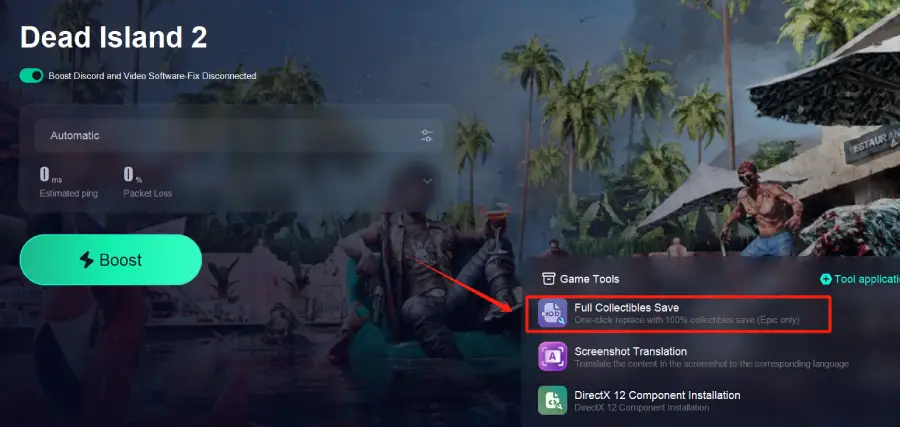
Step 3: Click on "Full Collectibles Save" located at the bottom right corner of the page.
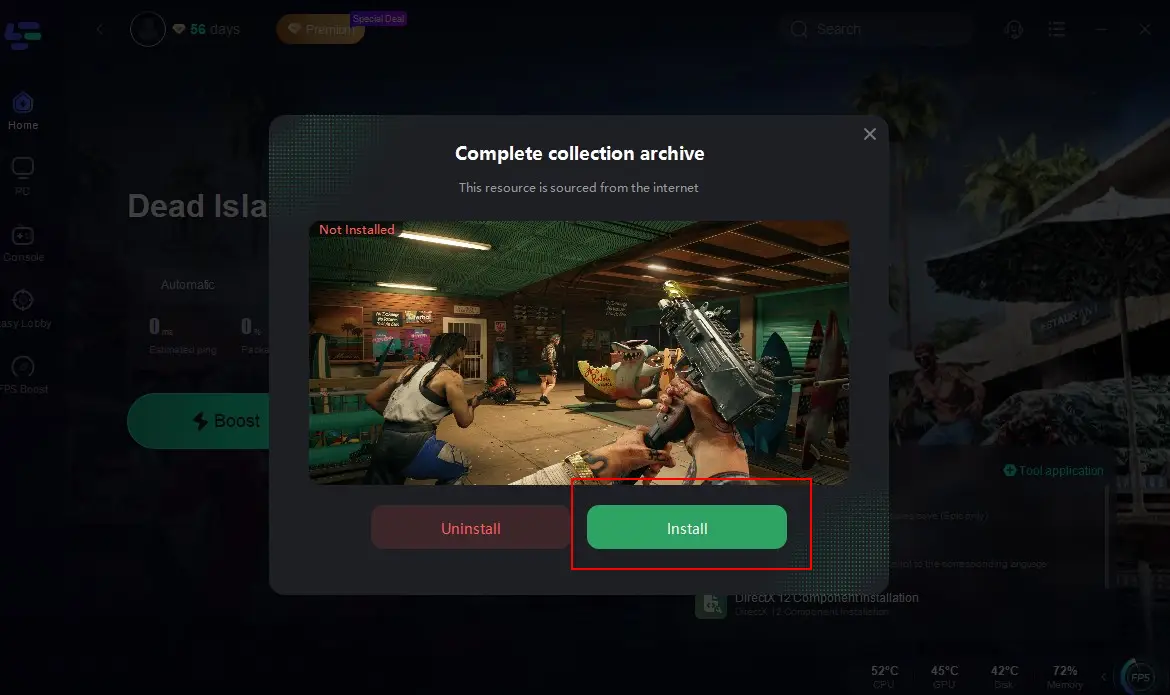
Step 4: Click "Install". Once the installation is complete, you can re-enter Dead Island 2, choose or freely replace your favorite mods, and use them in the game to increase your chances of survival. Additionally, you can save your progress when exiting the game.
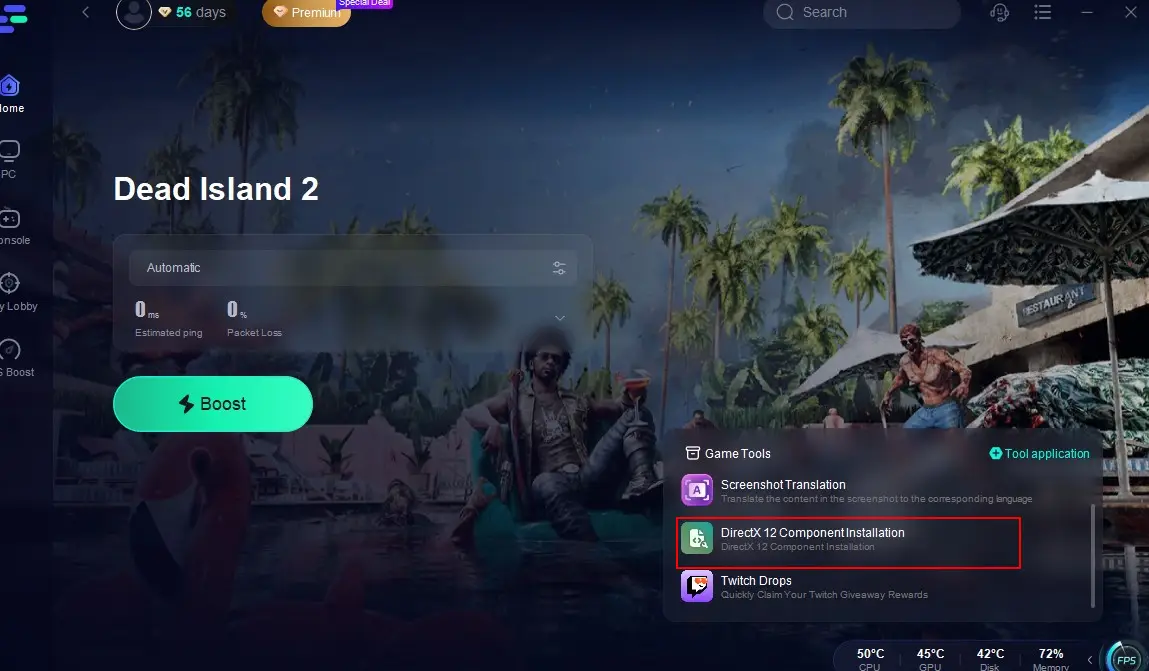
Meanwhile, LagoFast also provides players with a DirectX Component Installation tool:
Scroll down the game toolbar on the bottom right, locate and click on "DirectX Component Installation," and it will help you enhance your gaming hardware's performance, enabling you to achieve the best audio and visual effects while playing Dead Island 2.
Part 4: How to Optimize Gaming Experience in Dead Island 2
While utilizing the Dead Island 2 mod tools provided by LagoFast, don't forget to leverage LagoFast to help you reduce connection issues and stuttering problems! LagoFast has always excelled in enhancing players' gaming experiences, and the reasons are as follows:
- Reduced Lag: Minimizes latency issues, ensuring real-time responsiveness during combat.
- Stable Connection: Provides a consistent network connection, preventing disconnections during crucial moments.
- Optimized Game Performance: Enhances system performance, allowing for smoother graphics and faster load times.
Enhance your gaming experience in Dead Island 2 with LagoFast
Click the button below to get LagoFast for free.
Search for Dead Island 2 in the search bar and click on it.
Click "Select Server" to choose your preferred optimal server node, then click "Smart Boost."

Finally, check the real-time packet loss rate and Ping for the game. Click "Start Game" to return to the game, and you'll be able to enjoy the best gaming experience in Dead Island 2 with no lag or stuttering!

Conclusion
For both veteran players aiming to improve their survival chances and win rates in Dead Island 2 and new players eager to get up to speed quickly, using Dead Island 2 mods is the optimal approach. The existence of these mods opens up a multitude of possibilities for players' in-game actions. Moreover, utilizing LagoFast not only streamlines the process of using mods for players, enabling them to effortlessly switch between mods with different functionalities and automatically save their progress, but it also helps players overcome connection issues and stuttering problems, allowing them to enjoy the smoothest and most seamless gaming experience possible in Dead Island 2.

Boost Your Game with LagoFast for Epic Speed
Play harder, faster. LagoFast game booster eliminates stutter and lags on PC, mobile, or Mac—win every match!
Quickly Reduce Game Lag and Ping!
Boost FPS for Smoother Gameplay!