
Quick Answer
If Darktide matchmaking not working is preventing you from playing, start with this order: improve connection quality using LagoFast, restart the game completely, check Darktide server status, disable crossplay temporarily, leave and recreate the strike team, verify game files, and clear cached session data. If you see Darktide teammate unavailable for matchmaking, especially after finishing a mission, restarting the client and disabling crossplay often resolves the issue until an official fix arrives.

- ✅Less ping and crashes.
- ✅ Higher FPS and better performance.
- ✅ Support for 2000+ games.
- ✅ Stable connection and region switching.
Part 1: Common Darktide Matchmaking Problems
Part 2: Why Darktide Matchmaking Fails
Part 3: How to Fix Darktide Matchmaking Not Working
Part 1: Common Darktide Matchmaking Problems
Darktide matchmaking issues do not always look the same. Some players fail before entering a lobby, while others only encounter problems after completing missions.
Understanding the exact symptom usually makes troubleshooting faster.
Teammate Unavailable for Matchmaking
One of the most reported errors recently is Darktide teammate unavailable for matchmaking.
This message can appear even when playing solo and usually prevents mission selection or queueing. Players often describe finishing a mission successfully, returning to the Mourningstar, then discovering that the mission board no longer allows matchmaking.
The issue has appeared frequently on PlayStation, although similar reports occasionally show up elsewhere.
Common signs include:
- Red warning message before queue begins
- Unable to select Quickplay
- Cannot launch another mission after completion
- Strike team appears stuck in loading state
- Restart temporarily fixes it
Can’t Join Friends
Another common complaint is Darktide can’t join friends.
You may receive invites but fail to connect, remain in “Joining Strike Team,” or return to the hub after loading.
Typical causes include:
- Crossplay incompatibility
- NAT restrictions
- Session desync
- Different game versions
- Platform service interruptions
This becomes more noticeable during updates or content events when player traffic spikes.
Invite Not Working
If Darktide invite not working appears repeatedly, the issue is often tied to social services instead of gameplay servers.
Symptoms include:
- Friend invite never appears
- Accept button does nothing
- Friend list stays offline
- Invitation expires instantly
- Group dissolves before mission starts
Social synchronization delays can sometimes resolve themselves after several minutes.
Stuck in Lobby
Many players describe getting Darktide stuck in lobby with no visible error.
You enter the strike team normally but matchmaking never progresses.
Signs include:
- Endless searching
- Team ready but mission never launches
- Loading animation looping
- Character movement available in hub but no queue progress
Cannot Start Mission
When Darktide cannot start mission happens, players usually believe matchmaking is broken when the actual problem may be different.
Examples:
- Host cannot initiate mission
- Countdown never begins
- Queue instantly cancels
- Team returns to Mourningstar
This often overlaps with strike team synchronization issues.
Before moving into fixes, it helps to understand why these failures happen.
Related Article: Best Skitarii Build in Warhammer 40K Darktide: Full Guide
Part 2: Why Darktide Matchmaking Fails
Darktide uses dedicated servers and continuous online validation rather than traditional peer-to-peer hosting.
That design improves consistency but also introduces more points where matchmaking can break.
Server Communication Delays
Darktide constantly exchanges session information between:
- Matchmaking servers
- Social systems
- Mission boards
- Platform accounts
If one layer delays updates, the game may think a teammate is unavailable.
Crossplay Synchronization Problems
Crossplay expands matchmaking pools but introduces compatibility challenges.
Players on different platforms occasionally experience:
- Delayed squad updates
- Failed invites
- Strike team desync
- Lobby loading loops
Temporarily turning crossplay off can isolate this variable.
Network Instability
Even if internet speed looks fine, unstable routing or packet loss can interrupt:
- Session creation
- Party confirmation
- Mission handoff
- Match completion
This is especially noticeable after finishing missions and returning to the hub.
Corrupted Session Data
Darktide stores temporary data during gameplay.
If a previous session closes incorrectly, the next matchmaking attempt may fail.
This can lead to:
- Persistent loading
- Invisible teammates
- Queue lock
- Mission selection bugs
Platform Service Issues
Sometimes the game itself is fine.
Steam maintenance windows, console network outages, or account authentication delays can interrupt multiplayer.
If multiple games suddenly fail online, the platform may be responsible.
Now that the causes are clearer, move on to practical fixes.
Part 3: How to Fix Darktide Matchmaking Not Working
Work through these solutions in order.
Fix 1: Use LagoFast First to Reduce Matchmaking Connection Problems
If your connection fluctuates or matchmaking repeatedly times out, start here.
LagoFast is commonly used by multiplayer players to optimize routing and reduce instability between local networks and game servers.
General process:
Click the Free Trial button to download and install LagoFast Free Trial.
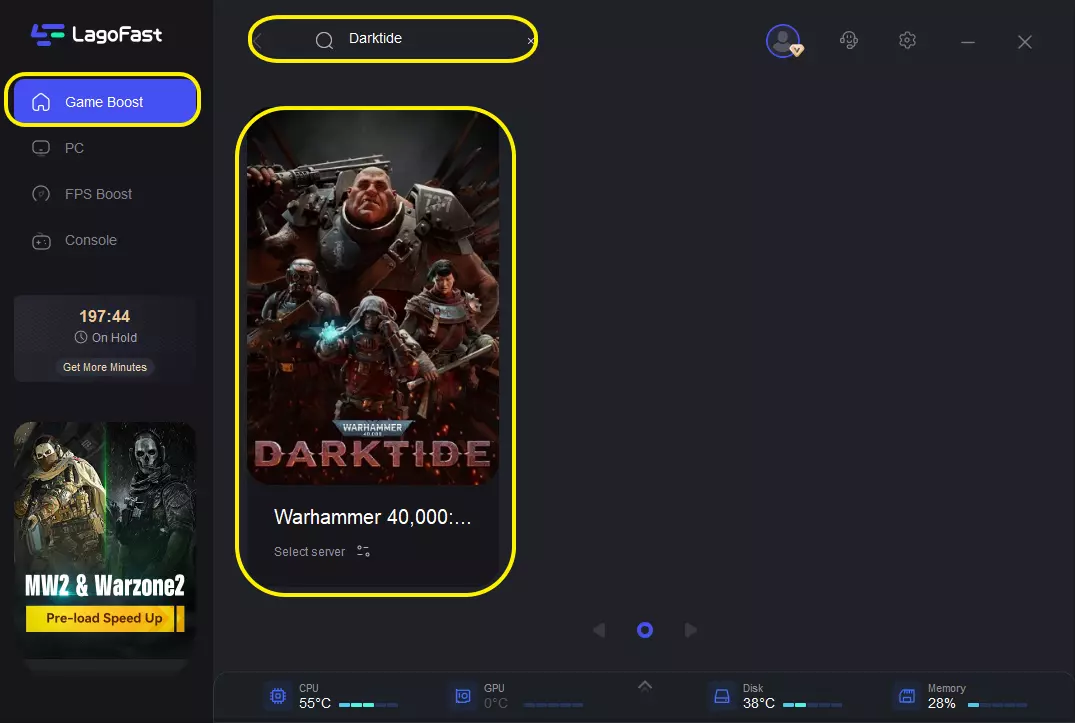
Search for Darktide: Open the app and type "Warhammer 40,000: Darktide" in the search bar.
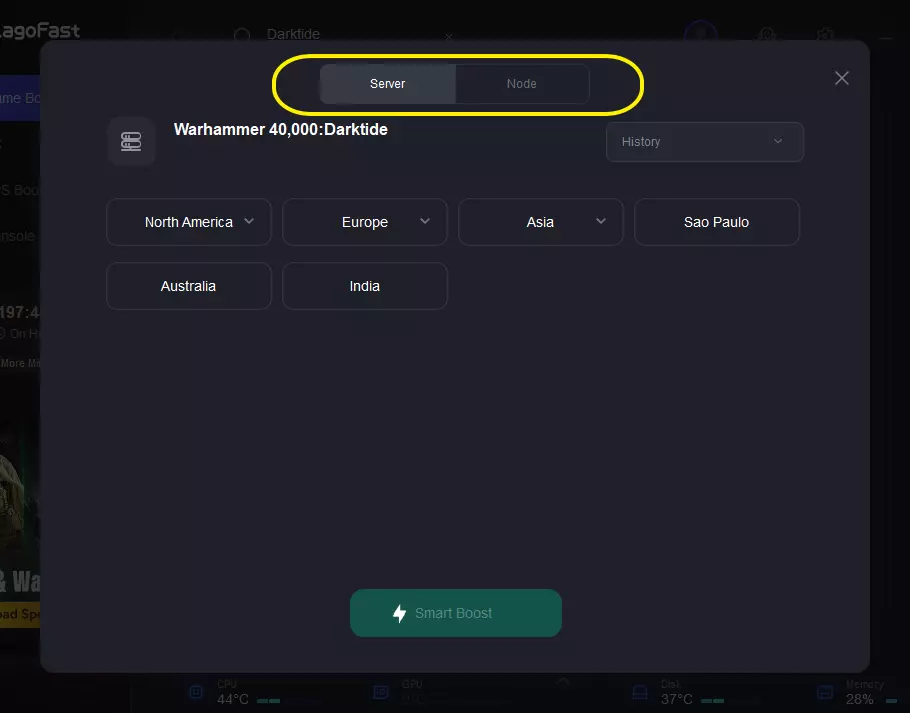
Select Your Server: Choose the server region closest to you. LagoFast will display the real-time ping for each available node.
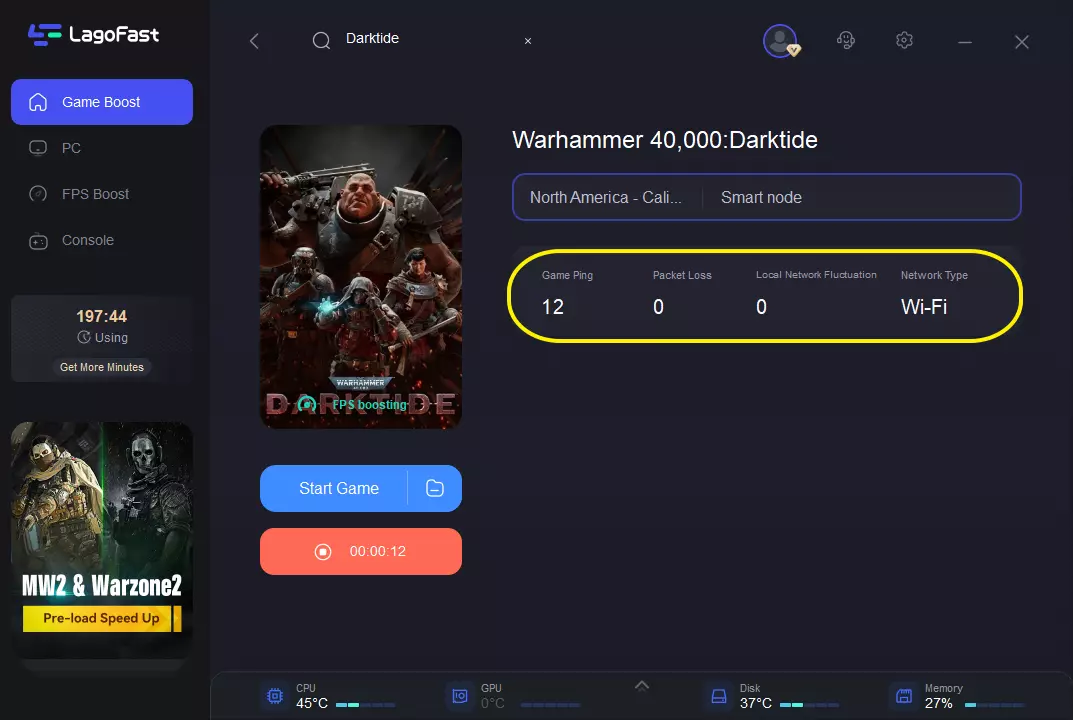
Smart Boost: Click the "Boost" button. LagoFast will optimize your network connection and apply FPS-boosting configurations to ensure your game runs as smoothly as possible.
This may help reduce:
- Failed invites
- Long queue times
- Lobby stalls
- Mission launch failures
It will not fix server-side outages, but it can eliminate unstable routing issues.
Fix 2: Fully Restart Darktide
Do not simply return to title.
Completely close the game.
Then:
- Exit application
- Wait 30–60 seconds
- Relaunch
- Reconnect online
This often clears temporary session locks.
Fix 3: Disable Crossplay Temporarily
If you encounter Darktide strike team not working or teammate availability errors:
- Open Settings
- Navigate to Network
- Disable Crossplay
- Restart game
Test matchmaking again.
If successful, crossplay synchronization may be causing the issue.
Fix 4: Leave and Recreate the Strike Team
If friends cannot join:
- Disband current team
- Return everyone to hub
- Recreate squad
- Invite manually again
Avoid using old invites.
Fix 5: Verify Game Files
Corrupted files can block social systems.
Steam:
Library → Darktide → Properties → Installed Files → Verify Integrity
Xbox:
Manage Game → Check Updates
PlayStation:
Use Restore Licenses and reinstall only if necessary.
Fix 6: Check Server and Platform Status
Before troubleshooting locally:
- Confirm Darktide servers are operational
- Check Steam, PlayStation Network, or Xbox services
- Wait during maintenance windows
Server issues can mimic local connection failures.
Fix 7: Clear Cache and Temporary Network Data
PC:
- Flush DNS
- Restart router
- Renew network connection
Console:
- Power cycle system
- Disconnect network briefly
- Reconnect and relaunch
Fix 8: Remove Mods Temporarily
For PC users:
- Disable all mods
- Launch clean version
- Test multiplayer
Even harmless UI modifications can occasionally affect social synchronization.
Fix 9: Change Region or Queue Type
Try:
- Quickplay instead of direct mission
- Lower difficulty
- Different mission rotation
- Different region timing
This helps confirm whether queue population is contributing.
Part 4: FAQs
Why does Darktide say teammate unavailable for matchmaking when I am solo?
Usually the game still believes an old session or strike team exists. Restarting the client and recreating matchmaking data often resolves it.
Why can’t I join my friend in Darktide?
Check crossplay settings, verify both players are on the same game version, recreate the strike team, and restart the session.
How do I fix Darktide cannot start mission?
Try leaving the squad, selecting a different mission, restarting matchmaking, and verifying files.
Does reinstalling fix Darktide matchmaking?
Only sometimes. Reinstalling is usually unnecessary until basic network and session troubleshooting fails.
Why is Darktide strike team not working?
Strike team issues are commonly tied to session desync, platform authentication delays, or incomplete mission cleanup after previous matches.
Conclusion
When Darktide matchmaking not working interrupts your missions, the issue is usually connected to networking, session synchronization, crossplay, or temporary server behavior rather than permanent account problems.
Start with the fastest fixes first: optimize connection quality, restart the game, disable crossplay, recreate the strike team, and verify files. If you specifically encounter Darktide teammate unavailable for matchmaking, restarting the client remains one of the most reliable short-term workarounds while broader fixes continue to roll out.
Once matchmaking becomes stable again, you can get back to purging heretics instead of fighting the lobby.
Boost Your Game with LagoFast for Epic Speed
Play harder, faster. LagoFast game booster eliminates stutter and lags on PC, mobile, or Mac—win every match!
Quickly Reduce Game Lag and Ping!
Boost FPS for Smoother Gameplay!