
Counter-Strike 2 is designed to run on a wide range of PC hardware, but even modern systems occasionally encounter stability problems. One of the most frustrating issues reported by players is the CS2 "Out of memory" Crash error, which abruptly closes the game during loading or gameplay.
Understanding the difference between a cs2 memory leak and a true out of memory error (RAM) in CS2 is essential. This guide explains why the error occurs and provides step-by-step methods to fix it.

- ✅ Reduce Lag and High Ping.
- ✅ Boost FPS at the Same Time.
- ✅ Add CSGO to Steam Library.
- ✅ Change Server Without Latency.
- ✅ End All Connection crash Issues.
- ✅ Multiplatform: PC, Mobile, Console.
Part 1. What Is the CS2 "Out of Memory" Crash Error?
Part 2. CS2 Memory Leak vs Out of Memory Error
Part 3. Common Causes of CS2 Memory Allocation Error
Part 4. How to Fix CS2 Out of Video Memory Error and RAM Issues
Part 5. How to Enhance Your Game Experience with LagoFast Game Booster
Part 1. What Is the CS2 "Out of Memory" Crash Error?
The CS2 "Out of memory" Crash error occurs when the game attempts to allocate additional memory but the operating system cannot provide it.
The error may appear as:
- CS2 "Fatal Error: Out of Memory"
- cs2 failed to allocate memory
- cs2 memory allocation error
- CS2 says low memory
When this happens, the game cannot continue running and immediately crashes.
Several scenarios may trigger the error:
- system RAM is fully used
- GPU VRAM is exhausted
- a memory leak gradually consumes available memory
- launch options or mods overload the game engine
In some reported cases, players with 32GB RAM still experienced crashes due to memory leaks where the game gradually consumes memory until the system reaches its limit.
Part 2. CS2 Memory Leak vs Out of Memory Error
Understanding the difference between these two problems helps identify the correct fix.
CS2 Memory Leak
A cs2 memory leak occurs when the game allocates memory but fails to release it after use.
Typical symptoms include:
- RAM usage steadily increases over time
- performance gradually drops
- crashes occur after long sessions
Players have reported situations where CS2 memory usage climbs above 20GB of RAM before crashing, even on high-end systems.
Community reports also show that RAM usage can climb continuously after launching the game, eventually reaching 100% system utilization and causing the crash.
Out of Memory Crash
An out of memory error (RAM) in CS2 occurs when the game requests more memory than the system can provide.
This can happen when:
- running high graphics settings
- playing on low-RAM systems
- using high-resolution textures
- running many background programs
Both problems may show the same error message, which is why many players misdiagnose the issue.
Part 3. Common Causes of CS2 Memory Allocation Error
Several technical factors can trigger the cs2 memory allocation error.
1. Insufficient System RAM
While the official requirement may be lower, 16GB RAM is generally recommended for smooth gameplay, especially when background apps are running.
Systems with only 8GB often experience crashes during intense gameplay or when maps change.
2. GPU VRAM Limitations
Another common cause is How to Fix CS2 Out of Video Memory Error situations.
When the GPU runs out of VRAM:
- textures cannot load
- rendering fails
- the game crashes
Updating GPU drivers often resolves this problem.
3. CS2 Memory Leak Bug
Occasionally the issue is caused by a BUG CS2 100% RAM memory Counter-Strike 2, where memory usage increases continuously.
One example involved the game’s main menu background. If a certain map background was selected, RAM usage increased until the game crashed.
4. Launch Options or Mods
Some launch parameters may conflict with the game engine.
Examples include:
- outdated optimization commands
- experimental rendering flags
- workshop mod conflicts
Removing unnecessary launch options often improves stability.
5. Background Applications
Programs such as:
- web browsers
- recording software
- overlays
can consume large amounts of memory, leaving less available for the game.
Part 4. How to Fix CS2 Out of Video Memory Error and RAM Issues
Below are proven troubleshooting steps to fix the CS2 "Out of memory" Crash error.
1. Close Background Applications
Before launching CS2:
- close browsers
- disable overlays
- exit unnecessary apps
This frees up RAM for the game.
2. Verify Game Files
Corrupted game files may cause memory allocation problems.
Steps:
- Open Steam Library
- Right-click Counter-Strike 2
- Select Properties
- Open Installed Files
- Click Verify integrity of game files
This repairs missing or damaged files.
3. Update GPU Drivers
Outdated graphics drivers can cause memory management issues.
Steps:
- Open Device Manager
- Expand Display Adapters
- Update your GPU driver
- Restart your PC
Driver updates often resolve CS2 out of video memory errors.
4. Increase Virtual Memory
Windows uses a page file when RAM is insufficient.
Steps:
- Open System Settings
- Search Advanced system settings
- Open Performance Settings
- Adjust Virtual Memory
- Increase page file size
This allows the system to allocate additional memory.
5. Reduce Graphics Settings
If your GPU VRAM is limited:
Lower the following settings:
- texture quality
- shadow quality
- anti-aliasing
- resolution
This reduces memory usage.
Part 5. How to Enhance Your Game Experience with LagoFast Game Booster
Although memory errors are primarily hardware-related, network instability can also contribute to crashes during map loading or server synchronization.
LagoFast (LagoFast Game Booster - Get No Lag and Lower Ping) Game Booster improves game connectivity and network stability by optimizing routing between the player and the game server.
Key benefits include:
- lower latency
- reduced packet loss
- stable connection during matchmaking
- smoother map loading
These improvements reduce the risk of crashes caused by connection interruptions.
How to Use LagoFast Game Booster
Step 1: Click the Free Trial button to download and install LagoFast Free Trial.
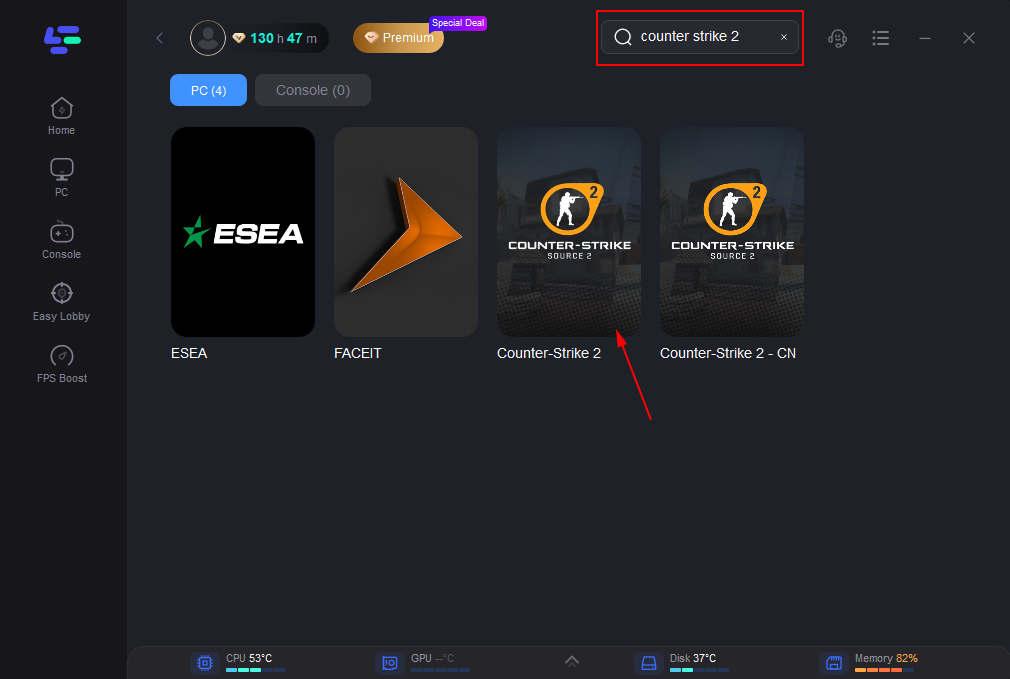
Step 2: Search for Counter-Strike 2 in the game library.
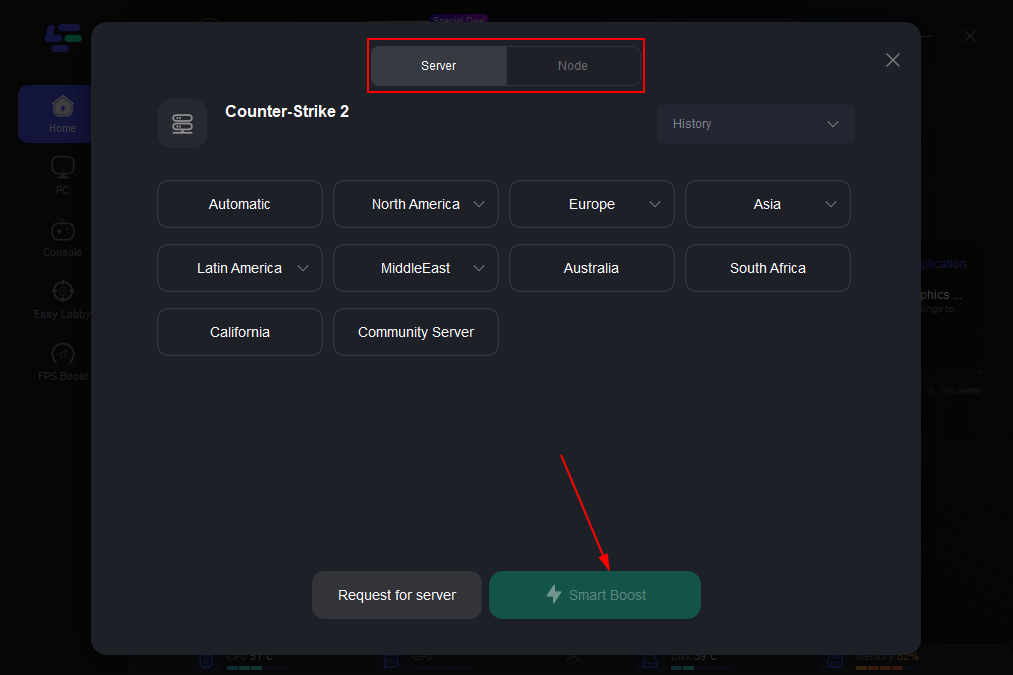
Step 3: Choose the recommended server route and click Boost to activate network optimization.
Step 4: Launch CS2 through LagoFast, join matchmaking or a custom server.
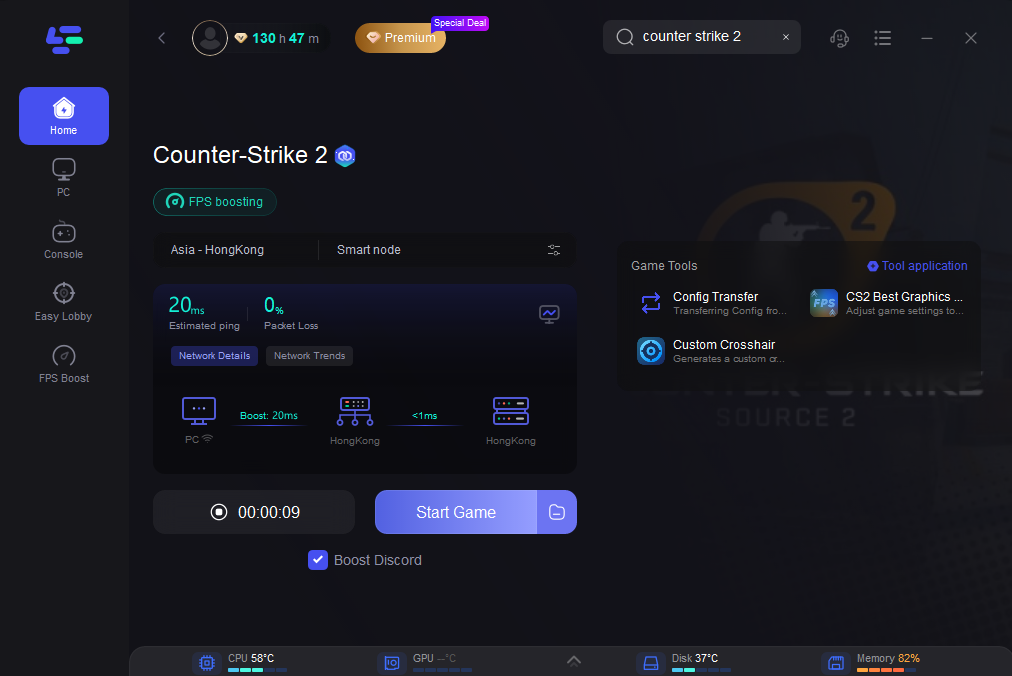
With optimized network routing, the game communicates with servers more efficiently, improving overall stability.
Part 6. FAQs
1. Why does CS2 say my system is running out of memory?
This message appears when the game cannot allocate additional RAM or VRAM. It can be caused by insufficient memory, background applications, or a memory leak bug.
2. What is the CS2 memory leak bug?
A memory leak occurs when the game continuously allocates memory but does not release it. Over time, this fills all available memory and triggers a crash.
3. Can CS2 crash even with 32GB RAM?
Yes. Some players reported crashes due to memory leaks where the game gradually consumed all available RAM despite having large capacity systems.
4. Does lowering graphics settings help?
Yes. Lower graphics settings reduce VRAM usage, which can prevent cs2 failed to allocate memory errors.
5. Should I upgrade RAM for CS2?
If your system has only 8GB RAM, upgrading to 16GB or more significantly improves stability and performance.
Conclusion
The CS2 "Out of memory" Crash error is usually caused by either insufficient system resources or memory management issues within the game. Problems such as cs2 memory allocation error, cs2 failed to allocate memory, or Your system is running out of memory cs2 often occur when RAM or VRAM is fully used.
In many cases, the issue is related to a cs2 memory leak, where memory usage gradually increases during gameplay until the system reaches its limit. Other times, the cause is simply hardware limitations or outdated drivers.
For online play, network optimization tools like LagoFast Game Booster can also help stabilize connections and improve overall gameplay reliability.
With the right adjustments, players can reduce crashes and enjoy smoother Counter-Strike 2 matches.
Boost Your Game with LagoFast for Epic Speed
Play harder, faster. LagoFast game booster eliminates stutter and lags on PC, mobile, or Mac—win every match!
Quickly Reduce Game Lag and Ping!
Boost FPS for Smoother Gameplay!