

Crystal of Atlan is a visually stunning fantasy action RPG that’s gaining traction among mobile and PC gamers alike. With its rich storyline, intricate character design, and real-time combat system, it’s no surprise that players want smooth performance. However, many users have reported experiencing lag during gameplay, especially in high-traffic areas or intense battle scenes. If you’re struggling with Crystal of Atlan lag issues, this guide breaks down the common causes and practical solutions to improve your experience.

- ✅ Reduce Lag and High Ping.
- ✅ Boost FPS at the Same Time.
- ✅ Support 2000+ Popular Online Games.
- ✅ Change Server all over the World.
1. Common Causes of Crystal of Atlan Lag
2. How to Fix Lag in Crystal of Atlan
3. Device Requirements for Smooth Gameplay
4. Use LagoFast to Fix Crystal of Atlan Lag Across Regions
1. Common Causes of Crystal of Atlan Lag
1. Network Instability
Lag in Crystal of Atlan often stems from unstable or slow internet connections, especially on mobile networks or shared Wi-Fi.
2. Device Limitations
Outdated hardware or low-end devices may struggle to keep up with the game’s high graphics and real-time rendering demands.
3. Background Apps
Too many apps running in the background can eat up memory and bandwidth, causing performance drops.
4. Server Congestion
During peak hours or large-scale events, the game’s servers may become overloaded, leading to delays and stutters.
2. How to Fix Lag in Crystal of Atlan
1. Lower Graphics Settings in the Game
One of the simplest and most effective solutions is to tweak the in-game graphics settings:
- Graphics Quality: Switch from High/Ultra to Low or Medium
- Frame Rate Limit: Cap at 30 or 45 FPS for stability
- Particle Effects: Turn off or reduce
- Anti-Aliasing: Disable to reduce GPU load
- V-Sync: Optional, depending on your screen’s refresh rate
These changes can drastically improve frame stability and reduce overheating, especially on mobile devices.
2. Update Game and OS
Make sure both Crystal of Atlan and your system firmware are up to date. Developers often release patches that fix performance bugs or optimize game engine performance.
3. Clear Cache and Unused Data
Regularly clearing your device’s cache helps free up RAM and remove corrupted data that may slow down performance.
On Android:
Go to Settings > Apps > Crystal of Atlan > Storage > Clear Cache
On iOS:
Reinstalling the app is the easiest way to clear cached files
4. Free Up Device Resources
Before launching the game:
- Close all unused apps
- Disable auto-sync for cloud services
- Pause downloads or updates
- Turn off battery saver mode if it throttles performance
5. Switch to Better Network
Lag is often caused by weak or unstable networks:
- Use a 5GHz Wi-Fi connection instead of 2.4GHz for faster speeds
- If on mobile data, ensure you’re in an area with strong signal
- Use Ethernet on PC whenever possible for consistent connection
6. Restart Your Device Before Playing
This helps:
- Kill background processes hogging CPU/RAM
- Reset network adapters
- Free up memory leaks
3. Device Requirements for Smooth Gameplay
| Platform | Minimum Specs | Recommended Specs |
| Android | Snapdragon 845, 4GB RAM | Snapdragon 888, 6GB+ RAM |
| iOS | iPhone X or later | iPhone 12+ |
| PC | Intel i5, GTX 1050, 8GB RAM | Intel i7, GTX 1660, 16GB RAM |
Final Tips for Lag-Free Experience
- Keep your device updated
- Reboot before extended play sessions
- Play during off-peak hours if server lag is common
- Clear cache regularly to avoid data buildup
4. Use LagoFast to Fix Crystal of Atlan Lag Across Regions
If you’re playing Crystal of Atlan on a different regional server—such as accessing the Asia server from Europe or the US—the lag can be severe due to cross-region latency. The game currently has separate clients for Asia (JP/KR/SEA) and Global (EU/NA), making a stable connection even more critical. This is where LagoFast steps in to help.
Why Use LagoFast
- Reduces cross-region lag for global/Asia servers
- Smart routing ensures lower ping and fewer disconnects
- Real-time network monitoring helps avoid random spikes
- Easy setup—no complex configuration required
For PC Users
Download LagoFast and install it on your PC by clicking the Free Trial button.
Open it and search for “Crystal of Atlan.”
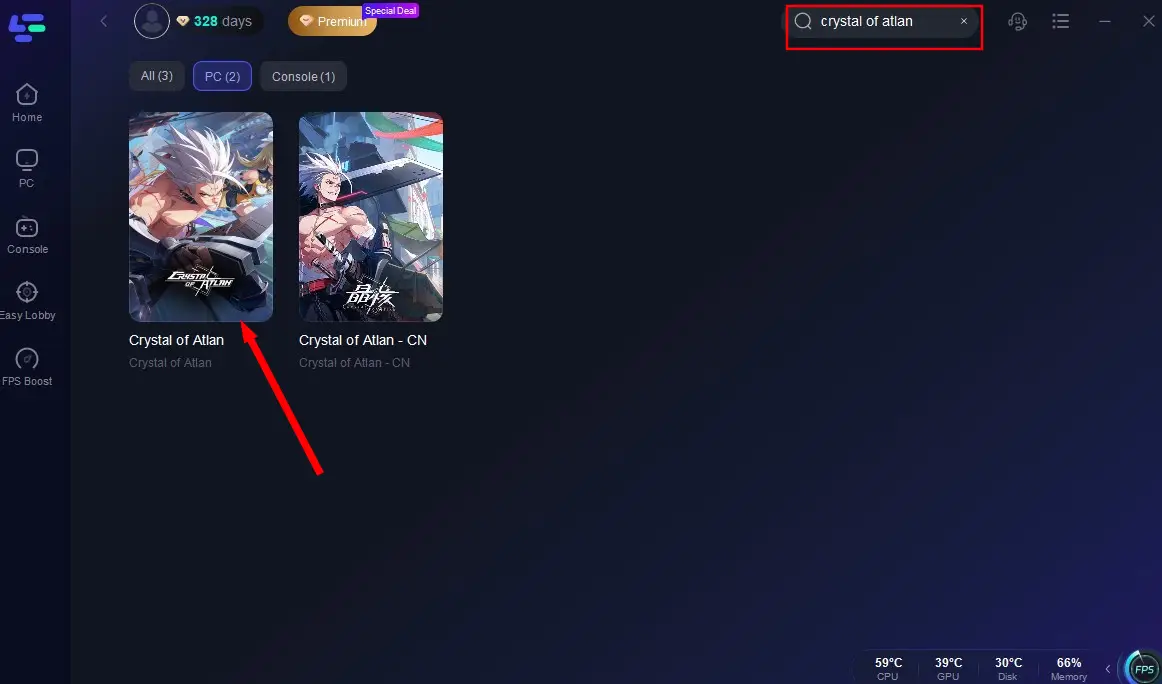
Select the correct server (Asia or Global) and node for better routing.
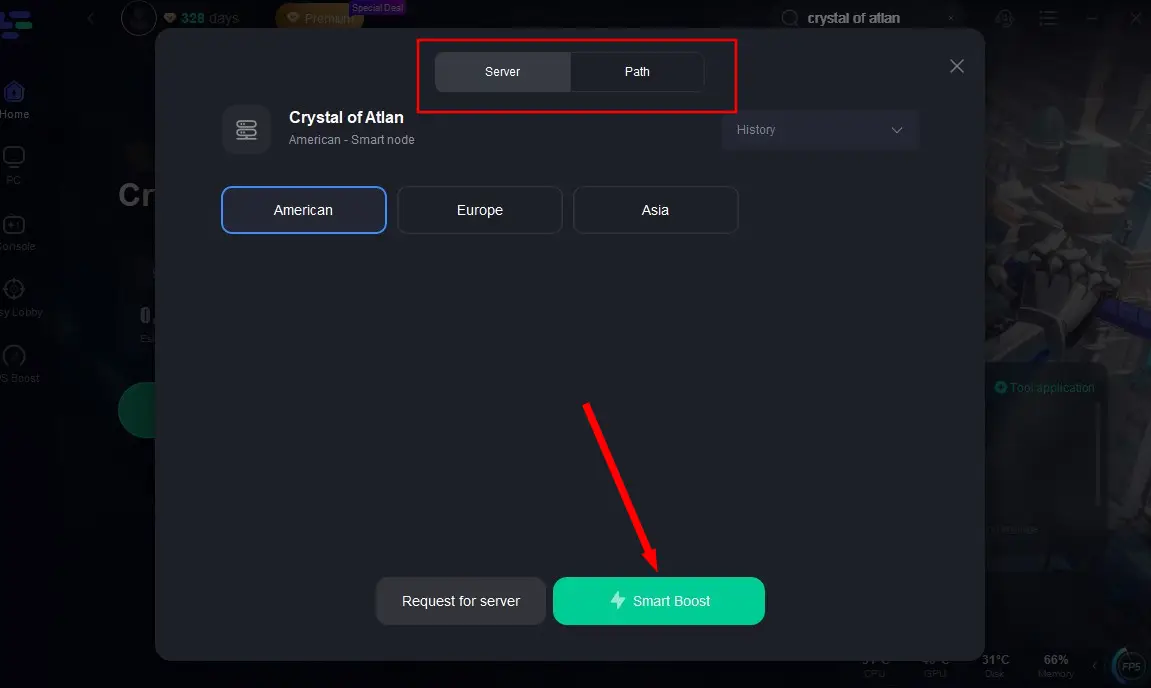
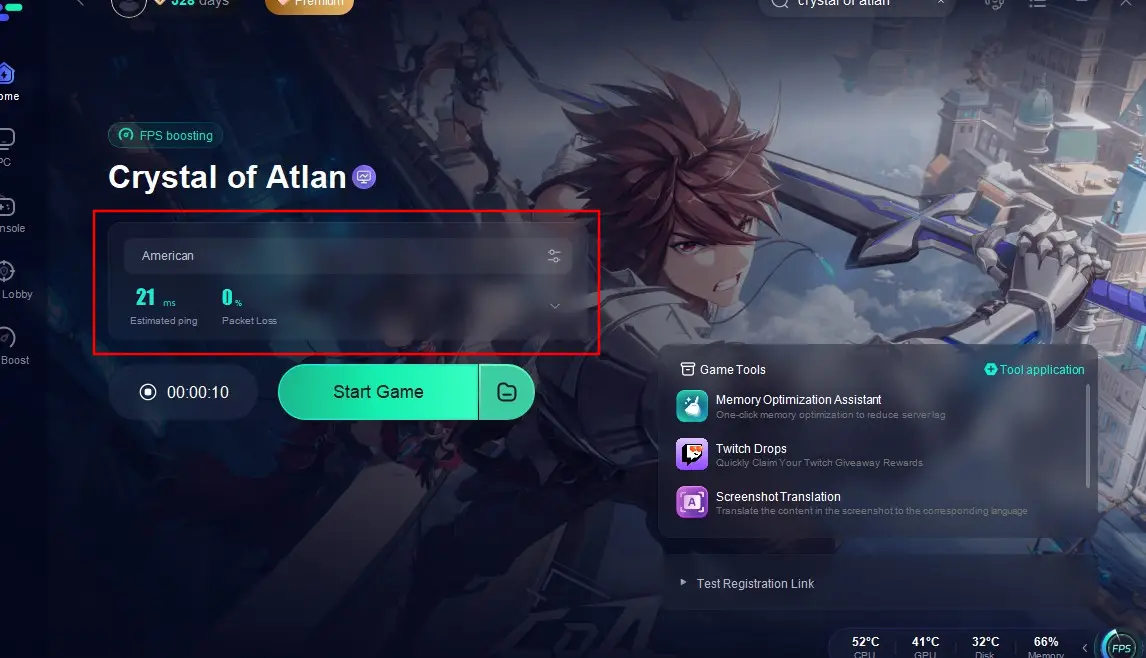
Click Smart Boost to monitor and optimize ping, packet loss, and network conditions in real time.
For Mobile Users(Take Crystal of Atlan Asia as an example)
Step 1: Download LagoFast Mobile Booster from the App Store or Google Play, or scan the QR code below:

Step 2: Open the app, search for Crystal of Atlan Asia and tap it.
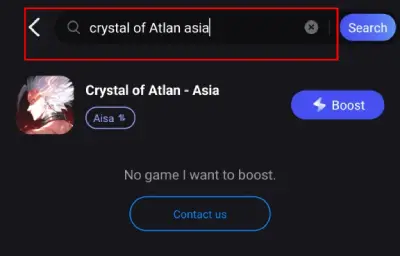
Step 3: Select the server region you want to connect to (There are three servers for Crystal of Atlan Asia).
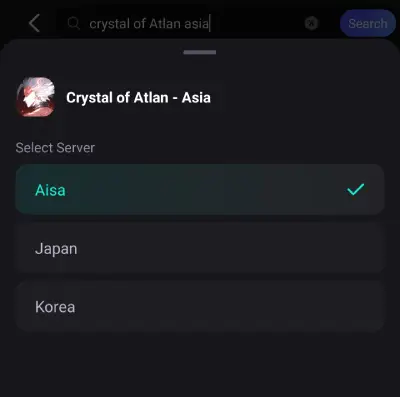
Step 4: Hit Boost—you’ll instantly see real-time ping, packet loss rate, and connection quality.

With LagoFast, you no longer need to worry about region-locked lag or unstable mobile networks. Just boost and play. Stay ahead of your enemies, not behind your connection. Whether you’re exploring dungeons or battling bosses, LagoFast ensures smoother gameplay and faster response times, no matter where you are. If you’re struggling with high latency in Crystal of Atlan, give LagoFast a try and experience the game the way it’s meant to be played.
Conclusion
Experiencing lag in Crystal of Atlan can take away from its rich and immersive gameplay. Fortunately, by optimizing your device settings and using tools like LagoFast, you can significantly reduce lag and enjoy a smooth gaming experience. Don’t let latency hold you back—take control of your connection and focus on mastering the magical world of Atlan.

Boost Your Game with LagoFast for Epic Speed
Play harder, faster. LagoFast game booster eliminates stutter and lags on PC, mobile, or Mac—win every match!
Quickly Reduce Game Lag and Ping!
Boost FPS for Smoother Gameplay!