
Trying to launch Crimson Desert only to see a DirectX12 error can be incredibly frustrating. Instead of exploring the game world, you're stuck staring at an error message or watching the game close before it even loads. Many players run into this problem when their system is missing certain components, when drivers are outdated, or when the game cannot properly initialize DirectX 12.
The good news is that the Crimson Desert DirectX 12 error is usually fixable. In this guide, we’ll explain what the error means, why it happens, and the most practical solutions you can try to get the game running again.

- ✅ Reduce Lag and High Ping.
✅ Boost FPS at the Same Time.
✅ Support 2000+ Popular Online Games.
✅ Change Server without Latency.
✅ Boost Game Loading Speed.
Part 1: What the Crimson Desert DirectX 12 Error Means
Part 2: Why the Crimson Desert DirectX 12 Error Happens
Part 3: How to Fix the Crimson Desert DirectX 12 Error
Part 1: What the Crimson Desert DirectX 12 Error Means
The Crimson Desert DirectX 12 error typically appears when the game cannot properly access or initialize DirectX 12, which is required for modern graphics rendering. When this happens, the game may fail to launch or crash during startup.
Players usually encounter one of the following situations:
- The game fails to launch and shows a DirectX error message
- Crimson Desert crashes immediately after opening
- A message appears saying DirectX 12 is missing or unsupported
- The game loads briefly and then closes before reaching the main menu
In simple terms, the game is trying to use DirectX 12 graphics features, but something in the system is preventing it from working correctly.
Part 2: Why the Crimson Desert DirectX 12 Error Happens
Several different factors can trigger this error. Understanding them makes it much easier to solve the problem.
Missing or Corrupted DirectX Components
DirectX relies on multiple system files. If some of these files are missing or corrupted, the game may fail to start.
Common signs include:
- DirectX initialization errors
- Game closing immediately after launch
- Missing DLL messages
This often happens when system components were not installed correctly or became damaged.
Outdated Graphics Drivers
Modern games like Crimson Desert rely heavily on updated GPU drivers.
If your graphics drivers are outdated:
- DirectX 12 may not function correctly
- The game may crash during startup
- Rendering errors may appear
Updating GPU drivers can often resolve these problems instantly.
Windows or System Compatibility Issues
Sometimes the problem comes from system-level conflicts.
Examples include:
- Missing Visual C++ runtime libraries
- Windows compatibility issues
- Incorrect DirectX installations
These issues prevent the game from properly accessing required system resources.
Unstable Network or Game Initialization Problems
While DirectX errors are usually system-related, unstable connections can sometimes interrupt the game startup process, especially if the client fails to load required online components during launch.
Part 3: How to Fix the Crimson Desert DirectX 12 Error
In some cases, startup issues and DirectX-related errors happen because the game client cannot initialize properly due to unstable connections or missing system components. Improving connection stability and repairing required components can help resolve these problems. LagoFast is a game performance platform designed to improve the gaming experience. It reduces ping, fixes packet loss, stabilizes network connections, and optimizes routing between players and game servers.
LagoFast also provides several useful tools that help fix common system problems:
- Fix C++ Issue Tool – Repairs missing or damaged Visual C++ components that can prevent games from launching.
- Win 11 Lag Fix Tool – Fixes issues where Windows 11 may cause game lag or system instability.
- DirectX 12 Component Installation Tool – Installs the required DirectX components that modern games rely on.
- Upcoming FPS Boost Tools and Game Crash Fix Tools—Additional utilities will be released in the future to help improve FPS and overall game performance.
These utilities can help resolve both system component problems and launch-related issues, making it easier to start Crimson Desert without errors.
How to Use LagoFast for Crimson Desert
Step 1: Click the Free Trial button to download and install LagoFast.
Step 2: After installation, search "Crimson Desert" in the search bar and select the game.
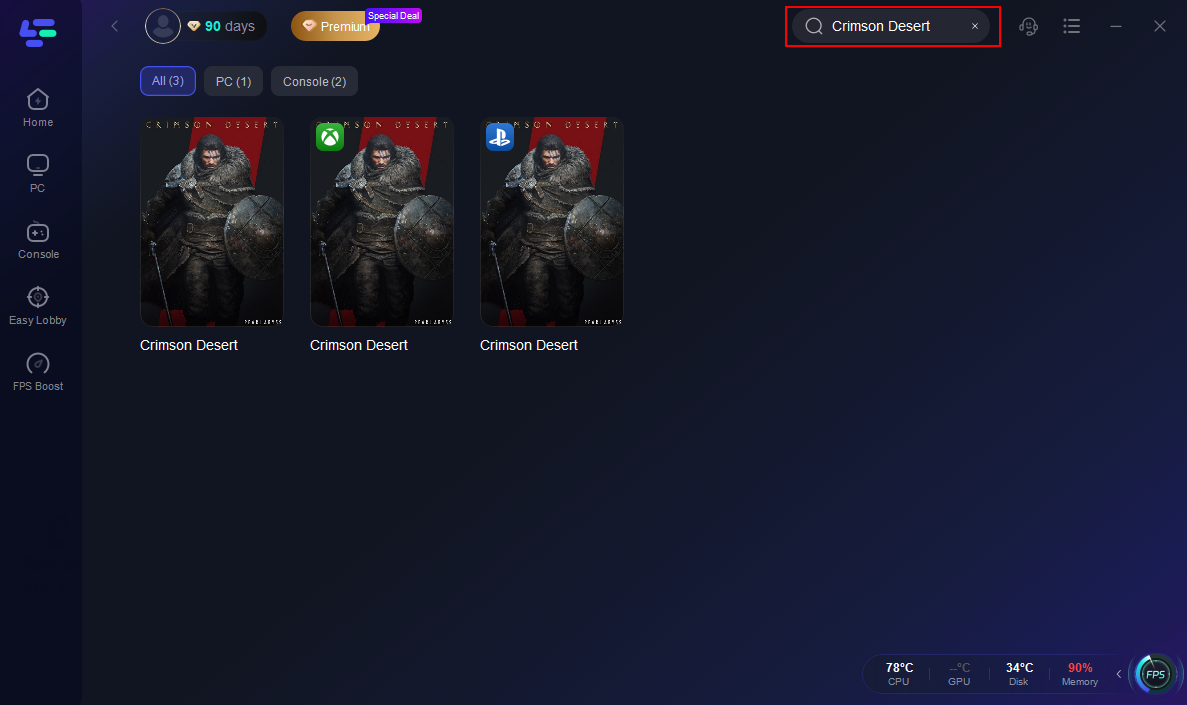
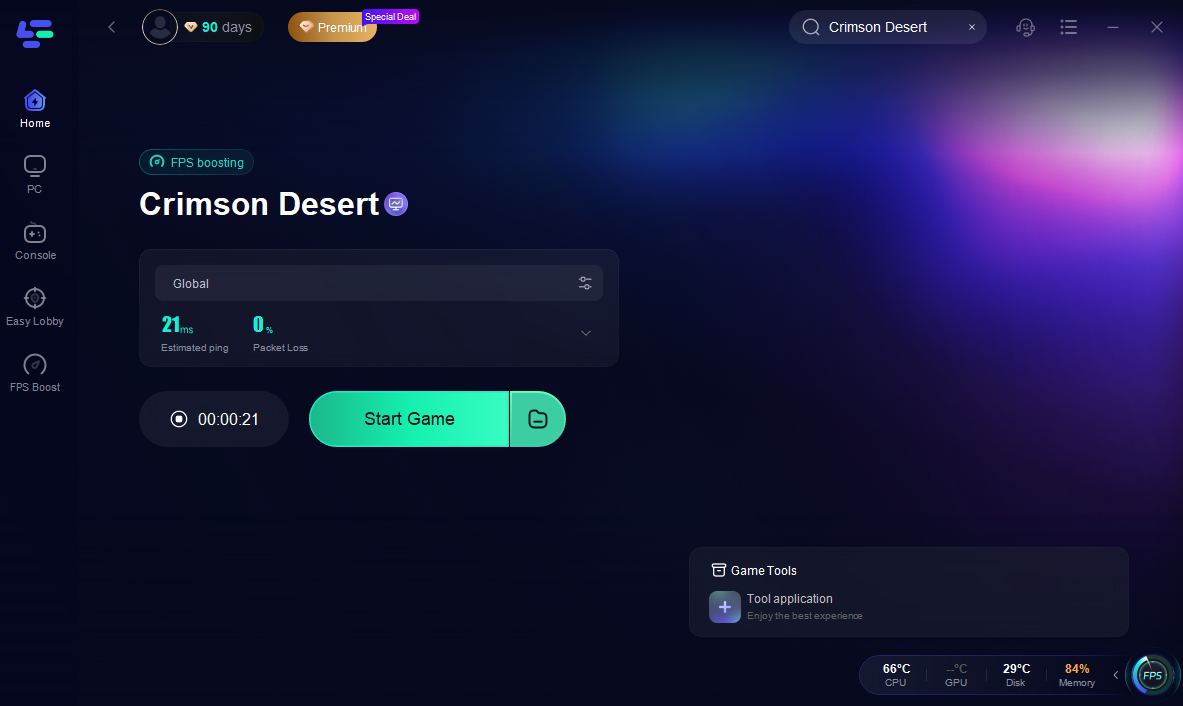
Step 3: Choose your preferred server node and click "Smart Boost" to start optimizing.

Step 4: Launch your game and enjoy smooth, optimized gameplay with lower ping and packet loss.
Fix 2: Update Your Graphics Drivers
One of the most common causes of DirectX12 errors is outdated GPU drivers.
Steps to update drivers:
- Visit the official website of your GPU manufacturer
- Download the latest driver for your graphics card
- Install the driver and restart your computer
Updating drivers ensures that DirectX 12 features are fully supported.
Fix 3: Reinstall or Repair DirectX
If DirectX files are missing or damaged, reinstalling them can solve the issue.
Try the following:
- Download the DirectX runtime installer from Microsoft
- Run the installer and repair existing components
- Restart your PC after installation
This process restores any missing DirectX system files.
Fix 4: Verify Game Files
Corrupted game files can also trigger launch errors.
To verify files:
- Open your game launcher (Steam or official launcher)
- Navigate to Game Properties
- Select Verify Integrity of Game Files
The launcher will automatically replace missing or damaged files.
Fix 5: Update Windows
Older versions of Windows may lack required system libraries for newer games.
Make sure to install:
- Latest Windows updates
- Security patches
- System runtime libraries
Keeping your system updated prevents many compatibility issues.
Conclusion
The Crimson Desert DirectX12 error can be frustrating, especially when it prevents the game from launching properly. In most cases, the issue is caused by missing DirectX components, outdated graphics drivers, or system compatibility problems. By updating your drivers, repairing DirectX, verifying game files, and making sure your system components are properly installed, most players can resolve the problem quickly. Tools like LagoFast can also help stabilize connections and fix common system issues that may affect game startup. Once everything is set up correctly, you should be able to launch Crimson Desert smoothly and play without those DirectX errors getting in the way.
Boost Your Game with LagoFast for Epic Speed
Play harder, faster. LagoFast game booster eliminates stutter and lags on PC, mobile, or Mac—win every match!
Quickly Reduce Game Lag and Ping!
Boost FPS for Smoother Gameplay!