

If you've already secured your ticket to Chrono Odyssey, the next-gen MMORPG captivating players with its innovative time-manipulation mechanics, but are frustrated by limited server access preventing you from diving into the action—or if you simply want to join friends on a same server for cooperative adventures—this guide will equip you with the ultimate server-switching strategy. We'll show you how to connect to the safest, most stable Chrono Odyssey servers no matter where you are.

- ✅ Reduce Lag and High Ping.
- ✅ Boost FPS at the Same Time.
- ✅ Support 2000+ Popular Online Games.
- ✅ End Connection & Crashing Issues.
- ✅ Stable Server Connections
Part 1: Chrono Odyssey Closed Beta Test Overview
Part 2: How Many Servers Does Chrono Odyssey Have
Part 3: Reasons for Changing Server in Chrono Odyssey
Part 4: How to Change Chrono Odyssey Server Easily
Part 1: Chrono Odyssey Closed Beta Test Overview
The Chrono Odyssey Closed Beta Test is set from June 20, 2025 at 12am PDT / 3am EDT / 8am BST until June 22, 2025 at 11:59pm PDT and June 23, 2025 at 2:59am EDT / 7:59am BST. After enter the test, Players chose from three starter classes—Swordsman, Berserker, and Ranger—each offering weapon-switching flexibility and unique skill trees. The standout "Chronotector" system allowed time manipulation, enabling tactics like slowing enemies or reverting environmental changes. Combat shone in modes like solo "Time Rift" challenges and cooperative 100-player regional boss raids.
The test unveiled the initial zone of "Setra," featuring dynamic weather, random world events, and resource-gathering crafting systems. Powered by Unreal Engine 5, the game boasted 4K visuals with ray tracing, while confirming cross-platform support for consoles.
Part 2: How Many Servers Does Chrono Odyssey Have
Despite Chrono Odyssey's global appeal thanks to its fresh time-travel combat system, the game's server network hasn't yet expanded to every continent. Currently, Chrono Odyssey initially operates 18 servers across three major regions :
- North America
- Europe
- Asia
Each region hosts six servers labeled numerically (e.g., NA-1 to NA-6). Players in these areas can choose servers within their continent for optimal stability. However, players in regions like South America must use reliable methods to switch to official server locations to access the game.
And with the high number of participation, Chrono Odyssey has increased the number of server in each open region to 70, make its server number to 210. This ensures that players in every area can connect to the most stable servers and enjoy a seamless gameplay experience during testing.
Part 3: Reasons for Changing Server in Chrono Odyssey
Changing server in Chrono Odyssey isn't just about accessing the game from unsupported regions—it offers strategic advantages:
- Play Across Borders: Chrono Odyssey's cooperative gameplay requires connecting to the same server. Switching server nodes lets you team up with friends worldwide.
- Reduce Lag: As a fast-paced action game, Chrono Odyssey demands split-second reactions. Connecting to a geographically closer server minimizes delay for smoother combat.
- Unlock Exclusive Content: Servers may host region-specific events, limited-time activities, or unique in-game items—switching servers grants access to these treasures.
- Fresh Social Experiences: Each server fosters its own community. Exploring different regions connects you with diverse player groups and fresh perspectives.
- Avoid Overcrowding: Peak hours can overwhelm popular servers. Switching to less congested nodes ensures hassle-free login and gameplay.
Part 4: How to Change Chrono Odyssey Server Easily
If you need to change servers but dread complicated security checks, LagoFast simplifies the process. With servers in 60+ countries and 150+ cities, this gaming VPN ensures seamless server transitions and lag-free gameplay.
Additionally, if players within official server regions encounter lengthy server queues or struggle to access Chrono Odyssey due to overcrowding, LagoFast can help you switch to a less crowded server node—ensuring you jump into your temporal adventures without delay.
Here's why it stands out:
- Reduced Lag: Minimizes latency issues, ensuring real-time responsiveness during combat.
- Stable Connection: Provides a consistent network connection, preventing disconnections during crucial moments.
- Optimized Game Performance: Enhances system performance, allowing for smoother graphics and faster load times.
- FPS Optimization: By minimizing ping fluctuations and stabilizing latency, LagoFast dynamically enhances frame rate consistency, elevating both visual clarity and responsiveness.
How to Use LagoFast for Chrono Odyssey:
Download & Install: Click the free trial button to get LagoFast on your PC.
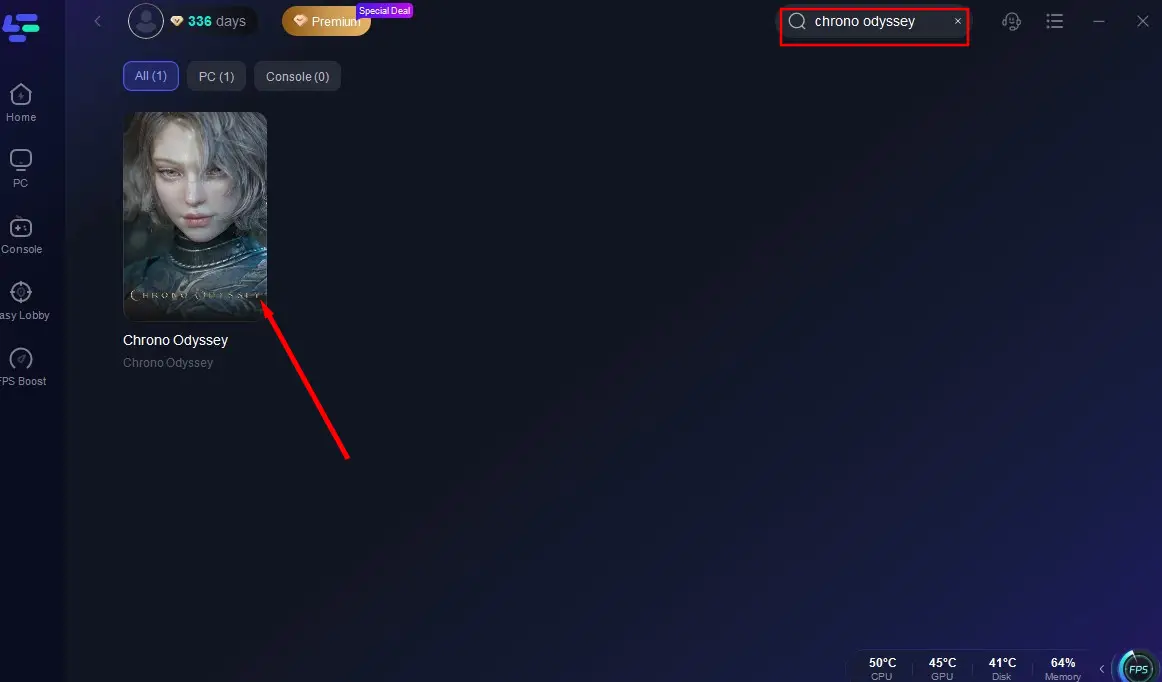
Launch & Search: Open the app, type "Chrono Odyssey'" into the search bar, and select the game.
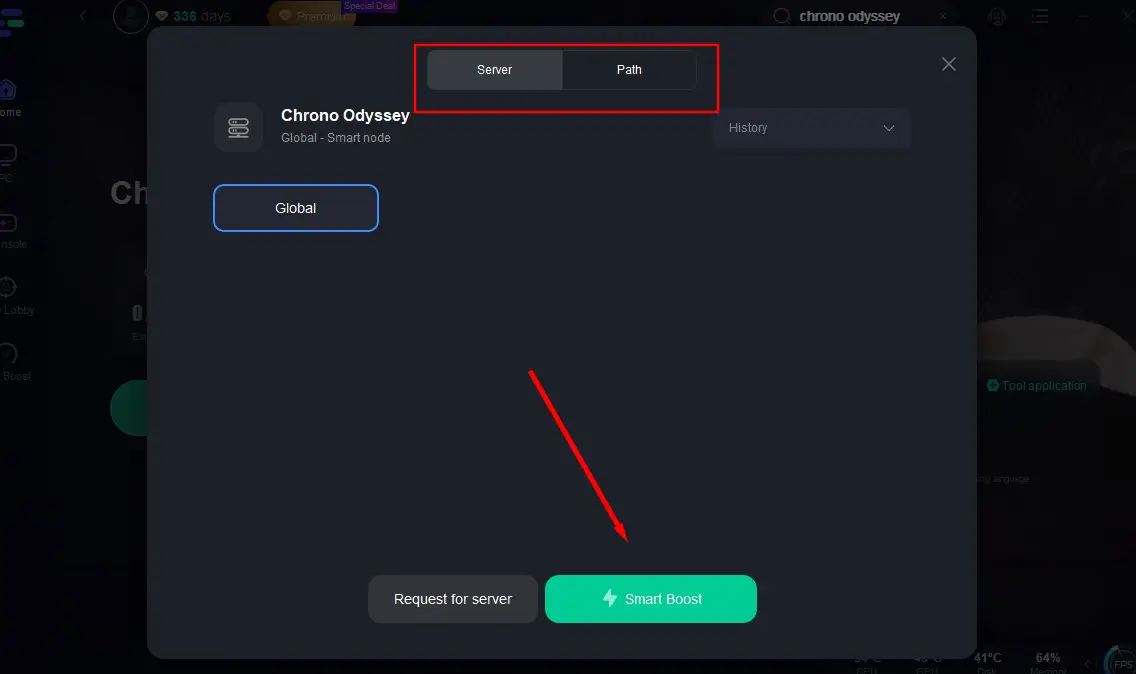
Select Server & Boost: Click "Select Server" to choose your target node, then hit "Smart Boost" to optimize your connection.
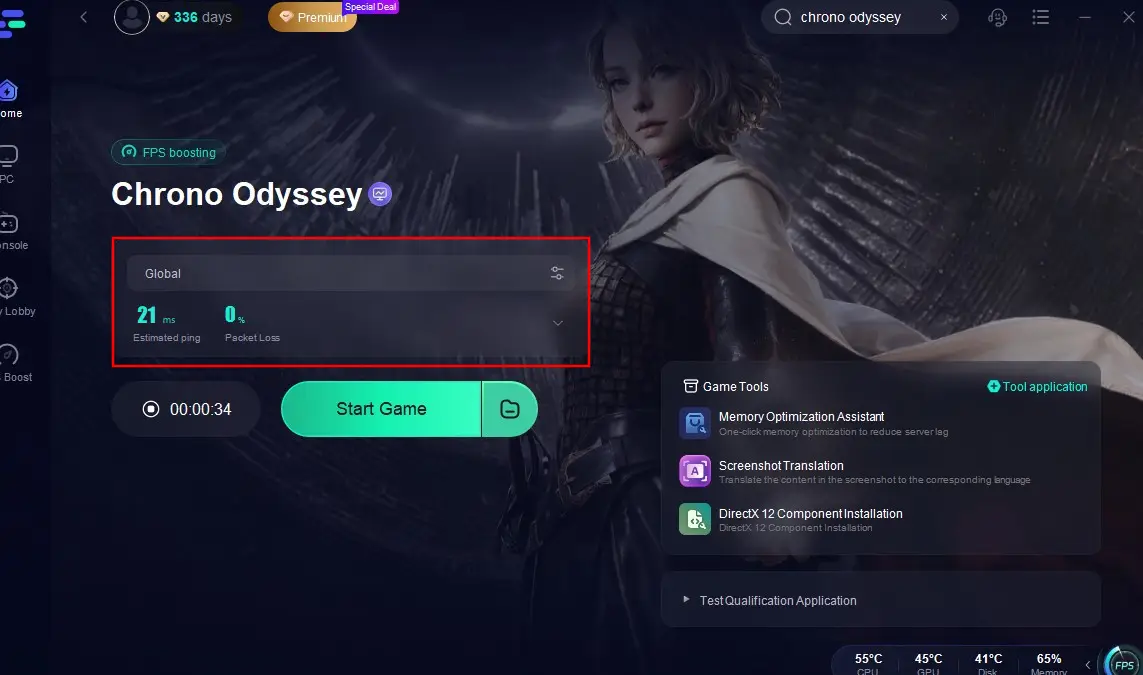
Play: Once the server switch completes (check for low latency), click 'Start Game' and jump into the action!
Conclusion
For players seeking smoother gameplay, exclusive content, or global camaraderie, changing Chrono Odyssey server is a game-changer. LagoFast's extensive network ensures reliable, secure connections to servers worldwide. Don’t wait—download LagoFast today, switch to your ideal server, and embark on your time-bending journey in Chrono Odyssey!

Boost Your Game with LagoFast for Epic Speed
Play harder, faster. LagoFast game booster eliminates stutter and lags on PC, mobile, or Mac—win every match!
Quickly Reduce Game Lag and Ping!
Boost FPS for Smoother Gameplay!