
Dune: Awakening, Funcom's ambitious survival MMO set in the expansive universe of Arrakis, is poised to redefine the genre with its unique blend of survival mechanics and massive multiplayer interactions.
As the game's release approaches, understanding its server dynamics, connectivity solutions, and optimization tools becomes essential for an immersive experience.

Part 2: How Many Players Are in a Dune Awakening Server?
Part 3: How to Change Server in Dune Awakening
Part 4: How to Solve Can't Connect to Dune Awakening Server
Part 5: How to Enhance Game Experience With LagoFast Game Booster
Part 1: Introduction
Set in an alternate timeline where Paul Atreides was never born, Dune: Awakening plunges players into a world teetering on the brink of chaos. As a Bene Gesserit agent, your mission is to navigate the treacherous landscapes of Arrakis, seeking the elusive Fremen and unraveling the mysteries that lie beneath the sands. The game's emphasis on survival, exploration, and player-driven narratives makes understanding its server infrastructure and optimization tools crucial for both newcomers and veterans alike.
Part 2: How Many Players Are in a Dune Awakening Server?
Dune: Awakening's server architecture is designed to support a dynamic and immersive multiplayer experience, with player capacity varying based on specific in-game regions:
- Hagga Basin: This initial survival-focused area accommodates between 40 to 100 players, providing a more intimate environment for early-game exploration and base-building.
- Social Hubs: Cities and villages, such as Harko Village, serve as gathering points where up to 100 players can interact, trade, and form alliances.
- Deep Desert: The vast expanses of the deep desert can host "many hundreds of players," facilitating large-scale PvP engagements and cooperative events.
This tiered approach ensures that players experience both close-knit community interactions and expansive, large-scale confrontations, depending on their location within the game world.
Part 3: How to Change Server in Dune Awakening
At launch, Dune: Awakening does not support private servers, and players are initially assigned to specific server clusters upon character creation. However, discussions are ongoing regarding the possibility of allowing players to change server clusters in the future.
Currently, the game employs a shared world system with multiple instances of regions like the Hagga Basin, enabling players from different servers to interact within the same world.
Part 4: How to Solve Can't Connect to Dune Awakening Server
Connectivity issues can hinder the gaming experience. Here are steps to troubleshoot and resolve common connection problems:
- Check Server Status: Ensure that the game's servers are operational by visiting official channels or community forums.
- Restart Your System: Sometimes, a simple reboot of your computer or console can resolve connectivity issues.
- Verify Internet Connection: Ensure your internet connection is stable. Consider using a wired connection for improved stability.
- Update Network Drivers: Outdated drivers can cause connectivity problems. Ensure your network drivers are up to date.
- Configure Firewall Settings: Firewalls can block game connections. Ensure that Dune: Awakening is allowed through your firewall.
- Use a Game Booster: Tools like LagoFast can optimize your connection for gaming, reducing latency and improving stability.
Part 5: How to Enhance Game Experience With LagoFast Game Booster
LagoFast is a game optimization tool designed to improve gaming performance by reducing lag, lowering ping, and increasing FPS. It achieves this through advanced features such as:
How LagoFast Helps Improve Your Gaming Experience:
- Smart Game Routing: Utilizes multipath connections and real-time servers to maintain stable gameplay, automatically switching routes if one becomes congested.
- FPS Booster: Optimizes your PC's operating system, CPU, and GPU settings to eliminate in-game ghosting and tearing, ensuring smoother visuals.
- Global Server Network: With servers in over 60 countries and 150 cities, LagoFast ensures optimal performance by connecting you to the nearest server.
How to Use LagoFast with League of Legends
Step 1: Begin by clicking the Free Trial button to download and install the LagoFast Free Trial.
Step 2: Open the LagoFast application and log in or create an account if necessary.
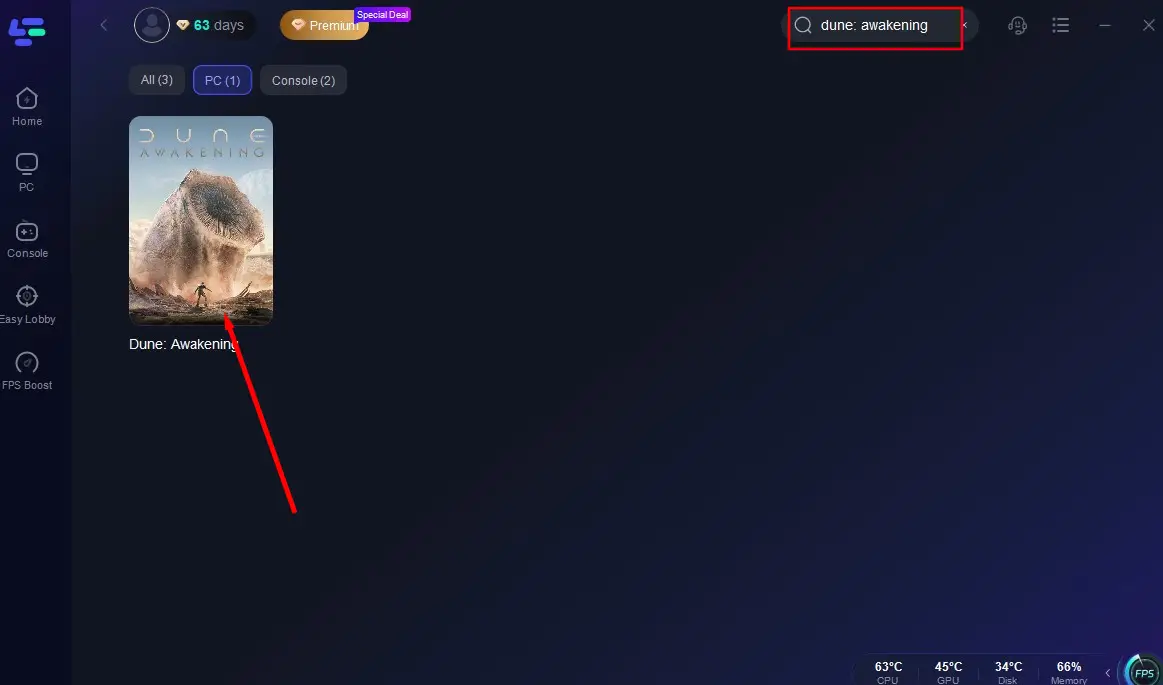
Step 3: In the LagoFast interface, find and select dune awakening from the list of supported games.
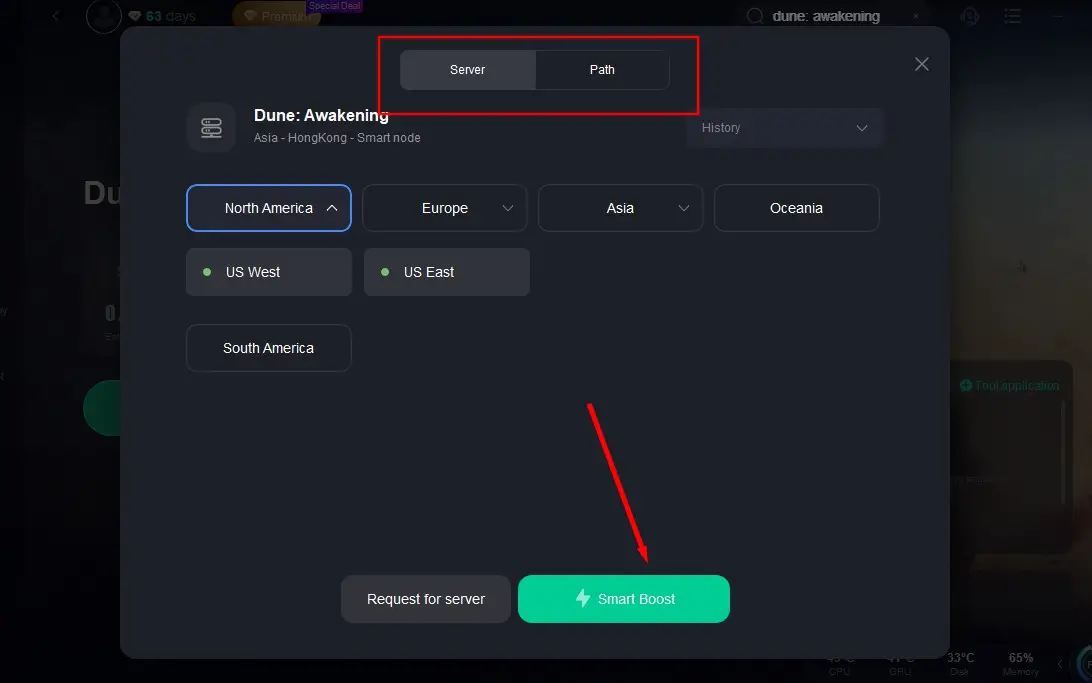
Step 4: Choose the server region closest to your location and let LagoFast optimize the best route for your connection.
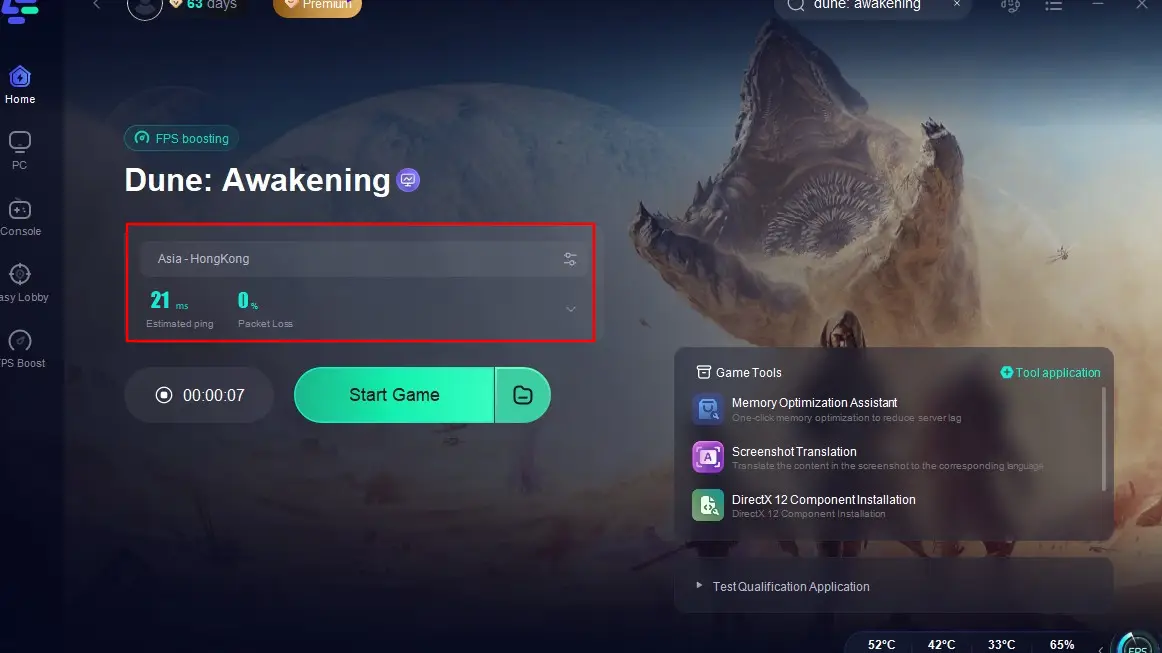
By integrating LagoFast into your gaming setup, you can experience Dune: Awakening with reduced latency, smoother gameplay, and enhanced overall performance.
Part 6: FAQs
Q1: Will Dune: Awakening support private servers in the future?
A: While private servers are not available at launch, Funcom has expressed interest in potentially offering rented servers in the future, though modifications would likely be restricted to maintain game balance.
Q2: Is cross-platform play available in Dune: Awakening?
A: As of now, cross-platform play has not been confirmed. The game is set to release on PC initially, with console versions for PS5 and Xbox Series X/S planned for a later date.
Q3: How can I stay updated on server status and game updates?
A: Regularly check the official Dune: Awakening website, community forums, and social media channels for the latest news and server status updates.
Conclusion
By understanding the server dynamics, optimizing your connection, and utilizing tools like LagoFast, you can ensure a seamless and immersive experience in the vast world of Dune: Awakening.

Boost Your Game with LagoFast for Epic Speed
Play harder, faster. LagoFast game booster eliminates stutter and lags on PC, mobile, or Mac—win every match!
Quickly Reduce Game Lag and Ping!
Boost FPS for Smoother Gameplay!