

Having smooth, responsive matches in EA SPORTS FC 26 often comes down to one thing: the server you connect to. Lower ping, reduced lag, and fairer competition all hinge on fast, stable routes to the game’s data center. While FC 26 doesn’t allow you to directly choose the data center, you can influence it—especially with smart tools like LagoFast. This guide shows you how.

- ✅ Reduce Lag and High Ping.
- ✅ Boost FPS at the Same Time.
- ✅ Support 2000+ Popular Online Games.
- ✅ Change Server without Latency.
- ✅ End Stuck & Crashing Issues.
Part 1. Which Regions Have FC 26 Servers?
Part 2. Why We Need to Change FC 26 Server Regions?
Part 3. The Importance of Changing Servers in FC 26
Part 4. The Easiest Way to Change Servers
Part 1: Which Regions Have FC 26 Servers?
EA SPORTS FC 26 is supported by a robust network of 32 game data centers located around the globe. These centres handle the full breadth of online modes such as Division Rivals, Ultimate Team Champions, Co-op Seasons, Clubs, Friendlies, and more.
Here's the breakdown of the server regions:
- Europe: Amsterdam, Dublin, Frankfurt, Helsinki, London, Madrid, Milan, Paris, Tel Aviv, Warsaw, Zürich
- Asia: Dubai, Hong Kong, Manama, Mumbai, Singapore, Tokyo
- Oceania: Sydney
- North America: Ashburn, Council Bluffs, Dallas, Des Moines, Los Angeles, Mexico City, Miami, Portland
- South America: Buenos Aires, Lima, Santiago, São Paulo
- Africa: Johannesburg, Lagos
These game data centers host matches ensuring your gameplay isn’t dependent on peer-to-peer connections and help preserve competitive integrity through centralized data syncing.
Part 2: Why We Need to Change FC 26 Server Regions?
You might expect the game to connect you to the nearest data center, but that’s not always how it works. The reality is that ISP routing—or high server load—can direct your traffic to distant servers, even if there's a closer one available.
This situation can cause:
- High latency
- Choppy gameplay
- Delayed inputs
- Unfair vs. Opponent
Influencing your server connection—even indirectly—can significantly improve your gameplay.
Part 3: The Importance of Changing Servers in FC 26
Switching—or guiding your system toward a more optimal data center—brings several key advantages:
- Better Responsiveness — Lower ping results in faster in-game reactions.
- Smoother Matches — Reduced lag, jitter, and desync issues.
- Consistent Fair Play — Matching on congested or distant servers can skew gameplay.
- Avoiding Overcrowded Centers — Switching during peak times can help you avoid server overload.
EA designed these data centers for stability, but routing quirks can still degrade your experience. Taking control makes a real difference.
Part 4: The Easiest Way to Change Servers
There’s no direct server select option in FC 26—but here's how you can influence it using LagoFast Game Booster, whether you're on PC, console, or mobile. After network optimization, switching servers becomes smoother.
How to use LagoFast Game Booster on PC
Step 1. Download LagoFast by clicking the "Free Trial" button.
Step 2. Before you start your game, search for it within the LagoFast application to ensure it's supported.
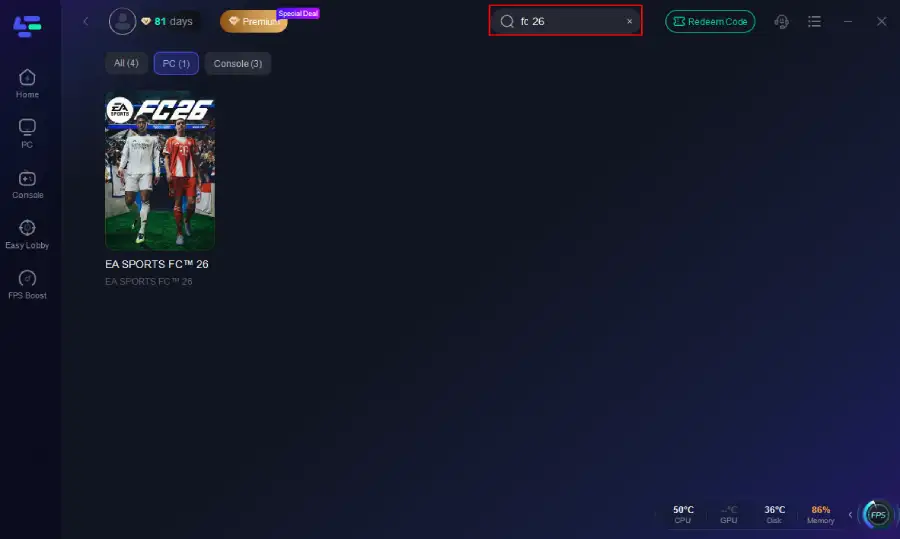
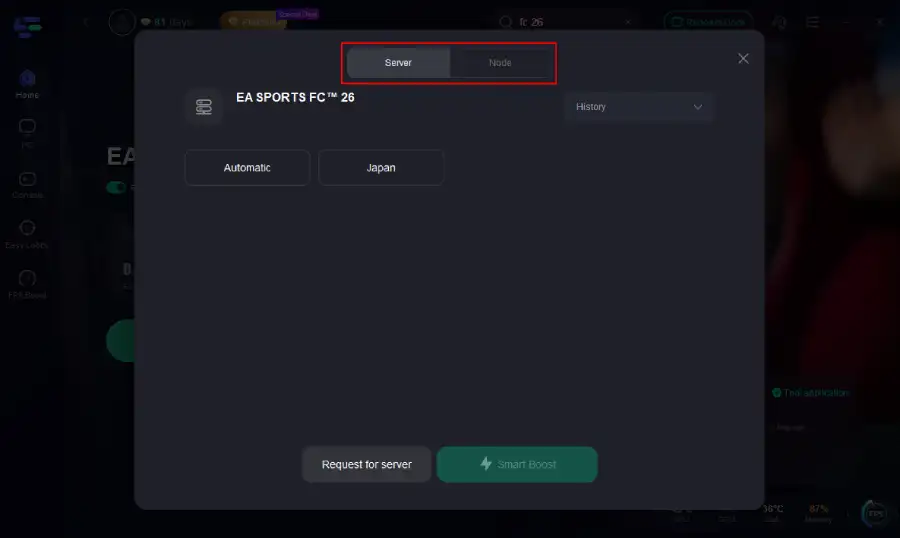
Step 3. Navigate to "Select Server" to choose the most stable server. Follow up by selecting the best Node available on the right to optimize your connection.
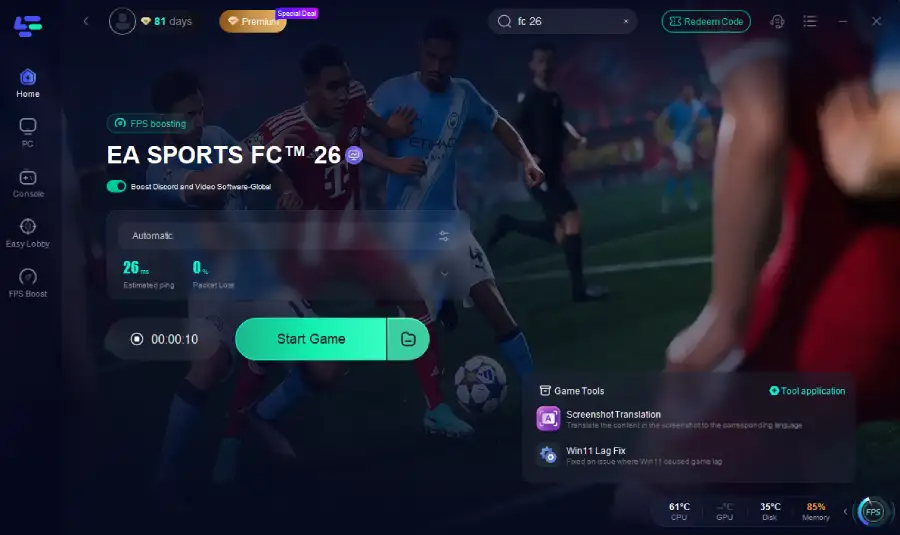
Step 4.Click the "Smart Boost" button to get real-time data on your game's ping, packet loss, and network type, which helps in monitoring and adjusting for optimal performance.
How to use LagoFast Game Booster on Console (PS5 / PS4)
LagoFast Box offers a simple, one-click method to optimize your game connection and reduce lag on PS5 or PS4:
Step 1. Download the LagoFast Console App to control the LagoFast Box

Step 2. Connect your LagoFast Box to your router and Console. You can use either wired connection or wireless connection.

Step 2. Launch LagoFast Console App and Boost FC 26. After you finish LagoFast Box binding, you can boost the game in LagoFast Console App.

Follow the tutorial to use the LagoFast Mobile to change server on your mobile devices:
Step 1: Search “LagoFast Mobile booster” in the Google App Store or Apple App Store. Alternatively, click here to download the APK File.
Step 2: Click the “Download” button, then install and launch “LagoFast Mobile Booster”.
Step 3: Start FC 26, then switch to LagoFast Mobile and search for it.
Step 4. Select and click FC 26 in the interface.
Step 5: Enter the server selection interface, where you can change to a stable server, then click the “Boost” button to fix high ping and enhance the gaming experience
Step 6: Finally, go back to FC 26 and start playing it without any lag.
LagoFast can greatly improve everyone's gaming network environment, not only helping everyone smoothly change servers, but also reducing latency and enhancing the gaming experience.
Part 5: FAQs
Q1: Can I manually choose my server region in FC 26 settings?
No—there isn’t a menu option to select a server in FC 26. Tools like LagoFast are your best alternative.
Q2: Why does FC 26 sometimes connect me to faraway servers?
Because ISPs and internet infrastructure determine its routing—not your physical proximity to data centers
Q3: Does using LagoFast guarantee connection to a specific region?
Not guaranteed—but it significantly improves routing quality, which increases the odds of connecting to the optimal server region.
Q4: Do all online modes use these servers?
Yes—modes like Online Seasons, Ultimate Team, Clubs, Co-op, Friendlies, and Divison Rivals all use centralized data centers.
Q5: Are FC 26 servers always online?
Generally yes, but outages or maintenance can occur. Check EA’s online status page if you experience connection issues.
Conclusion
While EA SPORTS FC 26 doesn’t let you outright pick your server, you can influence your connection path—especially with a network optimizer like LagoFast. By reducing latency and improving routing, you enhance your chances of matching with the closest or least congested data center. This boost leads to smoother gameplay, fairer matches, and a more responsive feel—exactly what every competitive player deserves.

Boost Your Game with LagoFast for Epic Speed
Play harder, faster. LagoFast game booster eliminates stutter and lags on PC, mobile, or Mac—win every match!
Quickly Reduce Game Lag and Ping!
Boost FPS for Smoother Gameplay!