
As the highly expected game, Borderlands 4, prepares for its launch on September 12, 2025, players worldwide are eagerly awaiting its arrival. With the release date coming near, Gearbox Software and 2K are partnering with Twitch to bring players an exciting Twitch Drops event, offering every player a chance to earn exclusive rewards before the game even goes live.
This article will delve into how to get Borderlands 4 Twitch Drops, what rewards are available, how you can earn the Twitch Drops easily and quickly, and how you can ensure the best possible gaming experience.

- ✅ Reduce Lag and High Ping.
- ✅ Boost FPS at the Same Time.
- ✅ Support 2000+ Popular Online Games.
- ✅ Change Server without Latency.
- ✅ Boost Game Loading Speed.
- ✅ Fix Game Crashing Freezing Issues
Part 1: Borderlands 4 Twitch Drops Overview
Part 2: How to get Borderlands 4 Twitch Drops — Common Way
Part 3: How to Earn Borderlands 4 Twitch Drops Easily and Quickly
Part 1: Borderlands 4 Twitch Drops Overview
Borderlands 4 Twitch Drops is a special event where players can earn in-game rewards by watching designated Twitch streams.
Between August 29, 2025 (1 PM PT) and September 29, 2025 (11:59 PM PT), simply by watching any official Borderlands or Gearbox channel streaming Borderlands 4 for 30 minutes within the Borderlands 4 category, you can earn the “Watch, Drop, and Roll" ECHO-4 Drone Skin (Purple).
This is not only a perk for loyal fans but also an excellent opportunity to get an early taste of game content and acquire unique cosmetic items.
Hot Related: Borderlands 4 Interactive Map – Best Map Tool with LagoFast
Part 2: How to Get Borderlands 4 Twitch Drops — Common Way
To get Borderlands 4 Twitch Drops is very easy, you can just follow these five steps:
- Link the accounts: First, link your Twitch account to the SHiFT account. If you don't have a SHiFT account, please follow the instructions to create one for free. Make sure to complete this step before claiming any rewards.
- Watch streams: During the event period (August 29, 2025, 1 PM PT to September 29, 2025, 11:59 PM PT), log in to the linked Twitch account and watch a Drops-enabled Borderlands 4 stream from either “Official Borderlands”nds" or "Gearbox Channel." Be aware that watching other streams may not be eligible for drops.
- Pay attention: Keep an eye on the Drops notification at the top of the chat window to see the required watch time.
- Claim rewards: Twitch will automatically track your progress towards earning rewards. Once you meet the drop requirements, you will receive a claim notification at the top of the Twitch navigation. Please remember, you must claim the rewards via Twitch within 24 hours.
- Important Note: The rewards will be available in-game after Borderlands 4 launches on September 12, 2025.
Ensure you have a stable internet connection and a SHiFT account linked to your gaming platform, and eventually purchase the Borderlands 4 base game to enjoy your exclusive drop rewards!
Related Article: Is Borderlands 4 on Game Pass >
Part 3: How to Earn Borderlands 4 Twitch Drops Easily and Quickly
If you want to get Borderlands 4 Twitch Drops rewards, but you don't want to spend hours watching streams, the LagoFast game booster can offer a convenient solution.
LagoFast is a game optimization tool designed to enhance your gaming experience. It offers various features, including a Twitch Drops tool, allowing players to earn rewards without continuous stream watching.
How to Use LagoFast to Get Borderlands 4 Twitch Drops Rewards:
Step 1: Download and install LagoFast via the free trial button
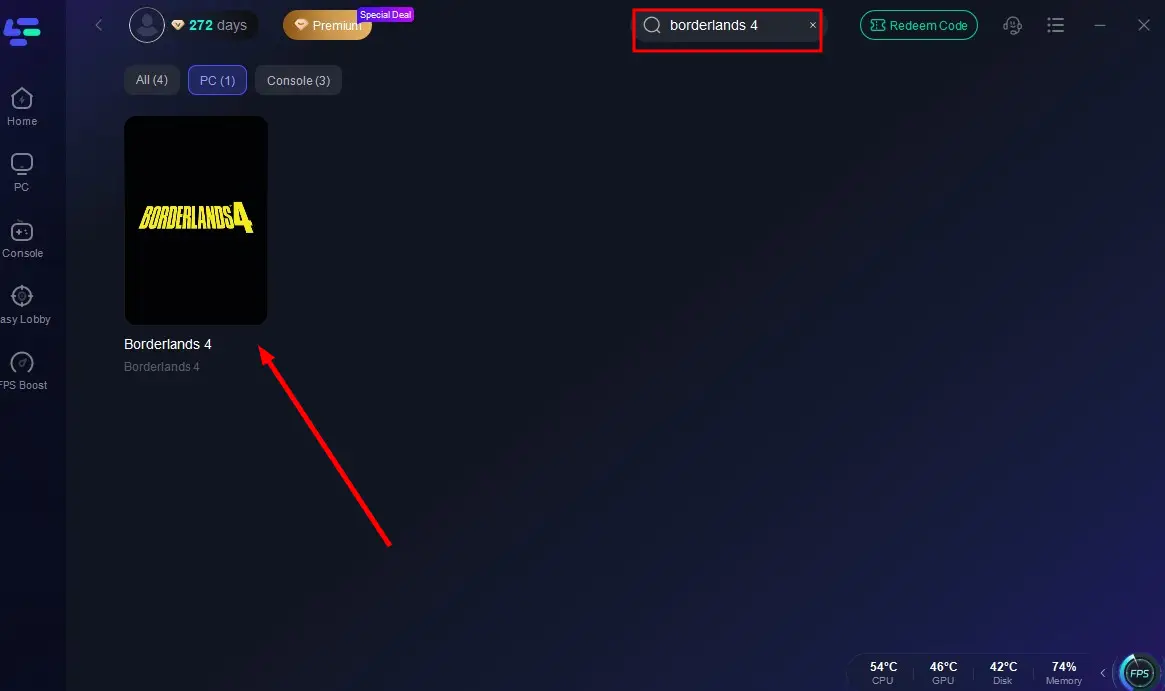
Step 2: Open LagoFast, then click the PC button on the left and search Borderlands 4 in the search bar, and click it after it appears.
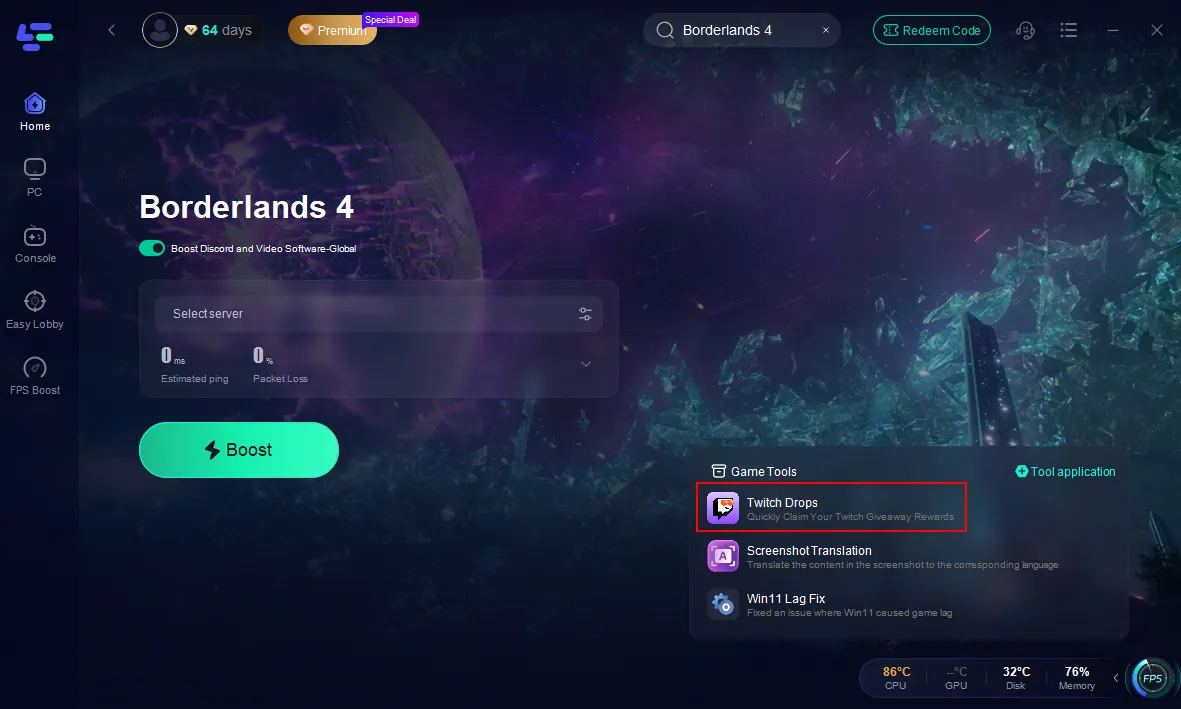
Step 3: Click "Twitch Drops" under the “Game Tools” section on the right.
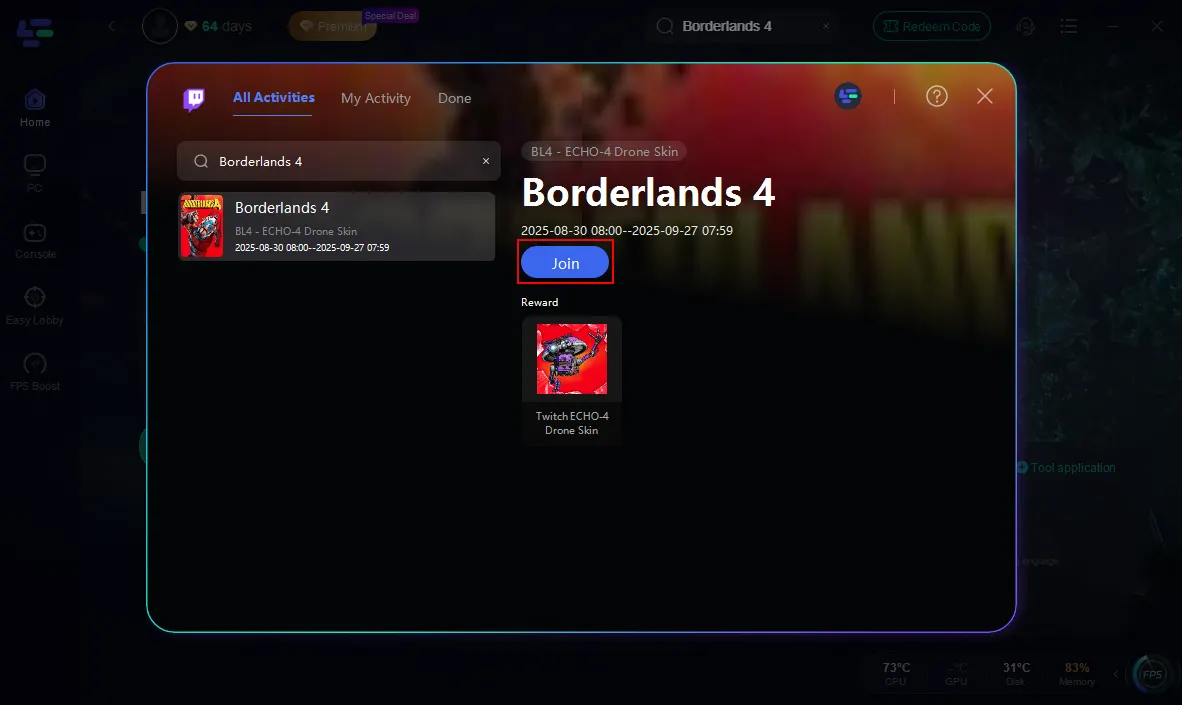
Step 4: Search “Borderlands 4” on the left side, click "Join" to start. Follow the prompts to link your Twitch account.
How to Use LagoFast to Optimize Your Gameplay
In addition to the Twitch Drops tool, LagoFast Game Booster offers several features that can significantly enhance your overall gaming experience in Borderlands 4, providing you with unparalleled support.
LagoFast Feature Highlights:
- Ultimate acceleration, and say Goodbye to lag: This tool is a game booster that maintains stability and smooth performance through multi-path connections and real-time server routing. It continuously finds the best path for your game data, reducing lag and preventing interruptions.
- Exclusive global routes: LagoFast offers dedicated network routes around the world, delivering strong and stable connections no matter your location.
- Boost FPS and refine performance: LagoFast is not only a network tool, it also improves game performance. It can optimize the operating system, fine-tune CPU and GPU usage, and adjust in-game settings with a single click. Therefore, LagoFast enables you to reduce screen tearing, stabilize frame rates, and keep your graphics drivers up to date.
- Flexible pay-per-minute pricing: Unlike services that require monthly or annual subscriptions, this tool lets you pay only for the minutes you use. This flexible approach helps you save money and avoid long-term commitments.
- Simple and intuitive operation: LagoFast game booster is designed with an intuitive user interface, making it easy for even beginners to use. With just one click, you can boost your FPS and enjoy a seamless gaming experience.
How to Use LagoFast for Borderlands 4:
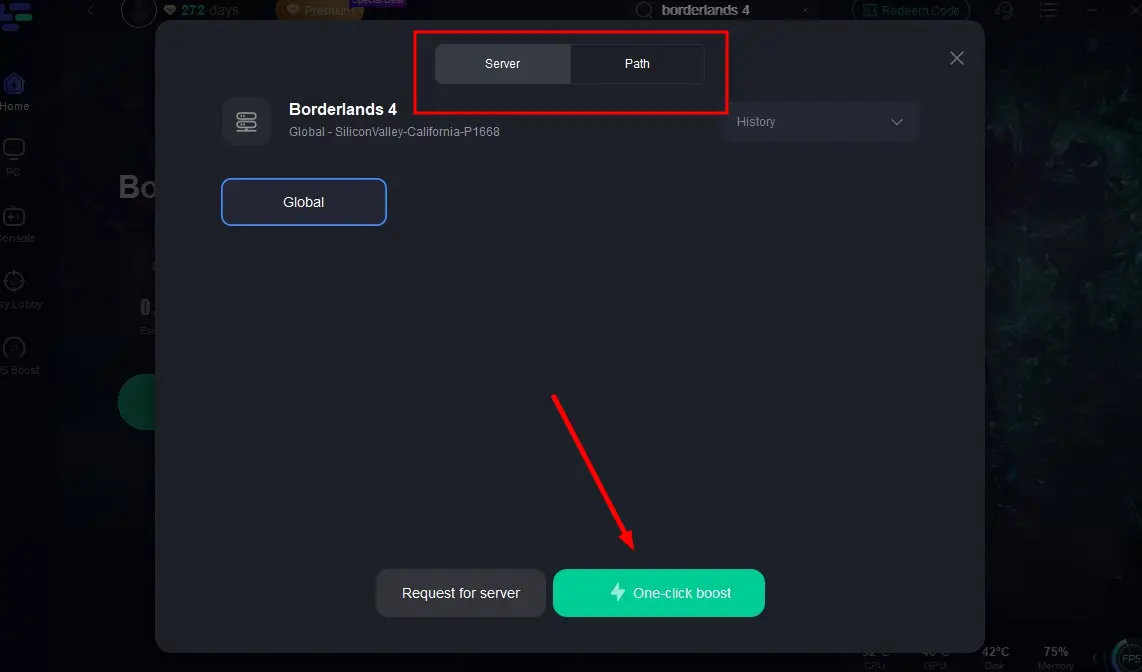
Step 1: Click on “Server” to change to a better server that ensures the best gaming experience and fixes lag, then click on “Smart Boost”.
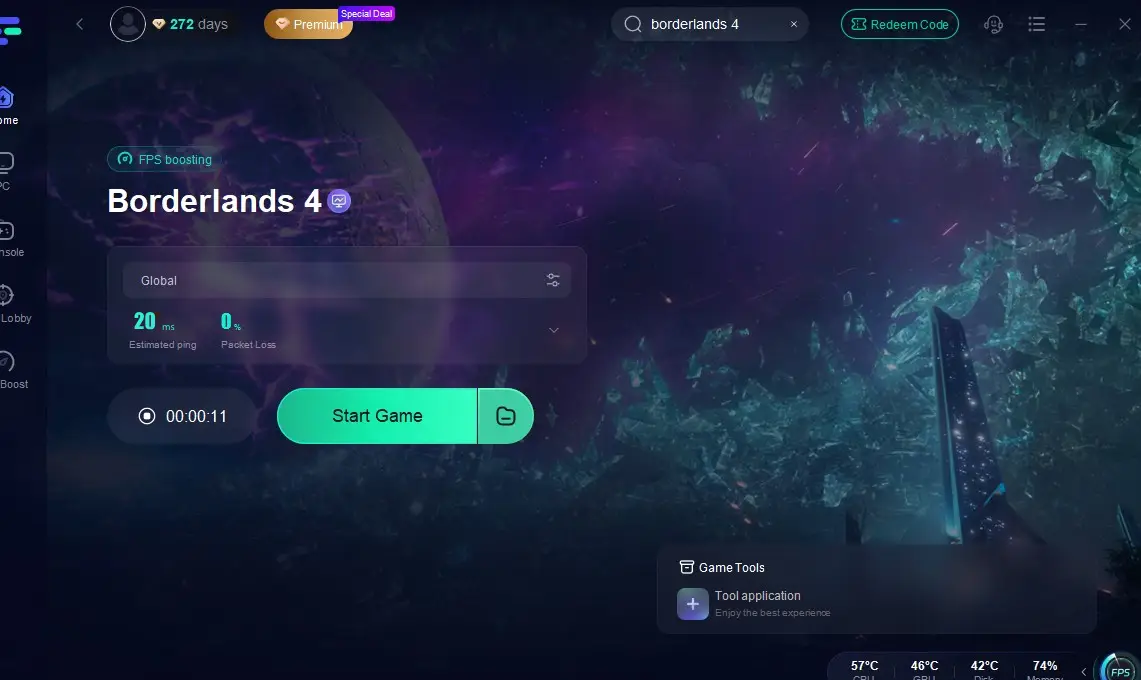
Step 2: Check the specific game ping, packet loss, and multiple path connections on the right side. Finally, click the “Start Game” to play the game.
Hot Related: Borderlands 4 Is Not Working on PC? Complete Fix Guide for Errors and Crashes
Summary
Borderlands 4 is undoubtedly one of the most anticipated games of 2025. The Twitch Drops event provides an excellent opportunity for all eager players who can conveniently obtain Twitch Drops via LagoFast to get exclusive rewards early.
At this point, the LagoFast game booster is an indispensable gaming tool. With its exceptional acceleration performance, exclusive global routes, FPS optimization features, and cost-effective payment model, it provides you with comprehensive assurance for an unparalleled gaming experience. As we are waiting for the release date of Borderlands 4, staying updated through official channels and using tools like LagoFast can enhance your overall gaming experience.

Boost Your Game with LagoFast for Epic Speed
Play harder, faster. LagoFast game booster eliminates stutter and lags on PC, mobile, or Mac—win every match!
Quickly Reduce Game Lag and Ping!
Boost FPS for Smoother Gameplay!