
Quick Answer
The fastest BOMBANANA Fatal Error Fix is to check and restore missing game files, verify game integrity, repair corrupted data, and use a one-click diagnostic tool such as LagoFast’s Fix “Fatal error” feature to automatically detect and repair missing content.
Introduction
Running into a fatal error when launching BOMBANANA can be frustrating, especially when the game suddenly stops working without a clear explanation. In many cases, this issue is connected to missing, corrupted, or incomplete game files that prevent the game from loading properly. The good news is that this problem is usually fixable without advanced technical knowledge. This guide explains what the error means, why it happens, and the fastest ways to repair it so you can get back into the game with minimal downtime.

- ✅ Reduce Lag and High Ping.
✅ Boost FPS at the Same Time.
✅ Support 2000+ Popular Online Games.
✅ Change Server without Latency.
✅ Boost Game Loading Speed.
Part 1: What BOMBANANA Fatal Error Means and Why It Happens
Part 2: How to Fix BOMBANANA Fatal Error
Part 3: Enhance Your Gaming Experience with LagoFast
Part 1: What BOMBANANA Fatal Error Means and Why It Happens
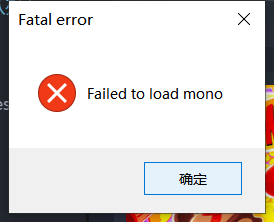
A fatal error generally means the game encountered a critical issue that prevented it from continuing execution. Unlike small in-game bugs, fatal errors usually stop the game from launching entirely or force an immediate crash.
For BOMBANANA, one of the most common triggers appears to be missing or damaged game files.
Missing or Incomplete Game Files
Game installation files can become incomplete during download, interrupted updates, failed patches, storage issues, or unexpected shutdowns.
When BOMBANANA tries to load required assets but cannot find them, it may display a fatal error message and terminate immediately.
Typical symptoms include:
- Game closes instantly after startup
- Error popup mentioning missing files
- Endless loading screen
- Black screen before menu
- Crash after applying updates
Corrupted Cache or Temporary Data
Games often generate cache files to improve loading speed. If these temporary files become corrupted, the launcher may incorrectly load broken resources.
This can look similar to a missing file issue even though the original installation remains intact.
Interrupted Updates or Patch Conflicts
Live-service and frequently updated games are especially vulnerable to patch mismatches.
If an update partially installs or conflicts with previous versions, BOMBANANA may fail validation checks during startup.
Security Software Blocking Game Files
Occasionally, antivirus software or Windows security features may quarantine or block game files incorrectly.
This can result in certain executable or resource files disappearing after installation.
Understanding the root cause makes fixing the issue much easier. Next, we’ll go through practical solutions from fastest to more advanced.
Part 2: How to Fix BOMBANANA Fatal Error
Since missing files are one of the most likely reasons behind this problem, it makes sense to start with the fastest repair options before moving into manual troubleshooting.
Method 1: Use LagoFast Fix “Fatal error” Tool (Recommended)
If you want the quickest way to identify what is actually broken, LagoFast provides a built-in Fix “Fatal error” feature designed for game diagnostics.
Instead of manually checking hundreds or thousands of game files, the tool compares your current installation against a complete version and automatically identifies missing or damaged content.
Steps:
Step 1: Click the Free Trial button to download and install LagoFast.
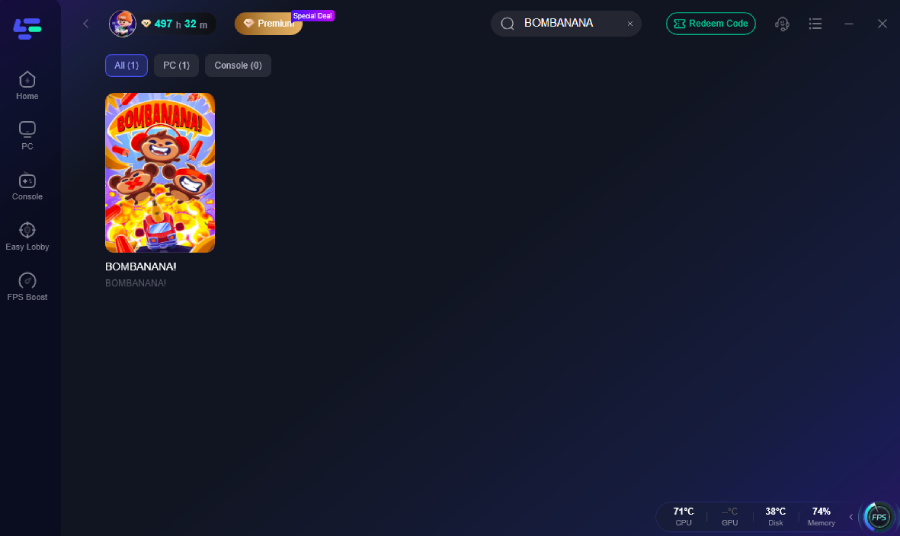
Step 2: Open LagoFast, then click the PC button on the left and search BOMBANANA in the search bar; click it after it appears.
Step 3: Select the Fix “Fatal error” tool.
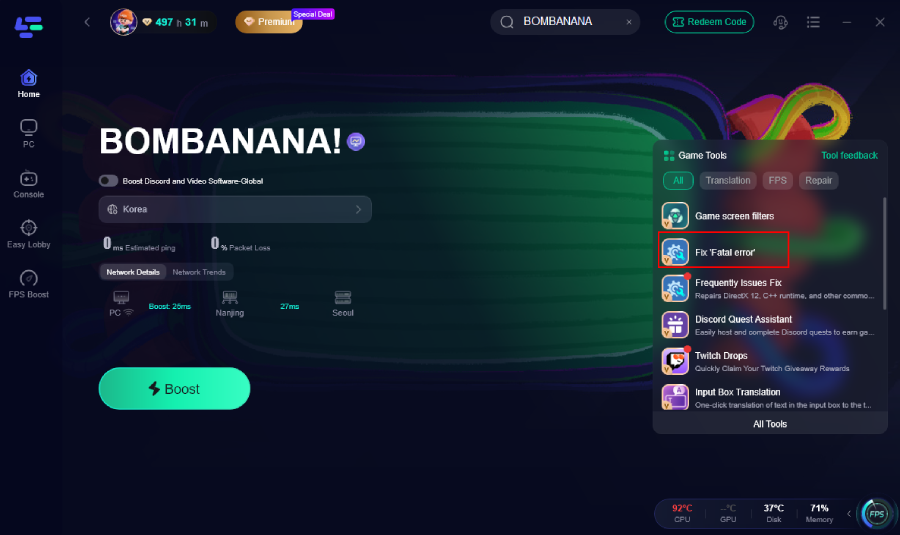
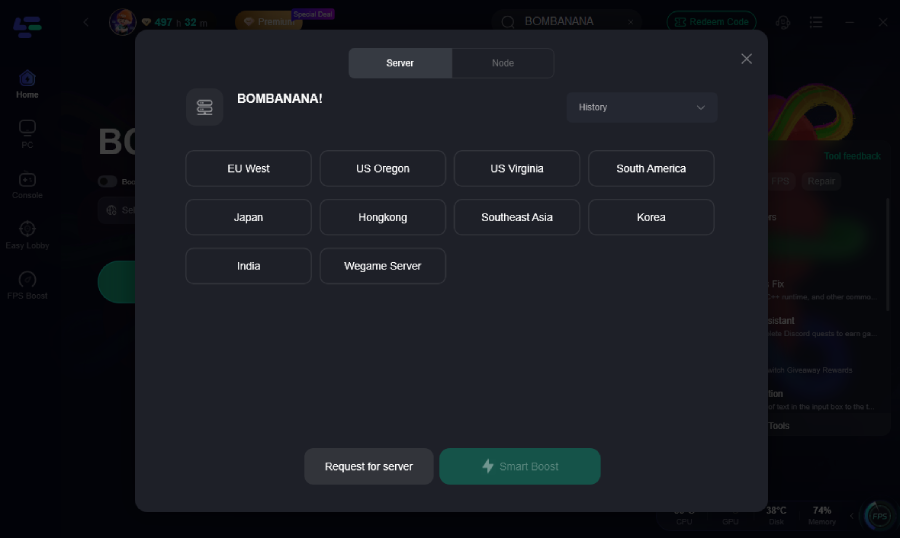
Step 4: Click on “Server” to change to a better server that ensures the gaming experience, then click on “Smart Boost”.
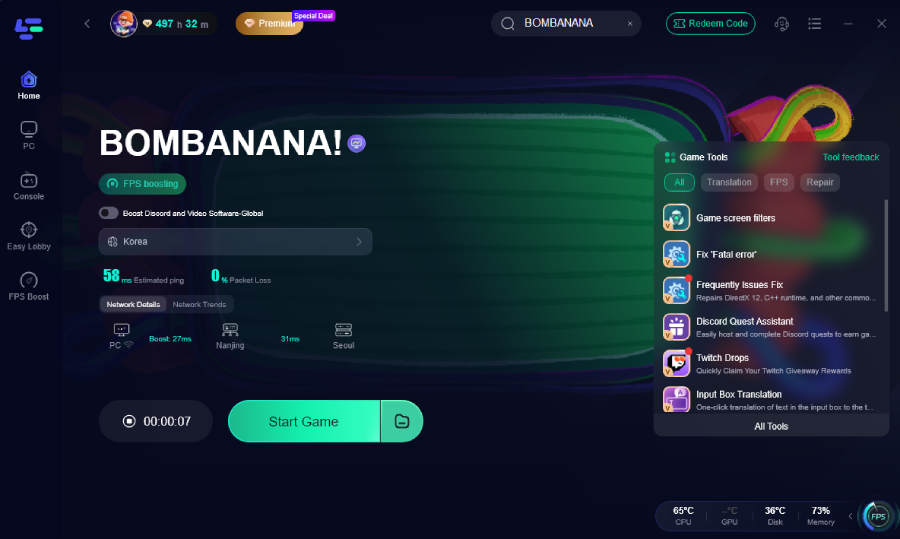
Step 5: Check the specific game ping, packet loss, and multiple path connection on the right side. Finally, click “Start Game” to play the game.
Why this helps:
- One-click integrity checking
- Automatic missing file detection
- Faster than manual comparison
- Reduces installation errors
- Useful after failed updates
For players who want the fastest BOMBANANA Fatal Error Fix, this method often eliminates the trial-and-error process.
Method 2: Verify Game Files Manually
If BOMBANANA supports launcher-level verification, run a file integrity check.
General process:
- Open your game launcher.
- Locate BOMBANANA.
- Open Properties or Settings.
- Find Verify Integrity or Repair Files.
- Wait for validation to complete.
The launcher will redownload missing files automatically.
This method is one of the safest because it avoids reinstalling the entire game.
Method 3: Delete Temporary Cache Files
Corrupted cache may continue causing launch failures even after files are repaired.
To clear temporary data:
- Close BOMBANANA completely.
- Open local app data folders.
- Locate cache directories.
- Delete temporary files only.
- Restart the game.
Do not remove save data unless you have a backup.
Method 4: Reinstall the Latest Game Version
If multiple repair attempts fail, reinstalling ensures a clean file structure.
Recommended process:
- Uninstall BOMBANANA.
- Restart your PC.
- Delete leftover installation folders.
- Download the latest build again.
- Install on a stable drive.
Avoid pausing downloads midway.
Method 5: Check Antivirus and Windows Security
Sometimes security software removes game files silently.
Things to check:
- Antivirus quarantine history
- Real-time protection logs
- Firewall permissions
- Controlled Folder Access settings
Restore any removed BOMBANANA files and add the game folder to exclusions if appropriate.
Method 6: Update System Components
Some fatal errors are triggered by outdated dependencies.
Update:
- Graphics drivers
- Windows updates
- DirectX components
- Visual C++ redistributables
Restart after updates complete.
Method 7: Review Storage Health
Storage issues can repeatedly corrupt game files.
Check:
- Available disk space
- SSD health status
- Disk error scan results
- Installation drive permissions
Moving the installation to another drive may help.
After completing these fixes, launch the game again and confirm whether startup behavior improves.
Part 3: Enhance Your Gaming Experience with LagoFast
Once the fatal error is resolved, many players also want smoother gameplay and fewer interruptions. Besides repair tools, LagoFast includes several features designed to improve overall gaming performance.
Faster Network Routing
LagoFast helps optimize network paths and reduce unstable routing conditions.
This may lead to more consistent connections and lower chances of lag spikes during gameplay.
Smart Game Acceleration
The platform adjusts network performance for supported games and helps stabilize online sessions.
Players can switch nodes depending on their region and server conditions.
One-Click Error Diagnosis
Beyond the Fix “Fatal error” function, LagoFast offers tools that simplify troubleshooting.
Instead of manually checking logs and settings, players can quickly identify common causes of launch failures.
Reduced Packet Loss
For online games, unstable packets often create delays and connection issues.
Optimization features aim to improve transmission consistency and reduce interruptions.
Cleaner Gaming Workflow
Keeping performance tools and repair utilities in one place saves time compared with using multiple separate applications.
For players who frequently update or test games, this can simplify maintenance.
Part 4: FAQs
Why does BOMBANANA keep showing fatal error after reinstall?
If the issue returns after reinstalling, remaining cache files, blocked permissions, or antivirus quarantine may still be affecting installation integrity.
Can missing files repair themselves?
Normally no. Missing game files usually require verification, reinstallation, or automated repair tools.
Will repairing files delete my save progress?
Usually no, because save data is commonly stored separately. Still, backing up important saves is recommended before major changes.
Is LagoFast required to fix the issue?
No. Manual methods such as verifying files and reinstalling can work. LagoFast simply speeds up diagnosis and repair.
How long does a fatal error repair take?
A file verification process may take several minutes, while full reinstallations can take significantly longer, depending on game size and internet speed.
Conclusion
A fatal error in BOMBANANA is often linked to missing, damaged, or mismatched game files, especially after updates or interrupted installations. Fortunately, most players can resolve the problem by verifying integrity, restoring missing files, clearing cache, and checking system permissions. If you want a faster approach, tools that automatically compare and repair installations can reduce manual troubleshooting and get the game running again. Follow the methods above step by step and you should be able to return to playing without long downtime.
Boost Your Game with LagoFast for Epic Speed
Play harder, faster. LagoFast game booster eliminates stutter and lags on PC, mobile, or Mac—win every match!
Quickly Reduce Game Lag and Ping!
Boost FPS for Smoother Gameplay!