
You’ve finally jumped into the vibrant world of Blue Protocol: Star Resonance, eager to carve your path across the plains of Magna, team up with friends, and experience the high-octane anime-style action it promises. But instead of soaring into battle, your PC freezes—or worse, crashes outright mid-fight. In this guide, we’ll explain why these crashes occur, how to fix them step-by-step, and how tools like LagoFast Game Booster can help stabilize your gameplay and keep your adventure uninterrupted.

- ✅ Reduce Lag and High Ping.
- ✅ Boost FPS at the Same Time.
- ✅ Support 2000+ Popular Online Games.
- ✅ Change Server all over the World!
- ✅ Boost Game Loading Speed.
Part 1: Why Does Blue Protocol: Star Resonance Crash?
Part 2: How to Fix Blue Protocol: Star Resonance Crashes
Part 3: Enhance Your Gaming Experience with LagoFast Game Booster
Part 1: Why Does Blue Protocol: Star Resonance Crash?
Crashes in online action-MMOs like Blue Protocol Star Resonance can arise from hardware, software, or network factors. Understanding these helps you apply the right fix.
Hardware & PC Spec Limitations
If your PC only meets the minimum requirements, crashes become more likely. Even powerful systems may crash if resources are over-stressed.
Outdated or Conflicting Drivers & Software
Old or mismatched GPU, audio, or chipset drivers—and unpatched Windows versions—often trigger instability.
Corrupted Game Files or Installation Issues
Incomplete updates or corrupted files can cause the engine to crash when loading assets. Verifying game files often resolves this.
Background Apps, Overlays & Resource Conflicts
Overlays such as Discord or GPU tuning tools may interfere. Background downloads or tasks can drain CPU/GPU resources and lead to freezing.
Network or Server-Related Issues
Because the game is online-only, unstable connections or packet loss can cause disconnects or crash-to-desktop events.
Part 2: How to Fix Blue Protocol: Star Resonance Crashes
Follow these steps to address the most common crash causes.
Step 1: Check and Upgrade Your PC Specs
Keep Windows 10/11 fully updated.
Ensure 8 GB RAM (minimum), a capable GPU (GTX 1060 or better) and a solid CPU.
Upgrade hardware or lower in-game settings if performance is marginal.
Step 2: Update Graphics Drivers & System Software
Download the latest stable driver from NVIDIA, AMD or Intel.
Update audio and chipset drivers and install all Windows updates.
After updating, clear shader cache or perform a clean driver install.
Step 3: Verify Game Files / Reinstall if Needed
On Steam or your launcher, run “Verify integrity of game files.”
If corruption persists, back up settings and reinstall as a last resort.
Step 4: Close Background Apps & Overlays
In Task Manager, end unnecessary programs.
Disable overlays (Discord, MSI Afterburner, RGB control tools).
Prevent resource conflicts before launching the game.
Step 5: Lower In-Game Settings
Reduce resolution, texture quality, and disable V-Sync or motion blur.
Cap FPS if needed to reduce GPU/CPU stress and prevent overheating.
Step 6: Address Network Stability
Use wired Ethernet instead of Wi-Fi.
Avoid concurrent streaming or downloads.
If high ping or packet loss persists, proceed with LagoFast Game Booster.
Part 3: Enhance Your Gaming Experience with LagoFast Game Booster
Optimizing your network path is critical for an online-only MMO like Blue Protocol Star Resonance. LagoFast Game Booster helps minimize network-related crashes and lag.
What LagoFast Offers
- Reduces ping and packet loss by optimizing routing.
- Selects smart nodes to bypass congested ISP paths.
- Improves stability and reduces disconnections during raids or boss fights.
Step-by-Step Setup (Global for example)
Visit the official LagoFast website and click Free Trial to install.
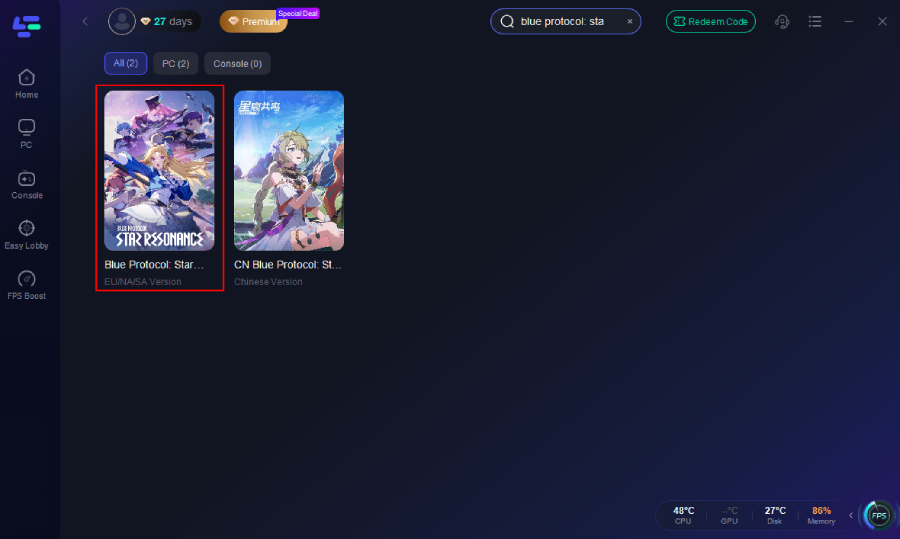
Open the client and search “Blue Protocol Star Resonance.”
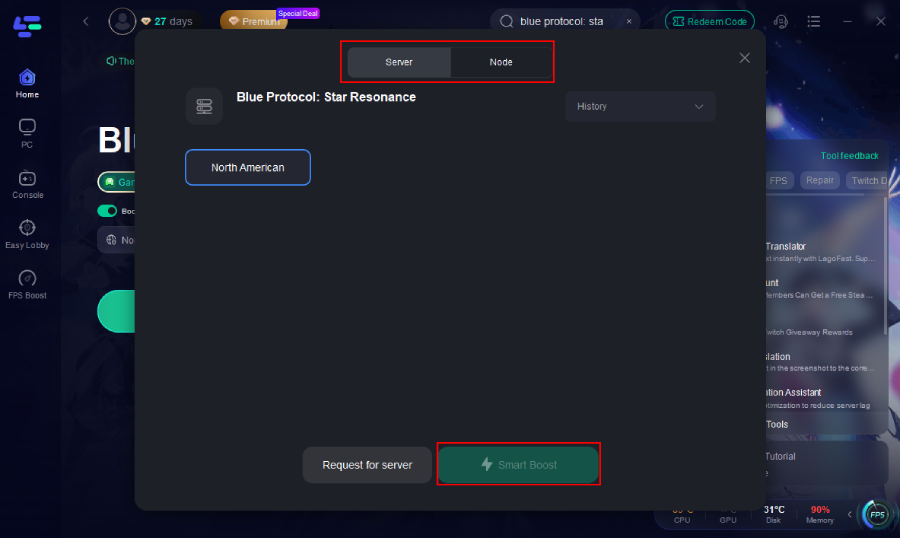
Choose a nearby Server/Node and activate Smart Boost.
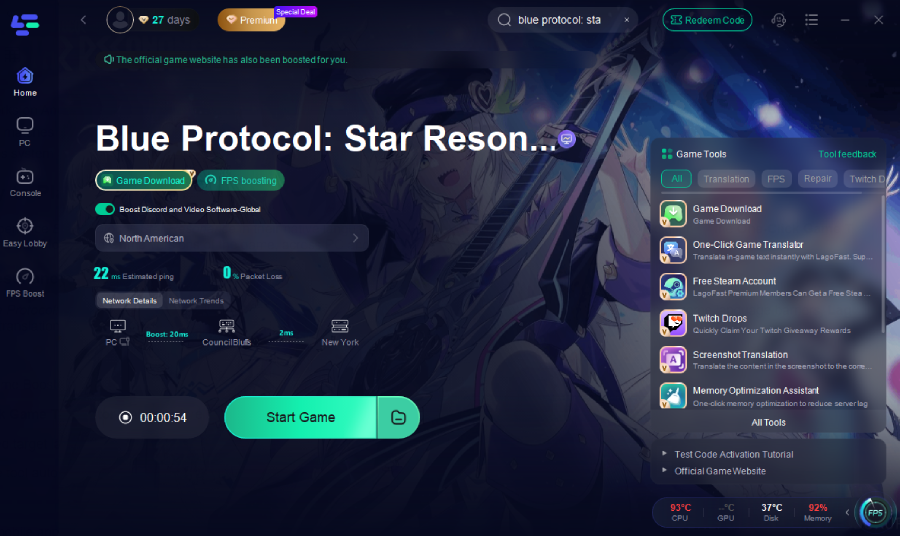
Launch the game directly from LagoFast for smoother, faster gameplay.
On Mobile (Take CN version as an example)
1. Download LagoFast Mobile from Google Play or the App Store, or scan the QR code below.

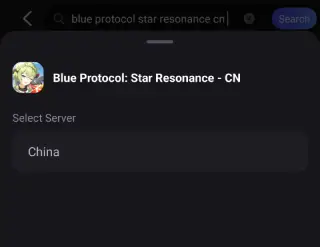
2. After installation, search for "Blue Protocol: Star Resonance CN" in LagoFast's search bar.
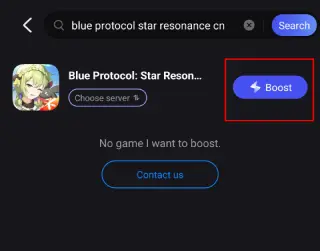
3. Select a suitable server node to connect to.
4. Once optimized performance is confirmed, click "Start Game" to launch the game.
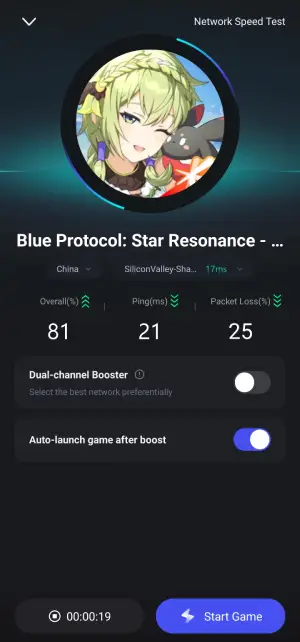
By combining system maintenance with a stable network via LagoFast, you address both hardware and connection instability.
Part 4: FAQs
Q1: My PC meets the specs but still crashes—why?
Even powerful systems can crash if drivers are unstable, background apps conflict, or the network connection is poor.
Q2: Will reinstalling the game fix all crash issues?
Only if the cause is corrupted files or installation faults. For driver or network issues, other fixes are required.
Q3: Crashes only happen in large zones or raids—what then?
These events strain hardware and network. Lower graphics settings, update drivers, and use LagoFast to stabilize performance.
Q4: Can overheating cause crashing?
Yes. Monitor temperatures with HWMonitor, clean dust, improve airflow, and reduce settings or undervolt if necessary.
Conclusion
Crashes in Blue Protocol: Star Resonance can be discouraging, but most are fixable. By verifying your hardware, keeping drivers updated, managing background apps, maintaining file integrity, and optimizing network routes with LagoFast Game Booster, you can significantly improve stability. With fewer interruptions, focus on your journey through Magna—smooth, steady, and crash-free.

Boost Your Game with LagoFast for Epic Speed
Play harder, faster. LagoFast game booster eliminates stutter and lags on PC, mobile, or Mac—win every match!
Quickly Reduce Game Lag and Ping!
Boost FPS for Smoother Gameplay!