
Since Blue Protocol: Star Resonance launched with its focus on China-based servers, players from around the world have been grappling with a range of connectivity problems. One of the most common frustrations is the “can’t connect to Blue Protocol: Star Resonance server” message, which pops up when trying to log in or during gameplay. This issue is largely due to the game’s initial focus on serving players in China, leaving those in other regions dealing with high latency, frequent disconnections, and various Blue Protocol: Star Resonance Connection Failed Errors. The good news is that there are effective ways to tackle these problems and achieve a Blue Protocol: Star Resonance stable connection, and we’ll walk through them here.

Part 1: Understanding the Connection Challenges in Blue Protocol: Star Resonance
Part 2: Solutions to Fix Connection Issues in Blue Protocol: Star Resonance
Part 1: Understanding the Connection Challenges in Blue Protocol: Star Resonance
As a reboot developed by Shanghai Bokura Network (a Tencent subsidiary), Star Resonance operates primarily on China-based infrastructure, creating significant hurdles for international players. The primary culprits include:
- Geographic distance: Data traveling long physical distances introduces lag, often exceeding 150 ms and causing rubber-banding during combat.
- ISP throttling: Internet service providers may restrict gaming traffic, worsening connection stability.
- Firewall interference: Security software or Windows Firewall can block critical game ports, preventing login or in-game communication.
- Server congestion: Peak hours, particularly during evening times in UTC+8, overload servers, triggering timeouts and disconnects.
Part 2: Solutions to Fix Connection Issues in Blue Protocol: Star Resonance
Best Solution: Use LagoFast Game Booster for Optimal Performance
The most impactful fix for cross-region lag is LagoFast Game Booster, a specialized tool designed to bypass geographic barriers and reduce latency by 40–60%. Unlike traditional VPNs, LagoFast focuses solely on gaming traffic, ensuring no IP masking risks while stabilizing connections. Here’s how it works:
- Dual-platform support: Seamlessly boost gameplay on both PC and Mobile, ideal for players on the go.
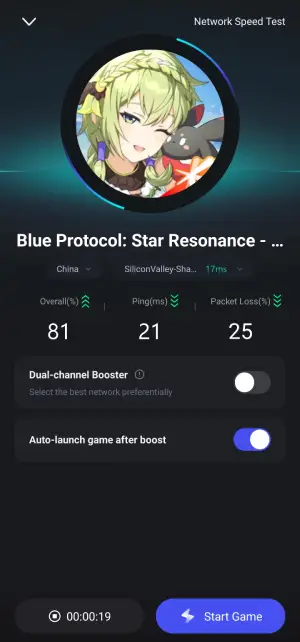
- Smart routing: Automatically selects the fastest server pathways to bypass ISP bottlenecks, with real-time metrics showing ping and packet loss.
- User-friendly setup: Simply download LagoFast from their official site, search for Star Resonance, and launch the game directly through the app. Users report average ping reductions from 200+ ms to 80–100 ms, with near-zero disconnections during raids.
How to Boost Blue Protocol: Star Resonance Global on PC Using LagoFast:
Step 1: Click the Free Trial button to download and install LagoFast.
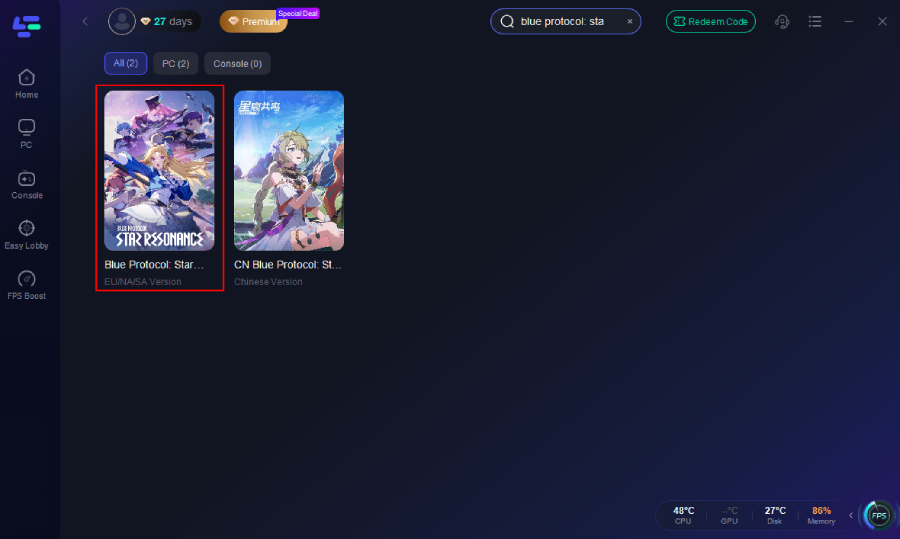
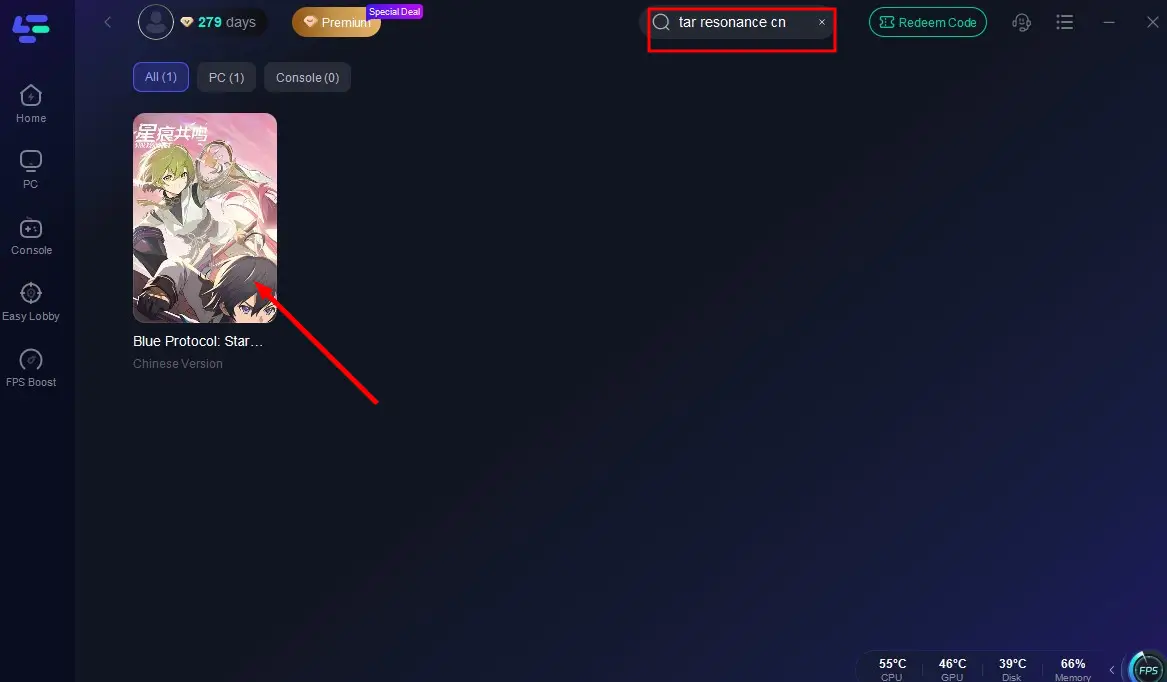
Step 2: Open LagoFast, then click the PC button on the left and search Blue Protocol: Star Resonance in the search bar, and click it after it appears.
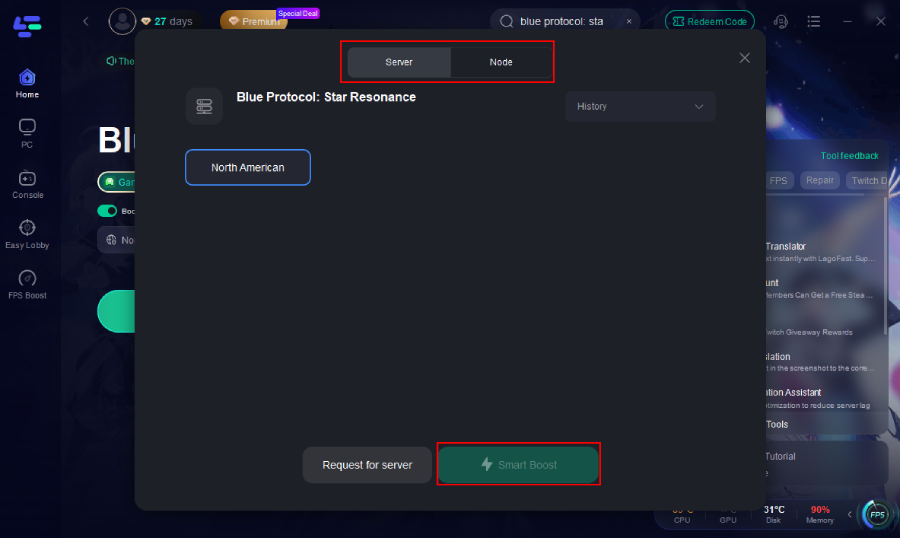
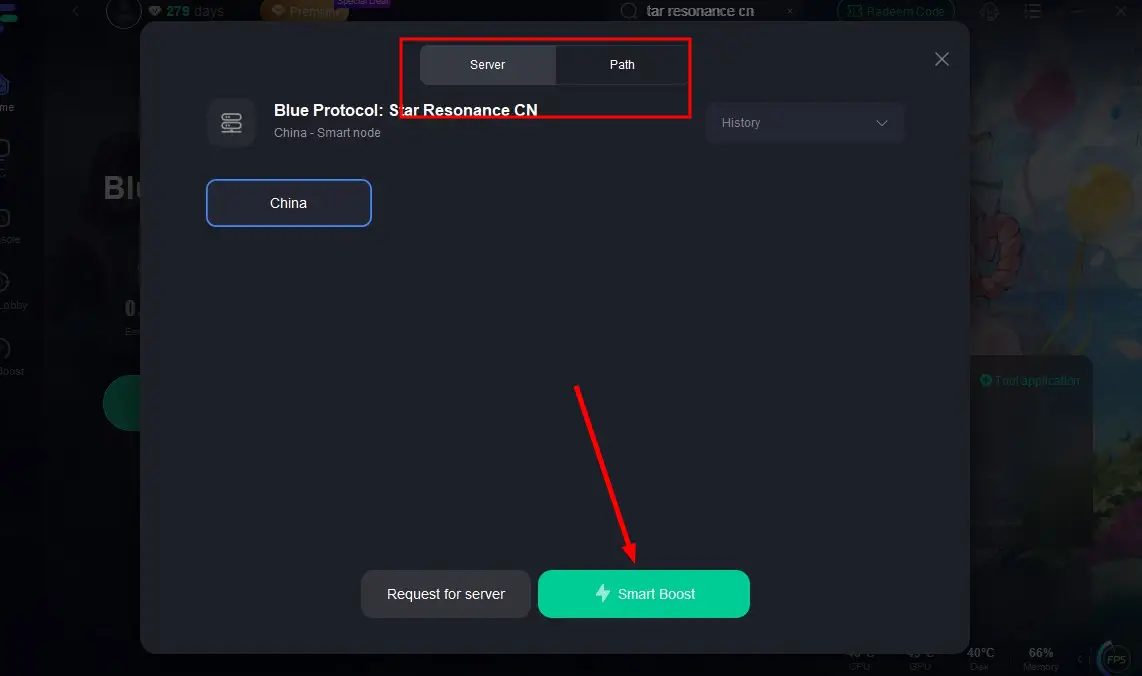
Step 3: Click on “Server” to change to a better server that ensures the Blue Protocol: Star Resonance gaming experience, then click on “Smart Boost.”
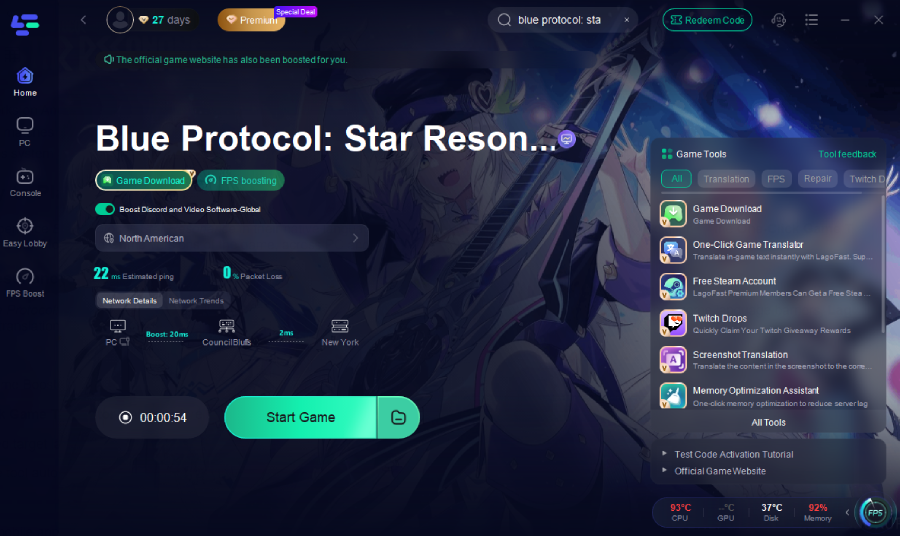
Step 4: Check the specific game ping, packet loss, and multiple path connections. Finally, click “Start Game” to play the game.
Step-by-Step Guide of Using LagoFast to Boost Blue Protocol: Star Resonance CN:
Click the Free Trial button to install the software.
Search for "Blue Protocol: Star Resonance" in the client and select the game.
Choose a server/node, ideally close geographically .
Activate Smart Boost, which shows real-time ping, packet loss, and network stability.
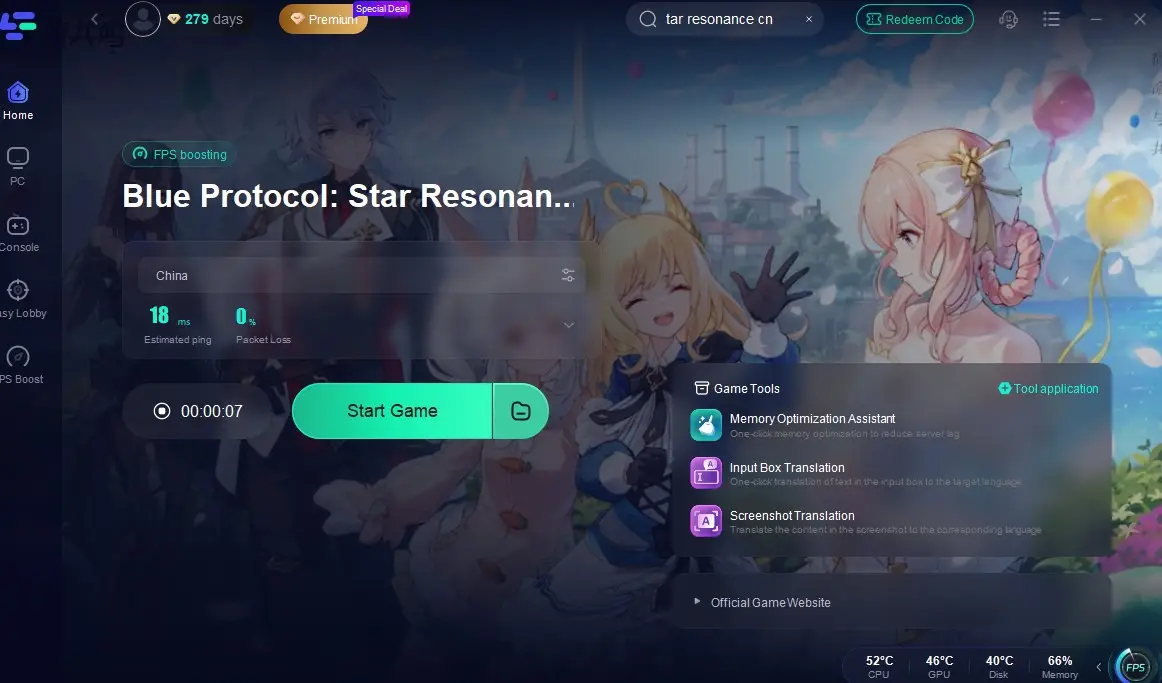
Launch the Game from LagoFast directly after boosting—enjoy smoother gameplay and a faster connection.
How to use LagoFast Game Booster on Mobile
Step 1: Go to the LagoFast official website and download the LagoFast Mobile APK file.

Step 2: Search Blue Protocol: Star Resonance and click the Boost button.
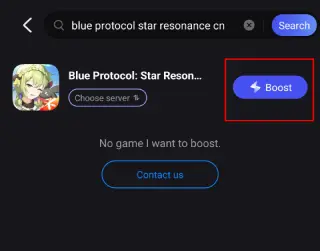
Step 3: Choose the Server you like, then click the Boost button.
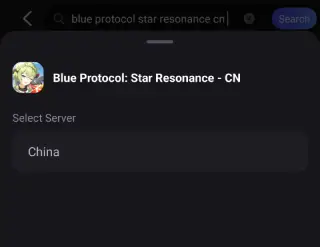
Step 4: Use LagoFast's optimization features to enhance network stability and reduce lag during gameplay.
Solution 2: Reset Your Network Settings
Corrupted network settings can exacerbate connection issues. To refresh your network stack:
- Open Command Prompt as administrator.
- Enter netsh winsock reset, netsh int ip reset, and ipconfig /flushdns sequentially.
- Restart your router and device.
This process resolves DNS conflicts and TCP/IP errors that might block game traffic.
Solution 3: Disable Conflicting Software
Security software like firewalls or antivirus programs may mistakenly block Star Resonance’s connection. Temporarily disable them:
- Windows Firewall: Go to Control Panel > System and Security > Windows Defender Firewall and turn it off.
- Third-party antivirus: Right-click the app icon in the taskbar and select “Exit” or “Disable.”
- Whitelist the game: Add Blue Protocol: Star Resonance to your firewall’s allowed apps list .
Solution 4: Check Server Status
Before troubleshooting, verify if the servers are offline for maintenance. Check the official announcement on Star Resonance’s website or follow their social media for updates. Planned maintenance windows often occur during off-peak hours for Western players, so timing your sessions around these can help .
Solution 5: Optimize In-Game Settings
Lowering graphical settings can reduce bandwidth usage and improve stability:
- Disable anti-aliasing and set texture quality to medium.
- Limit FPS to match your monitor’s refresh rate (e.g., 60 FPS for a 60Hz screen).
- Enable “Low Latency Mode” in the game’s network settings if available .
Conclusion
Dealing with Blue Protocol: Star Resonance Connection Failed Errors can be frustrating, but with the right steps, you can achieve a stable connection and enjoy the game without constant interruptions. Starting with LagoFast Game Booster is the best way to tackle the regional latency issues, and combining it with network resets, security adjustments, and smart playtime planning will further enhance your experience. By following these solutions, you’ll spend less time struggling with connection problems and more time diving into the world of Blue Protocol: Star Resonance.
Boost Your Game with LagoFast for Epic Speed
Play harder, faster. LagoFast game booster eliminates stutter and lags on PC, mobile, or Mac—win every match!
Quickly Reduce Game Lag and Ping!
Boost FPS for Smoother Gameplay!