

Anime-style role-playing game Blue Archive has gained significant popularity since its 2021 debut. To cater to players' diverse platform preferences, NEXON Games Co., Ltd. will launch its PC version via Steam, offering a more immersive gaming experience on PC. This article covers everything you need to know about Blue Archive's Steam release, including release date, PC system requirements, and methods to successfully download and play the game on Steam despite regional restrictions.

- ✅ Reduce Lag and High Ping.
- ✅ Boost FPS at the Same Time.
- ✅ Support 2000+ Popular Online Games.
- ✅ End Stuck & Crashing Issues.
- ✅ Fix Black Screen Errors.
Part 1: Blue Archive Steam Release Date
Part 2: Benefits of Playing Blue Archive on Steam
Part 3: How to Download Blue Archive via Steam in Locked Regions
Part 4: How to Enhance Gaming Experience in Blue Archive
Part 1: Blue Archive Steam Release Date
After a delay, Blue Archive Steam release date has been set to July 4, 2025, at 1:00 AM UTC. To reward players for their patience, the developers will offer a limited-time bonus after the game launches on Steam: from Friday, July 4 (1:00 AM UTC) to Friday, July 11 (2:59 PM UTC), players will receive 10 Recruitment Tickets and 300 AP via in-game mail. These rewards must be claimed within seven days of receipt, or they will expire. Each account can only redeem this bonus once.
Blue Archive System Requirements on PC
Minimum:
- Requires a 64-bit processor and operating system
- OS: Windows 10
- Processor: Intel Core i3 - 540 3.06 GHz
- Memory: 4 GB RAM
- Graphics: GeForce GTX650Ti
- DirectX: Version 11
- Storage: 19 GB available space
- Sound Card: Windows Compatible Audio Device
Recommended:
- Requires a 64-bit processor and operating system
- OS: Windows 10
- Processor: Intel Core i3 - 540 3.06 GHz
- Memory: 4 GB RAM
- Graphics: GeForce GTX650Ti
- DirectX: Version 11
- Storage: 19 GB available space
- Sound Card: Windows Compatible Audio Device
Part 2: Benefits of Playing Blue Archive on Steam
Blue Archive's Steam release offers PC players an excellent way to enjoy the game with several key advantages:
- Enhanced Controls and Experience: Players can use mouse and keyboard controls for greater precision in battles, paired with higher resolution graphics to create a smoother, more immersive gameplay experience.
- Cross-Platform Progression: The game allows syncing progress between mobile and PC, enabling players to share items, equipment, and achievements across devices.
- Improved Social Interaction: Your in-game status will be visible to other Steam players, helping you connect with like-minded companions. Additionally, Steam's built-in forums and guide sections foster active discussions and community engagement around Blue Archive.
Part 3: How to Download Blue Archive via Steam in Locked Regions
Blue Archive's Steam release is not available globally and has regional restrictions preventing downloads in certain countries, including Belgium, China, Japan, the Netherlands, Slovakia, and Vietnam. LagoFast offers a solution for players in these regions to access the game: providing Steam accounts located in permitted regions. Here's how to use LagoFast to download Blue Archive on Steam:
Step 1: Click the "Free Trial" button to download and install LagoFast.
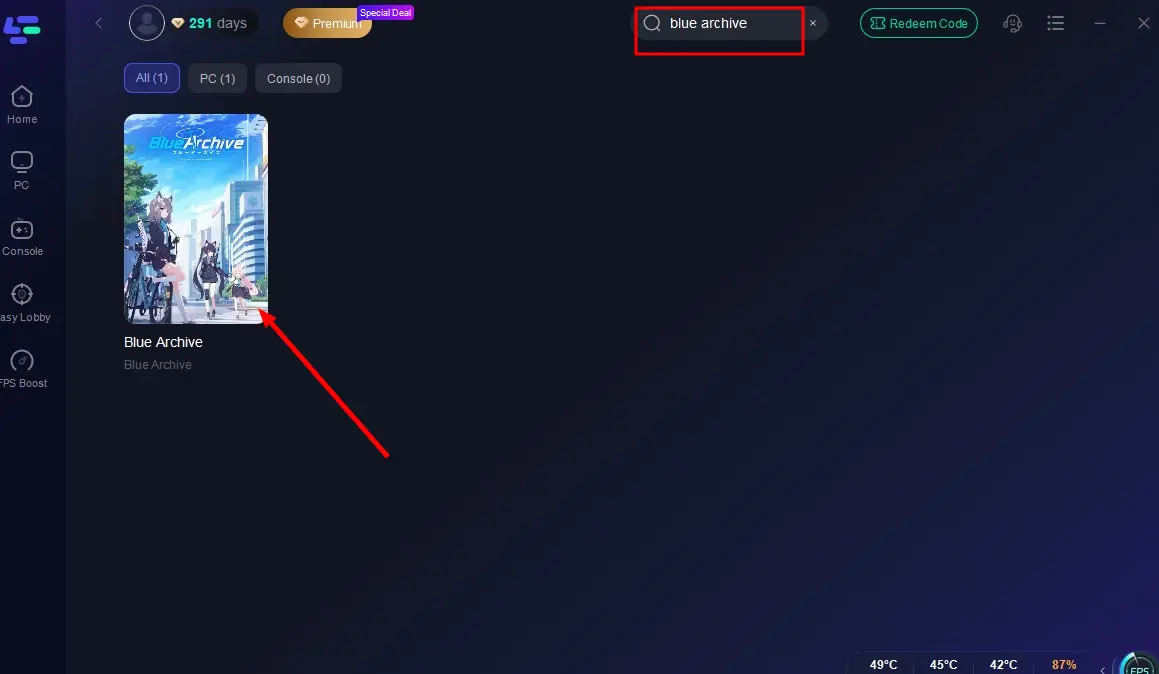
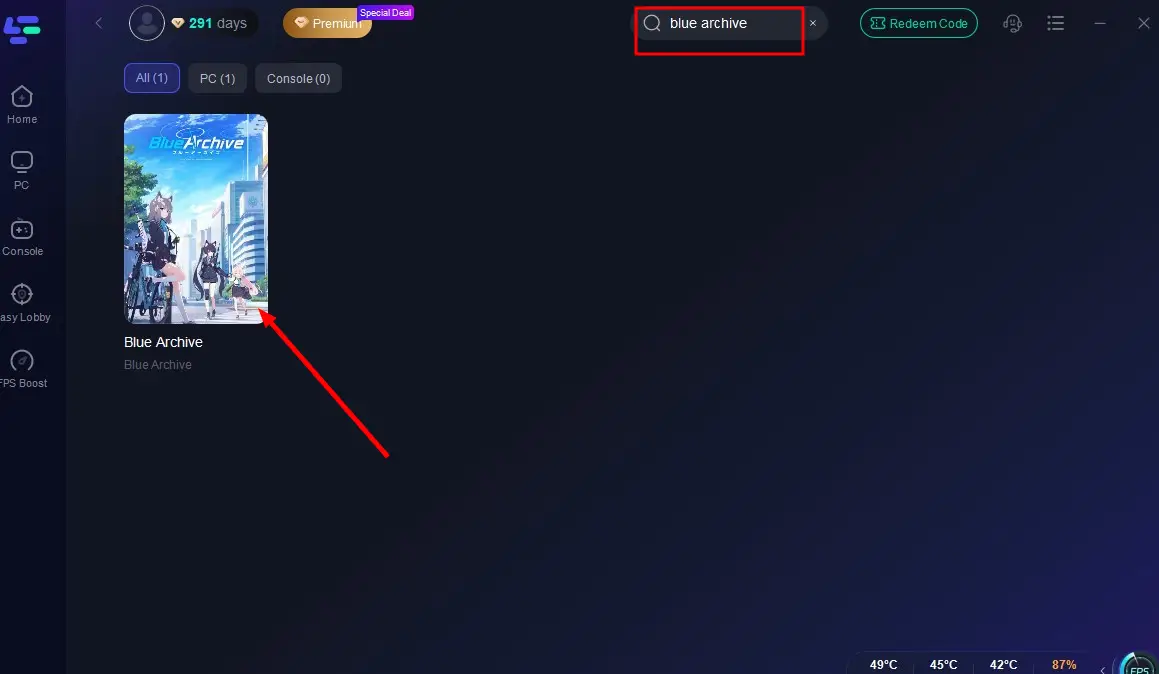
Step 2: Launch LagoFast, input "Blue Archive" in the search bar, and click the result.
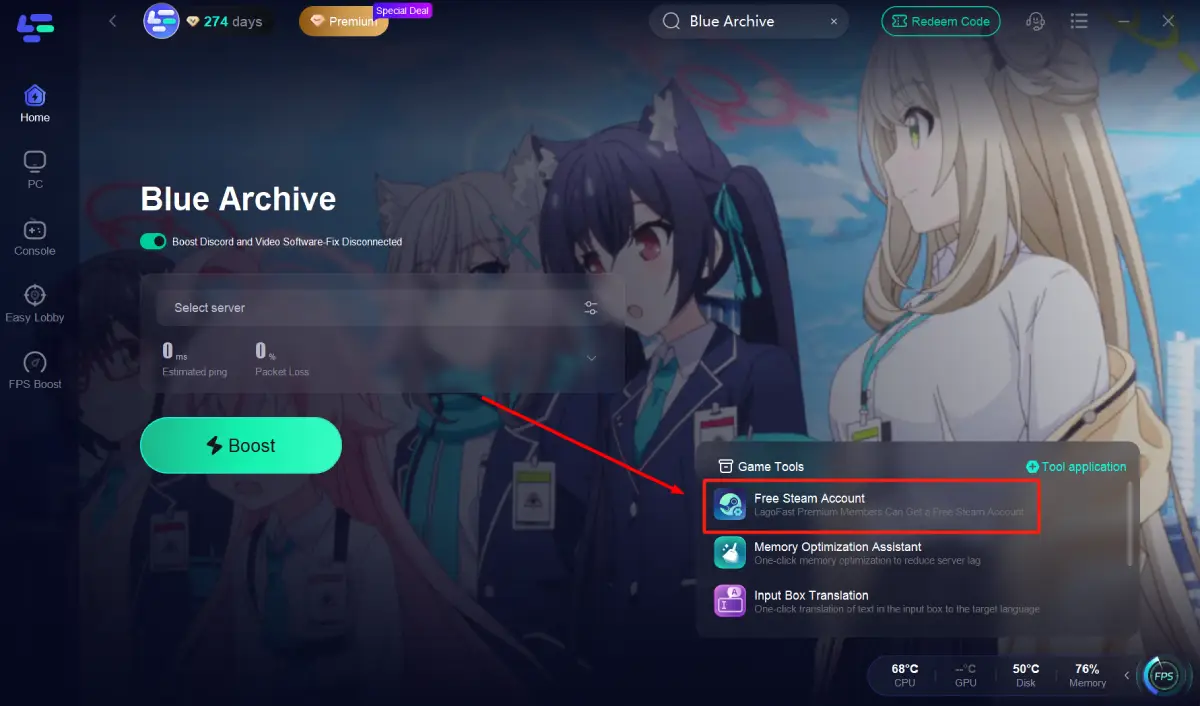
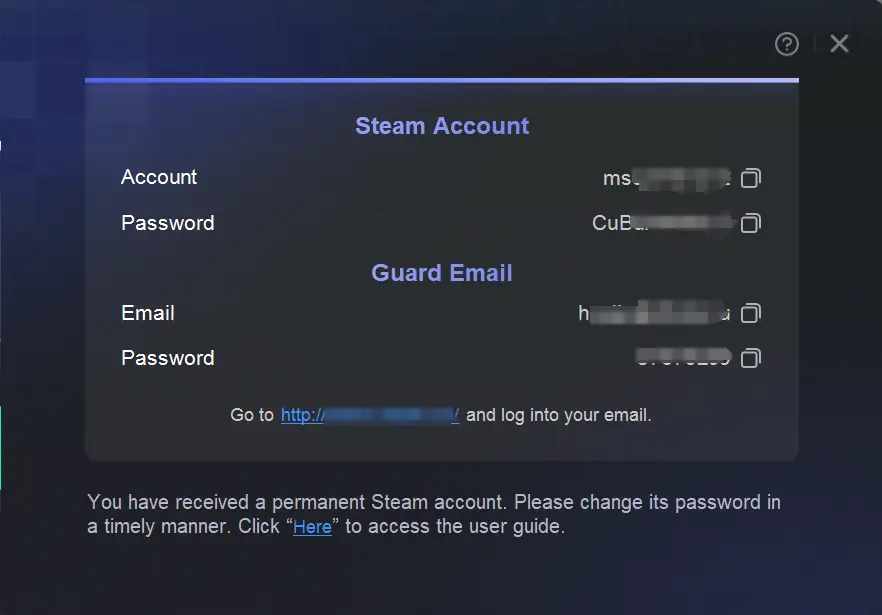
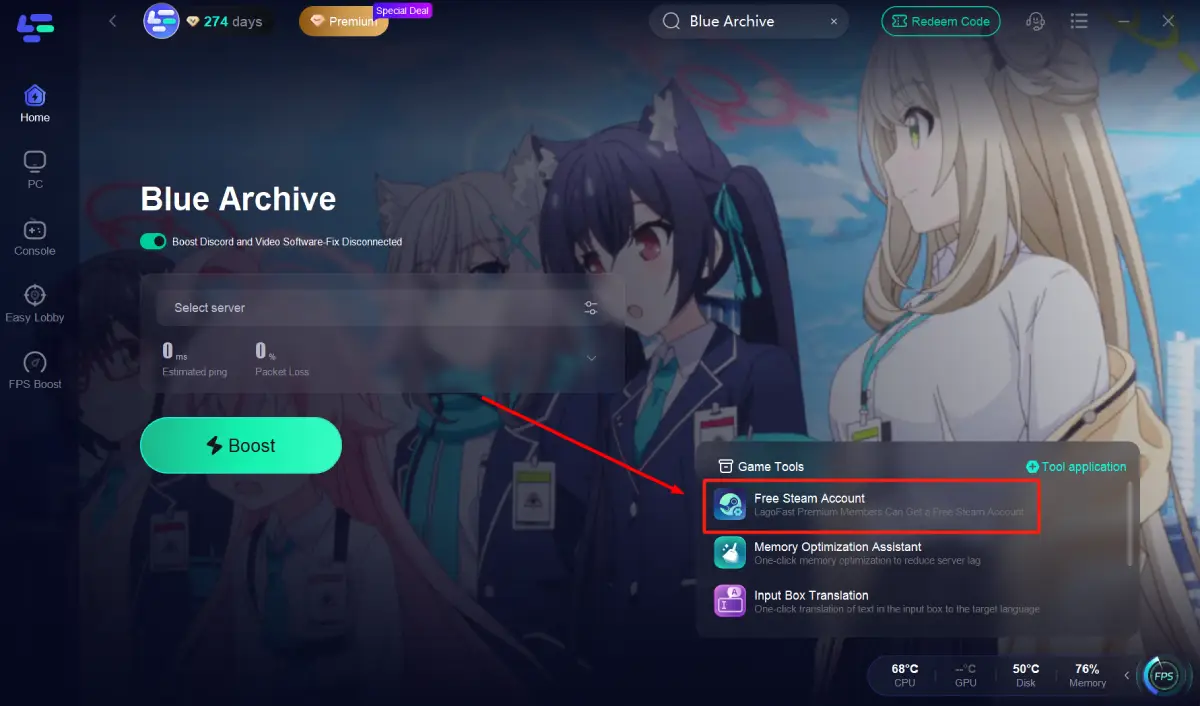
Step 3: Click the "Free Steam Account" tool in the bottom-right corner to receive an unrestricted Steam account (with login credentials and verification email). Use this account to log in and download Blue Archive directly in locked regions.
Part 4: How to Enhance Gaming Experience in Blue Archive
When playing Blue Archive in geo-restricted regions or from distant servers, players may experience significant lag and latency. LagoFast can help reduce loading times and improve gameplay smoothness.
Why Choose LagoFast
- Reduces lag and stabilizes connection
- Optimizes server routes for lower latency
- Supports easy account access in permitted regions
How to Enhance Blue Archive Gaming Experience with LagoFast
Step 1: Click "Free Trial" to download and install LagoFast.
Step 2: Search for "Blue Archive" in LagoFast's search bar.
Step 3: Click "Select Server" to choose the nearest node, then activate "Smart Boost".
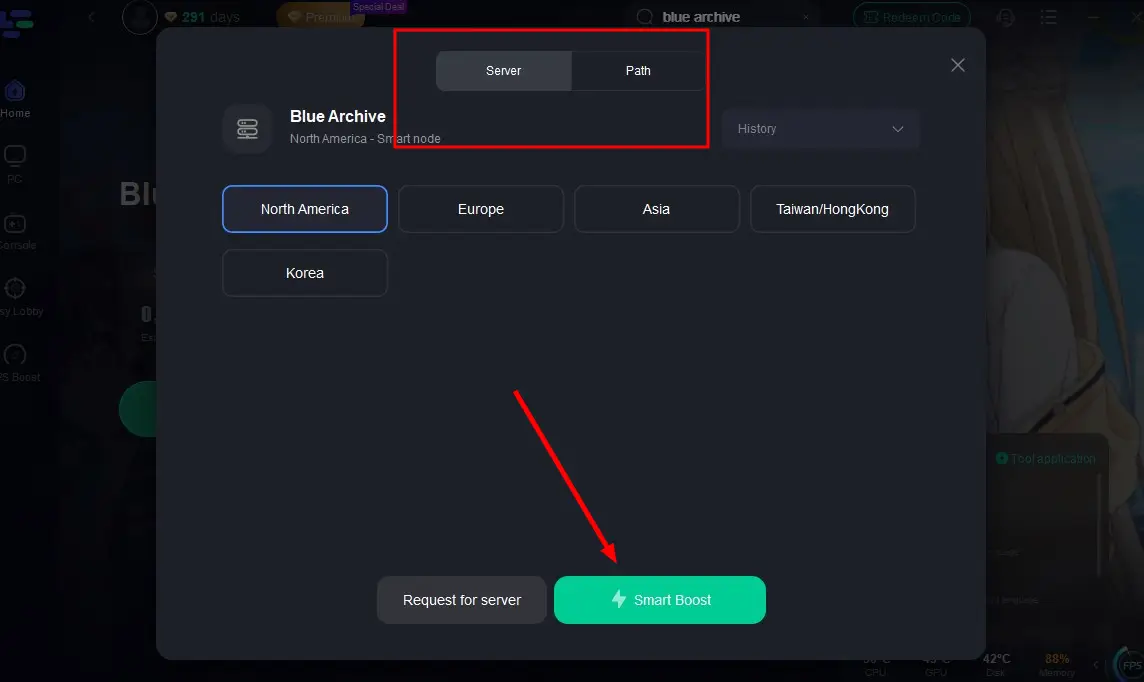
Step 4: After acceleration starts, click "Start Game" to enjoy lag-free, high-FPS gameplay in Blue Archive.
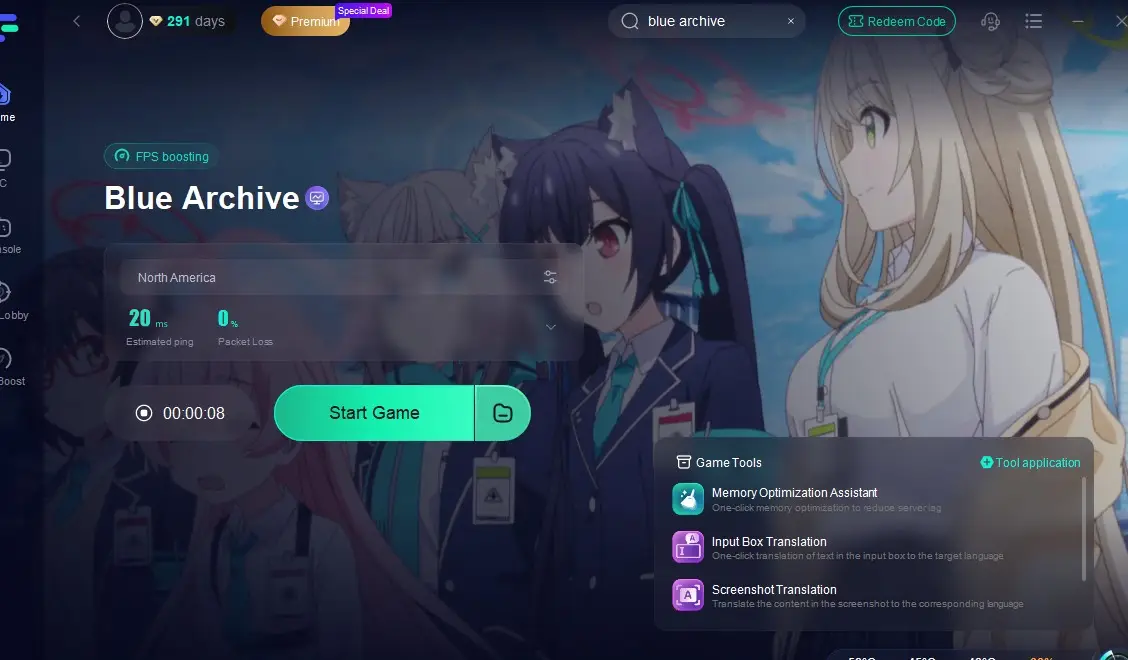
Additionally, LagoFast provides a built-in Blue Archive game translation tool to overcome language barriers:
Click the screenshot translation tool (bottom-right corner).
Set your target language and customize the translation shortcut.
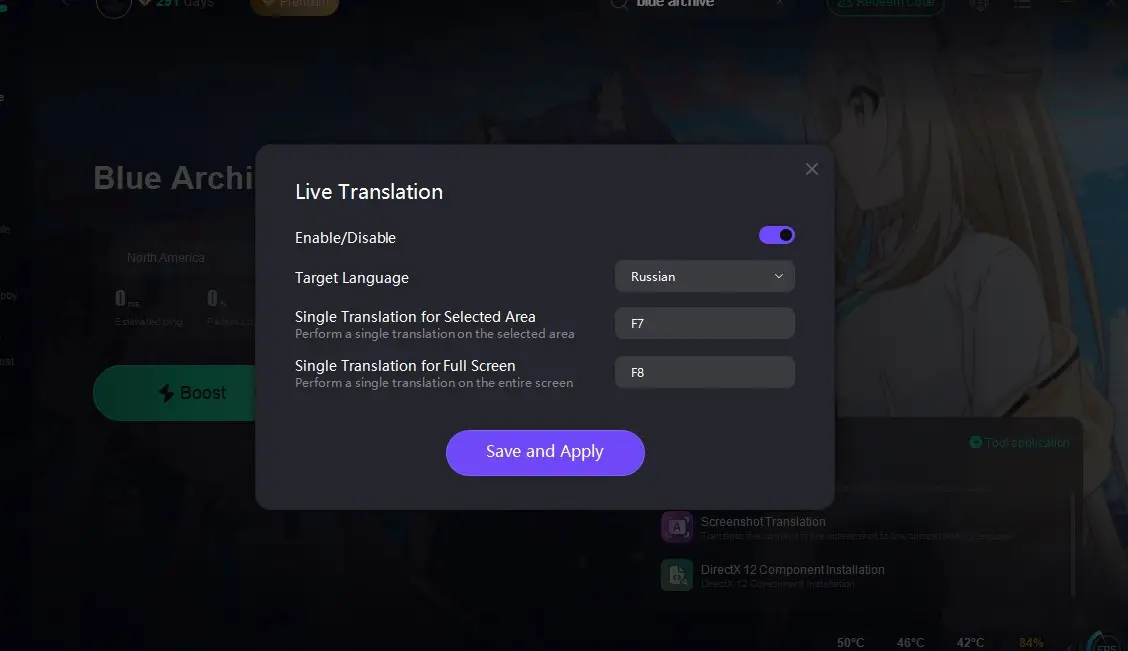
In-game, press the shortcut to instantly translate text into your preferred language.
Conclusion
Steam offers a convenient platform for players to enjoy Blue Archive on PC, enhancing immersion through its easy access and management tools. Search for Blue Archive on Steam now to dive into a captivating anime world! For players in geo-restricted regions, don't miss out—use LagoFast's free Steam accounts to secure your spot in the game!

Boost Your Game with LagoFast for Epic Speed
Play harder, faster. LagoFast game booster eliminates stutter and lags on PC, mobile, or Mac—win every match!
Quickly Reduce Game Lag and Ping!
Boost FPS for Smoother Gameplay!