
If you’re a fan of martial arts MMORPGs, you’ve probably heard the buzz: Blade and Soul Neo is making its way to Steam, and players worldwide are gearing up for its release. With its revamped graphics, dynamic combat, and cross-platform support, this modern take on the classic game is set to attract both veterans and newcomers. But for international players, one question looms large: how will the game handle translation, especially for non-Korean or non-English speakers? In this guide, we’ll break down the language support for Blade and Soul Neo on Steam and explore tools to enhance your experience—including LagoFast’s Screenshot Translation feature, which addresses blade and soul neo screen translation needs directly.
Part 1. B&S NEO is Coming to Steam!
Part 2. Which Languages Will Blade and Soul NEO Steam Support?
Part 3. How to Get Game Translation in Blade and Soul NEO Steam
Part 1. B&S NEO is Coming to Steam!
Blade and Soul Neo’s Steam launch, announced in May 2025 , marks a major milestone for the franchise. The game will offer cross-play compatibility, allowing players on Steam and NCSoft’s Purple platform to join the same servers. This unified player base ensures a vibrant community and seamless multiplayer experiences. While the initial focus was on a “fresh start” for Steam users, developer feedback led to the integration of cross-platform features, including shared marketplaces and dungeons .
Part 2. Which Languages Will Blade and Soul NEO Steam Support?
Blade & Soul NEO on Steam offers a range of languages for both the game interface and subtitles. Specifically, the game supports English, French, German, and potentially other languages as indicated by the Steam store page. The Steam page also lists Simplified Chinese, Traditional Chinese, Japanese, Korean, Thai, and other languages in the "Languages" section, indicating that they are supported.
Here's a more detailed breakdown:
- Interface: English, French, German are confirmed.
- Subtitles: English, French, and German are confirmed.
- Other Languages: The Steam store page lists many more languages, including Simplified Chinese, Traditional Chinese, Japanese, Korean, Thai, and many more, as being supported in the game.
For languages not officially supported—such as Arabic, Turkish, Polish, or Persian—players will need additional tools to bridge the gap. This is where third-party solutions like LagoFast’s Screenshot Translation come into play, offering real-time text translation for in-game menus, dialogue, and item descriptions.
Part 3. How to Get Game Translation in Blade and Soul NEO Steam
LagoFast’s Screenshot Translation Tool
LagoFast, a leading game booster, has introduced a Screenshot Translation feature tailored for Blade and Soul Neo on Steam. This tool allows players to capture in-game text and instantly translate it into their preferred language. Here’s how it works:
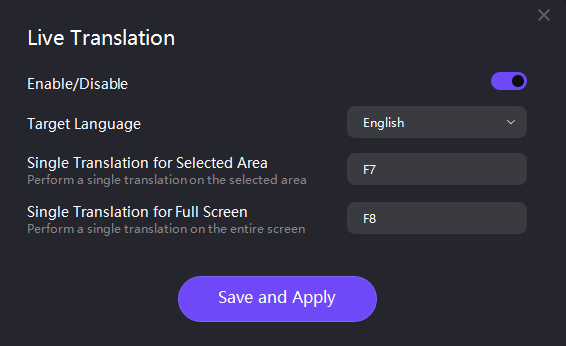
- Activate the Tool: Launch LagoFast, select Blade and Soul Neo, and enable the Screenshot Translation feature from the settings menu.
- Capture Text: Use the hotkey to take a screenshot of any in-game text (e.g., quests, menus, or dialogue boxes).
- Instant Translation: The tool processes the image and overlays translated text in real time, supporting 21 languages including English, Russian, Arabic, Turkish, Portuguese (Brazil), Thai, Vietnamese, and more .
This feature is a game-changer for players in regions where Blade and Soul Neo’s official language support is limited. For example, Arabic or Turkish players can use LagoFast to translate menus and quests, ensuring they don’t miss out on critical story details or gameplay instructions. The tool’s accuracy and speed make it ideal for fast-paced combat scenarios where quick comprehension is key.
How to Get Game Translation in B&S NEO Steam:
Step 1. Click Free Trial to download LagoFast.
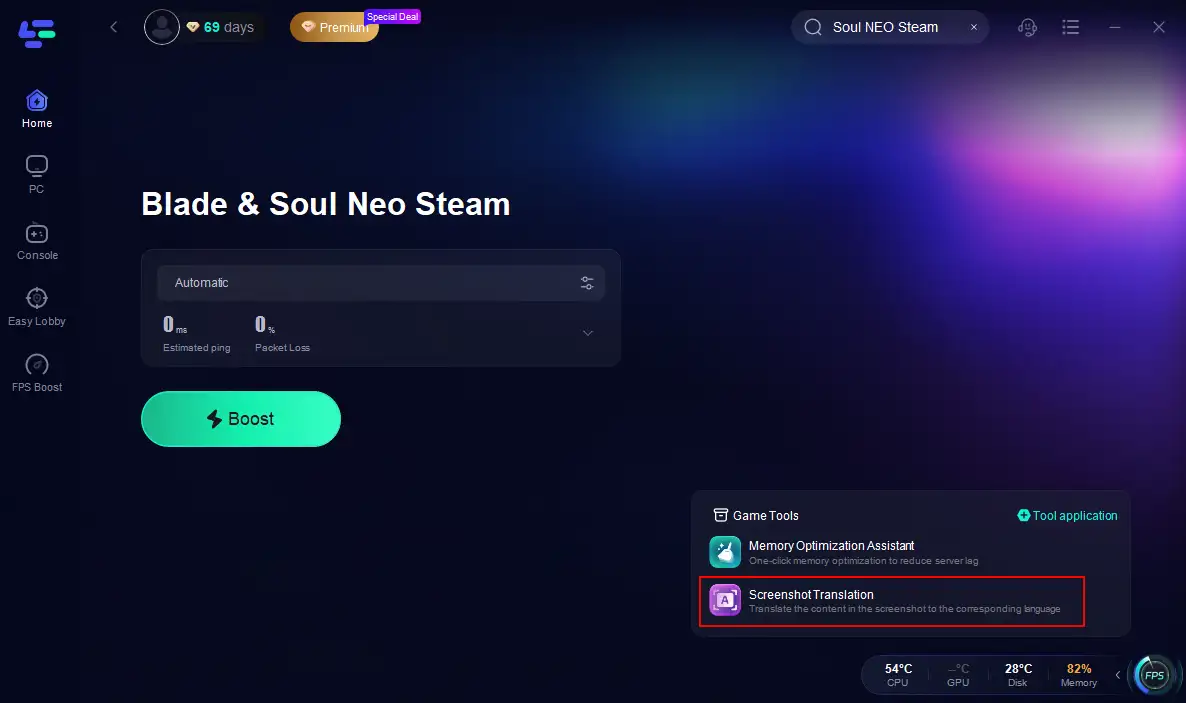
Step 2. Open LagoFast and find Blade and Soul NEO Steam. Click it.
Step 3.Click the Screenshot Translation tool on the right.
LagoFast’s Other Foundation Features
Beyond translation, LagoFast offers core functionalities to optimize your Blade and Soul Neo experience:
- Low-Latency Connection: LagoFast routes your connection through dedicated servers to reduce ping and eliminate packet loss, a common issue in MMORPGs . This is crucial for Blade and Soul Neo’s real-time combat, where split-second timing determines success.
- Multiplatform Support: Whether you’re playing on PC, PlayStation 5, or Xbox Series X/S, LagoFast ensures stable performance across all devices .
- One-Click Boost: Simplify your setup with LagoFast’s intuitive interface, which requires no technical expertise. Just click “Boost” to enhance your network and enjoy lag-free gameplay .
With over 2,000 supported games and a global network of servers in 60+ countries, LagoFast has earned a reputation as a reliable solution for online gamers . Its integration with Blade and Soul Neo makes it a must-have tool for both casual players and competitive enthusiasts.
How to Boost Blade and Soul NEO with LagoFast Game Booster:
Step 1. Click Free Trial to download LagoFast.
Step 2. Open LagoFast and find Blade and Soul NEO Steam. Click it.
Step 3. Choose the best server and node.
Step 4. Activate smart booster and check the ping and packet loss rate.
Conclusion
Blade and Soul Neo’s arrival on Steam opens the door to a revitalized MMORPG experience, but language barriers can still pose challenges for international players. While the game’s official language support covers most major regions, tools like LagoFast’s Screenshot Translation fill the gaps for less-supported languages, ensuring no player is left behind. By combining this feature with LagoFast’s network optimization, you can fully immerse yourself in Blade and Soul Neo’s world without missing a beat.
Whether you’re mastering combos in PvP or exploring the game’s vast open world, blade and soul neo game translation and screen translation tools are essential for a seamless experience. Don’t let language hold you back—give LagoFast a try and level up your gameplay today!
Boost Your Game with LagoFast for Epic Speed
Play harder, faster. LagoFast game booster eliminates stutter and lags on PC, mobile, or Mac—win every match!
Quickly Reduce Game Lag and Ping!
Boost FPS for Smoother Gameplay!