
Black Myth: Wukong, the highly anticipated action RPG from Game Science, pushes the boundaries of visual fidelity with its stunning Unreal Engine 5 graphics and full ray tracing. To achieve optimal performance without sacrificing quality, NVIDIA’s DLSS (Deep Learning Super Sampling) technology is a game-changer. However, many players encounter issues enabling DLSS Frame Generation, especially in demanding scenes. This guide explores the reasons behind these problems and introduces the Black Myth: Wukong DLSS tool and Black Myth: Wukong DLSS mod solutions, including LagoFast’s cutting-edge optimization tools.

- ✅ FPS Boost Mod.
- ✅ Best Graphics Settings Tool.
✅ One-Click Arabic Translation Tool.
✅ Black Myth: Wukong Navigating Map.
✅ Fix Crashing Issue.
✅ End Stuck on Loading Screen Issues
Part 1. Why I Can’t Enable DLSS Frame Generation in Black Myth: Wukong?
Part 2. Best Black Myth: Wukong DLSS Mod - Fix DLSS Can’t Work Issue
Part 3. Other Solutions to Enable DLSS in Black Myth: Wukong
Part 1. Why I Can’t Enable DLSS Frame Generation in Black Myth: Wukong?
Understanding DLSS
DLSS, developed by NVIDIA, uses AI to upscale lower-resolution frames to higher resolutions, boosting performance while maintaining image quality. DLSS Frame Generation (part of DLSS 3) further enhances smoothness by generating intermediate frames, effectively doubling FPS in supported games like Black Myth: Wukong.
Common Reasons for DLSS Frame Generation Issues
Hardware Limitations:
DLSS Frame Generation requires an NVIDIA RTX 40-series GPU (e.g., RTX 4070, 4080) or newer. Older GPUs (RTX 30-series and below) cannot use this feature.
Insufficient system resources, such as outdated CPUs or insufficient RAM, may bottleneck performance, preventing DLSS from working correctly.
Driver and Software Compatibility:
Outdated NVIDIA drivers often cause DLSS-related errors. Game Science recommends installing the Day-1 NVIDIA driver (version 570.xx or newer) for full compatibility .
Incompatible background apps or conflicting software (e.g., antivirus programs) can interfere with DLSS functionality.
Game Settings and Optimization:
Black Myth: Wukong’s demanding ray tracing and high-resolution textures may strain even high-end hardware. Excessive settings can disable DLSS Frame Generation to prevent crashes.
Network instability or latency issues can indirectly affect DLSS performance, as the game’s online components (e.g., shader compilation) rely on stable connectivity .
Part 2. Best Black Myth: Wukong DLSS Mod—Fix DLSS Can’t Work Issue
For players struggling with DLSS Frame Generation or overall performance, LagoFast Game Booster offers an all-in-one solution. If you want to enhance your Black Myth: Wukong experience, try mods like BMWK—SPF Redux or Somersault Cloud Anywhere for better visuals and smoother combat. LagoFast also supports many other mod-enabled games, allowing players to explore and enjoy them directly on the platform.
At the same time, LagoFast Game Booster stabilizes your network, reduces latency, and boosts FPS, ensuring smoother gameplay and helping fix DLSS issues effortlessly.
How to Enable DLSS in Black Myth: Wukong:
Step 1: Click the Free Trial button to download and install LagoFast.
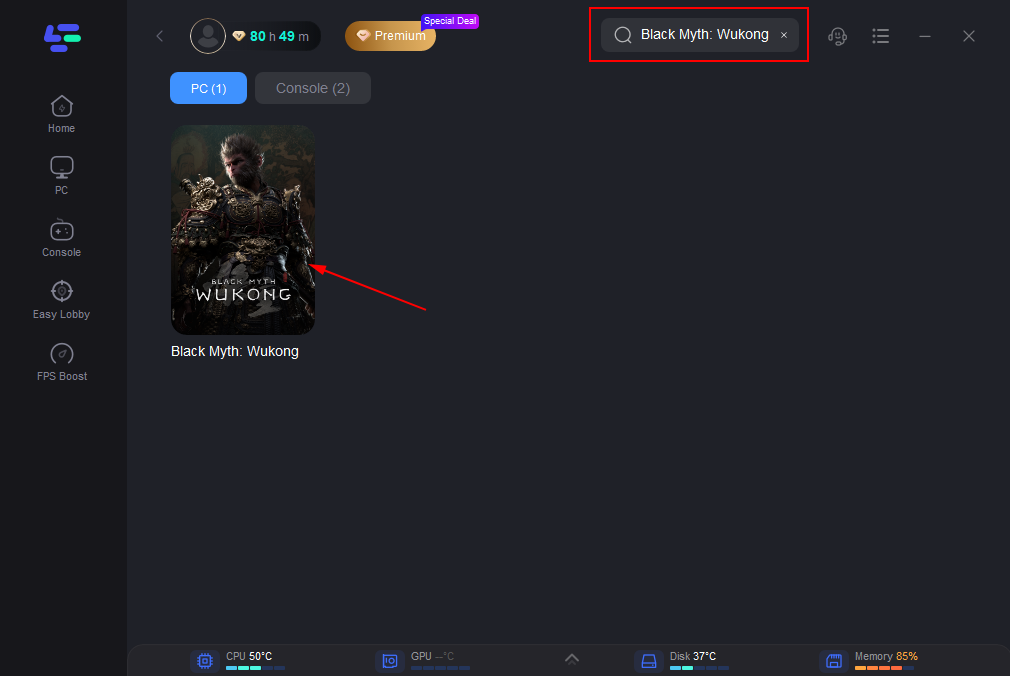
Step 2: Before opening Black Myth: Wukong, launch LagoFast and enter the game’s name in the search bar to ensure it's ready for boosting.
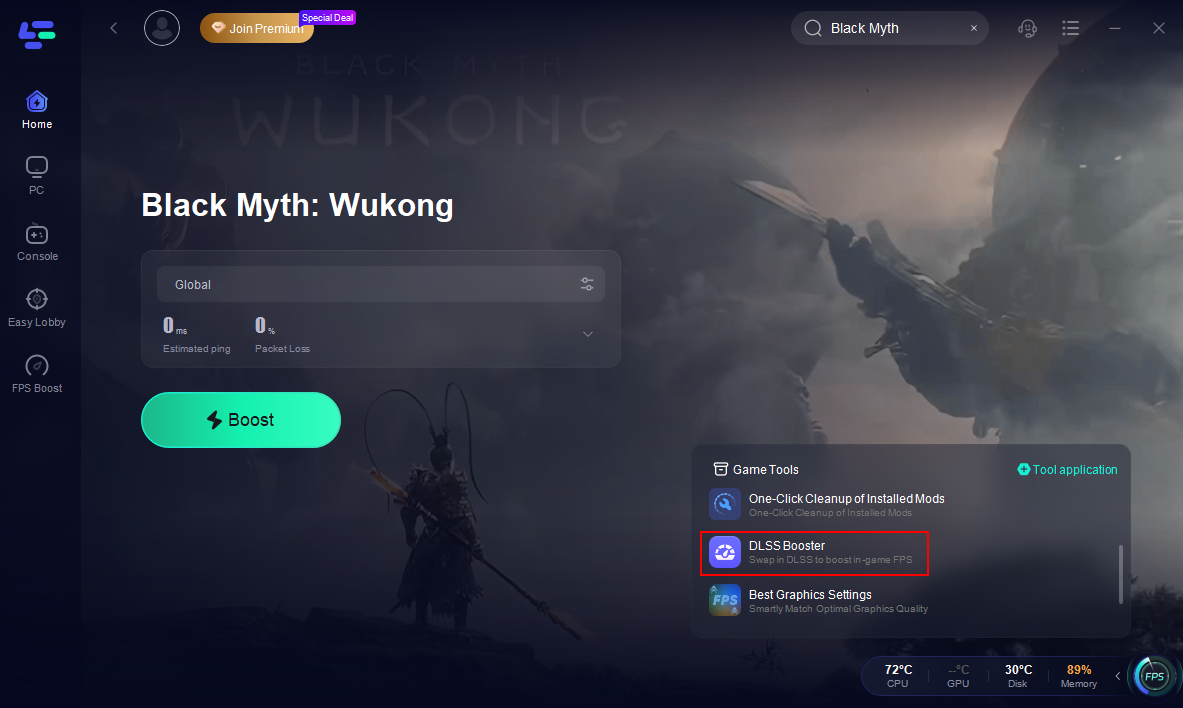
Step 3. Click the DLSS Booster on the right.
Other Benefits of LagoFast
- Reduce Lag and High Ping: Essential for seamless combat and navigation in Black Myth: Wukong.
- Fix Stuttering: Smooths out frame rate drops caused by network or hardware issues.
- Black Myth: Wukong Map Support: Access interactive 3D maps via LagoFast to explore efficiently, enhancing immersion .
How to Use LagoFast to Boost Black Myth: Wukong:
Step 1: Before opening Black Myth: Wukong, launch LagoFast and enter the game’s name in the search bar to ensure it's ready for boosting.
Step 2: To connect to the optimal gaming server, select “Server” in LagoFast. Then, choose the most effective "Node" listed on the right to maximize your network performance.
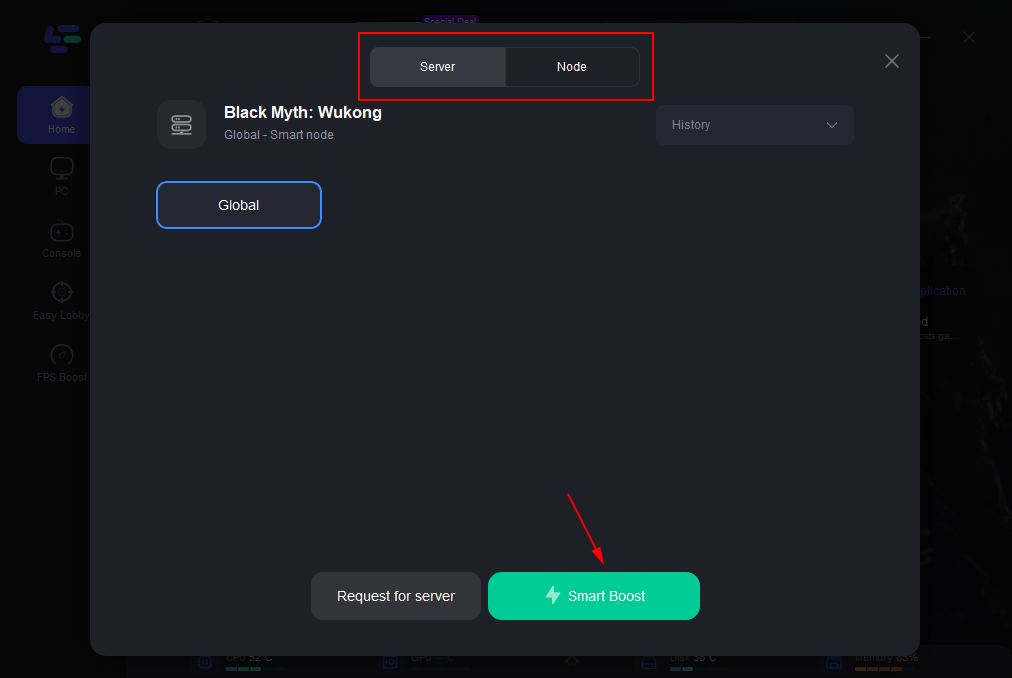
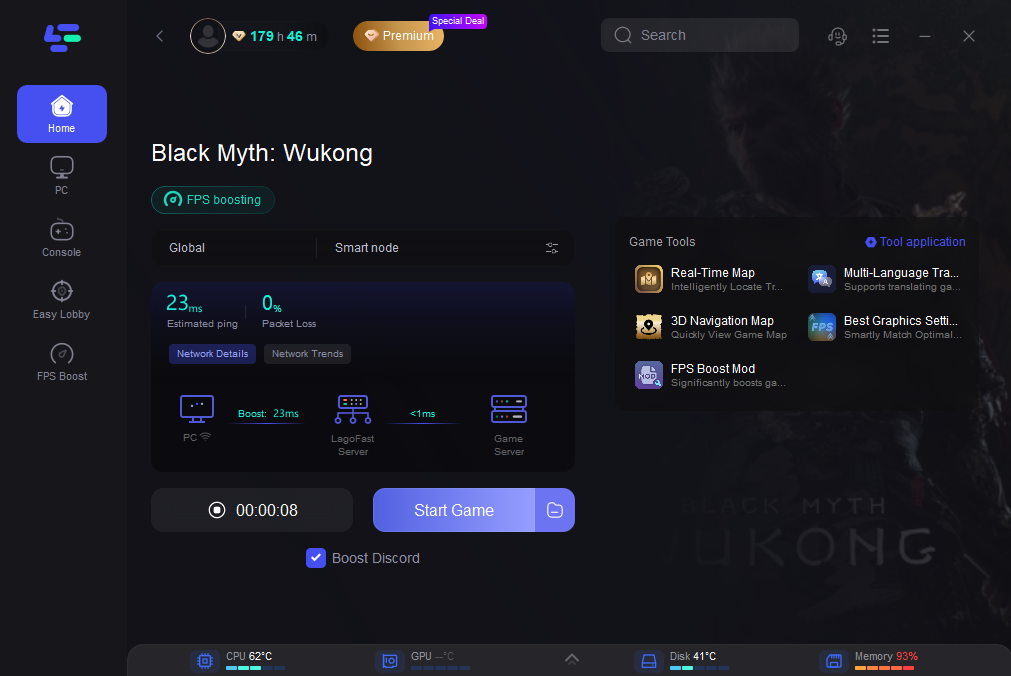
Step 3: Engage the “Smart Boost” feature to activate LagoFast's enhancements. This will display real-time stats like game ping, packet loss, and network type, allowing you to monitor the improvements.
How to Get Black Myth: Wukong Interactive Map with LagoFast:
Step 1: Click the Real-time Map Tool on the right.
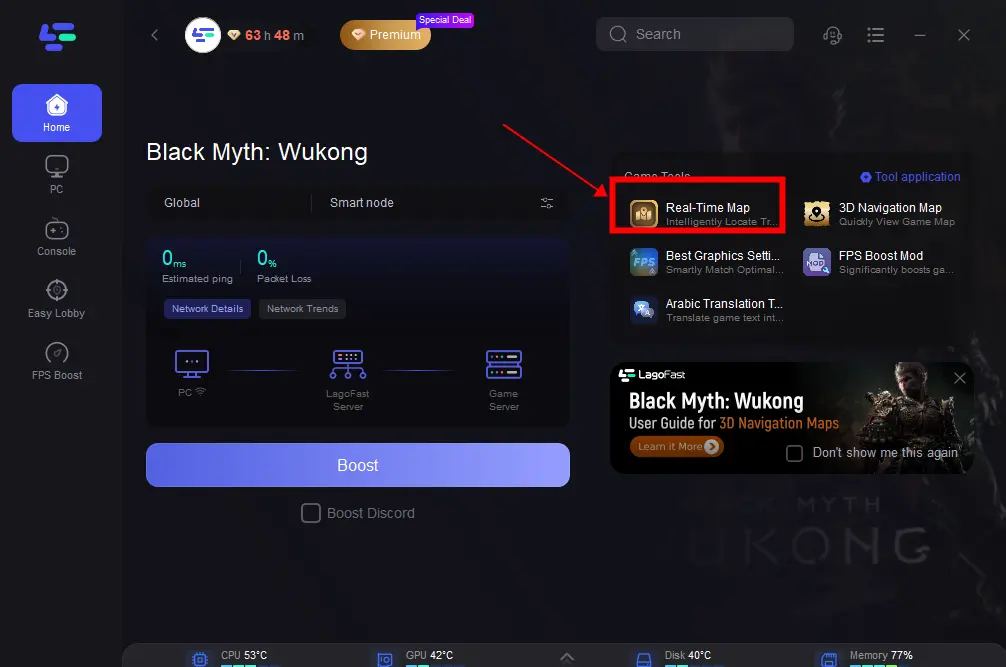
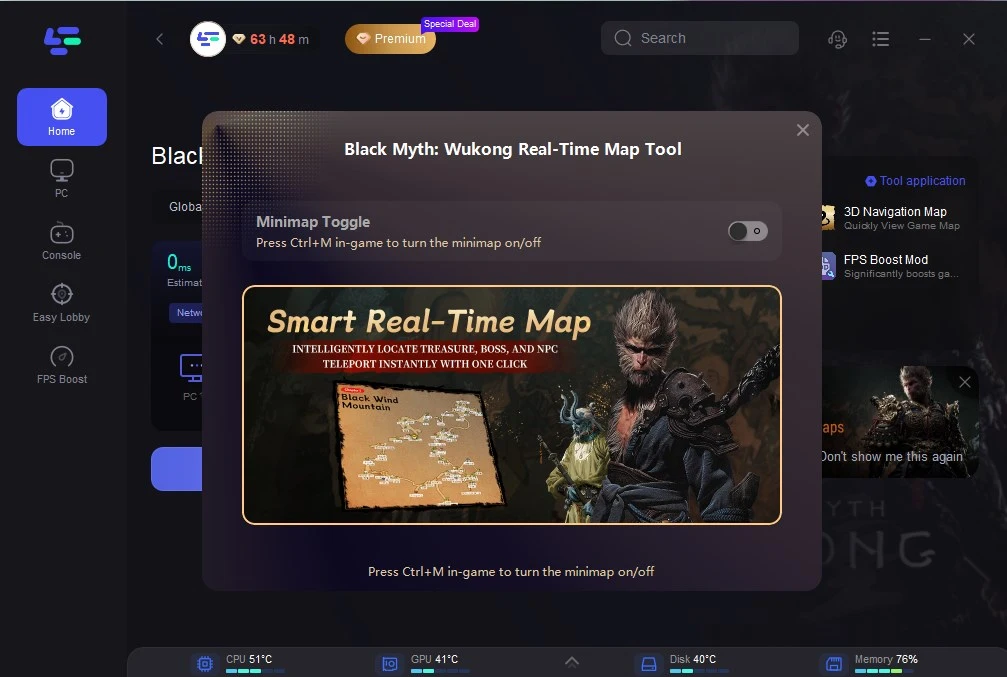
Step 2: Click the button on the right to open the real-time map. Or press control+M in-game to turn the minimap on.
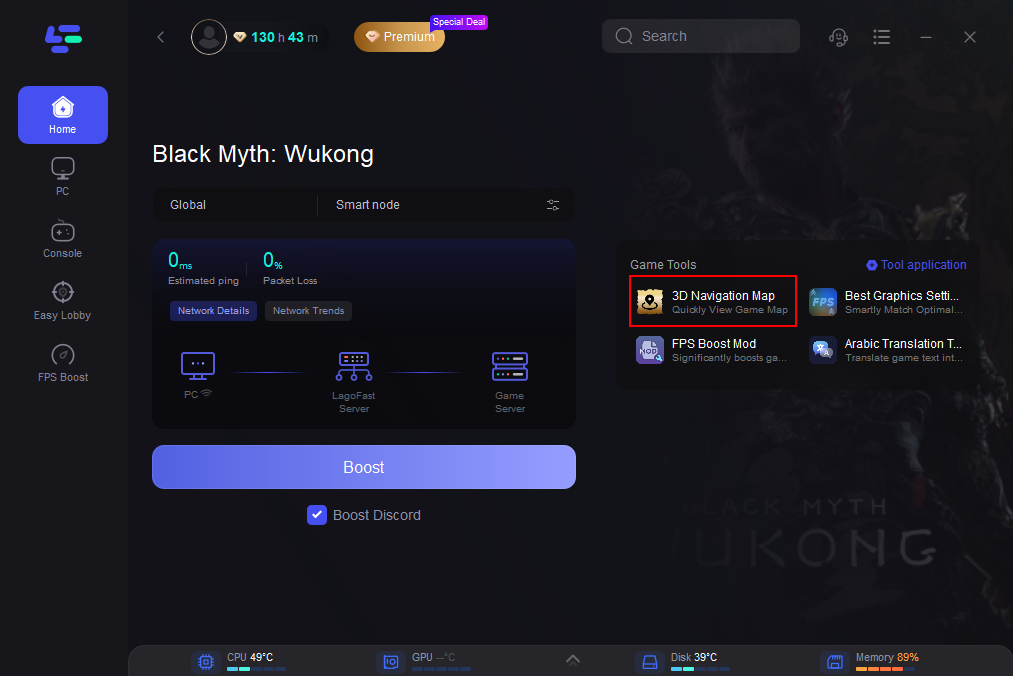
How to Get Black Myth: Wukong Navigating Map in LagoFast
[Note]: Before using this tool, please exit the game and close Steam in the background.
Step 1: Click the 3D Navigation Map Tool on the right.
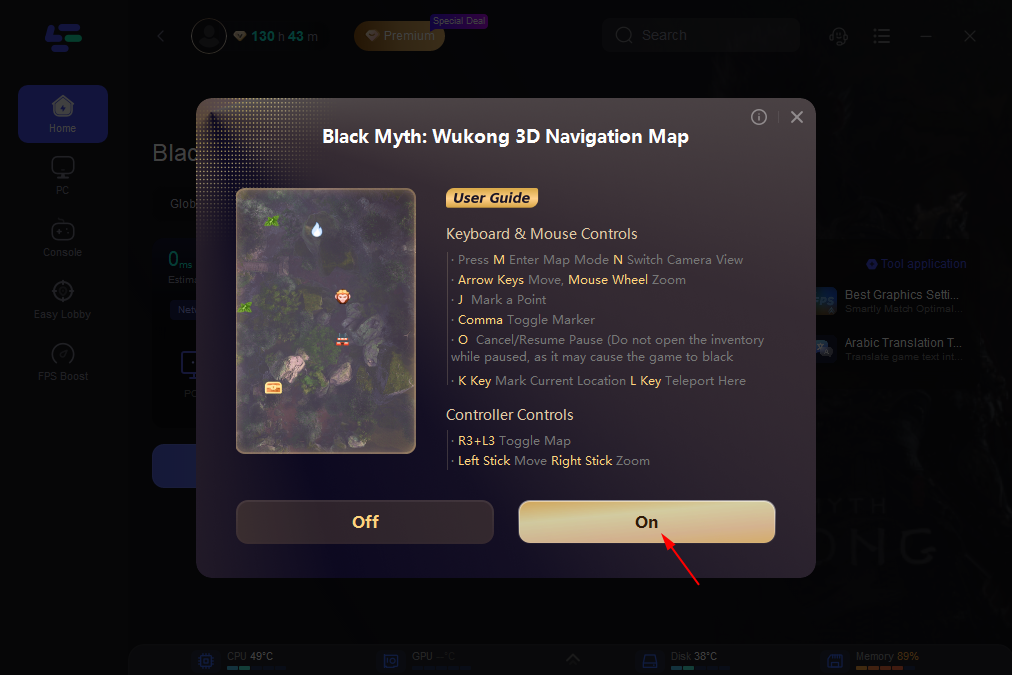
Step 2: Click on “On” and wait for loading. This may take a while, please be patient.
Step 3: After the loading is finished, click the Boost button and Start Game. Then you can use the Black Myth: Wukong Navigating 3D map in the game.
Here is a display of the in-game map effect. Players can use this map to get a simpler gaming experience.
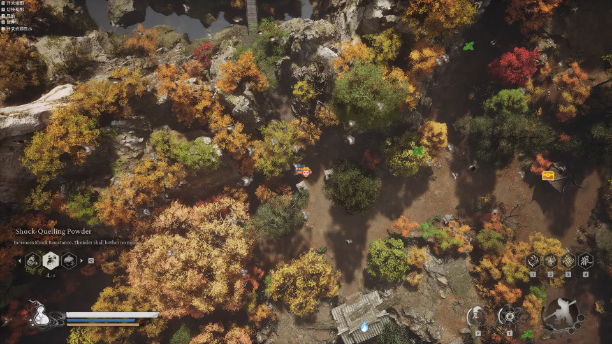
For more complete information, you can click here.
Part 3. Other Solutions to Enable DLSS in Black Myth: Wukong
Update NVIDIA Drivers:
Install the latest Game Ready Driver (v570.xx or newer) from NVIDIA’s website to ensure DLSS compatibility .
Check Hardware Requirements:
Verify your GPU is RTX 40-series or newer. For RTX 30-series users, DLSS 3.5 is supported but lacks Frame Generation .
Ensure your CPU (e.g., Intel Core i7-13700K or AMD Ryzen 7 7800X3D) and RAM (32GB+) meet the game’s recommendations .
Adjust In-Game Settings:
- Lower Ray Tracing: Disable or reduce ray tracing presets to ease GPU load.
- DLSS Quality Preset: Balance resolution and performance by selecting “Balanced” or “Performance” in the game’s graphics settings .
- Disable V-Sync: Turn off V-Sync to allow higher frame rates, though this may cause screen tearing.
Use NVIDIA Control Panel:
Force DLSS Frame Generation via NVIDIA’s Control Panel (Global Settings > DLSS > “On”).
Monitor System Performance:
Use tools like MSI Afterburner to track GPU/CPU usage and identify bottlenecks.
Conclusion
DLSS is a game-changer for Black Myth: Wukong, but technical hurdles can hinder its effectiveness. By addressing hardware limitations, updating drivers, and leveraging tools like LagoFast’s DLSS tool and Black Myth: Wukong DLSS mod, players can unlock smooth, high-performance gameplay. Remember to optimize both your network and system resources for the best results. With these solutions, you’ll conquer the mythical world of Sun Wukong with ease.

Boost Your Game with LagoFast for Epic Speed
Play harder, faster. LagoFast game booster eliminates stutter and lags on PC, mobile, or Mac—win every match!
Quickly Reduce Game Lag and Ping!
Boost FPS for Smoother Gameplay!