
Brazilian Portuguese Version: Melhores configurações para Call of Duty: Black Ops 6
Call of Duty: Black Ops 6 is the latest installment in the iconic franchise, and it comes packed with stunning graphics and intense gameplay. However, to get the most out of your gaming experience, especially on PC and consoles, optimizing your settings is crucial. Whether you're aiming for high FPS, better visibility, or smoother performance, this guide will help you configure the best settings for Call of Duty: Black Ops 6.

- ✅ Reduce Lag and High Ping.
- ✅ Boost FPS at the Same Time.
- ✅ Change Region Server Without lag.
- ✅End Disconnection & Crashing Issues
- ✅ Support 2000+ Online Games.
- ✅ Support Easy Lobby in All CoD Games.
Part 1: Why Optimizing Settings is Essential
Part 2: Best Display Settings for Call of Duty: Black Ops 6
Part 3: Best Quality Settings for Call of Duty: Black Ops 6
Part 4: Best View Settings for Call of Duty: Black Ops 6
Part 5: How To Optimize Your Gaming Experience With LagoFast
Part 1: Why Optimizing Settings is Essential
Modern games like Black Ops 6 are resource-heavy, and without the right settings, you might experience lag, stuttering, or even crashes. By fine-tuning your settings, you not only ensure a smoother gameplay experience but also gain a competitive edge with better visibility and faster reaction times.
Hot Related : What is Call of Duty: Black Ops 6 Release Date?
Part 2: Best Display Settings for Call of Duty: Black Ops 6
Your display settings play a significant role in how well your game performs. Let's dive into the optimal display settings:
- Display Mode: Fullscreen Exclusive – This reduces latency, making your inputs more responsive.
- Display Monitor: Choose your primary display with the highest refresh rate. This ensures smoother visuals and reduced motion blur.
- Display Adapter: Select your GPU. Ensure your graphics card drivers are up to date.
- Screen Refresh Rate: Set this to the maximum supported by your monitor (e.g., 144Hz, 240Hz). This provides the smoothest possible gameplay.
- Display Resolution: 1920x1080 (1080p) for balanced performance and quality. If you have a high-end GPU, consider 2560x1440 (1440p). Avoid 4K as it may drastically reduce FPS.
- Aspect Ratio: Automatic – This will match your monitor’s aspect ratio.
- Display Gamma: 2.2 (SRGB) – Standard gamma for most monitors.
- Brightness: 50 – Adjust according to your preference, but 50 is a good baseline.
- Constrain Mouse to Game Window: Enable if you experience issues with the mouse moving outside the game window.
- Nvidia Reflex Low Latency: On + Boost – This reduces latency, making your game feel more responsive.
- V-Sync (Gameplay): Off – Disabling V-Sync reduces input lag.
- V-Sync (Menus): Off – Helps in reducing menu lag.
- Custom Frame Rate Limit: Set a custom frame rate limit to match your monitor’s refresh rate. For example:
- Gameplay: 240 FPS (if you have a 240Hz monitor)
- Menu: 60 FPS
- Out of focus: 30 FPS
- Menu Render Resolution: 100 – This ensures clarity in menus.
- Pause Game Rendering: Off – Keeps the game running smoothly even when in the menu.
You May Like : Is Black Ops 6 Cross Platform?
Part 3: Best Quality Settings for Call of Duty: Black Ops 6
Quality settings determine how the game looks and performs. Here's how to balance performance and visual fidelity:
- Quality Presets: Custom – Allows for tailored settings.
- Render Resolution: 100 – Keeps the game sharp without sacrificing performance.
- Upscaling / Sharpening:
1080p: FidelityFX CAS – Sharpens the image with minimal impact on FPS.
1440p: Nvidia DLSS/AMD FSR 3.0 – Balances performance and quality.
- FidelityFX CAS Strength: 100 – Maximizes sharpness.
- Nvidia DLSS Preset & Sharpness: Quality, 50 – Enhances visuals with minimal FPS impact (only for Nvidia GPUs).
- AMD FSR 3.0 Preset & Frame Generation: Quality, On – Provides similar benefits for AMD GPUs.
- Path Tracing + Ray Reconstruction: Off – Though visually impressive, this setting can significantly lower FPS.
- VRAM Scale Target: 90 – Maximizes VRAM usage, but drop to 80 if stuttering occurs.
- Variable Rate Shading: On – Boosts FPS, but may cause stability issues on some systems.
- Texture Resolution: Normal – Provides a balance between performance and visual quality.
- Texture Filter Anisotropic: Normal – Enhances texture clarity at oblique angles.
- Depth of Field: Off – Improves clarity by removing blurring effects.
- Detail Quality Level: Low – Reduces unnecessary details, improving FPS.
- Particle Resolution: Very Low – Reduces particle detail to save resources.
- Bullet Impacts: Preference – Visual effect; disable if you need more FPS.
- Persistent Effects: Off – Disables persistent visual effects for better performance.
- Shader Quality: Low – Reduces the impact of shaders on performance.
- On-Demand Texture Streaming: Off – Prevents potential stuttering by loading textures in advance.
- Local Texture Streaming Quality: Low – Reduces texture load on your GPU.
- Shadow Quality: Very Low – Minimizes shadows to boost FPS.
- Screen Space Shadows: Off – Disables additional shadow effects.
- Ambient Occlusion: Off – Reduces ambient lighting effects to improve performance.
- Screen Space Reflections: Off – Disables reflective surfaces to save resources.
- State Reflection Quality: Low – Further reduces reflection details.
- Tessellation: Off – Disables detailed surface textures to save GPU resources.
- Volumetric Quality: Low – Reduces the complexity of volumetric effects (like fog).
- Deferred Physics Quality: Low – Minimizes the impact of physical interactions on performance.
- Weather Grid Volumes: Off – Disables weather effects that can lower FPS.
- Water Quality: Off – Reduces the complexity of water rendering to boost performance.
Part 4: Best View Settings for Call of Duty: Black Ops 6
View settings influence how you see and interact with the game world:
- Field of View (FOV): 100-110 – A higher FOV gives a wider view but can slightly reduce performance.
- ADS Field of View: Independent – Keeps the FOV consistent when aiming down sights.
- Weapon Field of View: Default – Ensures weapon models don’t obstruct your view.
- Third-Person Field of View: 90-100 – Optimal for third-person modes.
- Vehicle Field of View: 75-90 – Adjust according to your preference.
- First-Person Camera Movement: Least – Reduces camera shake to improve focus.
- Third-Person Camera Movement: Least – Reduces unnecessary camera movement.
Part 5: How To Optimize Your Gaming Experience With LagoFast
For gamers seeking the ultimate performance in Call of Duty: Black Ops 6, LagoFast is an essential tool to elevate your gameplay. LagoFast is a cutting-edge lag reducer designed to optimize your network connection, reduce ping, and eliminate jitter, ensuring a smoother and more responsive gaming experience. By intelligently routing your game data through the fastest and most stable servers, LagoFast helps you maintain a consistently low ping, even during peak gaming hours. This means you'll experience fewer lag and disruptions, giving you a competitive edge in fast-paced multiplayer matches.
In addition to lag reduction, LagoFast offers customizable game-boosting features tailored to your specific needs. Whether you're playing on a high-end PC or a console, LagoFast can automatically adjust your settings for the best possible performance. With options to fine-tune your network, allocate system resources, and optimize graphics settings, LagoFast ensures that you're always playing at your best. Integrating LagoFast into your gaming routine can significantly enhance your experience in Call of Duty: Black Ops 6, allowing you to focus on your gameplay without being held back by technical issues.
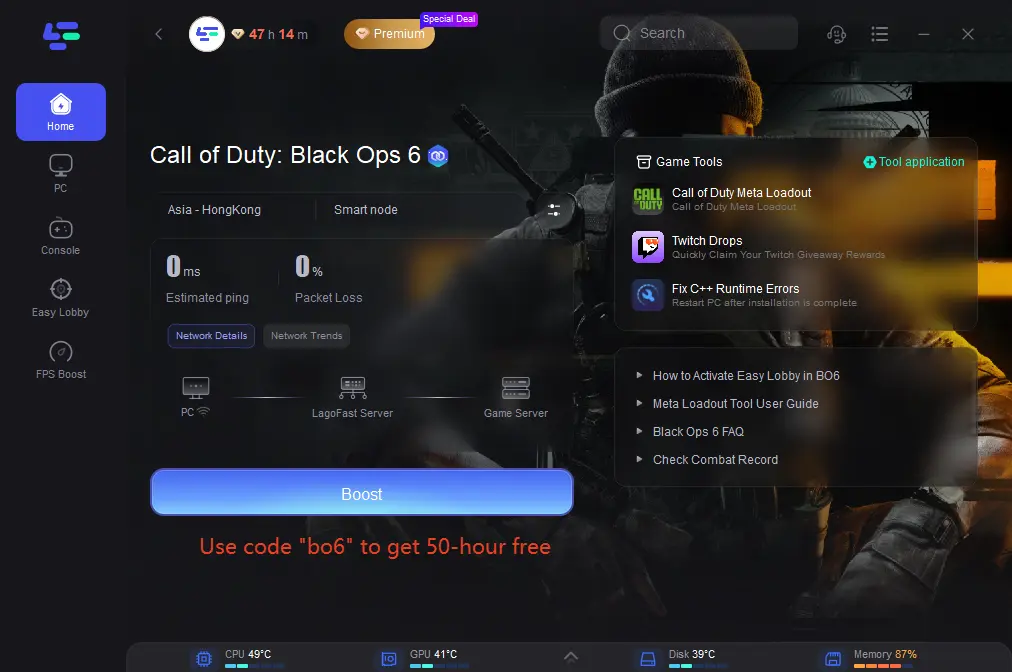
Tutorial to use LagoFast to optimize your gaming experience:
Step 1: Click the Free Trial button to download and install LagoFast.
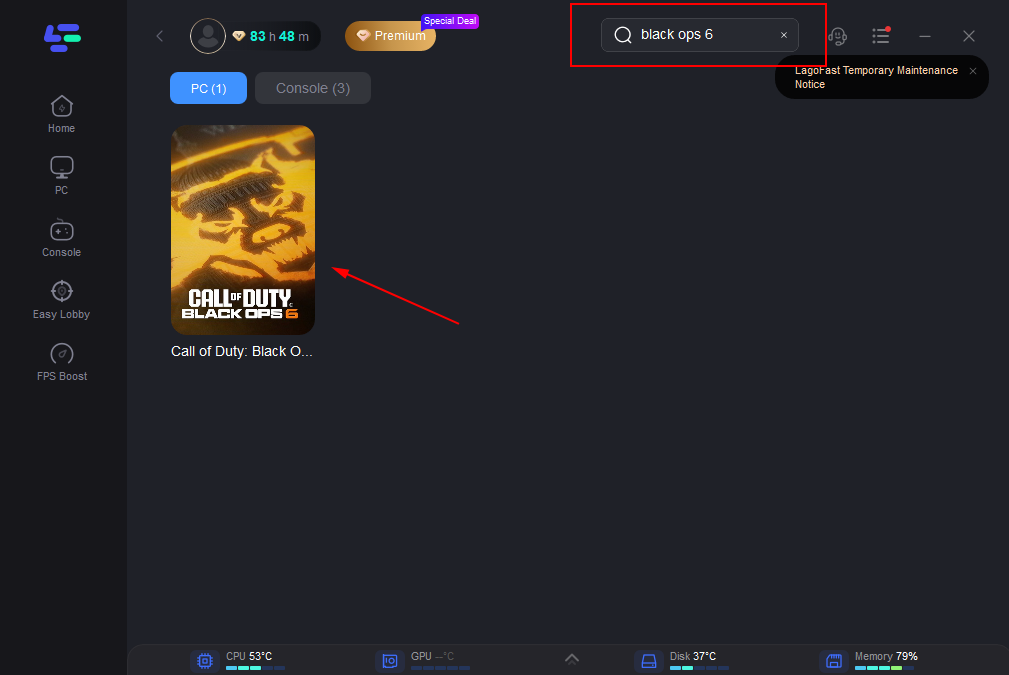
Step 2: Search CoD Black Ops 6 in the search bar, click it after appearing.
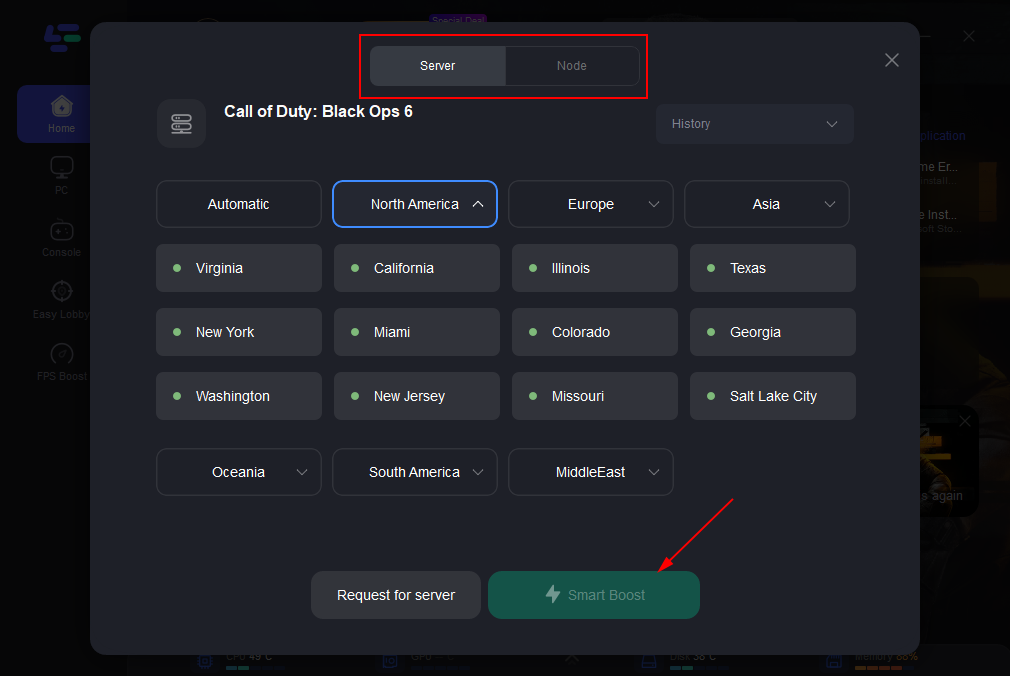
Step 3: Click on “Server” to change to a better server that can reduce high ping, then click on “Smart Boost”.
Step 4: Finally, click the “Start Game” to play the game.
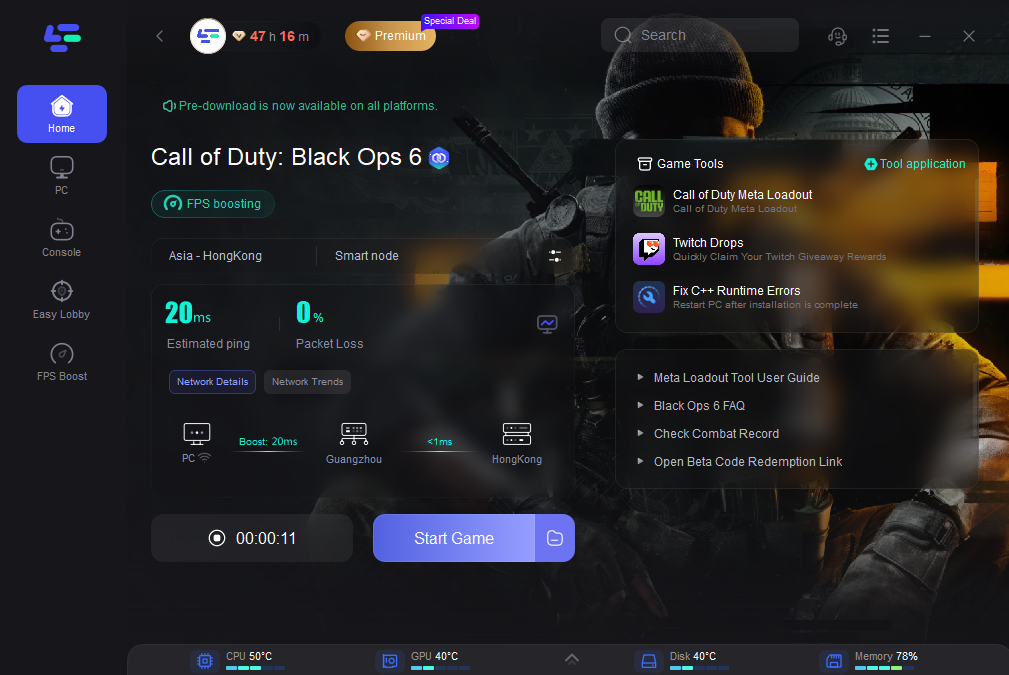
LagoFast is a powerful game booster designed to reduce lag, boost FPS, and optimize your connection. It also features the best VPN locations for BO6 and the top Meta Loadouts for Warzone/ BO6.
Redeem code "bo6" to get 50 hours for free! Play Black Ops 6 with LagoFast Free Trial NOW!
Part 6: FAQs
What is the Best Sensitivity Setting for Black Ops 6?
The best sensitivity setting is subjective and depends on your playstyle. However, a common range is between 4-6 for general gameplay. For precision, especially in sniping, consider a lower sensitivity of around 3-4.
What are the Best Graphic Settings for Black Ops 6?
The best graphic settings for Black Ops 6 focus on maximizing performance while maintaining visual clarity. Key settings include Fullscreen Exclusive display mode, 1080p resolution, low shadow quality, and disabling unnecessary effects like motion blur and depth of field.
Conclusion
Optimizing your settings in Call of Duty: Black Ops 6 is key to achieving the best performance, whether you're aiming for higher FPS, sharper visuals, or smoother gameplay. By carefully adjusting your display, quality, and view settings, you can tailor the game to suit your system's capabilities and your personal preferences. But for those who want to take their gaming experience to the next level, integrating LagoFast is a game-changer. This powerful tool helps minimize lag and stabilize your connection, ensuring that every match runs as smoothly as possible. With LagoFast, you’re not just tweaking settings—you’re unlocking the full potential of your gaming setup.

Boost Your Game with LagoFast for Epic Speed
Play harder, faster. LagoFast game booster eliminates stutter and lags on PC, mobile, or Mac—win every match!
Quickly Reduce Game Lag and Ping!
Boost FPS for Smoother Gameplay!