
Grand Theft Auto V has been significantly updated with the Enhanced Edition for PC, released on March 4, 2025. This update introduces next-gen features like ray tracing, faster loading times, and support for NVIDIA's DLSS 3, enhancing the immersive experience in Los Santos.
To take full advantage of these improvements, players can use the LagoFast DLSS Tool. This tool simplifies enabling DLSS, providing smoother gameplay and higher frame rates without sacrificing visual quality. Whether you're exploring the city or engaging in high-speed chases, LagoFast ensures a seamless experience.
In this guide, we'll explore the features of GTA 5 Enhanced, detail the capabilities of the DLSS tool, and provide step-by-step instructions to optimize your game's performance, helping both veterans and newcomers elevate their gaming experience.

Part 1: GTA 5 Enhanced Introduction
Part 2: What is GTA 5 Enhanced DLSS tool
Part 3: Will GTA 5 Enhanced support DLSS?
Part 4: How to enable DLSS in GTA 5 Enhanced
Part 5: How to boost FPS in GTA 5 Enhanced With LagoFast Game Booster
Part 1: GTA 5 Enhanced Introduction
Grand Theft Auto V Enhanced Edition, released on March 4, 2025, brings a suite of technical upgrades to the PC platform. This version includes features like ray tracing, faster loading times via SSD and DirectStorage, support for higher resolutions and framerates, and compatibility with NVIDIA DLSS 3 and AMD FSR 3. Additionally, it introduces new content such as Hao's Special Works auto shop and various gameplay enhancements previously exclusive to consoles.
Part 2: What is GTA 5 Enhanced DLSS tool
The GTA 5 Enhanced DLSS Tool refers to software solutions that enable or enhance NVIDIA's Deep Learning Super Sampling (DLSS) technology within the game. DLSS uses AI-driven upscaling to render games at lower resolutions and upscale them, providing higher frame rates without significant loss in visual quality. While GTA 5 Enhanced natively supports DLSS 3, tools like LagoFast's DLSS Booster can optimize and potentially unlock higher DLSS versions, such as DLSS 4, offering improved performance and visual fidelity.
Part 3: Will GTA 5 Enhanced support DLSS?
Yes, GTA 5 Enhanced supports NVIDIA DLSS 3 out of the box. This integration allows players with compatible RTX GPUs to benefit from AI-powered upscaling, resulting in smoother gameplay and enhanced visuals. Furthermore, with the use of third-party tools like LagoFast's DLSS Booster, players can potentially upgrade to DLSS 4, which introduces Multi Frame Generation and other enhancements for even better performance.
Part 4: How to enable DLSS in GTA 5 Enhanced
Follow these steps using LagoFast(LagoFast Game Booster - Get No Lag and Lower Ping)’s integrated DLSS tool:
1. Download & Install LagoFast
- Click Free Trial on the LagoFast website to install the client.
2. Locate GTA 5 Enhanced
- Launch LagoFast, search for “GTA 5 Enhanced,” and select it from the results.
3. Install Frame Generation Mod
- Scroll to Game Tools, find the Frame Generation Mod button, and click Install.
4. Enable and Configure
- After installation, launch the game via LagoFast. Press F9 to toggle the DLSS/Frame Gen overlay and adjust Strength and Motion Vector options in-game.
5. Verify in NVIDIA Control Panel
- Open NVIDIA Control Panel → Manage 3D settings → Program Settings → select Monster Hunter Wilds → set NVIDIA DLSS and Frame Generation to On.
For players interested in upgrading to DLSS 4, third-party tools like LagoFast's DLSS Booster can facilitate this process by patching the game's executable and injecting the necessary DLSS 4 code.
Part 5: How to boost FPS in GTA 5 Enhanced With LagoFast Game Booster
LagoFast Game Booster is a tool designed to optimize gaming performance by reducing lag, increasing FPS, and providing a stable connection. Here's how to use it with GTA 5 Enhanced:
How to Use LagoFast with Path of Exile 2
Step 1: Click the Free Trial button to download and install LagoFast Free Trial.
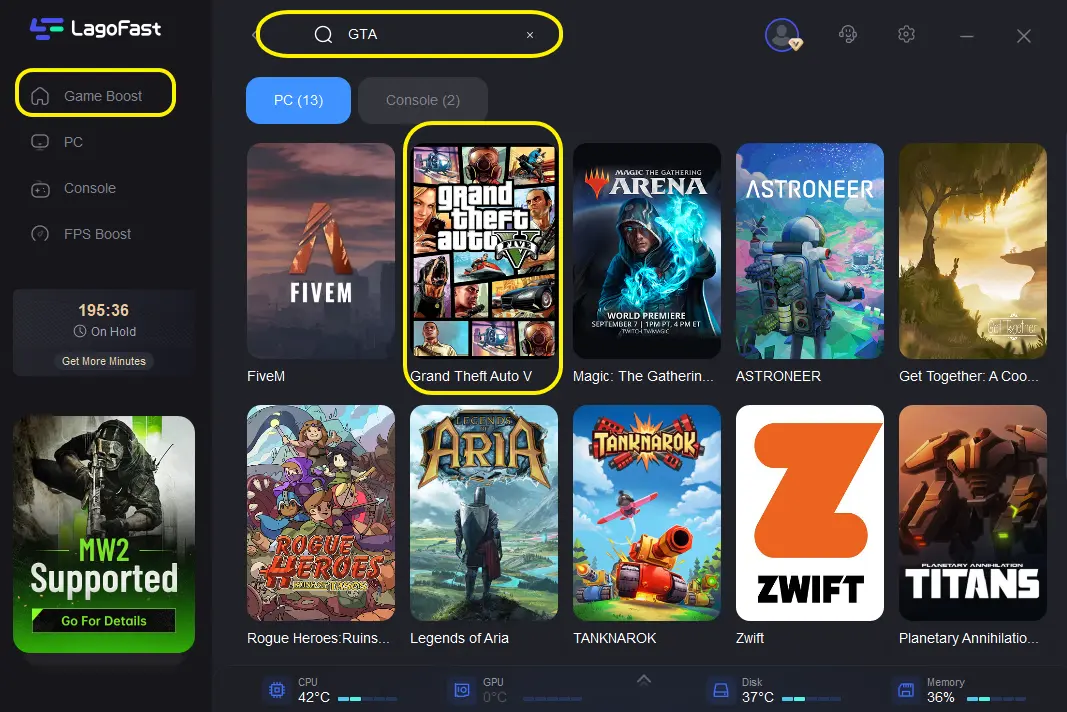
Step 2: Open LagoFast then click the PC button on the left and search GTA V in the search bar, click it after appearing.
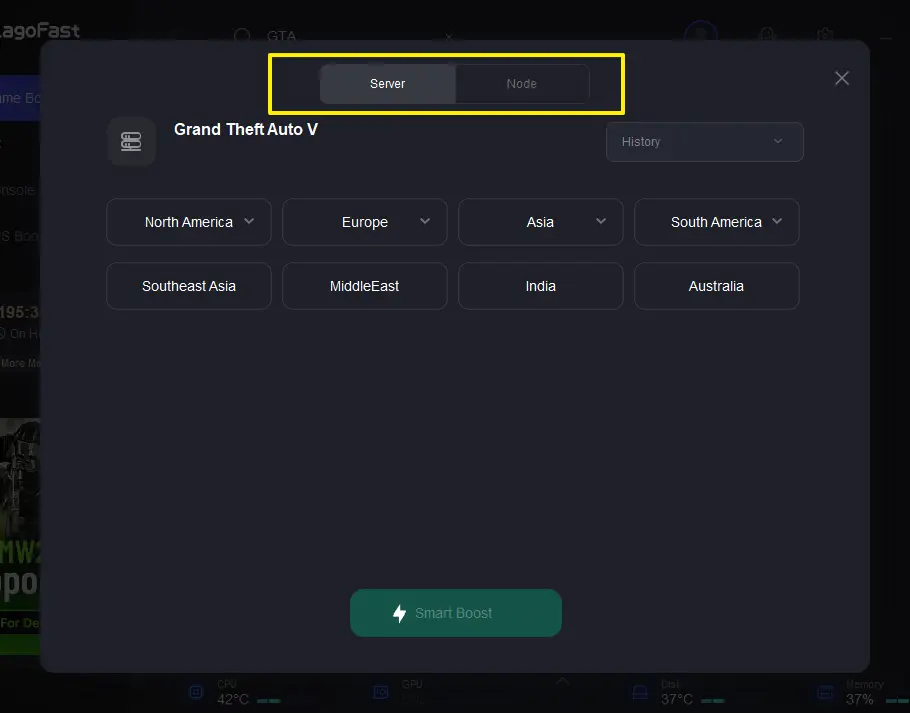
Step 3: Click on Server to change to a better server that ensures a stable connection, then click on Smart Boost.
Step 4: Check the specific game ping, packet loss, and multiple path connection on the right side.
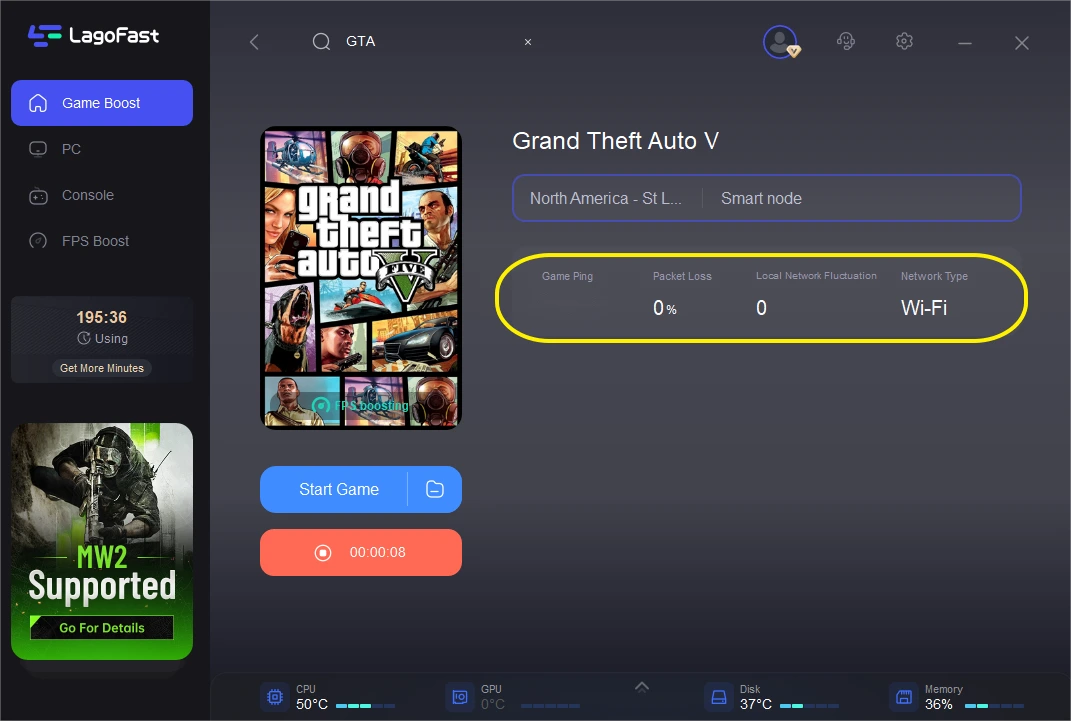
By following these steps, players can experience smoother gameplay with higher frame rates and reduced lag.
Part 6: FAQs
Q1: Is DLSS 4 officially supported in GTA 5 Enhanced?
A1: No, GTA 5 Enhanced officially supports up to DLSS 3. However, third-party tools like LagoFast's DLSS Booster can enable DLSS 4 features.
Q2: What are the benefits of using DLSS in GTA 5 Enhanced?
A2: DLSS improves performance by rendering the game at a lower resolution and upscaling it using AI, resulting in higher FPS and smoother gameplay without significant loss in visual quality.
Q3: Can I use LagoFast with other games?
A3: Yes, LagoFast supports various games, including Monster Hunter Wilds, Blade and Soul Neo Taiwan, Pal World, Black Myth: Wukong, Overwatch 2, Marvel Rivals, Legend of Ymir, and Naraka: Bladepoint.
Conclusion
In conclusion, utilizing DLSS technology and tools like LagoFast can significantly enhance your GTA 5 Enhanced gaming experience, providing smoother visuals and improved performance.
Boost Your Game with LagoFast for Epic Speed
Play harder, faster. LagoFast game booster eliminates stutter and lags on PC, mobile, or Mac—win every match!
Quickly Reduce Game Lag and Ping!
Boost FPS for Smoother Gameplay!