
Grounded 2 blends survival gameplay with rich visual detail and responsive controls. But to get the most out of it, tweaking your settings is essential - especially for smoother FPS and better reactions.
This article covers the best Grounded 2 settings to reduce lag and maximize FPS across all system levels. From graphics to controller adjustments, heres everything you need to optimize your play.

Part 1: What are Grounded 2 Advanced Graphics Settings?
Before adjusting anything, it helps to understand what these settings control. Advanced options let you fine-tune performance, visuals, and responsiveness.
Shadow Quality
Controls how realistic shadows appear. High shadows look better but cost a lot of FPS.
Anti-Aliasing
Smooths jagged edges. TAA or FXAA are light on performance, while others can slow the game.
Texture Quality
Impacts the detail level of surfaces. Higher settings need more VRAM.
Foliage & Environment Detail
Affects how much grass, plants, and terrain detail is visible. Lowering this improves FPS.
Post Processing
Includes motion blur, bloom, depth of field. These are not essential and can be disabled.
Understanding these gives you a solid base for customizing settings depending on your PC specs.
Part 2: How to Improve Grounded 2 Graphics Settings for Best Performance?
Once you know what each setting does, it's time to apply them based on your hardware. Optimizing Grounded 2 graphic settings is different for each player.
High-performance systems can handle more visual detail:
- Shadows: Medium or High
- Texture Quality: High
- Ambient Occlusion: On
- Anti-Aliasing: TAA
- V-Sync: Off
- Motion Blur: Off
Use full screen mode and match your frame rate limit to your display refresh rate for stability.
If your PC is struggling, lower the load:
- Shadows: Low or Off
- Texture Quality: Low or Medium
- Anti-Aliasing: Off or FXAA
- V-Sync: Off
- Resolution: Drop to 720p if needed
- Disable extra effects
This setup keeps gameplay smooth without sacrificing too much visibility. Now that visuals are adjusted, lets look at how to improve control settings.
Part 3: What are the Best Grounded 2 Settings PC to Reduce Lag and Maximize FPS?
Once your graphics and controls are optimized, the next step is to improve overall performance. The best Grounded 2 settings PC should include both in-game tweaks and system-level enhancements.
- Fullscreen mode for consistent frame pacing
- Frame cap to match your monitor
- Install the game on an SSD for faster loading
- Update your GPU drivers regularly
- Close unused background programs
- Enable Game Mode in Windows to prioritize performance
Why Use LagoFast Can Boost Your Grouned 2 Gaming Experience?
While in-game settings impact visuals and response, a tool like LagoFast Game Booster helps ensure your connection stays steady—especially during online co-op or intense combat moments. With optimized routing and real-time ping reduction, it complements your settings for a truly lag-free experience. Here's other reasons why it stands out:
- Optimized Graphics Drivers: Ensure your GPU drivers are up-to-date for optimal compatibility and performance.
- Close Background Applications: Shut down unnecessary programs running in the background to free up system resources.
- Use Performance Monitoring Tools: Utilize software to monitor system performance and identify potential bottlenecks.
Implementing these practices can lead to noticeable improvements in game performance.
How to Optimize Grounded 2 Gameplay with LagoFast?
1. Click the button below to download LagoFast for free and complete installation.
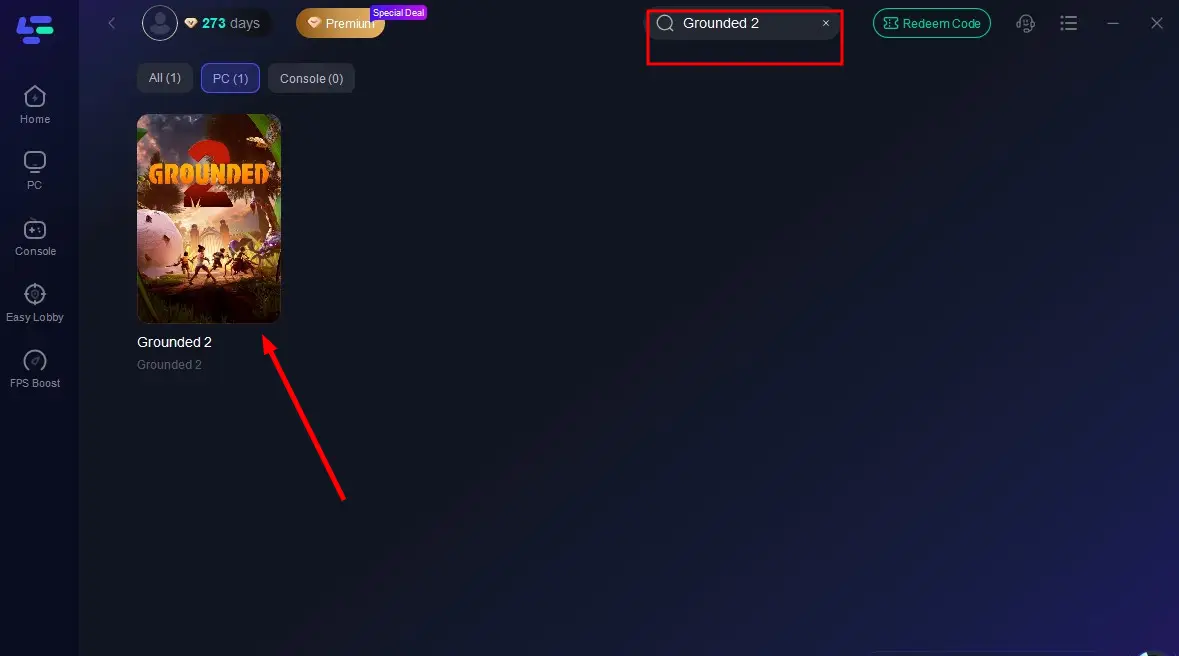
2. Open the LagoFast client, then type "Grounded 2" into the search bar and click the result.
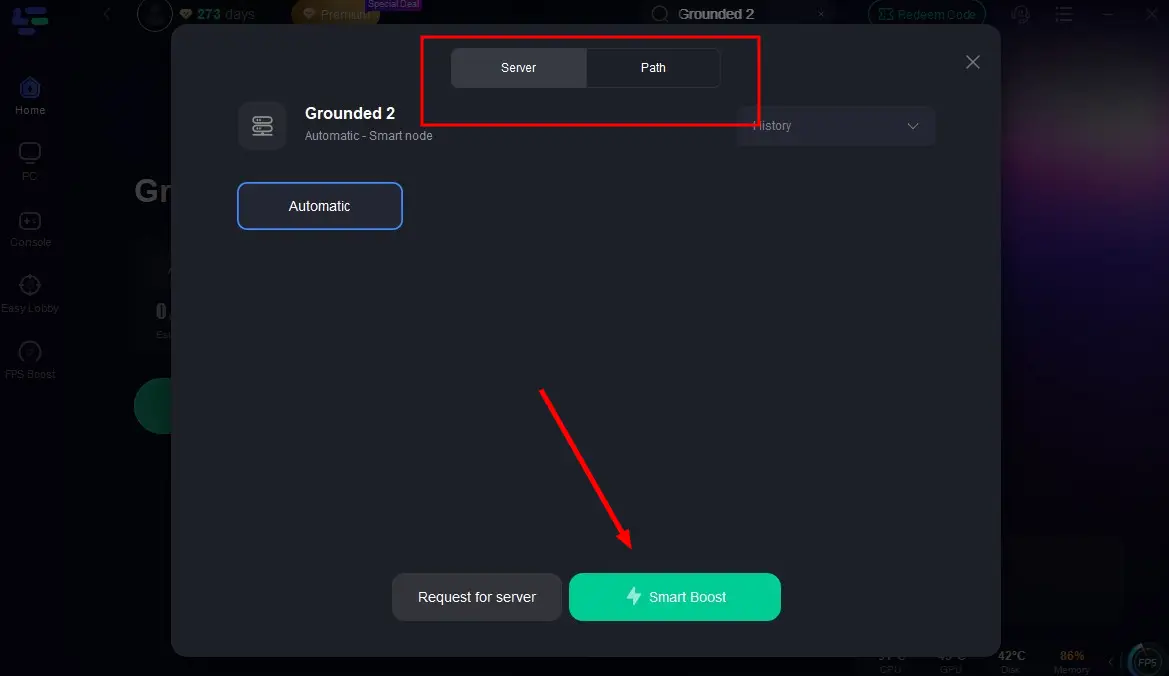
3. Click "Select Server" to choose the best server node, then click "Smart Boost" to activate real-time optimization.
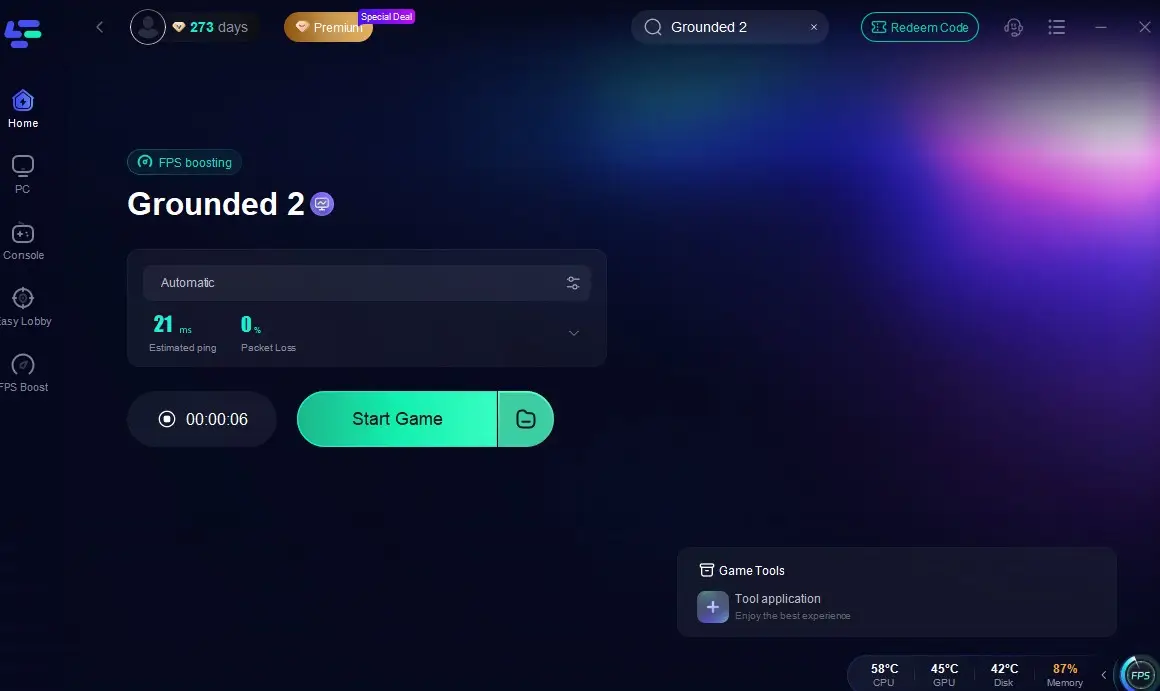
4. Once optimization starts, you'll see reduced packet loss and ping of the game. Click "Start Game" to return to Grounded 2 and enjoy lag-free gameplay!
Part 4: What are Grounded 2 Best Controller Settings?
Graphics only go so far—if your controls feel slow or unresponsive, it breaks immersion. Grounded best controller settings help players move, aim, and act more smoothly.
Common adjustable settings include:
- Look Sensitivity
- Aim Acceleration
- Controller Vibration
- Button Remapping
- Aim Assist
These help you feel more in control during combat, exploration, and crafting.
Part 5: Recommended Controller Settings for Grounded 2 (Xbox, PS4, PS5)
No matter which console you're using to explore the backyard in Grounded 2, tuning your controller setup is key to smoother movement and better combat performance. Here's a breakdown of the best controller settings by platform:
- Look Sensitivity: 6–8 (for fast and responsive camera control)
- Vibration: Off (more stable aim and less hand fatigue)
- Aim Assist: On (helps with ranged attacks, especially bows)
- Button Layout: Custom (remap jump or block to rear paddles if using an Elite controller)
- Look Acceleration: Low (for smoother turning without sudden jumps)
Tip: Xbox users benefit from cross-platform play. Smooth and precise input is essential for both PvE and PvP combat.
- Look Sensitivity: 5–7 (balanced movement speed for older hardware)
- Vibration: Off (prevents delay and distraction during combat)
- Aim Assist: On
- Control Scheme: Default or Custom (depending on your comfort)
- Look Acceleration: Medium
Tip: PS4 users may experience occasional frame drops, so keeping sensitivity moderate improves overall control.
- Look Sensitivity: 7–9 (DualSense handles faster input well)
- Vibration / Adaptive Triggers: Optional, but can be turned off for competitive play
- Aim Assist: On
- Control Mapping: Customize if needed—especially useful in tense combat situations
- Look Acceleration: Low
Tip: PS5’s smoother frame rate and haptics allow for more advanced setups. Use this to fine-tune aiming and movement fluidity.
With these tailored settings, your Grounded 2 adventure will feel more intuitive and competitive—regardless of which console you're playing on.
Conclusion
Optimizing your Grounded 2 settings is key to smooth, responsive gameplay.To fully reduce lag and maximize FPS, combine these adjustments with system tweaks—and use LagoFast Game Booster for a more stable, low-latency experience every time you play.

Boost Your Game with LagoFast for Epic Speed
Play harder, faster. LagoFast game booster eliminates stutter and lags on PC, mobile, or Mac—win every match!
Quickly Reduce Game Lag and Ping!
Boost FPS for Smoother Gameplay!