

Quick Answer
If you don’t want to waste time testing everything, here’s the simple truth:
- Best overall: Xbox Elite Series 2 Controller
- Best budget: Xbox Wireless Controller (Series X|S)
- Best for realism (racing): Logitech G923 Racing Wheel
- Best for PC customization: DualSense Wireless Controller
For most players, a controller is still the most balanced way to play FH6.
If Forza Horizon 6 doesn’t feel as smooth or responsive as it should, it usually has less to do with skill and more to do with setup. The controller you use, your input device choice, and even small configuration differences can noticeably change how the car behaves in corners, acceleration, and drifting. This guide breaks down the best controller options, compares keyboard vs controller and wheel setups, and explains the settings that actually make driving feel more consistent and controlled.

- ✅ Reduce Lag and High Ping.
✅ Boost FPS at the Same Time.
✅ Support 2000+ Popular Online Games.
✅ Change Server without Latency.
✅ Boost Game Loading Speed.
Part 1: Quick Comparison Overview
Part 2: Best Controller Options for Different FH6 Players
Part 3: How to Reduce Input Lag - Using LagoFast
Part 4: Controller vs Keyboard vs Wheel in Forza Horizon 6
Part 5: Bonus Tips: Xbox Controller Settings FH6
Part 1: Quick Comparison Overview
If FH6 feels inconsistent or hard to control, your input device plays a bigger role than most players realize. Here’s how each option performs in real gameplay conditions:
|
Controller |
Platform |
Latency |
Best For |
|
Xbox Elite Series 2 |
Xbox / PC |
Ultra Low |
Competitive driving |
|
Xbox Wireless Controller |
Xbox / PC |
Low |
Casual players |
|
DualSense |
PC |
Medium |
Adaptive feedback |
|
Logitech G923 |
PC / Xbox |
Very Low |
Simulation racing |
Part 2: Best Controller Options for Different FH6 Players
Casual Players (Just Want Smooth, No-Stress Driving)
If you’re just playing FH6 for fun and don’t care about leaderboard times, the standard Xbox Wireless Controller is more than enough. It’s simple, consistent, and requires no setup tweaks—just plug in and drive.
Competitive Players (Want Precision and Control)
The Xbox Elite Series 2 is a better choice if you care about precision and consistency. The improved stick control makes small steering corrections easier to manage, which becomes important in high-speed corners where minor mistakes can cost you control.
Simulation / Immersion Players (Realism First)
If realism matters more than convenience, a racing wheel like the Logitech G923 delivers the most immersive driving experience. However, it requires more time to get used to compared to a controller.
Part 3: How to Reduce Input Lag - Using LagoFast
If your inputs feel slightly delayed or the car doesn’t respond as quickly as you expect, it’s easy to assume something is wrong with your controller. In reality, this kind of “laggy” feeling usually comes from the connection or game performance rather than the hardware itself.
Why your controller feels slow in Forza Horizon 6
In most cases, the issue is tied to how the game is running or connecting online:
- Unstable network conditions during online races
- High ping or occasional packet loss
- Background performance drops affecting responsiveness
- Inconsistent routing to game servers
Even small issues here can make steering and braking feel less immediate than they should.
How to Fix Input Lag
This is where LagoFast Game Booster comes in, especially for online races where delay is most noticeable.
It helps by improving how your game connects to the server:
- Optimizing routing for a more direct connection
- Lowering ping in online sessions
- Reducing packet loss that causes stutter or delay
- Stabilizing the overall network during races
With a more stable connection, input lag becomes less noticeable, and steering, braking, and acceleration feel more immediate and consistent in real gameplay.
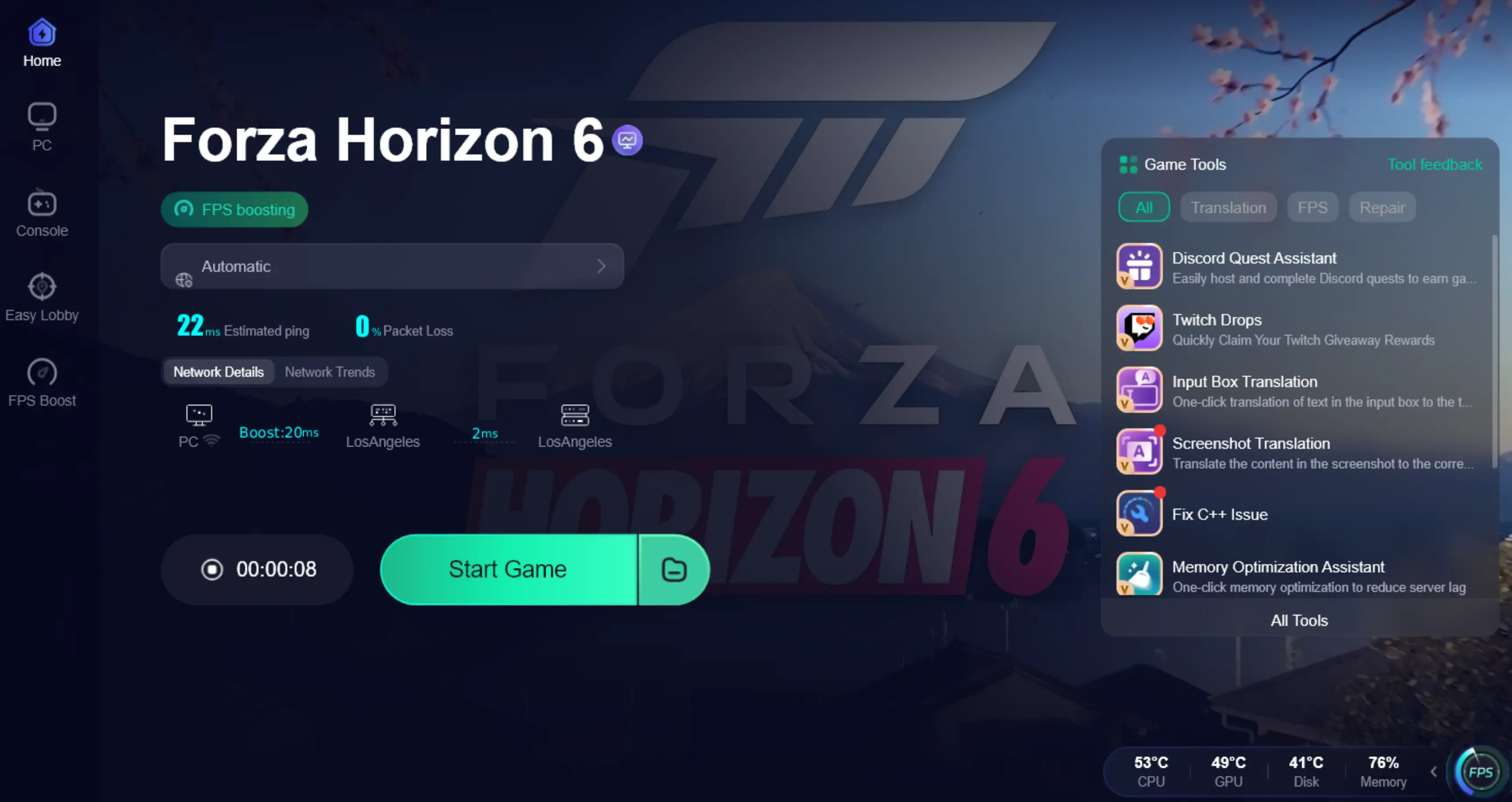
Tutorial to Use LagoFast to Fix FH6 Input Lag:
Step 1: Click the Free Trial button to download and install LagoFast.
Step 2: After installation, search "Forza Horizon 6" in the search bar and select the game.

Step 3: Choose your preferred server node and click "Smart Boost" to start optimizing.

Step 4: Launch your game and enjoy smooth, optimized gameplay with lower ping and no stutter.
Part 4: Controller vs Keyboard vs Wheel in Forza Horizon 6
When it comes to FH6, your input device has a bigger impact on driving feel than most players expect. Even with the same car and settings, the experience can feel completely different depending on how you control it.
Is controller better than keyboard in FH6?
For most players, yes. A controller gives you much smoother and more precise control, especially when steering through corners or making mid-drift corrections.
Keyboard vs Controller FH6
Keyboard input is digital, meaning it’s either fully on or off. That creates clear limitations in a driving game like FH6:
- Steering feels less precise in corners
- Drifting becomes harder to control
- Small adjustments are nearly impossible
A controller, on the other hand, uses analog input, which allows gradual steering, braking, and acceleration. That’s a major advantage in a game built around smooth handling physics.
Wheel vs Controller
A racing wheel offers the highest level of realism and immersion, but it’s not required for good performance. For most players, a controller still provides the best balance between control, comfort, and consistency in both casual and competitive play.
Part 5: Bonus Tips: Xbox Controller Settings FH6
Even with a good controller, FH6 won’t feel right if your settings are not tuned properly. Most handling issues come from small configuration mistakes rather than the controller itself.
A solid starting setup:
- Steering Sensitivity: 50–60
- Deadzones: 0–5
- Vibration: 30–50%
- Traction Control: Off (advanced players)
- ABS: On for stability
Part 6: FAQs
Is controller better than keyboard in FH6?
Yes. A controller gives smoother steering and more precise control, especially in corners and drifting.
Can I play FH6 with keyboard?
Yes, but it’s more limited. Keyboard input is digital, which makes smooth steering and small corrections harder.
Do I need a racing wheel for FH6?
No. A wheel is optional and mainly for realism. A controller is still the most practical choice for most players.
Why does FH6 feel delayed or unresponsive?
This is usually caused by input lag, unstable FPS, or network issues—not player skill.
Key Takeaway
In FH6, how the game feels depends more on your setup than your skill. A controller—especially Xbox—is the most consistent option for most players. If things still feel delayed or unresponsive, the issue is usually settings, performance, or connection rather than the device itself.

Boost Your Game with LagoFast for Epic Speed
Play harder, faster. LagoFast game booster eliminates stutter and lags on PC, mobile, or Mac—win every match!
Quickly Reduce Game Lag and Ping!
Boost FPS for Smoother Gameplay!