
In a franchise known for large-scale, visually rich environments, Battlefield 6 pushes PC hardware heavily. To enjoy high frame rates without sacrificing visual fidelity, optimized graphics settings are essential. This guide walks you through everything—from leveraging performance tools like LagoFast Game Booster to fine‑tuning in‑game graphics settings—for a smooth, competitive experience.

Part 1: Introduction of Battlefield 6
Part 2: Best PC Graphics Settings Tool In Battlefield 6 Beta
Part 3: Common Graphic Settings in Battlefield 6
Part 4: How to Adjust Settings Manually
Part 5: Troubleshooting Common Graphics Issues
Part 1: Introduction of Battlefield 6
The Battlefield series has long been known for delivering large-scale combat and cinematic realism. With Battlefield 6, EA DICE has taken visuals to the next level—offering photorealistic textures, dynamic weather, and environmental destruction powered by the latest iteration of the Frostbite engine.
But with these graphical upgrades come increased system demands. Even high-end gaming rigs may struggle to maintain a stable 60+ FPS without optimization. Whether you're playing competitively or just want a smooth visual experience, understanding and adjusting your settings is key.
Part 2: Best PC Graphics Settings Tool In Battlefield 6 Beta
If you want to skip the manual hassle and achieve the best settings instantly, the LagoFast Game Booster is your go-to solution.
Why Use LagoFast Game Booster?
- One-Click Graphics Optimization: LagoFast offers Best Graphics Settings Tool that can adjust your in-game settings to match your hardware, balancing performance and visual fidelity.
- FPS Boosting: It detects background processes and network bottlenecks to increase frame rates significantly.
- Network Optimization: Besides graphics settings, LagoFast reduces ping, packet loss, and network jitters—ideal for Battlefield 6's massive online multiplayer battles.
How to Use the Graphics Settings Tool of LagoFast:
Step 1: Click the "Free Trial" button to download and install LagoFast
Step 2: Once installed, launch LagoFast and enter "Battlefield 6" into the search bar, then click the search result

Step 3: Click the Best Graphics Settings tool in the bottom right corner. Follow the instructions, nd you can get your Battlefield 6 graphic settings adjusted with just a few clicks.
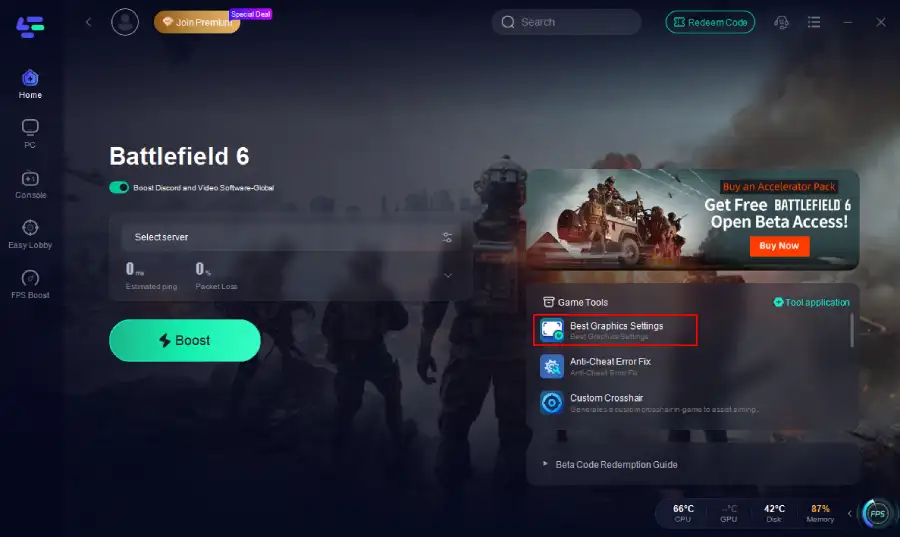
Step 4: Choose the best server location based on your geographical area and desired gaming performance, then click "Smart Boost" to initiate real-time optimization.

Step 5: Hit the “Smart Boost” button to monitor your ping, packet loss, and network type in real time.

If you're looking for the fastest way to optimize Battlefield 6, LagoFast is the best tool available—combining both FPS and connection optimization into a single, powerful package.
Part 3: Common Graphic Settings in Battlefield 6
To manually balance performance and visuals, start by adjusting these core graphics options from the main menu under the "Graphics" tab.
Display Settings:
- Fullscreen Mode: Borderless or Fullscreen
- Fullscreen Device: Your preferred monitor
- Fullscreen Resolution: Your preferred resolution from the monitor you're using
- Aspect Ratio: Auto
- Refresh Rate: Maximum Hz of your monitor
- Vertical Sync: Off

General Graphics Settings:
- Texture Quality: High
- Texture Filtering: High
- Mesh Quality: Low
- Terrain Quality: Medium
- Undergrowth Quality: Low
- Effects Quality: Low
- Volumetric Quality: Low
- Lighting Quality: Low
- Local Light & Shadow Quality: Low
- Sun Shadow Quality: Low
- Shadow Filtering: PCF
- Reflection Quality: Low
- Screen Space Reflections: Off
- Post Processing Quality: Low
- Screen Space AO & GI: Off
- High Fidelity Objects Amount: Medium

Camera Settings:
- Field of View: 105–110 (higher for better peripheral vision)
- Weapon FOV: Wide
- World & Weapon Motion Blur: Off
- Camera Shake: 20
- Film Grain, Vignette, Chromatic Aberration: Off
These settings ensure clarity during fast-paced gameplay and reduce distractions caused by cinematic effects.
Part 4: How to Adjust Settings Manually
- Go to the Graphics menu via the cog icon on Battlefield 6’s main screen.
- Set Resolution, Refresh Rate, Display Mode, and Upscaling (DLSS/FSR) first for global performance.
- Tweak advanced settings individually under Graphics, adjusting shadows, textures, effects, etc., based on your rig.
- Use LagoFast for further performance enhancement alongside manual tuning.
Part 5: Troubleshooting Common Graphics Issues
Low FPS or Stuttering:
- Use LagoFast to fix potential network-related FPS dips.
- Lower demanding effects (like AO, shadows).
- Cap FPS to monitor refresh rate if needed.
High Input Lag:
- Disable V-Sync.
- Never use DLSS Frame Generation—it reduces responsiveness.
Overheating & Crashes:
- Monitor temps; ensure proper cooling.
- Update GPU drivers promptly.
Loading or Connection Issues:
- LagoFast helps resolve stuck loading screens and improves session stability.
Part 6: FAQs
Q: What system specs are needed?
A: Minimum: RTX 2060 + i5‑8400 + 16 GB RAM for 1080p Low. Recommended: RTX 3060 Ti + Ryzen 7 3700X for 1440p High at 60 FPS.
Q: Does DLSS or FSR affect visuals?
A: Minor quality loss at Performance mode—but huge FPS gains. Try Balanced or Performance for best results.
Q: Should I use Fullscreen or Borderless?
A: Fullscreen offers slightly better performance due to lower system overhead.
Q: Can LagoFast help with aiming accuracy?
A: While primarily a performance tool, LagoFast does offer additional aim tools (like AimMaster) and crosshair customization in some versions.
Conclusion
Battlefield 6 is a visually stunning and demanding shooter. Whether you want every setting cranked to ultra or you're aiming for the smoothest 144FPS competitive gameplay, the right graphics configuration makes all the difference.
For those who want instant results without diving into settings manually, LagoFast Game Booster is a powerful ally. It not only enhances your graphics and frame rate with one click but also ensures a smooth, stable online connection—critical in massive multiplayer battles.
Optimize your game today, dominate the battlefield, and experience Battlefield 6 at its absolute best.

Boost Your Game with LagoFast for Epic Speed
Play harder, faster. LagoFast game booster eliminates stutter and lags on PC, mobile, or Mac—win every match!
Quickly Reduce Game Lag and Ping!
Boost FPS for Smoother Gameplay!