
You click Play on Battlefield 6, but nothing happens—maybe a black window flashes, or it just says “launching” forever. You’re not alone. Thousands of players report Battlefield 6 won’t start, won’t load into a match, or gets stuck because of Secure Boot errors.
If you’ve been struggling with these issues, this article will show you how to get Battlefield 6 running smoothly. Step by step, we’ll cover the common causes of launch problems and guide you through solutions that make the game playable again—quickly and reliably.

- ✅ Reduce Lag and High Ping.
- ✅ Boost FPS at the Same Time.
- ✅ Support 2000+ Popular Online Games.
- ✅ Stop Stuck & Black Screen Issues.
- ✅ Ensure Stable Connections.
Part 1: Why Battlefield 6 Won’t Start or Launch
Part 2: Best Way to Fix Battlefield 6 Won’t Start
Part 3: Other Ways to Fix Battlefield 6 Launch & Secure Boot Errors
Part 1: Why Battlefield 6 Won’t Start or Launch
Before you reinstall the whole game (again), here are the most common reasons it won’t start:
- Secure Boot not enabled or misconfigured—Battlefield 6 checks your Secure Boot state for anti-cheat.
- EA/Steam launcher conflicts—Launching via the wrong client or broken cache causes silent fails.
- Background apps or overlays—Discord, MSI Afterburner, or other overlays can freeze launch.
- Corrupt shader or DirectX cache—You might get a black screen or “nothing happens” issue.
- Network check fails – The game hangs during server authentication, especially if routing is unstable.
Part 2: Best Way to Fix Battlefield 6 Won’t Start
Instead of manually troubleshooting everything, here’s the clear solution breakdown:
LagoFast Solutions – Secure Boot, DirectX 12 & Network
LagoFast automatically handles:
- Secure Boot errors—Detects and fixes misconfigured Secure Boot settings
- DirectX 12 component installation & cache issues—Installs missing components and clears corrupt shader/DirectX cache
- Network & server hangs – Optimizes routing for smoother authentication, lower latency, and fewer connection failures
Launcher & Background App Conflicts – Manual Solutions
- Launcher conflicts—Clear EA/Steam cache or reinstall the client
- Background apps—Close Discord, MSI Afterburner, overlays, or other unnecessary programs before launch
How to Use LagoFast to Fix Battlefield 6
LagoFast is a powerful game booster that quickly solves common Battlefield 6 launch issues. It automatically configures Secure Boot to prevent anti-cheat errors, optimizes your network to reduce lag, packet loss, and high latency, and repairs DirectX 12 and shader cache problems. It also disables unnecessary background apps and overlays to ensure a smooth, conflict-free launch.
Follow these simple steps to use LagoFast and quickly fix Battlefield 6 launch issues:
Step 1: Click the Free Trial button on the official LagoFast website to download and install the latest version
Step 2: Open LagoFast, use the search bar to find Battlefield 6.

Step 3: Select the best server or route for your region to ensure optimal stability.

Step 4: On the right panel, click Secure Boot to automatically detect and fix any Secure Boot issues.
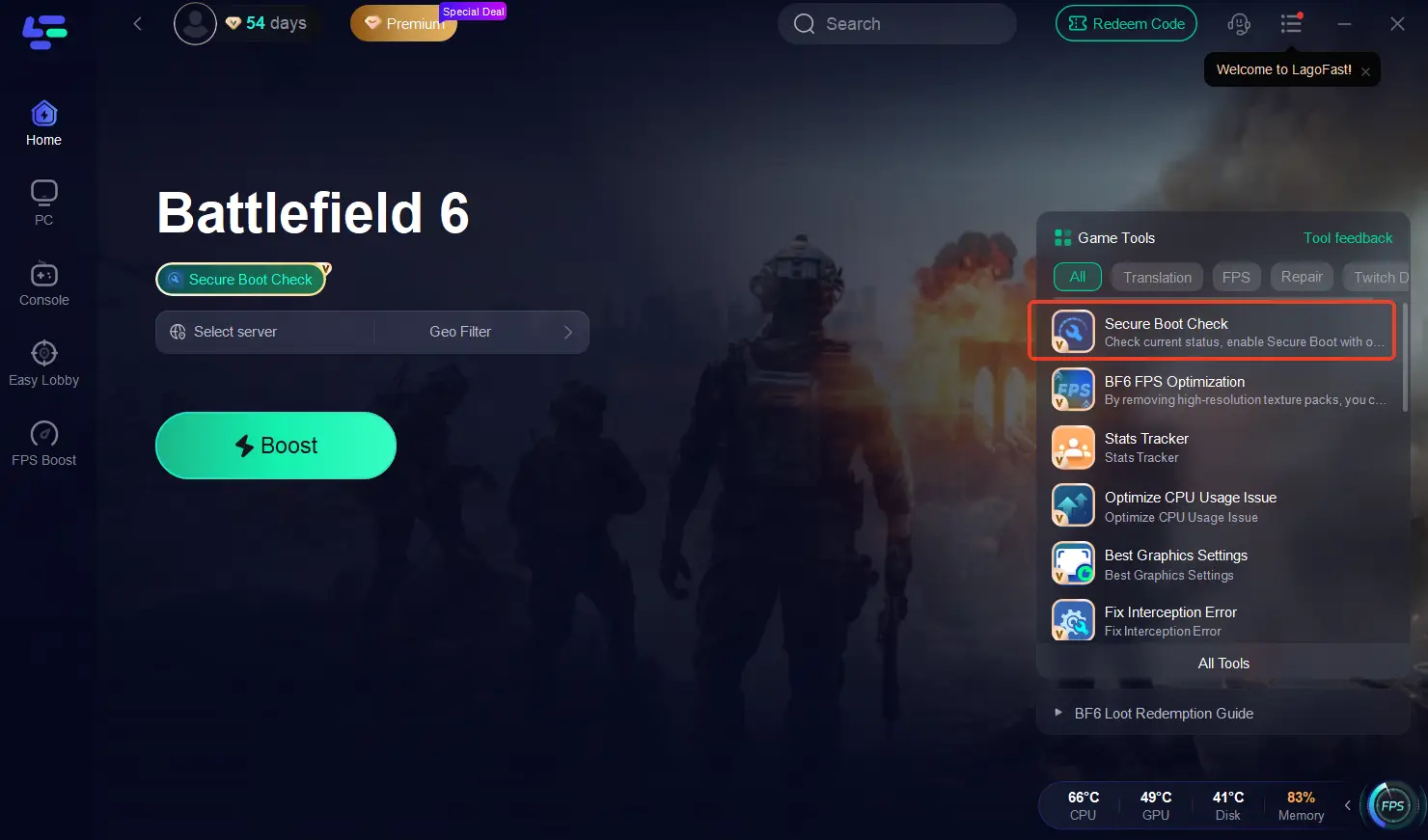
Step 5: Optimize network settings—LagoFast will automatically select the best connection path to minimize lag, packet loss, and high latency for smoother gameplay.

Part 3: Other Ways to Fix Battlefield 6 Launch & Secure Boot Errors
If you’d rather troubleshoot manually, you can try:
- Checking Secure Boot (Win + R → type msinfo32 → check “Secure Boot State”)
- Verifying game files in Steam or EA App
- Clearing DirectX shader cache
- Running the game as Administrator
- Disabling overlays like Discord, NVIDIA GeForce Experience, or MSI Afterburner
- Updating GPU drivers to the latest version from NVIDIA/AMD/Intel
- Updating Windows to ensure all system components (DirectX, .NET, Visual C++ redistributables) are current
- Temporarily disabling antivirus or firewall if they might block the game launch
- Checking system requirements to make sure hardware meets minimum specs
But honestly—LagoFast automates all of these in one click, detecting Secure Boot status, cleaning cache, disabling overlays, and optimizing your network for a stable start every time.
Final Thoughts
If Battlefield 6 won’t start, shows Secure Boot errors, or freezes on launch—don’t waste time tweaking BIOS or reinstalling. LagoFast Game Booster fixes it all in one click: Secure Boot, network, and cache. Launch instantly and jump back into the fight.
Boost Your Game with LagoFast for Epic Speed
Play harder, faster. LagoFast game booster eliminates stutter and lags on PC, mobile, or Mac—win every match!
Quickly Reduce Game Lag and Ping!
Boost FPS for Smoother Gameplay!