
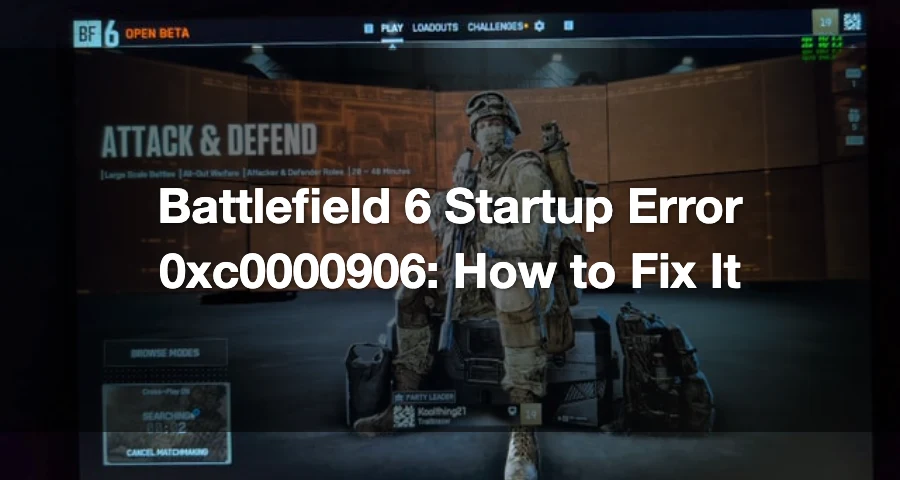
If Battlefield 6 throws startup error 0xc0000906, the fastest fixes are usually these: change Windows Exploit Protection settings for the Battlefield 6 and EA AntiCheat executables, verify the game files, and relaunch the EA app as administrator.
On PC, this error usually means Windows or another security layer is blocking the game from opening, or one of the required files is damaged.

- ✅ Lower ping and fewer disconnects.
- ✅ More FPS and better PC performance.
- ✅ Support for 3000+ games.
- ✅ Stable connections and region switching.
What Battlefield 6 Error 0xc0000906 Usually Means
Battlefield 6 is failing before launch because Windows cannot run one of the needed executable files properly. That can happen when:
Windows security blocks the game executable
Antivirus software sandboxes or quarantines a file
Game files are corrupted or incomplete
EA AntiCheat fails during startup
DirectX or Windows system files are damaged
The files most commonly tied to this kind of fix are:
bf6.exeBF6.EXEbf6event.exeEAAntiCheat.GameServiceLauncher.exe
Common Triggers Behind the Error
Windows Exploit Protection
This is the most repeated player fix for Battlefield 6 launch failures related to this error. Several players report that adding the Battlefield 6 executable and EA AntiCheat-related files to Exploit Protection and turning the listed overrides off lets the game launch normally.
That does not mean EA has officially confirmed Exploit Protection as the root cause. It does mean this is one of the strongest community-backed fixes right now.
Antivirus or AV Sandboxing
Some 0xc0000906 cases happen when antivirus software isolates or blocks executable files. If your antivirus recently updated, or you use aggressive real-time protection, it may be interfering with Battlefield 6 or EA AntiCheat.
Corrupted or Missing Game Files
If the launcher shows a repair prompt or the game suddenly stopped launching after an update, file corruption is a likely cause. Verifying or repairing the install is one of the safest first steps.
EA AntiCheat Conflicts
Battlefield 6 startup can fail if EA AntiCheat did not install correctly, broke after an update, or is being blocked during launch.
DirectX or Windows System File Issues
This is lower priority than Exploit Protection and file verification, but still worth checking if the main fixes do not work. DirectX problems or damaged Windows files can stop games from opening.
How to Play Battlefield 6 without Errors?
After resolving account and error code issues, stable connection matters. As a professional game booster, LagoFast provides Battlefield 6 server nodes across the globe, allowing players to connect to the nearest and most stable servers for lowest ping. The key advantages of using LagoFast include:
Global Server Network: Deploys server nodes in over 60 countries and 150+ cities worldwide, offering diverse server options.
Stable Connections: Avoids congested networks to minimize disconnects and maintain connection reliability.
Real-Time Monitoring: Displays FPS, ping, and connection quality
Lag-Free Gameplay: Reduces packet loss and jitter
Ping Reduction: Optimized routing for minimal latency
How to Play Battlefield 6 Smoothly with LagoFast:
Click the "Free Trial" button to download LagoFast and complete the installation.
Use the search bar to find Battlefield 6 and click on the search result.

Choose the best server location based on your geographical area and desired gaming performance, then click "Smart Boost" to initiate real-time optimization.

Verify your real-time ping and packet loss rates, then click "Start Game" to dive into the intense battles of Battlefield 6!

Tired of manually tweaking BIOS settings or troubleshooting drivers? LagoFast’s Anti-Cheat Error Fix Tool is tailor-made for this problem.
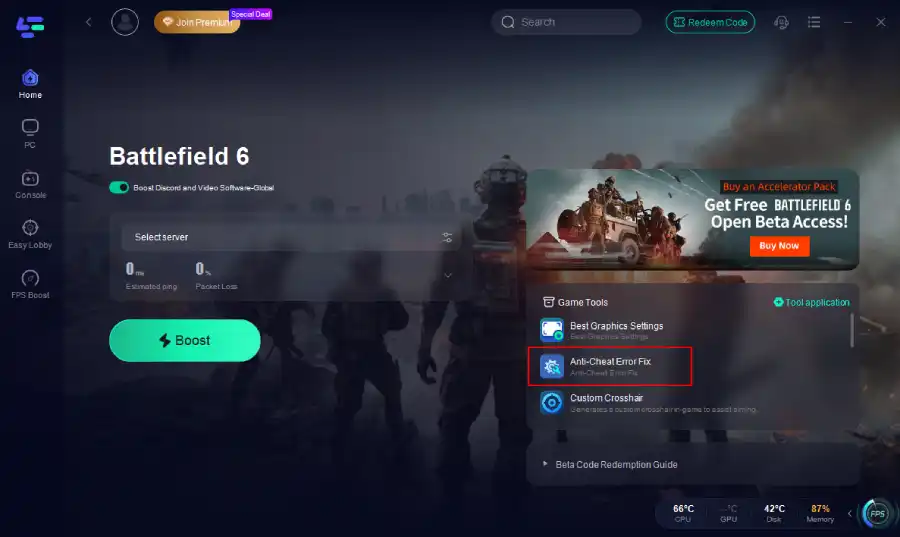
Click the Anti-Cheat Error Fix tool at the bottom right corner. Click confirm.
How to Fix Battlefield 6 Startup Error 0xc0000906
Follow these steps in order.
1) Adjust Windows Exploit Protection for Battlefield 6 and EA AntiCheat
This is the main fix to try first.
Open Windows search and type Exploit Protection.
Open Exploit protection.
Go to Program settings.
Add these files one by one if they are present in your install folders:
bf6.exeBF6.EXEbf6event.exeEAAntiCheat.GameServiceLauncher.exe
For each added file, enable Override system settings and set these to Off:
Control flow guard (CFG)
Data Execution Prevention (DEP)
Force randomization for images (Mandatory ASLR)
Randomize memory allocations (Bottom-up ASLR)
Validate exception chains (SEHOP)
Validate heap integrity
Apply the changes.
Fully close Battlefield 6, Steam, Epic, and the EA app.
Relaunch and test again.
If you only want to start with one file, begin with bf6.exe, then add the AntiCheat files if the error persists.
2) Verify or Repair the Game Files
If a file is missing, altered, or broken, repair the install before doing anything more invasive.
Steam
Open Steam.
Right-click Battlefield 6.
Open Properties.
Go to Installed Files.
Click Verify integrity of game files.
EA App
Open the EA app.
Find Battlefield 6 in your library.
Open the game menu.
Use the Repair option.
Epic Games
Open Epic Games Launcher.
Find Battlefield 6 in your library.
Open the game options.
Use Verify.
Even if you bought the game through Steam or Epic, Battlefield 6 still relies on the EA app for launch.
3) Run the EA App as Administrator
This matters even if you own the game on Steam or Epic.
Close the EA app completely.
Right-click the EA app.
Choose Run as administrator.
Then launch Battlefield 6 again from your normal launcher.
This can help if startup is failing during anti-cheat checks or EA app handoff.
4) Reinstall EA AntiCheat
This is a strong secondary fix. Some players report that uninstalling and reinstalling EA AntiCheat cleared the launch problem.
Recommended approach:
Close the game and all launchers.
Uninstall EA AntiCheat from Windows if it appears in your installed apps or through the game’s anti-cheat installer tools.
Launch Battlefield 6 again so the anti-cheat component can reinstall.
If prompted, approve the reinstall and restart the PC afterward.
If the game still fails, repeat the Exploit Protection check and make sure EAAntiCheat.GameServiceLauncher.exe and bf6event.exe were included.
5) Update DirectX and Restart the PC
DirectX issues are a lower-priority cause here, but still worth clearing out.
Make sure your DirectX components are current
Install any pending Windows updates tied to gaming runtimes
Restart the PC fully before testing again
A restart is also worth doing after file repair, anti-cheat reinstall, or security-setting changes.
6) Test Antivirus Interference Safely
If the error started after a security update, antivirus interference is possible.
Safe way to test it:
Disconnect from unnecessary background apps.
Temporarily disable third-party antivirus protection for a short test.
Launch Battlefield 6.
Re-enable protection immediately after the test.
If the game launches only when antivirus is off, add Battlefield 6 and EA AntiCheat to your antivirus exclusions instead of leaving protection disabled.
7) Run SFC and DISM if Windows Files May Be Damaged
If the problem appeared after a crash, interrupted update, or wider .exe problems on your PC, check Windows system files.
Open Command Prompt as administrator, then run:
sfc /scannow
DISM /Online /Cleanup-Image /RestoreHealth
Restart after both scans finish, then try launching the game again.
Launcher-Specific Notes
Steam
Use Steam file verification first, but do not stop there. Battlefield 6 still passes through the EA app, so you should also run the EA app as administrator.
EA App
If you launch directly through EA, use Repair first, then test admin launch, then reinstall EA AntiCheat.
Epic Games
Verify from Epic, but remember the game still depends on the EA app during launch. If Epic verification completes and the game still fails, move straight to EA app admin mode and anti-cheat troubleshooting.
Boost Your Game with LagoFast for Epic Speed
Play harder, faster. LagoFast game booster eliminates stutter and lags on PC, mobile, or Mac—win every match!
Quickly Reduce Game Lag and Ping!
Boost FPS for Smoother Gameplay!