
As the gaming community eagerly anticipates the release of Battlefield 6, understanding the server status and connectivity options becomes crucial for an optimal gaming experience.
This comprehensive guide provides insights into the current server status, upcoming tests, and tools to enhance your gameplay.
German Version: Alles, was du über den Serverstatus von Battlefield 6 wissen musst
Korean Version: Battlefield 6 서버 상태에 관한 필수 가이드
Part 1: Understanding Battlefield 6 Server Status
Part 2: Are Battlefield Servers Down Right Now
Part 3: How to Check Battlefield 6 Servers Status
Part 4: How about the Battlefield 6 Pre-Alpha Server Status
Part 5: Why Can't I Connect to Battlefield Servers
Part 6: How to Enhance Game Experience With LagoFast Game Booster
Part 1: Understanding Battlefield 6 Server Status
Battlefield 6, the latest installment in EA's renowned first-person shooter series, is currently in its pre-alpha stage. As such, the servers are not publicly accessible for general gameplay. However, EA has announced a one-time 72-hour Pre-Alpha Server Performance Test to evaluate server performance and stability under increased player counts .
Part 2: Are Battlefield Servers Down Right Now
As of now, Battlefield 6 servers are not available for public access. The upcoming Pre-Alpha Server Performance Test is scheduled to begin on Friday, May 23, 2025, at 10 AM CEST (4:00 AM EDT), and will run for 72 hours . This test is invite-only and will be accessible to players in Europe, North America, and select areas of Asia.
Part 3: How to Check Battlefield 6 Servers Status
To stay updated on the server status of Battlefield 6, consider the following methods:
- EA Help Server Status Page: Visit EA's official server status page for real-time updates on server availability.
- Battlefield Direct Communication on X (formerly Twitter): Follow @BattlefieldComm for official announcements and updates regarding server status and maintenance schedules.
- Community Forums and Reddit: Engage with the community on platforms like Reddit's Battlefield subreddit for user-reported issues and discussions.
Part 4: How about the Battlfield 6 Pre-Alpha Server Status
The Pre-Alpha Server Performance Test for Battlefield 6 is a critical phase in assessing the game's infrastructure. During this 72-hour window, EA aims to validate server performance and stability with increased player counts . Participants will have access to a select group of maps and modes. It's important to note that this is a closed playtest, and participants are likely required to sign a Non-Disclosure Agreement (NDA), prohibiting the sharing of gameplay footage or details.
Part 5: Why Can't I Connect to Battlefield Servers
If you're experiencing issues connecting to Battlefield servers, consider the following potential causes and solutions:
- Server Maintenance or Downtime: Check EA's official channels for any scheduled maintenance or unexpected outages.
- Network Connection Problems: Ensure your internet connection is stable. Restart your router or switch to a wired connection for improved stability.
- Outdated Network Drivers: Update your network drivers to the latest version to prevent compatibility issues.
- Improper DNS Configuration: Consider switching to a reliable DNS service like Google DNS (8.8.8.8 and 8.8.4.4) for better connectivity.
- Firewall or Security Software Blocking: Adjust your firewall settings to allow Battlefield 6 to connect to the servers. Temporarily disable security software or add Battlefield 6 to its trusted list.
- Corrupted Game Files or Cache Issues: Verify the integrity of your game files and clear the cache to resolve potential conflicts.
For a more detailed guide on troubleshooting connectivity issues, refer to LagoFast's comprehensive article on Battlefield 6 Can't Connect to Servers: Causes & Fixes.
Part 6: How to Enhance Game Experience With LagoFast Game Booster
To optimize your Battlefield 6 gaming experience, consider using LagoFast(LagoFast Game Booster - Get No Lag and Lower Ping) suite of tools designed to improve network performance and aiming precision.
LagoFast Game Booster enhances your network connection by reducing latency and packet loss. By selecting the best server location based on your geographical area, you can achieve a more stable and responsive gaming experience.
How to Use LagoFast to play Battlefield 6
Step 1: Begin by clicking the Free Trial button to download and install the LagoFast Free Trial.
Step 2: Find Battlefield 6 in search bar.

Step 3: Enable Network Acceleration and FPS Stabilizer.

Step 4: Click Boost and launch the game.

By utilizing LagoFast, players can ensure a more stable and responsive gaming experience, particularly in fast-paced titles like Battlefield 6.
AimMaster Tool for Enhanced Mouse Response
Mouse input latency and inconsistency can significantly impact aiming precision in FPS games. LagoFast's AimMaster tool leverages registry tweaks to minimize system intervention, providing a more direct "point-and-shoot" feel.
Getting Started:
Launch the Tool: Click "Sharpen Aim -AimMaster" in LagoFast. A small control panel will appear.
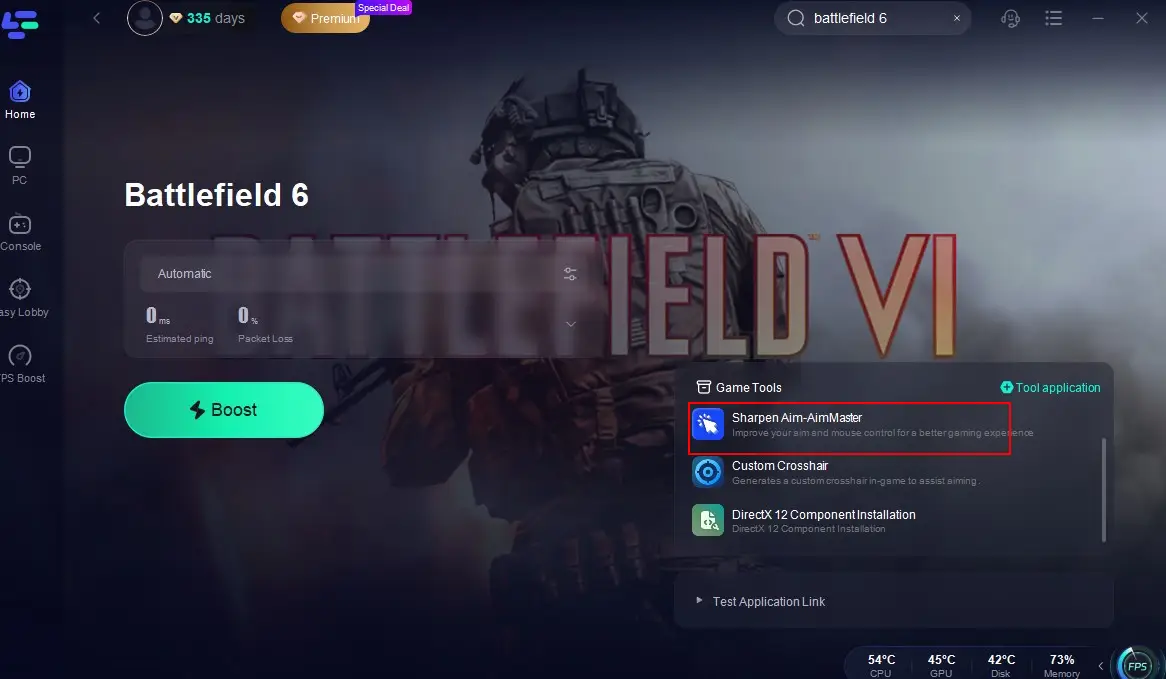
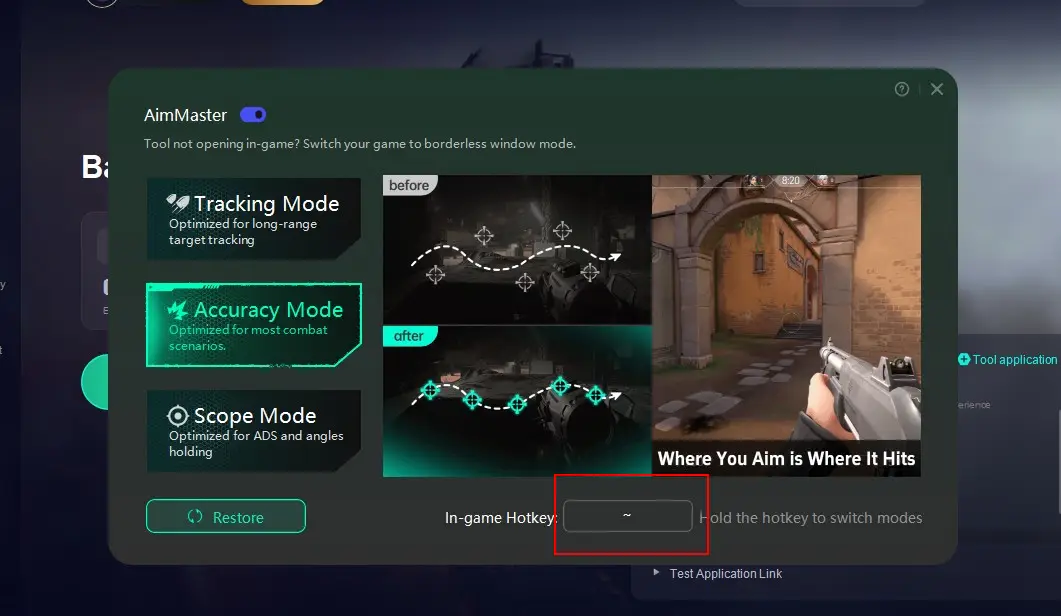
Choosing Your Mode:
- Tracking Mode: Optimized for long-range target tracking.
- Accuracy Mode: Ideal for standard combat encounters and medium-range duels.
- Scope Mode: Designed for ADS (Aim Down Sights) and holding tight angles.
Safety and Compliance:
No Injection or Macros: AimMaster only modifies Windows registry keys; it does not inject code, use macros, or hook into game processes.
Cheat-Free Guarantee: Because it doesn’t interact with the game client, AimMaster carries zero risk of cheat detection or account bans.
Custom Crosshair Tool
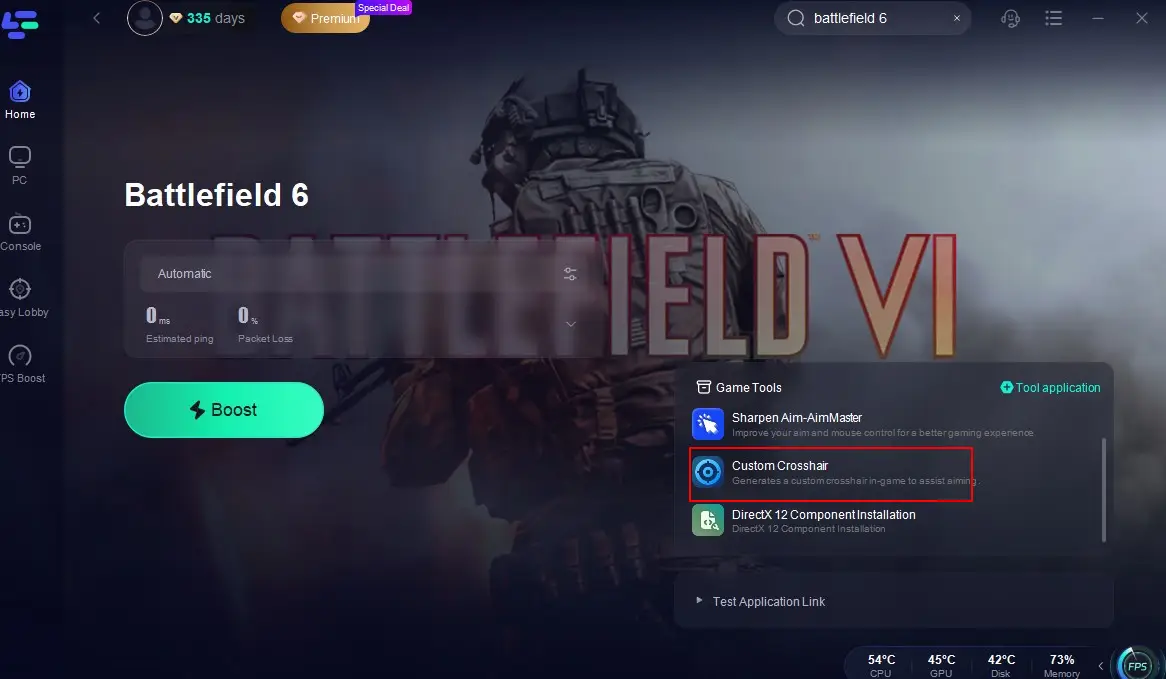
LagoFast also offers a Custom Crosshair tool, enhancing your aiming accuracy by providing a customizable crosshair overlay. This tool is particularly beneficial in games where the default crosshair may not suit your preferences or playstyle.
You May Also Want to Read: How to Solve Battlefield 6 Lag Issue
Conclusion
As Battlefield 6 progresses through its development stages, staying informed about server statuses and utilizing tools like LagoFast's Game Booster, AimMaster, and Custom Crosshair can significantly enhance your gaming experience. By proactively addressing connectivity issues and optimizing your setup, you'll be well-prepared to immerse yourself in the intense battles that Battlefield 6 promises to deliver.
Boost Your Game with LagoFast for Epic Speed
Play harder, faster. LagoFast game booster eliminates stutter and lags on PC, mobile, or Mac—win every match!
Quickly Reduce Game Lag and Ping!
Boost FPS for Smoother Gameplay!