
If you’re diving into Battlefield 6 this season, one crucial factor can make or break your experience — ping. No matter how skilled you are, lag can ruin every firefight. Understanding how server locations work and how to optimize your connection can help you stay competitive. This guide explains everything about Battlefield 6 Server Locations (Season 1), why server region matters, and how you can reduce lag by changing your connection route using a gaming VPN like LagoFast Game Booster.

- ✅ Reduce Lag and High Ping.
- ✅ Boost FPS at the Same Time.
- ✅ Support 2000+ Popular Online Games.
- ✅ Stop Stuck & Black Screen Issues.
- ✅ Ensure Stable Connections.
Part 1. Battlefield 6 Season 1 Server Locations
Part 2. Why Server Location Matters in Battlefield 6
Part 3. How to Change Server Location with a Gaming VPN — LagoFast
Part 1. Battlefield 6 Season 1 Server Locations
Battlefield 6 Season 1 uses a global server network designed to deliver low-latency connections across major regions. Players have reported servers in North America, Europe, Asia Pacific, South America, and Oceania.
Common regions include:
- North America — United States and Canada
- Europe — Western and Northern Europe
- Asia Pacific — Japan, Singapore, Hong Kong, and Australia
- South America — Brazil, Argentina, and nearby countries
Although the developer hasn’t released a detailed city-by-city list, these locations cover most active player bases around the world. That’s what we mean by Battlefield 6 Server Locations (Season 1) — the initial set of official servers available for matchmaking and live gameplay.
For the best results, always check which region your account is automatically connected to. Picking the nearest or most stable server can dramatically improve performance.
Part 2. Why Server Location Matters in Battlefield 6
Server location directly impacts your gameplay quality. Here’s why it’s so important:
Lower Ping = Faster Reactions
The farther you are from the server, the longer it takes for your actions to register. In a high-speed FPS like Battlefield 6, even a 50 ms difference can decide who wins the duel.
Reduced Packet Loss and Jitter
A closer server usually means fewer routing hops and less interference. That translates to smoother motion, fewer freezes, and no “rubber-banding.”
Fair Matchmaking
Players connected to nearby servers experience similar latency, keeping matches balanced. If you’re routed to a distant region, you’ll always be at a disadvantage.
Server Load and Stability
Some regions get overloaded during peak hours. Choosing another nearby region can help you avoid long queues and random disconnects.
Regional Availability
In areas without local servers, you’ll automatically connect to the nearest available one — which may still be several thousand kilometers away. That’s when tools to optimize routing become valuable.
In short, the closer your connection path to the Battlefield 6 server, the more stable and enjoyable your gameplay will be.
Part 3. How to Change Server Location with a Gaming VPN — LagoFast
If your ping is high or your server feels unstable, you can use a gaming VPN or latency-optimization tool to route traffic through a faster network path. LagoFast Game Booster is one of the most popular options among FPS players.
How to Change Server in Battlefield 6 with LagoFast:
Step 1: Click the free trial button below to download and install LagoFast at no cost.
Step 2: Launch LagoFast and enter Battlefield 6 in the search bar, then click on the search result.

Step 3: Click “Select Server” to choose the optimal server node, then click “Smart Boost” to start real-time optimization.

Step 4: After Smart Boost is activated, monitor your real-time packet loss and ping, then click “Start Game” to enjoy a crash-free Battlefield 6 experience.

In competitive titles like Battlefield 6, even small latency improvements can make the difference between victory and defeat. By using LagoFast Game Booster, you can virtually “move” closer to the server region, minimize lag, and ensure your commands register instantly.
More LagoFast Features for Battlefield 6 Players
1. One-Click Translation Tool for Battlefield 6
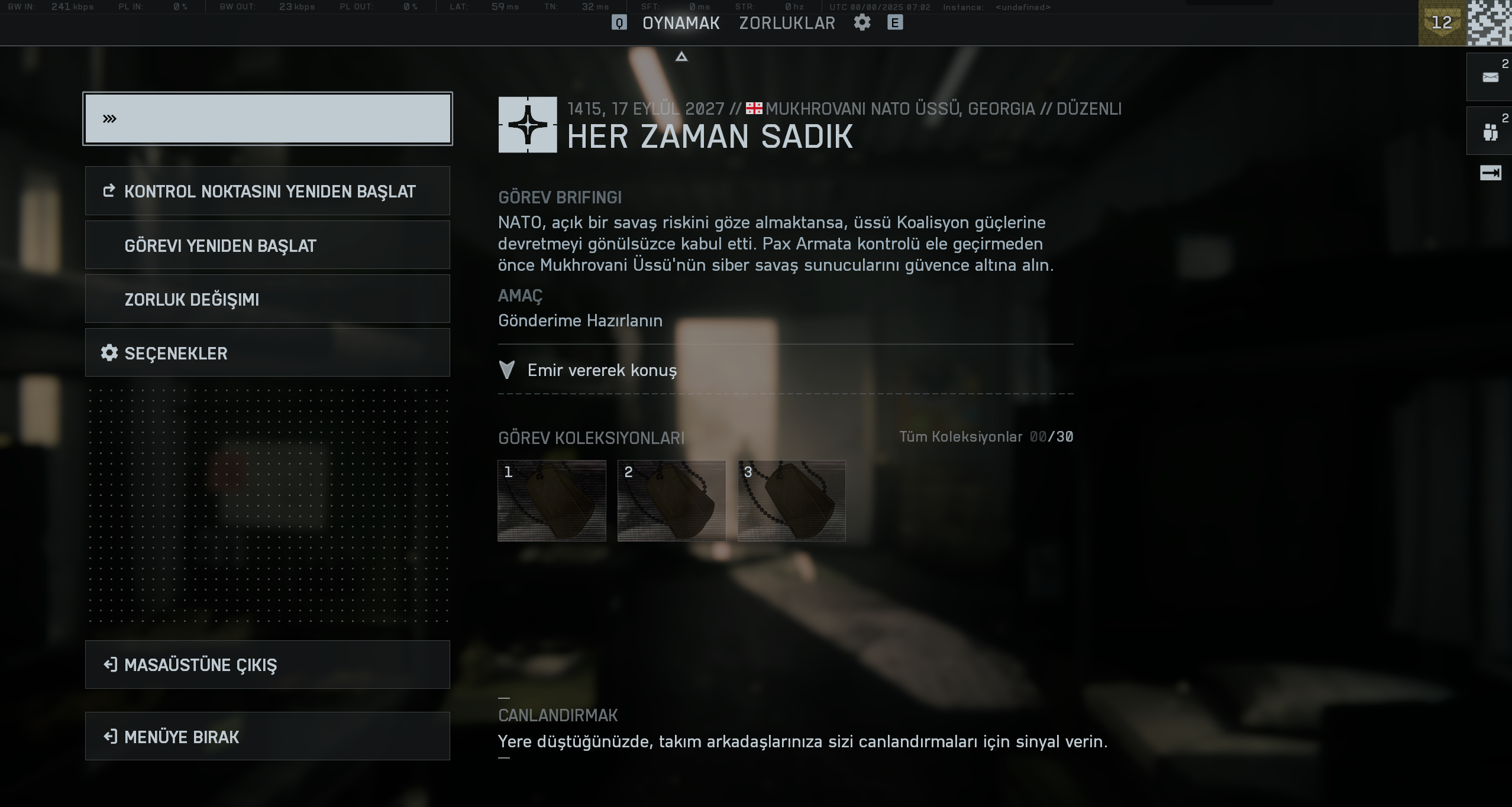
If you are a player from Russia or Turkey, language barriers might make it difficult to fully enjoy Battlefield 6, especially in Campaign Mode. LagoFast provides a one-click Battlefield 6 Game Translation Tool that allows you to translate the game interface into your native language, breaking down communication barriers and ensuring a smooth gaming experience.
How to use the translation tool:
Step 1: Click the Translation tool at the bottom right corner.
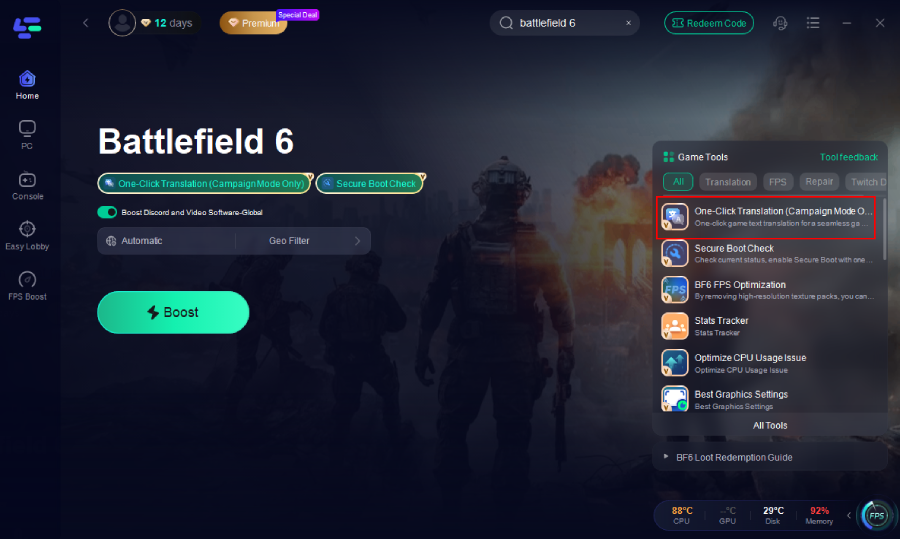
Step 2: Choose the game file path and install the translation file. The tool will automatically replace the in-game text with the translated version, seamlessly integrating it into the interface.

Step 3: Return to the game and click on the game screen to instantly get a translated version of your Battlefield 6 interface!
Russian
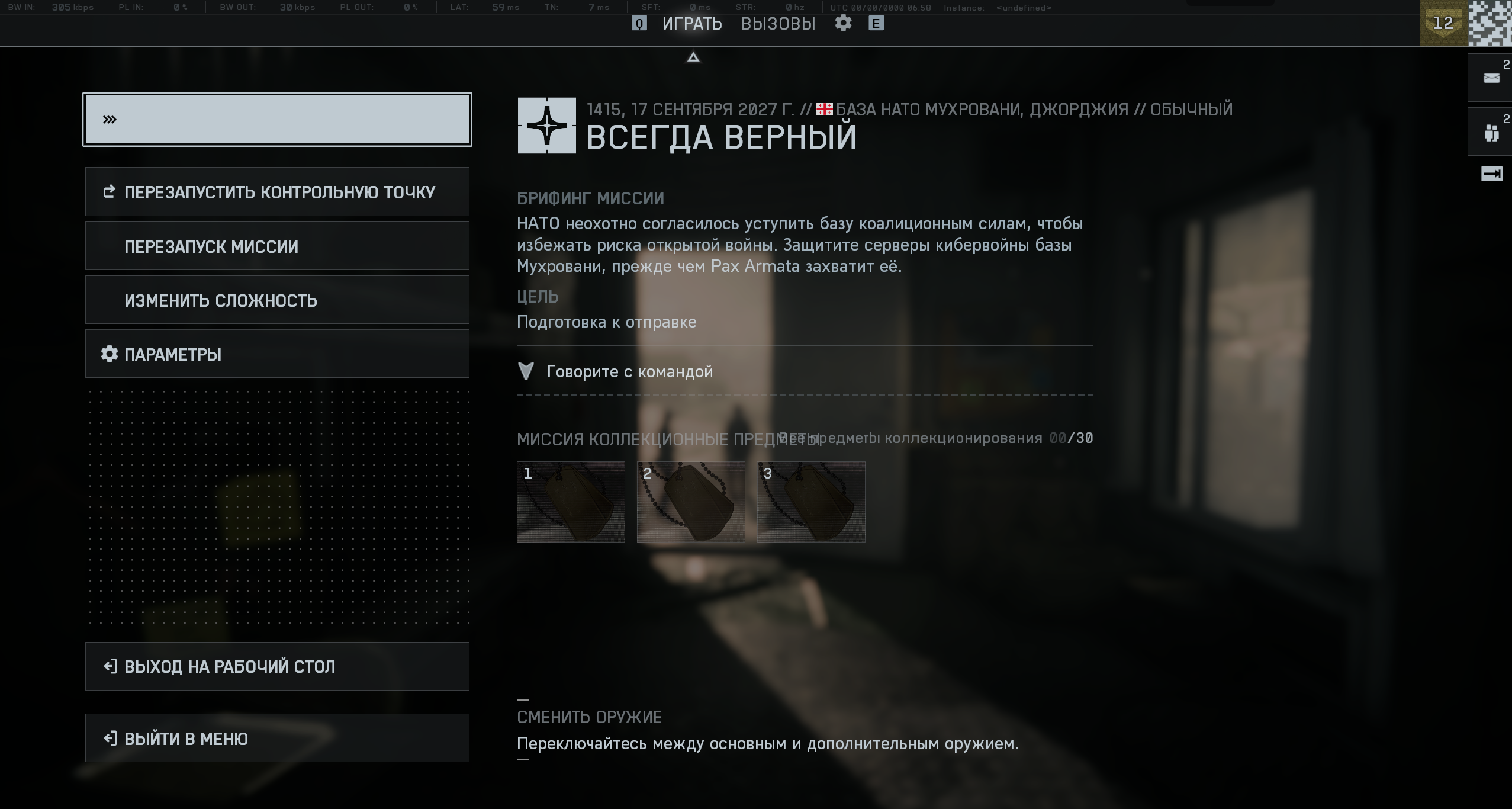
Turkey
2. FPS Boost 2.0 – Frame Generation for Smoother Gameplay
A stable network is essential, but performance inside your PC also matters. LagoFast’s FPS Boost 2.0 feature enhances in-game smoothness by optimizing CPU, GPU, and RAM usage while closing unnecessary background tasks.
During intense combat or explosions, this tool helps maintain stable frame rates and prevents micro-stutters. For players with mid-range PCs, FPS Boost 2.0 can even generate extra frames to deliver a smoother, high-refresh experience that feels closer to top-tier hardware performance.
Key benefits of FPS Boost 2.0 include:
- Higher and more stable frame rates in firefights
- Reduced screen tearing and input lag
- Better thermal management and lower power consumption
With network optimization plus frame-rate tuning, LagoFast helps both your ping and your performance stay consistent through every battle.
How to Use the tool:
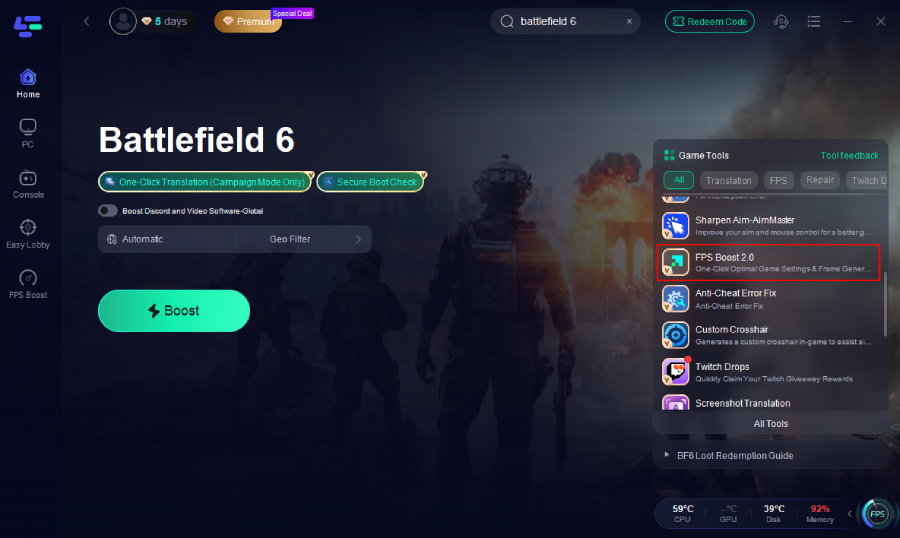
Step 1. Click the FPS Boost 2.0 tool on the right.
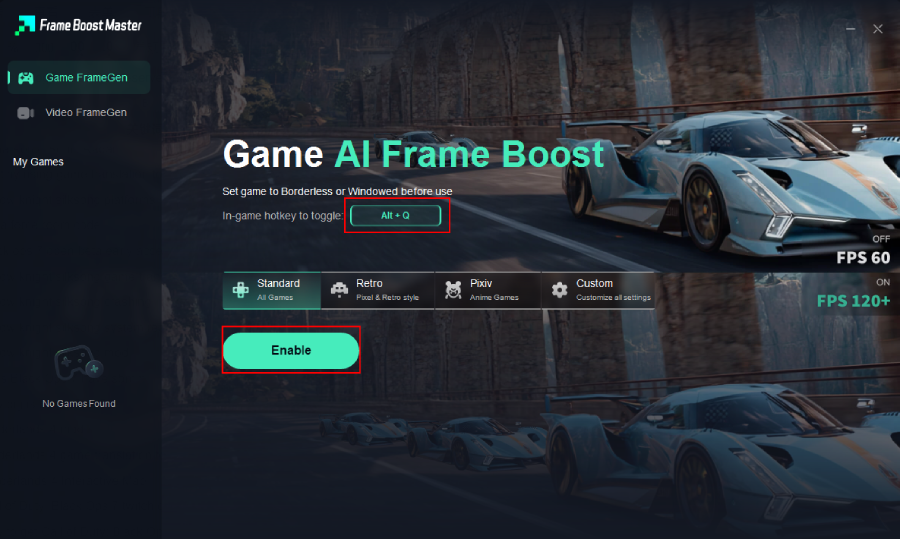
Step 2. Set up the hotkey and then click enable.
3. Secure Boot Tool – Fix Startup and Connection Errors
Battlefield 6 players occasionally encounter startup issues such as Secure Boot Errors or crashes during launch. LagoFast provides a Secure Boot Tool designed to detect and fix these problems quickly.
It scans your system for common conflicts, verifies required drivers, and ensures your security settings meet game requirements. This helps you avoid unexpected crashes or failed launches that often happen after system updates.
The Secure Boot Tool also protects your game integrity by preventing unauthorized interference during startup, so you can focus on gaming instead of troubleshooting system errors.
Run the Secure Boot check tool.
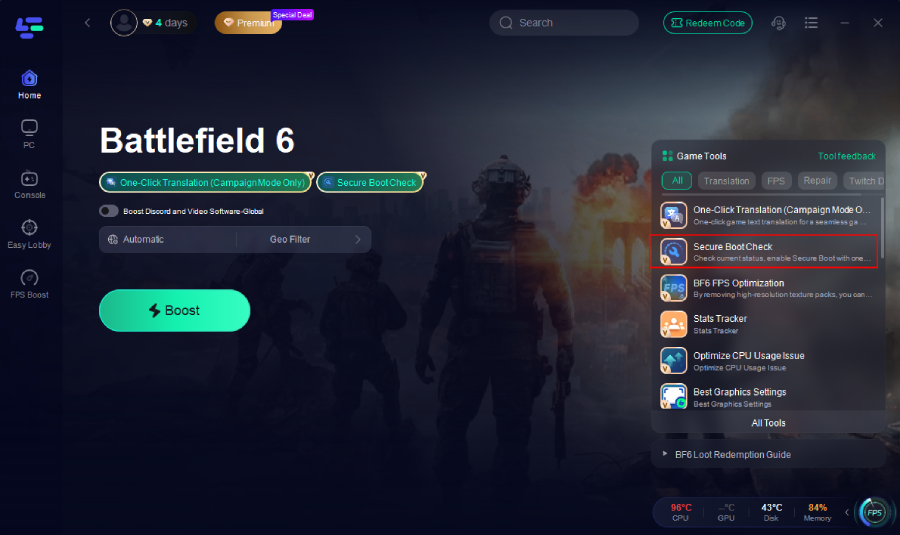
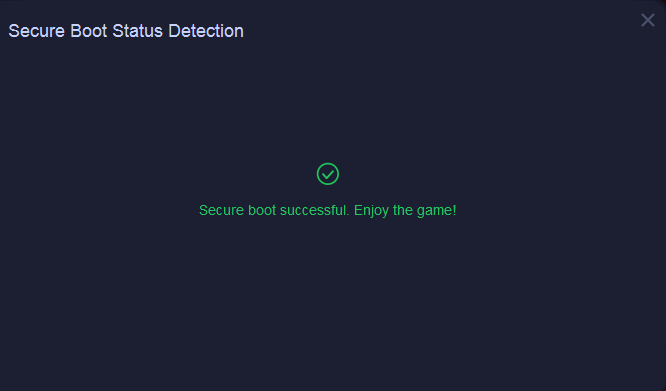
If Secure Boot is already enabled on your PC, the tool will display "Successful".
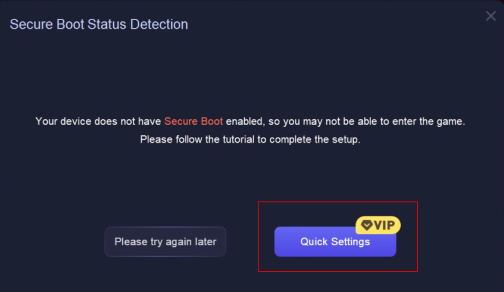
If not, it will notify you and provide a tutorial. Click “Quick Settings” to proceed.
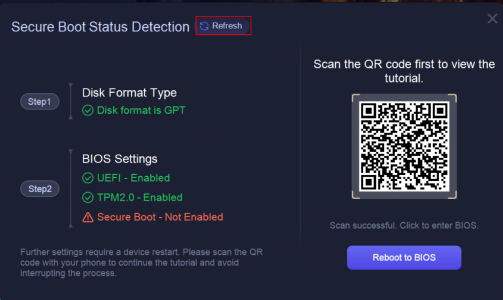
BIOS Settings (Secure Boot)
- Check BIOS settings: the tool will display the current status of UEFI, TPM 2.0, and Secure Boot.
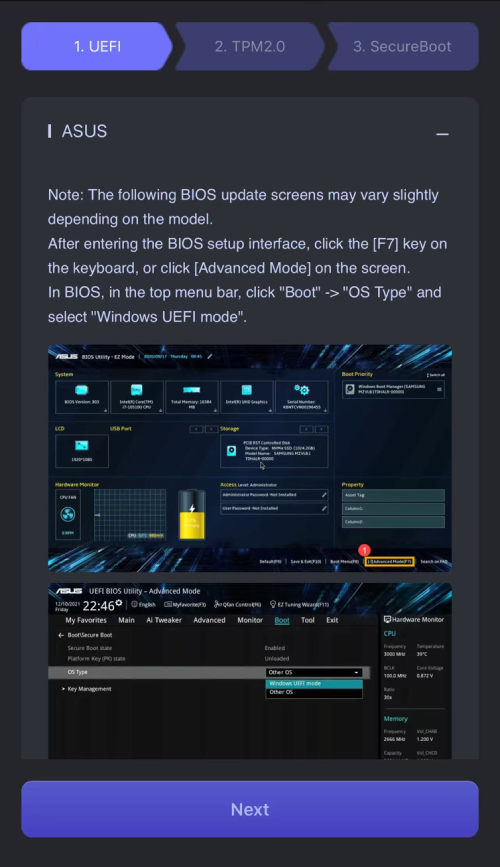
- If Secure Boot is not enabled, scan the QR code to view the model-specific tutorial, then click Reboot to BIOS and follow the instructions to enable it.
- After finishing, return to the tool and click Refresh to recheck the status.
Why LagoFast is the Complete Battlefield 6 Companion
Unlike ordinary VPNs, LagoFast goes beyond connection rerouting. It’s an all-in-one optimization suite that improves latency, boosts frame rate, enhances communication, and stabilizes your system environment. Whether you’re chasing competitive wins or just want smoother, hassle-free gameplay, LagoFast gives you the technical edge you need in Battlefield 6 Season 1.
Conclusion
Knowing your Battlefield 6 Server Locations (Season 1) and optimizing your connection route are essential steps toward better performance. Server distance affects latency, hit registration, and overall fairness in every match. With LagoFast Game Booster, you can fine-tune your connection to find the fastest route and enjoy smoother, more responsive gameplay.
Whether you’re competing in ranked matches or just want a stable session with friends, take a few minutes to check your server region and optimize your connection — because every millisecond counts on the battlefield.
Boost Your Game with LagoFast for Epic Speed
Play harder, faster. LagoFast game booster eliminates stutter and lags on PC, mobile, or Mac—win every match!
Quickly Reduce Game Lag and Ping!
Boost FPS for Smoother Gameplay!