
Battlefield 6 PC now requires Secure Boot to run, combined with EA's kernel-level Javelin Anti-Cheat system. This guide explains what Secure Boot is, how to enable it, and how to bypass it safely for a smooth gaming experience.

- ✅ Reduce Lag and High Ping.
- ✅ Boost FPS at the Same Time.
- ✅ Support 1000+ Popular Online Games.
- ✅ Support Easy Lobby in all Cod Games without Lag
Part 1: What is Battlefield 6 Secure Boot?
Part 2: How to Enable Battlefield 6 Secure Boot?
Part 3: How to Skip Secure Boot in Battlefield 6 Easily?
Part 1: What is Battlefield 6 Secure Boot?
Secure Boot is a UEFI firmware feature that verifies system integrity at startup. In Battlefield 6, it works with EA's Javelin Anti-Cheat to prevent cheating and unauthorized modifications.
Key elements of the security check include:
- Fair Play Enforcement Anti-cheat ensures no player uses exploits or unauthorized software.
- Startup Verification The game checks whether Windows Secure Boot is enabled. If it's off, Battlefield 6 will not launch.
During the Beta, all PC players needed Secure Boot enabled to maintain system integrity and fair play.
Part 2: How to Enable Battlefield 6 Secure Boot?
Many players face the “battlefield 6 secure boot not enabled” error because manually enabling Secure Boot can be tricky. Here's a step-by-step guide.
Secure Boot Tutorial for Battlefield 6:
- Check UEFI Mode Restart your PC and enter BIOS/UEFI (usually via F2 or F10). Make sure the boot mode is set to UEFI, not Legacy/CSM.
- Convert Disk to GPT if Needed If your OS drive uses MBR, use Microsoft's “mbr2gpt” tool to convert it to GPT. Backup your data first, as conversion is critical for UEFI boot.
- Enable Secure Boot in BIOS Navigate to Security > Secure Boot and set it to Enabled. Some motherboards require resetting factory keys first to activate Secure Boot properly.
- Verify TPM Status Press Windows Key + R, type “tpm.msc”, and confirm that TPM 2.0 is active. This is required for Secure Boot on Windows 11.
- Save and Reboot Save all BIOS changes and restart. Check in Windows to ensure Secure Boot is active.
Additional Tips
- Windows 11 requires both Secure Boot and TPM; disabling them may prevent Battlefield 6 from launching.
- Some motherboards only display the Secure Boot option after switching boot mode to UEFI.
- If dual-booting with Linux, enabling Secure Boot may cause boot issues—proceed carefully.
These steps can fail easily, especially for users unfamiliar with BIOS settings, and even small mistakes can prevent the game from launching.
Part 3: How to Skip Secure Boot in Battlefield 6 Easily?
For players who face difficulties enabling Secure Boot, LagoFast provides an automated Battlefield 6 secure boot error fix tool and a skip secure boot in Battlefield 6 option.
Why choose LagoFast?
LagoFast Offers:
- Secure Boot Automatic Detection Tool: Open the Battlefield 6 acceleration page and start boosting. The tool automatically checks Secure Boot status.
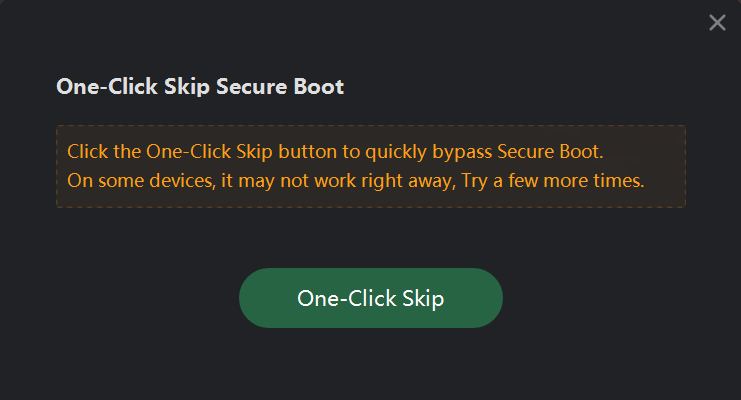
- One-Click Skip Secure Boot Tool: Players unable or unwilling to change BIOS settings can bypass Secure Boot entirely and launch the game instantly.
- Lag Reduction: Fine-tunes network pathways to minimize ping and packet loss, essential for staying competitive.
- FPS Boost: Shuts down unnecessary background tasks to free up system resources.
- Server Switching: Links you to the closest server for steadier, low-latency performance.
This system lets players either fix or skip Secure Boot quickly, avoiding BIOS complications and launch issues.
How to Use One-Click Skip Secure Boot Tool:
1. Click the Free Trial button below to get LagoFast.
2. After installation, launch LagoFast and search for Battlefield 6 in the search bar.

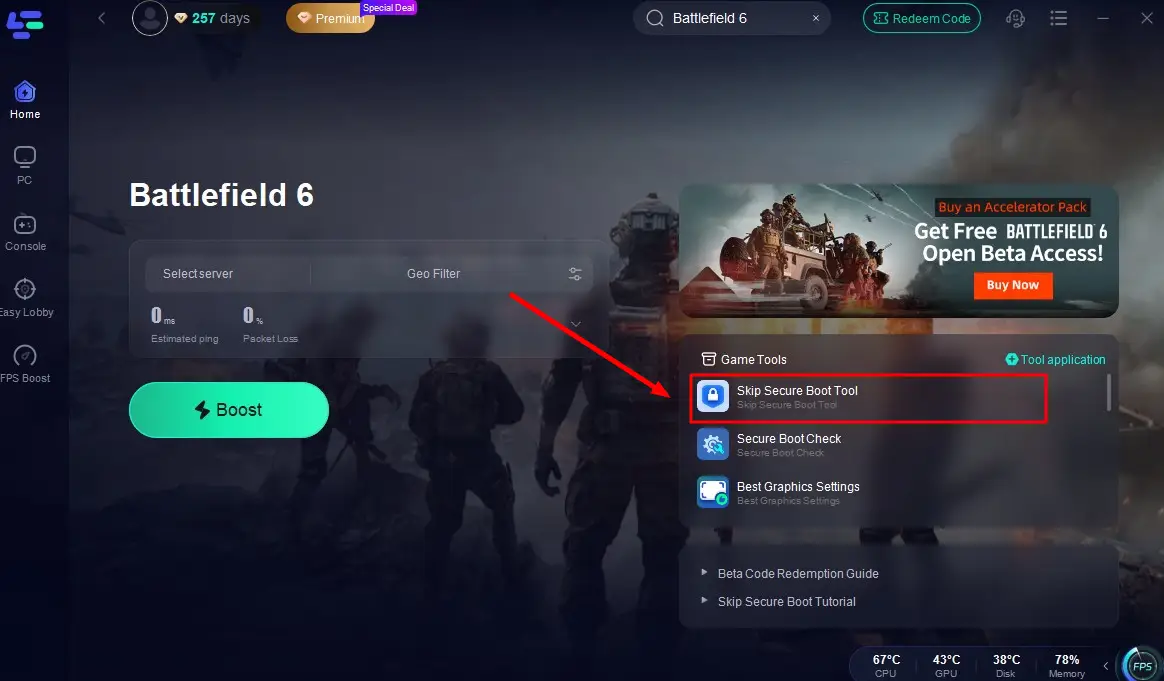
3. Click the Secure Boot Check Tool button in the bottom right corner to bypass verification in one click and enjoy a smooth entry into the game!
How to Use Battlefield 6 Secure Boot Automatic Detection Tool:
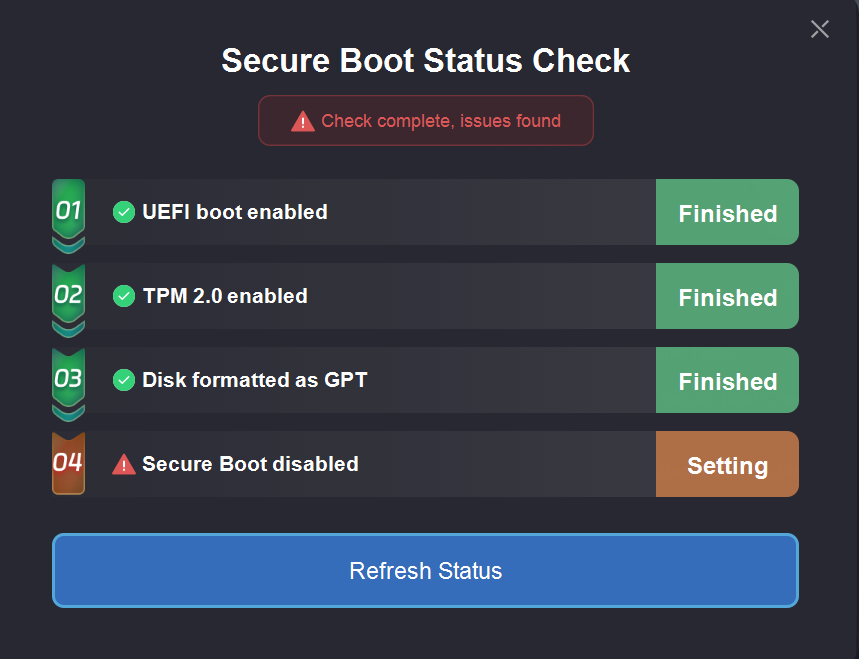
LagoFast can help automatically check your Secure Boot status. With this tool, players can monitor every step of the Secure Boot process in real time and clearly identify at which step a Secure Boot error occurs.
The updated tool runs four quick checks to pinpoint issues:
- UEFI Mode – Ensures the system is in UEFI, not Legacy.
- TPM 2.0 – Confirms TPM 2.0 is enabled.
- GPT Format – Verifies the system drive uses GPT.
- Secure Boot – Checks if Secure Boot is active.
If a step fails, the tool links to a tutorial for manual fixes.
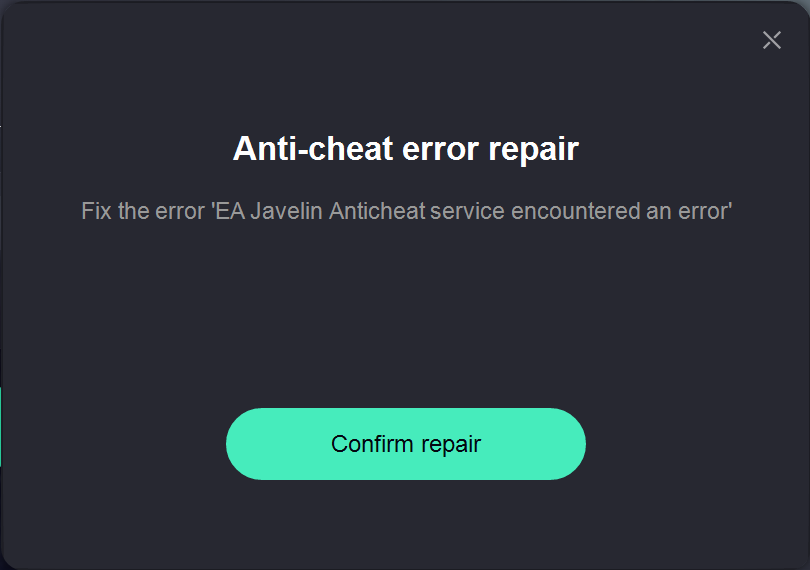
After enabling Secure Boot, some players may still encounter issues with EA's Javelin Anti-Cheat system, preventing Battlefield 6 from launching. To address this, LagoFast offers an automated detection and repair tool that quickly identifies anti-cheat errors and fixes them without manual effort.
How to Use Integrated Anti-Cheat Error Fix Tool:
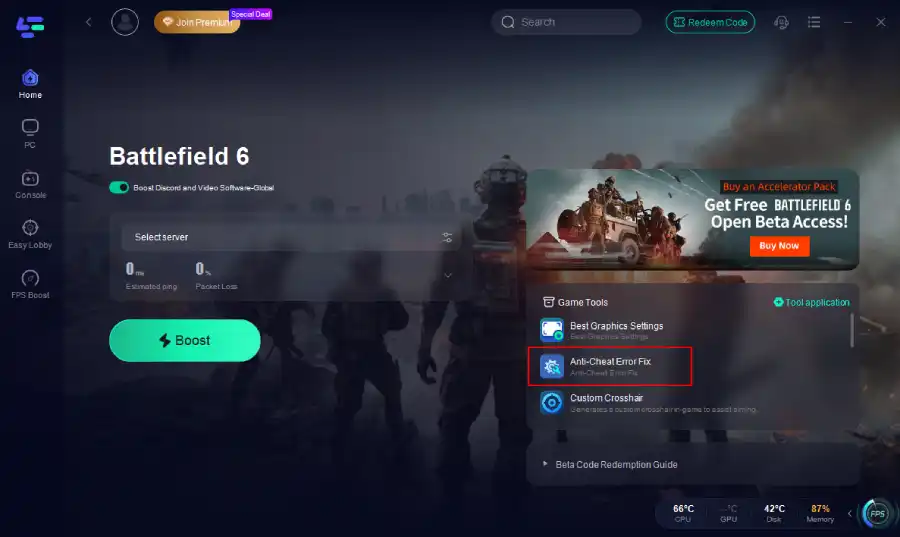
Install and launch LagoFast and enter "Battlefield 6" into the search bar, then click the search result. Click the Anti-Cheat Error Fix tool at the bottom right corner.
Click "confirm repair". Then you can enjoy a smooth gameplay in Battlefield 6.
How to Set Up LagoFast for Battlefield 6 to Reduce Ping:
Step 1: Click the button below to get LagoFast froe free, then complete installation.
Step 2: Find Battlefield 6 by LagoFast's search bar.

Step 3: Find Battlefield 6 and click “Select Server” to choose a stable server in your region

Step 4: Click “Smart Boost” to begin optimization and monitor your ping, packet loss, and connection in real time

Conclusion
Secure Boot in Battlefield 6 ensures fair play and system security. While manual setup can be tricky, using LagoFast's Battlefield 6 secure boot error fix tool allows fast detection, guided fixes, or a one-click skip. Players can quickly enter the game and enjoy uninterrupted gameplay.

Boost Your Game with LagoFast for Epic Speed
Play harder, faster. LagoFast game booster eliminates stutter and lags on PC, mobile, or Mac—win every match!
Quickly Reduce Game Lag and Ping!
Boost FPS for Smoother Gameplay!