

“Do I still need to enable Secure Boot to play REDSEC? I didn’t get the game because BIOS changes could brick my PC. Does REDSEC require the same risk?”
The answer is yes and no. Technically, Secure Boot can be enabled when the system is in user mode, but the process can be confusing and risky, especially if you are not familiar with BIOS settings.

- ✅ Reduce Lag and High Ping.
- ✅ Boost FPS at the Same Time.
- ✅ Support 2000+ Popular Online Games.
- ✅ Change Server without Latency.
- ✅ End Connection & Stuck Issues.
Part 1: Battlefield 6 REDSEC Secure Boot Explained
Part 2: Why Secure Boot Matters for Battlefield 6 REDSEC
Part 3: Why Gigabyte Users Struggle with Secure Boot
Part 4: Best Way to Solve Battlefield 6 REDSEC Secure Boot Error
Part 1: Battlefield 6 REDSEC Secure Boot Explained
Before tackling the issues many players face, it’s important to understand Secure Boot.
What is Secure Boot?
Secure Boot is a security feature in modern UEFI firmware that protects your PC during startup. It ensures only software signed with trusted certificates can load, preventing malware or unauthorized modifications.
How Secure Boot Works:
- When you power on your PC, UEFI firmware checks the bootloader’s digital signature.
- If the bootloader is trusted, the system starts normally.
- If it’s unrecognized or tampered with, the system stops it from loading.
Games like Battlefield 6 REDSEC require Secure Boot because their anti-cheat systems need a secure environment to prevent tampering and ensure fair play.
Part 2: Why Secure Boot Matters for Battlefield 6 REDSEC
Secure Boot is essential for REDSEC mode, but it can also create challenges for players. Here’s why:
- Essential Protection for Anti-Cheat Systems
REDSEC relies on Secure Boot to ensure a protected environment. This prevents tampering and ensures fair gameplay. - Varied System Handling
Not all PCs manage Secure Boot the same way. Minor misconfigurations can prevent REDSEC from launching. - Hardware-Specific Challenges
Certain setups, especially Gigabyte motherboards, are more prone to issues when Secure Boot isn’t correctly configured. - Player Hesitation
Due to the potential risks and complexity, many casual players avoid enabling Secure Boot, delaying or preventing them from accessing REDSEC mode.
Part 3: Why Gigabyte Users Struggle with Secure Boot
For Gigabyte motherboard users, enabling Secure Boot can feel like navigating a minefield. Community discussions reveal common frustrations:
- Complicated BIOS Navigation: Entering BIOS and finding Secure Boot options isn’t intuitive.
- Drive Conversion Risks: Switching boot modes may require converting drives or reinstalling Windows.
- High Risk of Errors: Many players report blue screens, system crashes, or data loss when trying to enable Secure Boot manually.
“I just want to play REDSEC, but I’m terrified of bricking my PC. Why should I take this risk just to play a mode?”
These concerns have made many casual players avoid REDSEC entirely. Even experienced users feel the process is risky and unnecessarily complex.
How to enable secure boot Gigabyte Battlefield 6 REDSEC
Enabling Secure Boot on a Gigabyte motherboard can be tricky for casual players, but it’s necessary for REDSEC’s anti-cheat system to function properly. Here’s what you need to know:
1. Access BIOS Carefully
- Restart your PC and press Del or F2 (depending on your motherboard) to enter BIOS.
- Navigate to the BIOS settings carefully, as incorrect changes can cause system issues.
2. Locate Secure Boot Options
- On Gigabyte motherboards, Secure Boot is usually under BIOS > Boot > Secure Boot.
- Make sure the system is in User Mode, not Setup Mode, to safely enable Secure Boot without interfering with your Windows installation.
3. Check Boot Drive Compatibility
- Enabling Secure Boot may require your boot drive to be in UEFI mode.
- Some users need to convert drives from MBR to GPT. This process can be risky, so back up important data beforehand.
4. Save Settings and Reboot
- After enabling Secure Boot, save changes and restart.
- If the system fails to boot, you may need to revert settings or use recovery tools.
Part 4: Best Way to Solve Battlefield 6 REDSEC Secure Boot Error
LagoFast is a powerful PC optimization and troubleshooting tool designed specifically for gamers. It not only helps manage Secure Boot requirements for Battlefield 6 REDSEC but also improves overall gaming performance by reducing ping, stabilizing network connections, and boosting FPS. With LagoFast, even users who are not tech-savvy can safely ensure their system meets security requirements without manually navigating BIOS, avoiding the risks of system crashes, blue screens, or data loss.
Key LagoFast Tools:
1. Automatic Secure Boot Checker
LagoFast silently detects your system’s Secure Boot status and guides you to enable it if needed. This ensures your PC meets the security requirements for REDSEC, providing a smoother, accelerated, and hassle-free gameplay experience—even on Gigabyte motherboards.
Here’s how to use LagoFast’s Battlefield 6 REDSEC Secure Boot Checker tool:
Step 1: Begin by clicking the Free Trial button to download and install LagoFast.
Step 2: Open LagoFast and use the search bar to Battlefield 6.

Step: On the right panel, click Secure Boot to automatically detect and fix any Secure Boot issues.
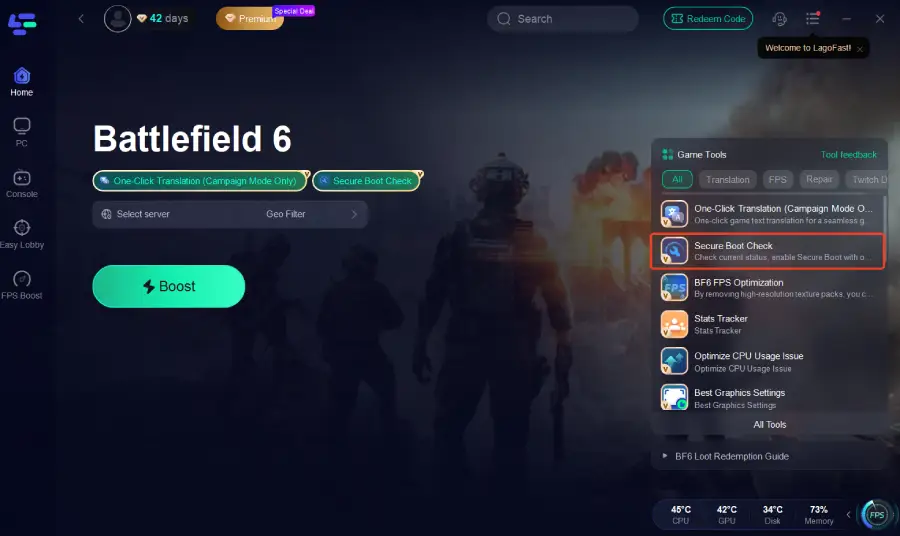
Step 4: Select the best server or route for your region to ensure optimal stability.

Step 5: Optimize network settings—LagoFast will automatically select the best connection path to minimize lag, packet loss, and high latency for smoother gameplay.

2. Anti-cheat Error Fix
- Automatically repairs REDSEC-related launch errors
- Minimizes crash risks and prevents potential data corruption
- Ensures smoother gameplay and more stable system performance
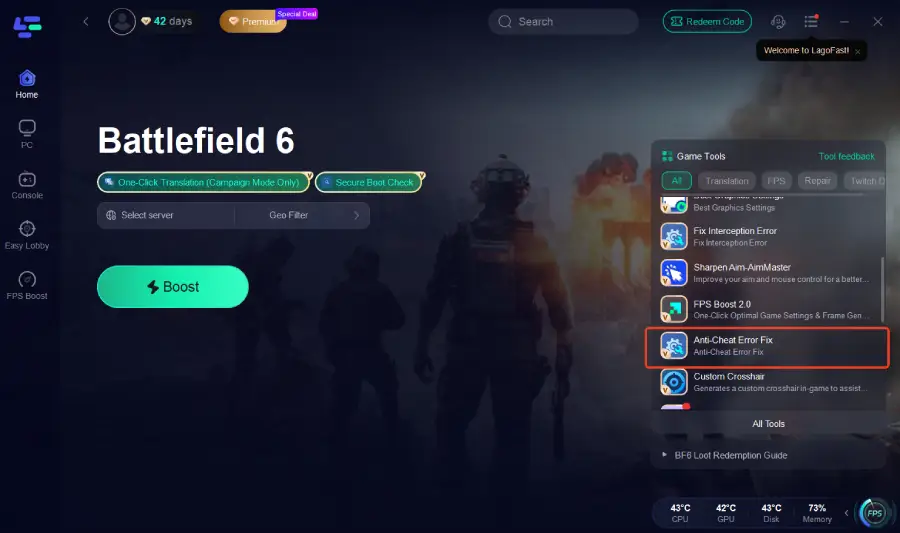
This tool ensures that even if your system encounters launch errors or conflicts, REDSEC will run smoothly, giving you a stable and reliable gaming experience.
Part 5: FAQs
Q1: Do I absolutely need Secure Boot to play REDSEC?
A: Technically, REDSEC works best with Secure Boot enabled because the anti-cheat system relies on a secure environment. However, if Secure Boot is already enabled in user mode, you can play without additional BIOS changes.
Q2: Can enabling Secure Boot brick my PC?
A: If done incorrectly through BIOS, there is a risk of system errors. That’s why tools like LagoFast are recommended—they safely manage Secure Boot without manually modifying BIOS.
Q3: Will LagoFast improve my REDSEC gameplay beyond Secure Boot?
A: Yes. While its main function is fixing Secure Boot and launch errors, LagoFast also optimizes network paths and stabilizes connections, helping reduce lag, packet loss, and high latency.
Q4: Can casual players use LagoFast without technical knowledge?
A: Absolutely. LagoFast is designed for one-click operations, making it safe and convenient for players of all experience levels.
Conclusion
Battlefield 6 REDSEC is an exciting mode, but many players struggle due to Secure Boot requirements and complex BIOS settings, especially on Gigabyte motherboards. With LagoFast, you can safely check and enable Secure Boot in user mode, automatically fix launch errors, and ensure stable, smooth gameplay without risking system crashes or data loss. By handling these technical barriers, LagoFast allows both casual and experienced gamers to enjoy REDSEC hassle-free, focusing on the game rather than worrying about system issues.

Boost Your Game with LagoFast for Epic Speed
Play harder, faster. LagoFast game booster eliminates stutter and lags on PC, mobile, or Mac—win every match!
Quickly Reduce Game Lag and Ping!
Boost FPS for Smoother Gameplay!