
Battlefield 6 has officially launched worldwide, attracting millions of players within hours. If you’ve tried logging in and encountered Battlefield 6 servers full, you’re not alone. Massive demand at launch has created Battlefield 6 login queues for many players. Here’s everything you need to know and how to bypass full servers to start playing without long waits.
Russia Version: Очередь на вход в ранний доступ бета тестирование Battlefield 6
Korean Version: Battlefield 6 로그인 대기열 – 가장 먼저 접속하는 방법
German Version: Battlefield 6 Login-Warteschlange

- ✅ Reduce Lag and High Ping.
- ✅ Boost FPS at the Same Time.
- ✅ Support 2000+ Popular Online Games.
- ✅ End Stuck & Black Screen Issues.
Why are Battlefield 6 Servers Full & Battlefield 6 not currently available
- Huge Launch Rush – Millions of players worldwide caused servers to reach capacity quickly.
- Dynamic Matchmaking – Servers are created on-demand, which can cause temporary delays.
- Regional Overload – Europe and North America often hit capacity first.
- Gradual Scaling – EA gradually increases server availability after launch.
- Popular Community Servers – Portal servers attract extra players, adding to the load.
How the Battlefield 6 Login Queue Works
When a server reaches capacity, players are automatically placed in a login queue.
- Your position is shown and updated in real-time.
- As players leave matches, you move up in the queue.
- Restarting matchmaking may help you join faster.
- Wait times during peak hours can range from 10–30 minutes.
How to Bypass Full Servers in Battlefield 6
If you’re seeing Battlefield 6 servers full, here are proven methods to get into a match faster:
1. Refresh the Server Browser
Open Server Browser → All → Refresh to reload available servers.
Manual refresh often reveals free slots that were previously hidden.
2. Switch Server Region
Go to Options → Gameplay → Matchmaking Region.
Try Europe, North America, or Asia to find less crowded servers and lower ping.
3. Play During Off-Peak Hours
Avoid peak times between 6 PM–11 PM local time.
Early mornings or midday often have more available servers.
4. Restart the Game and EA App
Close Battlefield 6 and restart the EA App (or Steam).
This clears the matchmaking cache and often resolves queue issues.
5. Use a Game Booster (Recommended)
LagoFast Game Booster optimizes ping and packet loss, helping you join servers that appear full.
Features:
- Optimizes ping & reduces packet loss
- Minimizes lag and disconnects
- Supports Battlefield 6 and 2,500+ other games
How to Use LagoFast:
Download and launch LagoFast (Free Trial available).
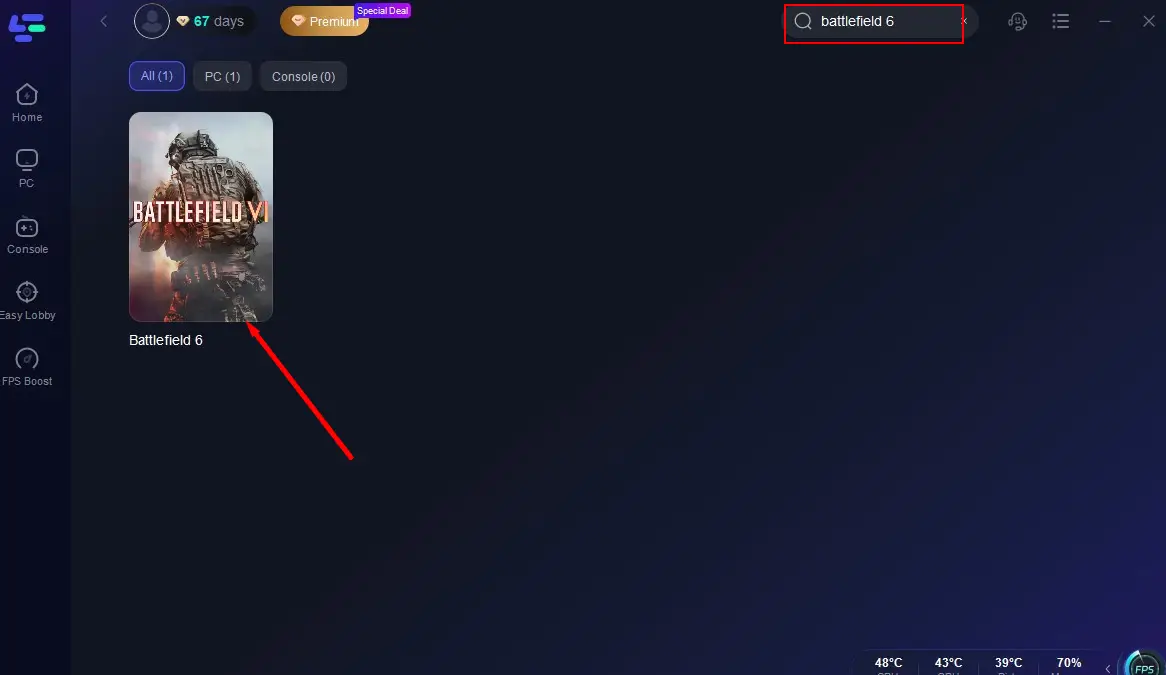
Click the PC icon, search for Battlefield 6, and select it.
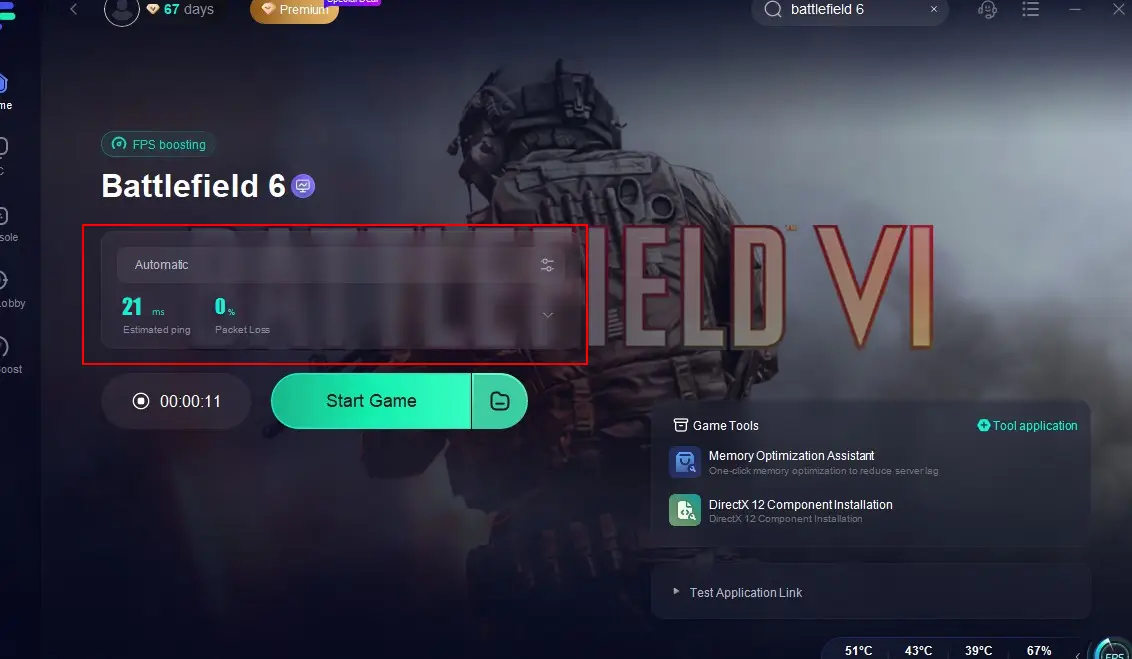
Click “Select Server” to switch to a better server, then click “Smart Boost.”

Check ping, packet loss, and multipath connection, then click “Start Game.”
6. Join Friends
If a friend is in a match, use Friends List → Join Game.
The system may automatically find an available slot for you.
7. Check for Updates
Make sure Battlefield 6 is updated and EA servers are online (EA Help Server Status).
Tips for Battlefield 6 Beta Players
Although there’s no official way to skip the queue during Beta, you can maximize your chances:
1. Join at the Right Time
- For Closed Beta, make sure to log in right at 11:00 AM Moscow Time on August 7.
- For Open Beta, be ready when it starts at midnight Pacific / 3:00 AM Eastern / 10:00 AM Moscow on August 9.
2. Use a Beta Key (if you have one)
- Players with Twitch Drops or creator-distributed keys are guaranteed earlier access.
How to Get Free Battlefield 6 Beta Key with LagoFast
For guaranteed early access, LagoFast’s membership promotion is the fastest and most reliable path. Perfect for players who want to skip the wait, unlock early access, and jump into the action without missing a thing.
- Buy a 3-month LagoFast membership through the limited-time Special Offer and receive:
- Built-in Twitch Drops tool that automatically detects and claims drops—no need to manually track streams
If you're looking to secure Twitch Drops for Battlefield 6 without spending hours watching live streams, LagoFast Game Booster offers a convenient solution.
Step 1: Click the Free Trial button to download and install LagoFast. Search for Battlefield 6 and click on it.
Step 2: Click the Twitch Drops Tool in the bottom-right corner of the page.
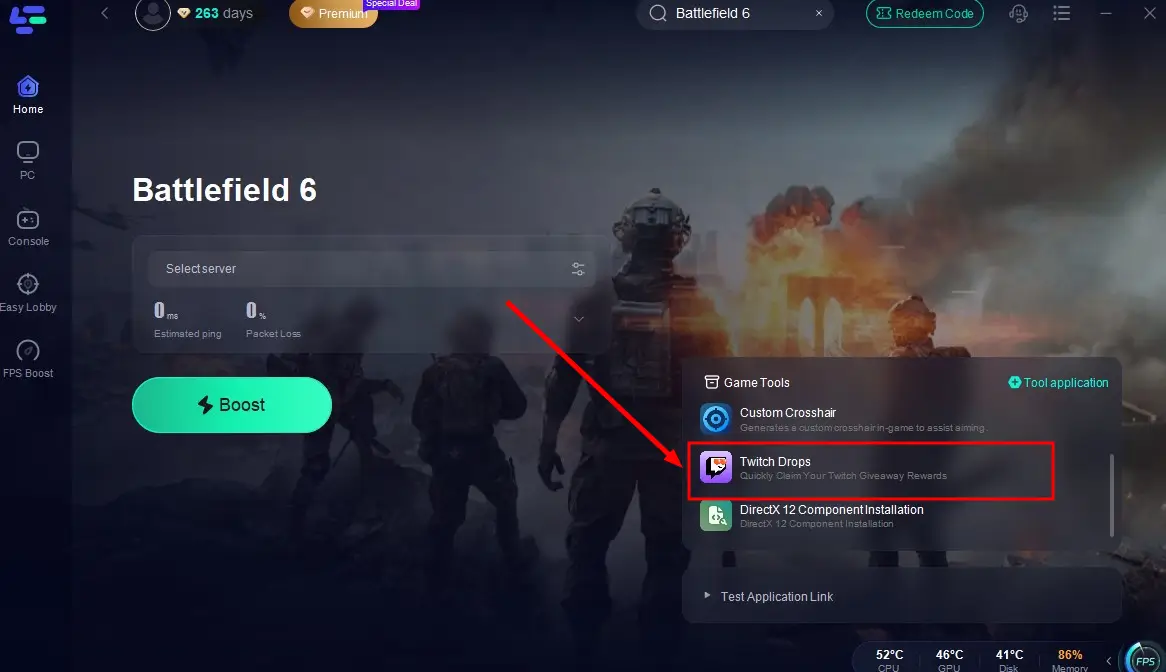
Step 3: In the pop-up window, search for Battlefield 6 again, click the Join button on the right, and link your account. Once set up, you’ll automatically earn rewards from any Battlefield 6 creator’s stream!
3. Use a Game Booster with Stable Routes
Some players use tools like LagoFast to reduce connection instability during login windows, helping avoid disconnection from long queues.
Tutorial to use LagoFast to Play Battlefield 6 with a Stable Connection:
Step 1: Click the Free Trial button to download and install LagoFast.
Step 2: Open LagoFast, then click the PC button on the left and search Battlefield 6 in the search bar, click it after it appears.
Step 3: Click on "Select Server" to change to a better server that ensures a smooth gaming experience in Playtest, then click on "Smart Boost".
Step 4: Check the specific game ping, packet loss, and multiple path connection on the right side. Finally, click the "Start Game" to play the game.
4. Don’t Launch Too Early
Launching the game before servers open won’t help — it only puts you in a fake queue. Wait for the official launch hour.
Final Thoughts
Battlefield 6 login queues and full servers are a result of high player demand and gradual server scaling. By following these steps, including using a game booster like LagoFast, you can bypass full servers and enjoy smoother gameplay. Plan your login time, select the right server region, and you’ll be in the action faster.

Boost Your Game with LagoFast for Epic Speed
Play harder, faster. LagoFast game booster eliminates stutter and lags on PC, mobile, or Mac—win every match!
Quickly Reduce Game Lag and Ping!
Boost FPS for Smoother Gameplay!