
If you’ve been hyped for Battlefield 6’s open beta (kicking off August 9th! ) but hit a roadblock with the EA Javelin Anticheat error, you’re not alone. This frustrating issue—often accompanied by messages like “Secure Boot is not enabled” or “Javelin Anticheat service encountered a system error”—can block you from joining the action. Let’s break down why this happens and how to fix it, including a game-changing tool from LagoFast designed to tackle it head-on.
German Version: Wie man den EA Javelin Anti-Cheat Fehler in Battlefield 6 behebt – Einfache Lösungen
Korean Version: Battlefield 6 EA Javelin Anticheat 오류 수정: 해결 방법
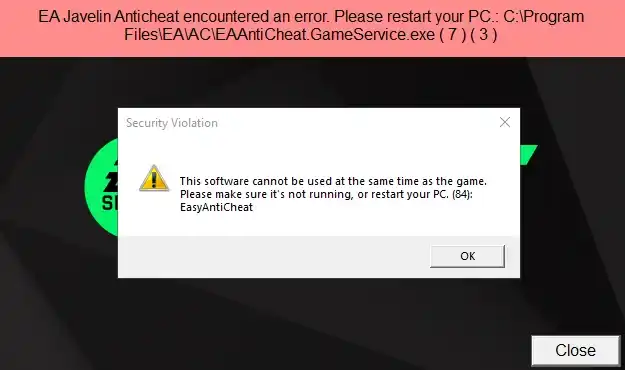
Part 1: What is the EA Javelin Anticheat Error in Battlefield 6?
Part 2: Effective Fixes for Battlefield 6 EA Javelin Anticheat Errors
Part 3: Enhance Your Battlefield 6 Experience with LagoFast
Part 1: What is the EA Javelin Anticheat Error in Battlefield 6?
The EA Javelin Anticheat is EA’s proprietary anti-cheat system, built to block hacks, memory manipulation, and kernel-level cheats in Battlefield 6 . However, it’s notoriously picky about system configurations. Common triggers include:
- Secure Boot Disabled: A mandatory requirement for Battlefield 6 on Windows 10/11. Without it, Javelin can’t verify system integrity .
- Driver or Software Conflicts: Outdated GPU drivers, antivirus software (e.g., Bitdefender), or background tools like RGB controllers may interfere .
- Corrupted Game Files: Broken anti-cheat files or incomplete game installations.
- TPM 2.0 Issues: The Trusted Platform Module (TPM) is linked to Secure Boot and Javelin’s operation .
Players often see errors like “Error 55” or “Service initialization failed” when these conditions aren’t met. Now, let’s dive into solutions.
Part 2: Effective Fixes for Battlefield 6 EA Javelin Anticheat Errors
1. LagoFast Anti-Cheat Error Fix Tool: The Quickest Solution
Tired of manually tweaking BIOS settings or troubleshooting drivers? LagoFast’s Anti-Cheat Error Fix Tool is tailor-made for this problem.
It's a one-click resolution. It automatically detects and fixes Secure Boot issues, driver conflicts, and anti-cheat service errors, which helps you skip the hassle of BIOS navigation or registry edits. While resolving the error, it also reduces lag, boosts FPS, and stabilizes your connection.
Download LagoFast for Battlefield 6 and launch the tool before starting the game. It’ll handle the heavy lifting so you can focus on gameplay.
Step 1: Click the "Free Trial" button to download and install LagoFast
Step 2: Once installed, launch LagoFast and enter "Battlefield 6" into the search bar, then click the search result

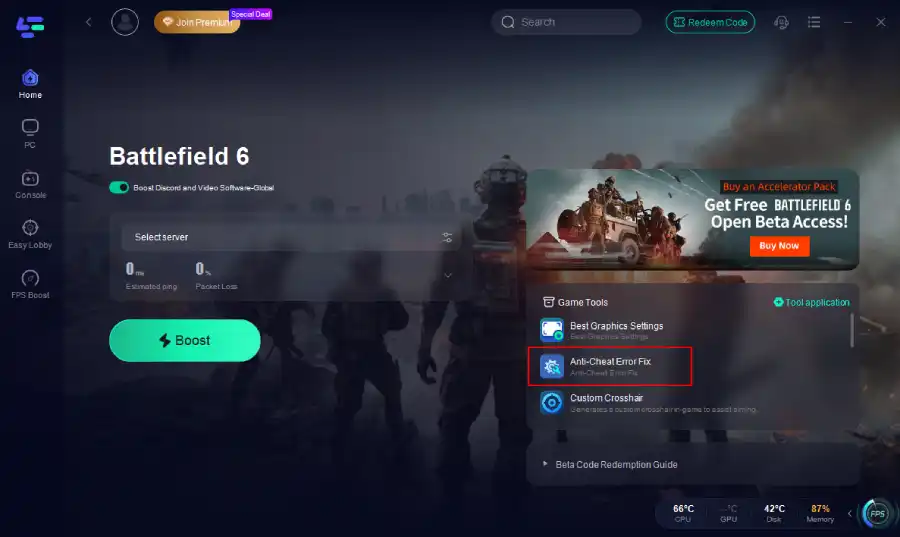
Step 3: Click the Anti-Cheat Error Fix tool at the bottom right corner.
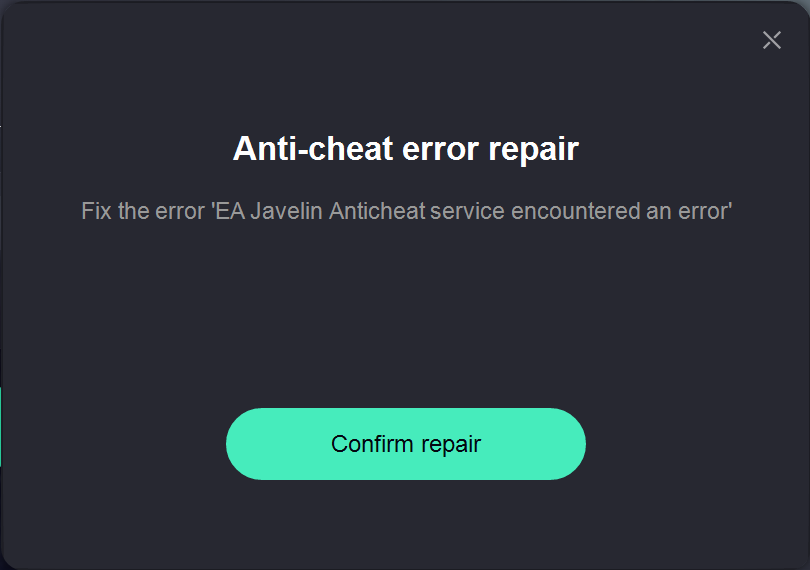
Step 4: Click confirm.
2. Enable Secure Boot (Manual Method)
If you prefer DIY fixes, here’s how to enable Secure Boot :
- Check UEFI Mode: Restart your PC, enter BIOS/UEFI (usually via F2/F10), and ensure UEFI boot mode is enabled (not Legacy/CSM).
- Convert Disk to GPT: Use Microsoft’s mbr2gpt tool to convert your OS drive from MBR to GPT (back up data first!).
- Enable Secure Boot: In BIOS, navigate to Security > Secure Boot and set it to Enabled. Some motherboards require resetting factory keys first.
- Verify TPM: Press Windows Key + R, type tpm.msc, and ensure TPM 2.0 is active.
3. Update Drivers and Disable Conflicting Software
- Update GPU Drivers: Use GeForce Experience (NVIDIA) or AMD Software to install the latest drivers .
- Temporarily Disable Antivirus: Programs like Bitdefender or Windows Defender may flag Javelin. Add exceptions for EAAC.exe and Battlefield6.exe .
- Close Background Apps: Tools like MSI Afterburner or Discord overlay can interfere. Kill them via Task Manager.
4. Repair/Reinstall EA Javelin Anticheat
- Repair via EA App: Right-click Battlefield 6 in your library > Manage > Repair.
- Reinstall Anticheat: Download the EA Anticheat Installer here and run it as administrator.
- Verify Game Files: On Steam/EA App, check for corrupted files under Properties > Local Files.
5. Disable Non-Essential Services
Press Windows Key + R, type services.msc, and disable Epic Games Launcher or EasyAntiCheat services if running. These can conflict with Javelin .
Part 3: Enhance Your Battlefield 6 Experience with LagoFast
Beyond fixing anticheat errors, LagoFast is your all-in-one tool for seamless gameplay:
Optimize Gaming Experience
- Lag Reduction: Optimizes network routes to slash ping and packet loss, critical for competitive matches.
- FPS Boost: Automatically closes background processes hogging resources.
- Server Switching: Connect to the nearest server for smoother, low-latency gameplay.
Click the "Free Trial" button to download LagoFast.
Use the search bar to find Battlefield 6 and click on the search result.
Choose the best server location based on your geographical area and desired gaming performance, then click "Smart Boost" to initiate real-time optimization.

Verify your real-time ping and packet loss rates, then click "Start Game" to dive into the intense battles of Battlefield 6!

Screenshot Translation Tool
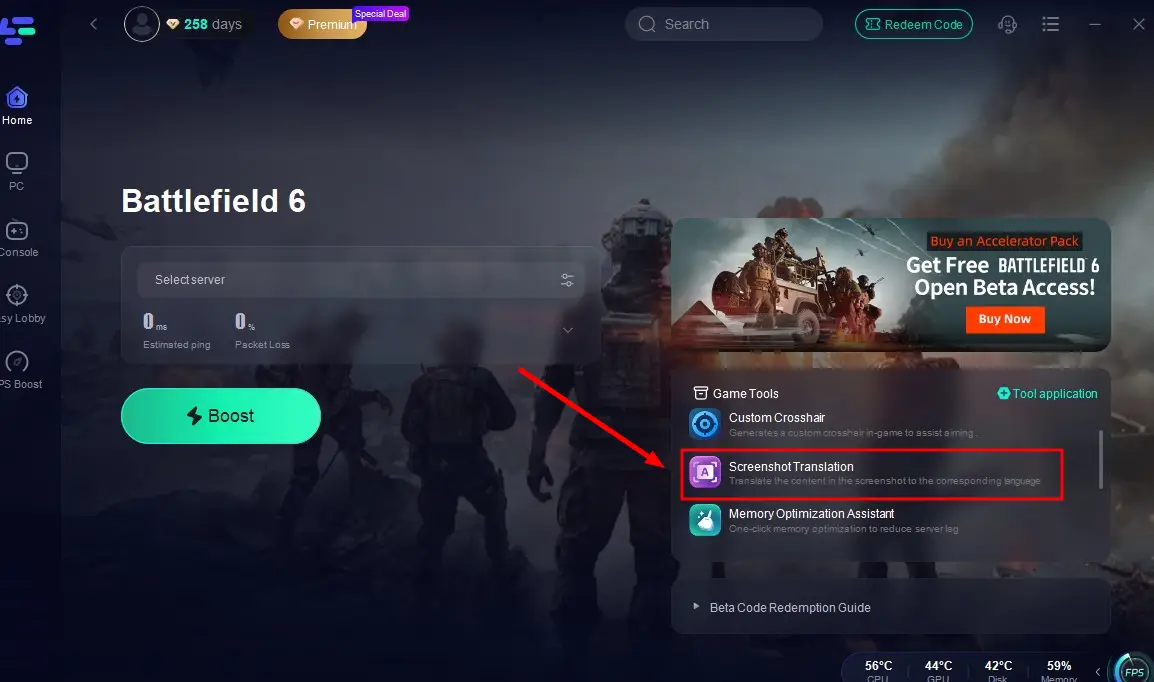
Struggling with in-game text in Russian or Thai? LagoFast’s Screenshot Translation Tool instantly translates HUD elements, squad messages, and objectives. Perfect for international servers!
Step 1: Click the screenshot translation tool in the bottom right corner.
Step 2: Select your target language and set the in-game hotkey.
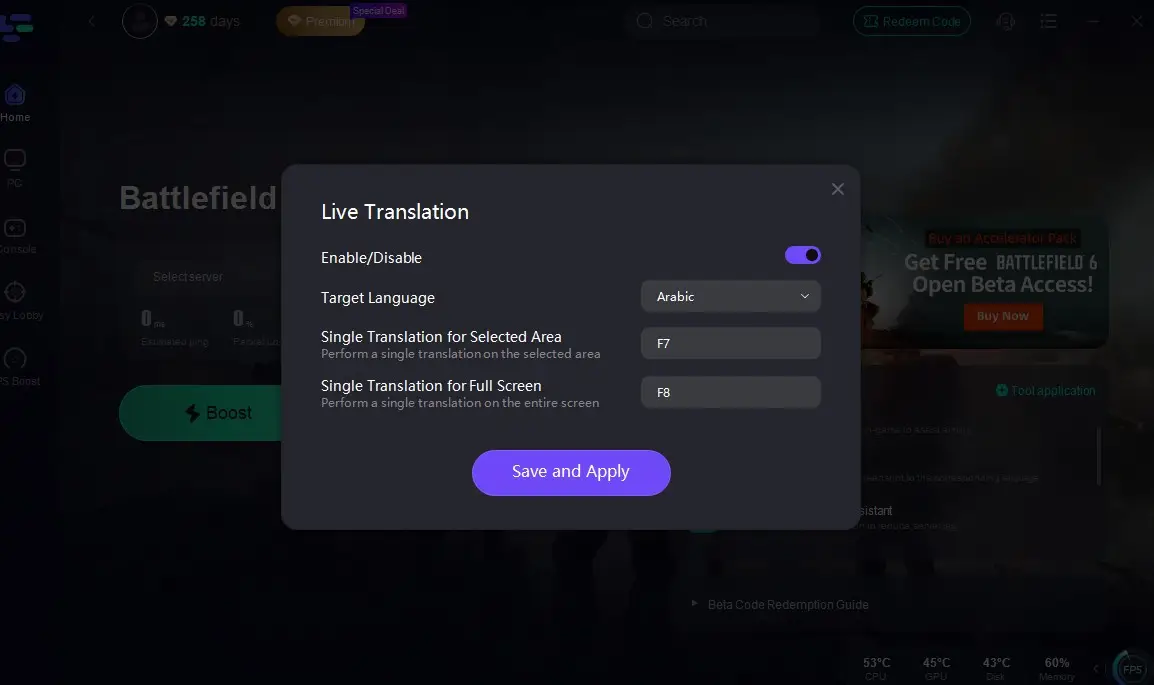
Step 3: Return to the game and click on the game screen to instantly get a translated version of your Battlefield 6 interface!
Best Graphics Settings Tool
Battlefield 6 supports DLSS, FSR, and XeSS for stunning visuals and performance. LagoFast’s Best Graphics Settings Tool auto-tunes your settings:
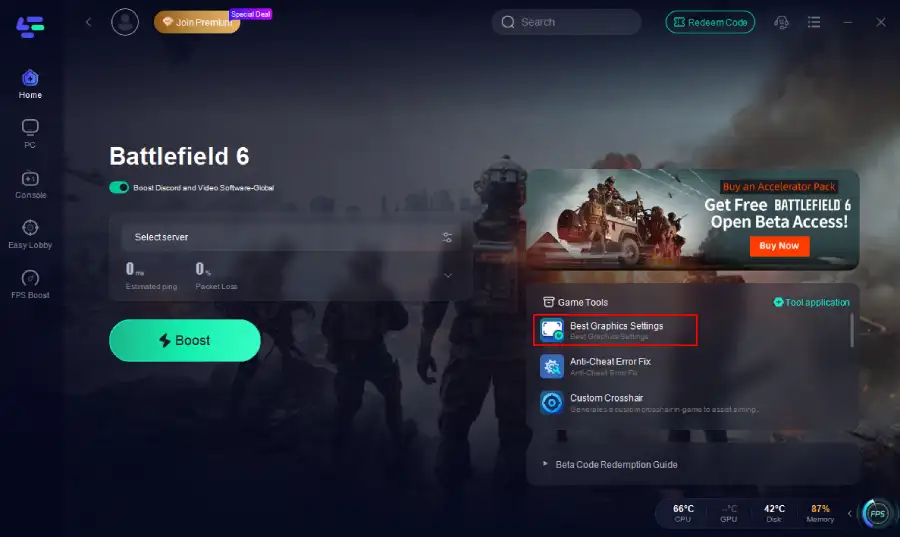
One click, and you’re ready to dominate with max FPS and zero stutters.
Conclusion
The EA Javelin Anticheat error in Battlefield 6 is a hurdle, but with LagoFast’s Anti-Cheat Error Fix Tool and manual tweaks like enabling Secure Boot, you’ll be back in the fight in no time. Don’t let technical issues ruin your battlefield experience—level up your setup, optimize performance, and stay ahead of the competition.

Boost Your Game with LagoFast for Epic Speed
Play harder, faster. LagoFast game booster eliminates stutter and lags on PC, mobile, or Mac—win every match!
Quickly Reduce Game Lag and Ping!
Boost FPS for Smoother Gameplay!