
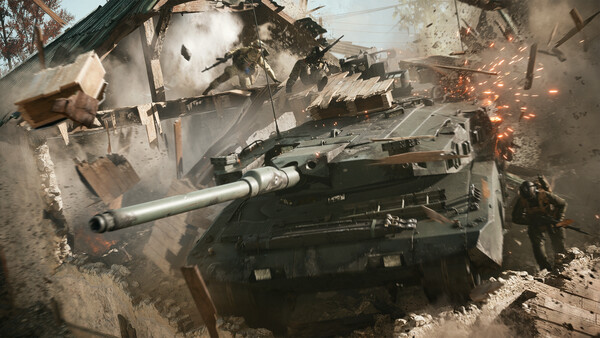
The long-rumored Battlefield 6: RedSec is finally here, and it’s making waves as EA DICE’s official entry into the free-to-play battle-royale space. Launching worldwide on October 28, 2025, RedSec promises large-scale chaos, tactical teamwork, and the destruction-driven gameplay that Battlefield fans love—now reimagined for the last-team-standing format.

- ✅ Reduce Lag and High Ping.
- ✅ Boost FPS at the Same Time.
- ✅ Support 2000+ Popular Online Games.
- ✅ Quick Fix For Server Connection Issues
What Is Battlefield 6 RedSec
RedSec (short for Redacted Sector) is not just another game mode—it’s Battlefield 6’s standalone battle-royale experience built directly on the Frostbite Engine. While it shares technology and assets with the main Battlefield 6 client, it functions as a separate download and focuses entirely on the high-stakes, shrinking-zone gameplay that dominates the genre.
Key features include:
- Up to 120 players per match, with full vehicle combat and squad coordination.
- A massive open-world map blending urban and rural combat zones.
- Dynamic destruction carried over from Battlefield 6’s core engine.
- Tactical insertion and extraction mechanics that let squads redeploy mid-match.
- A free-to-play model supported by optional cosmetics and seasonal content.
Unlike past experiments (like Firestorm in BF V), RedSec is positioned as a long-term live-service platform, complete with progression systems, ranked playlists, and crossover events tied to Battlefield 6’s ongoing seasons.
Battlefield RedSec Release Date
The official release date is October 28, 2025, aligning with the launch of Battlefield 6’s Season 1 update.
Launch time for various regions:
West Coast US: 8:00 AM PT
UK: 3:00 PM GMT
Europe (CET): 4:00 PM CET
So mark your calendar for Oct 28 if you’re playing on PC via Steam (or other platforms) and want to dive in at launch.
How to Download Battlefield 6 RedSec on Steam
- If you already own Battlefield 6, the RedSec Battle Royale mode comes with the Season 1 update (v1.1.1.0) and installs automatically. Just update your game, and RedSec will appear in the main menu.
- If you don’t own Battlefield 6, you can download Battlefield 6 RedSec as a free standalone game on PC, PS5, and Xbox — no purchase required.
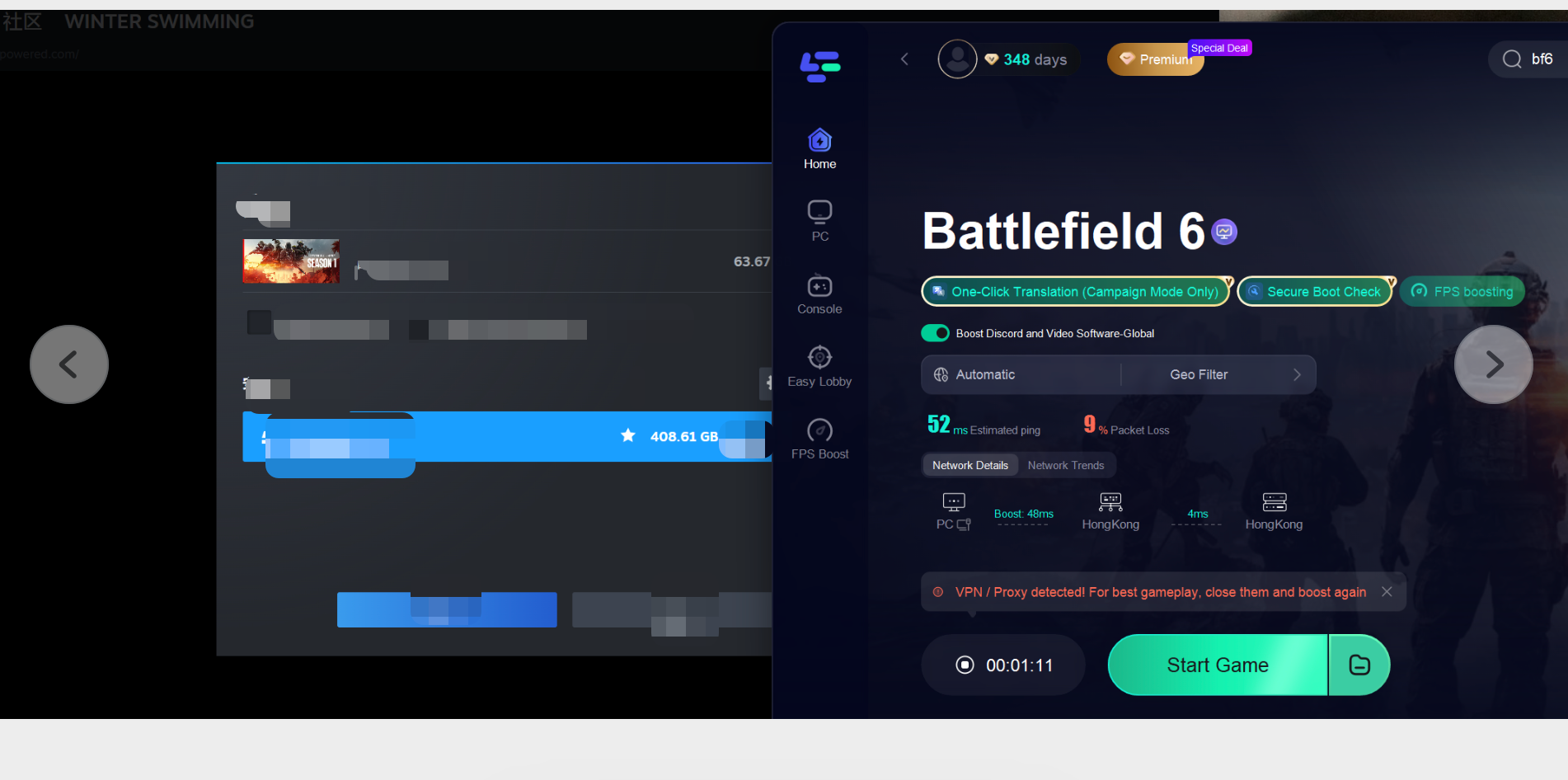
- On PC via Steam, you can download & install LagoFast > launch LagoFast and choose Battlefield 6 > Click Start Game, and Battlefield™ RedSec will be added to your library. Then download and play the Battlefield 6 Battle Royale mode for free.
Step 1: Click Free Trial to download and install LagoFast.
Step 2: Open LagoFast and use the search bar to find “Battlefield 6.”

How to Download Battlefield 6 RedSec on Xbox
1. Check Your Xbox
Make sure your console is Xbox Series X, Series S, or One.
Ensure you’re signed in with your Microsoft/Xbox account.
2. If You Already Own Battlefield 6
RedSec is included in Season 1 update (v1.1.1.0).
Update your Battlefield 6 game to the latest version.
Once updated, RedSec Battle Royale will appear in the main menu automatically.
3. If You Don’t Own Battlefield 6
RedSec is a standalone free-to-play game on Xbox.
Open the Microsoft Store on your console.
Search for “Battlefield 6 RedSec”.
Click Get/Install to download the game for free.
4. Launch and Play
After installation, open the game from your My Games & Apps library.
Sign in to your EA account to sync progress and access online features.
Tip: Make sure your Xbox has enough storage space (around 33–50 GB for RedSec files) and a stable internet connection for smooth gameplay.
Do Battlefield 6 and RedSec have crossplay
Battlefield 6 and RedSec support crossplay across PC, PS5, and Xbox, allowing players from different platforms to play together. Console crossplay is optional and can be toggled in settings.
Progression is shared between Battlefield 6 and RedSec, so your rank, weapons, gadgets, and customization items carry over if you use the same EA account, ensuring a seamless experience.
Battlefield RedSec Steam Price
RedSec is completely free-to-play on Steam. Since it is free to play, there is no typical “price” on Steam in the sense of buying the game. However:
- The base game, Battlefield 6, is a paid product on Steam.
- It appears RedSec may either integrate into Battlefield 6 or exist as a separate Steam entry (this has some ambiguity).
Therefore, if you want to play RedSec, you may not need to pay for Battlefield 6 (depending on the exact structure in your region or platform), but you’ll want to confirm via Steam when the mode becomes visible.
Battlefield RedSec Steam Key
Since RedSec is free, a Steam key is not required. You won’t need to redeem codes or buy activation licenses from third-party stores. Simply open your Steam client, search for Battlefield RedSec, and click “Add to Library.”
You don’t need any key to play Battlefield RedSec on Steam. Just download it directly.
If EA later distributes promo keys for skins or bundles, you’ll get them only from official Battlefield or EA sources — never from resellers.
EA might release optional keys or codes for:
Exclusive skins, XP boosts, or Season 1 cosmetics.
Cross-progression bonuses if you already own Battlefield 6.
Partner giveaways through influencers or promotional bundles.
If EA does this, those keys will usually appear through:
EA’s official social channels (Twitter/X, Facebook, YouTube).
Battlefield’s official website during seasonal events.
Steam event pages (if codes are distributed via publisher bundles).
These codes are redeemed through your EA Account, not inside Steam.
You would log in at ea.com/redeem and enter the code there — it automatically applies to your linked Steam copy.
How To Download Battlefield RedSec Steam
Here’s how to install the game on Steam once the servers go live:
- Step 1. Open the Steam Store and search for “Battlefield RedSec.”
- Step 2. Click “Add to Library” (the game is free).
- Step 3. Select an install location with at least 70–80 GB of free space.
- Step 4. Wait for the preload or download to finish.
- Step 5. Launch the game and sign in with your EA Account to sync progress and anti-cheat requirements (Secure Boot + TPM 2.0 enabled).
- The base Battlefield 6 install is about 49 GB.
The RedSec files (labeled “BR assets”) add another 33 GB.
With textures, DLC, and patches combined, the full install reaches roughly 120 GB total.
That’s considerably smaller than comparable titles — as one user pointed out, “COD (BO6 + Warzone) is nearly 493 GB on PS5.”
Preload will open a few hours before launch, allowing players to have everything ready before servers unlock.
How to Use LagoFast for Smooth Battlefield 6 Battle Royale on PC
Step 1: Click Free Trial to download and install LagoFast.
Step 2: Open LagoFast and use the search bar to find “Battlefield 6.”
Step 3: Choose your preferred server and click "Smart Boost" to begin optimization.

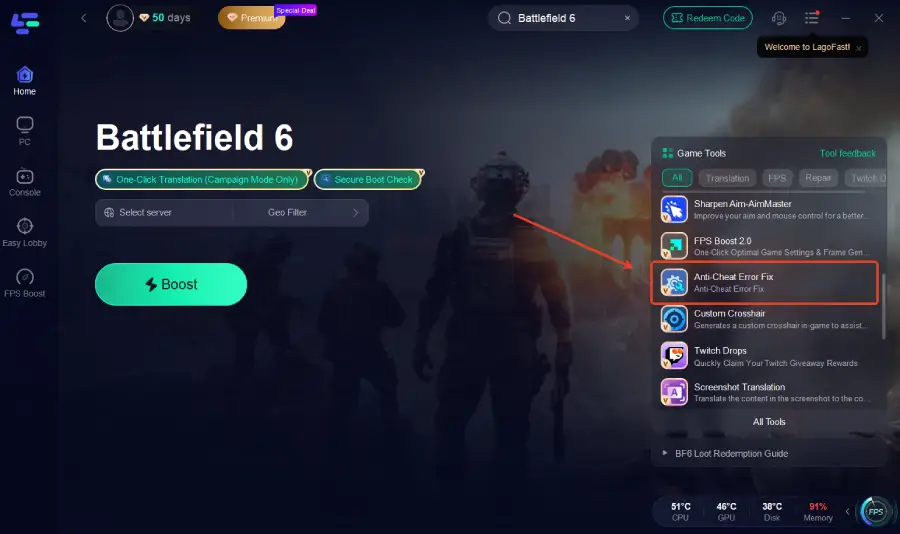
Step 4: On the right panel, click Anti-Cheat Error Fix to automatically detect and fix any Anti-Cheat Error issues.
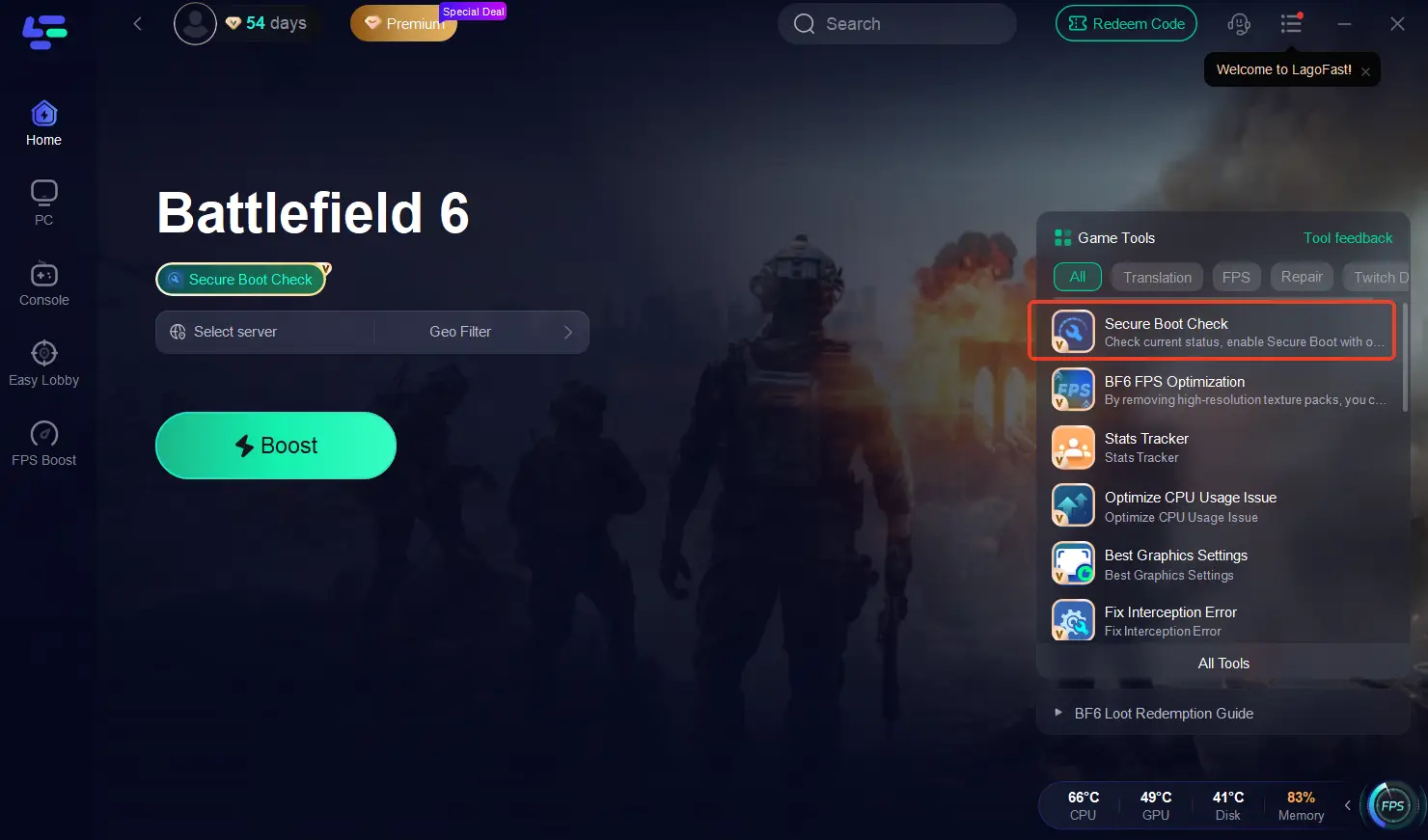
Step 5: On the right panel, click Secure Boot to automatically detect and fix any Secure Boot issues.
Step 6: Optimize network settings—LagoFast will automatically select the best connection path to minimize lag, packet loss, and high latency for smoother gameplay.

Most players report that after enabling these tools, they can enter Battlefield 6 matches successfully within minutes—without BIOS tweaks, reinstalls, or complicated settings.
Final Thoughts
Battlefield RedSec represents EA DICE’s biggest attempt yet to bring the chaos of Battlefield into the free-to-play arena. Its standalone structure, manageable file size, and cross-progression with Battlefield 6 make it appealing both to veterans and newcomers.
If you’re on PC, head to Steam on October 28 at 8 AM PT to download the game for free. Whether you’re chasing that first squad win or just exploring the new Redacted Sector, one thing’s certain—Battlefield’s return to large-scale battle-royale warfare has officially begun.
Boost Your Game with LagoFast for Epic Speed
Play harder, faster. LagoFast game booster eliminates stutter and lags on PC, mobile, or Mac—win every match!
Quickly Reduce Game Lag and Ping!
Boost FPS for Smoother Gameplay!