

If you’re trying to download the latest driver for your ASUS or ACER laptop in Germany, you may have noticed that the official support pages often fail to load or downloads don’t start. What should be a simple ASUS & ACER Drive Update turns into repeated refreshes and connection errors. This guide explains why these access issues happen and shows a straightforward way to reach the official driver downloads quickly and safely.

Part 1: Why You Can’t Access ASUS & ACER Driver Updates in Germany
Part 2: Why Driver Updates Actually Matter
Part 3: The Easier Way to ASUS & ACER Drive Update via LagoFast
Part 1: Why You Can’t Access ASUS & ACER Driver Updates in Germany
Due to network access limitations affecting some domains in Germany, many users are unable to reliably reach the official support websites of ASUS and Acer. As a result, downloading drivers through the usual official channels has become difficult for many local users.
This often leads to issues such as:
- Support pages failing to load
- Driver download links not responding
- BIOS and chipset files being inaccessible
- Update pages timing out
So when your ASUS & ACER Drive Update fails, it’s not your laptop or system bug; the real issue is that the official download domain isn’t fully accessible from Germany.
Part 2: Why Driver Updates Actually Matter
Many users postpone driver updates because everything seems to be working fine—until it isn’t. Problems usually appear gradually: lower FPS in games, unexpected Wi-Fi drops, GPU instability after a system update, or software that suddenly doesn’t run as smoothly as before.
Drivers play a critical role in how your hardware communicates with your operating system. When they fall behind, performance can degrade, compatibility conflicts become more likely, and even routine Windows updates may trigger errors.
Over time, skipping updates can lead to:
- System instability
- Reduced performance in games and applications
- Hardware compatibility issues
- Increased exposure to security vulnerabilities
For gamers, creators, and remote workers, these issues directly affect daily use. What starts as a small inconvenience can turn into lost time troubleshooting.
Part 3: The Easier Way to ASUS & ACER Drive Update via LagoFast
Since the core problem isn’t your device but the access path itself, the real fix is restoring a stable connection to the official driver domains. That’s where LagoFast comes in. Inside the LagoFast client, there is a dedicated ASUS & ACER Drive Update option. After enabling acceleration, you can click the provided info link, which automatically redirects you to the official ASUS or ACER driver download page. There's no complicated configuration or manual routing involved. For users in Germany who currently can’t reach the official sites directly, this provides a more direct and convenient way to complete the update process.
How to Use LagoFast ASUS & ACER Drive Update
Step 1: Click the Free Trial button to download and install LagoFast.
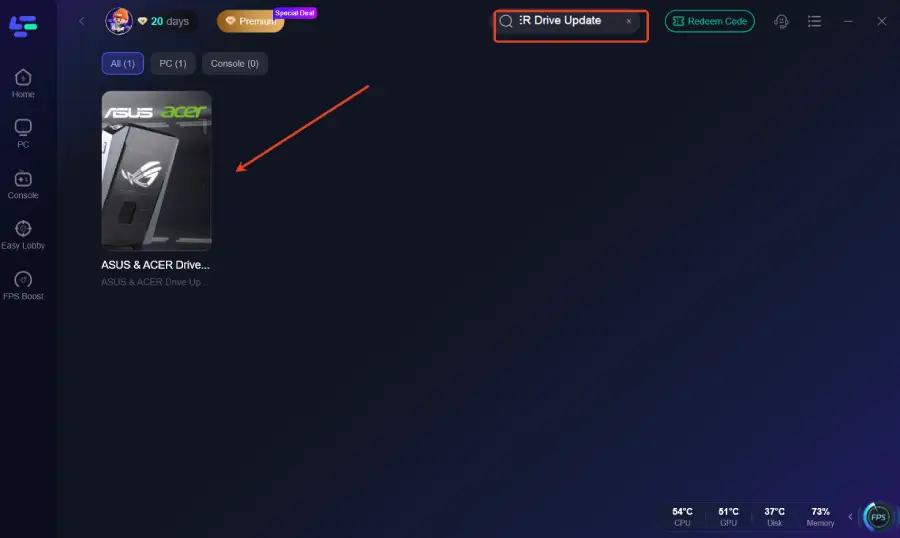
Step 2: After installation, search "ASUS & ACER Drive Update" in the search bar and select it.
Step 3: Click the “ASUS Drive Update” or “ACER Drive Update” button in the bottom-right corner.
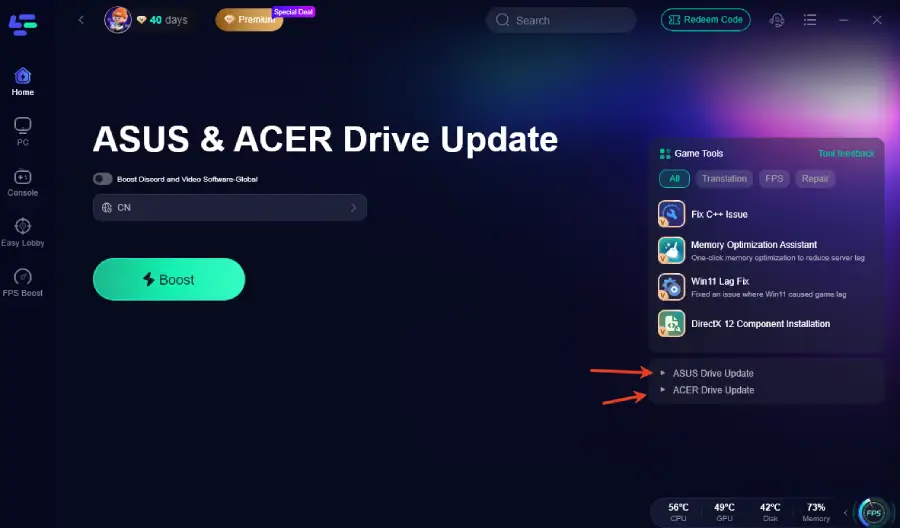
Step 4: After entering the official driver page, simply select your model and download the “ASUS Drive Update” or “ACER Drive Update.

Conclusion
For users in Germany, problems with ASUS & ACER Drive Update are less about technical mistakes and more about limited access to the official driver pages. When these pages won’t load, even a simple driver update becomes unnecessarily complicated. Keeping drivers up to date is crucial for system stability, performance, and compatibility, especially for gamers and remote workers. By using the dedicated ASUS & ACER Drive Update feature inside LagoFast, you can reach the official driver pages directly and complete updates without extra steps, making the entire process quick and straightforward.

Boost Your Game with LagoFast for Epic Speed
Play harder, faster. LagoFast game booster eliminates stutter and lags on PC, mobile, or Mac—win every match!
Quickly Reduce Game Lag and Ping!
Boost FPS for Smoother Gameplay!