

Arknights Endfield is a major leap from the original Arknights, introducing real-time combat, semi-open world exploration, and complex factory simulation systems that rely heavily on stable network performance. As players prepare for its global release, many have already noticed a frustrating issue during tests and early access sessions: Arknights: Endfield high ping. What makes this more confusing is that the problem often appears even when the game is running on a high end PC. Smooth frame rates do not always mean smooth online performance, and when network latency spikes, combat responsiveness, character switching, and base management all suffer. Understanding why this happens and how to fix it is essential for anyone who wants to fully enjoy the Enfield experience.

Part 1: Why Do You Have Arknights Endfield High Ping Issue
Part 2: How to Fix Arknights Endfield High Ping on PC—100% Work
Part 3: How to Ensure a Stable Arknights Endfield Mobile Gaming Experience
Part 1: Why Do You Have Arknights Endfield High Ping Issue
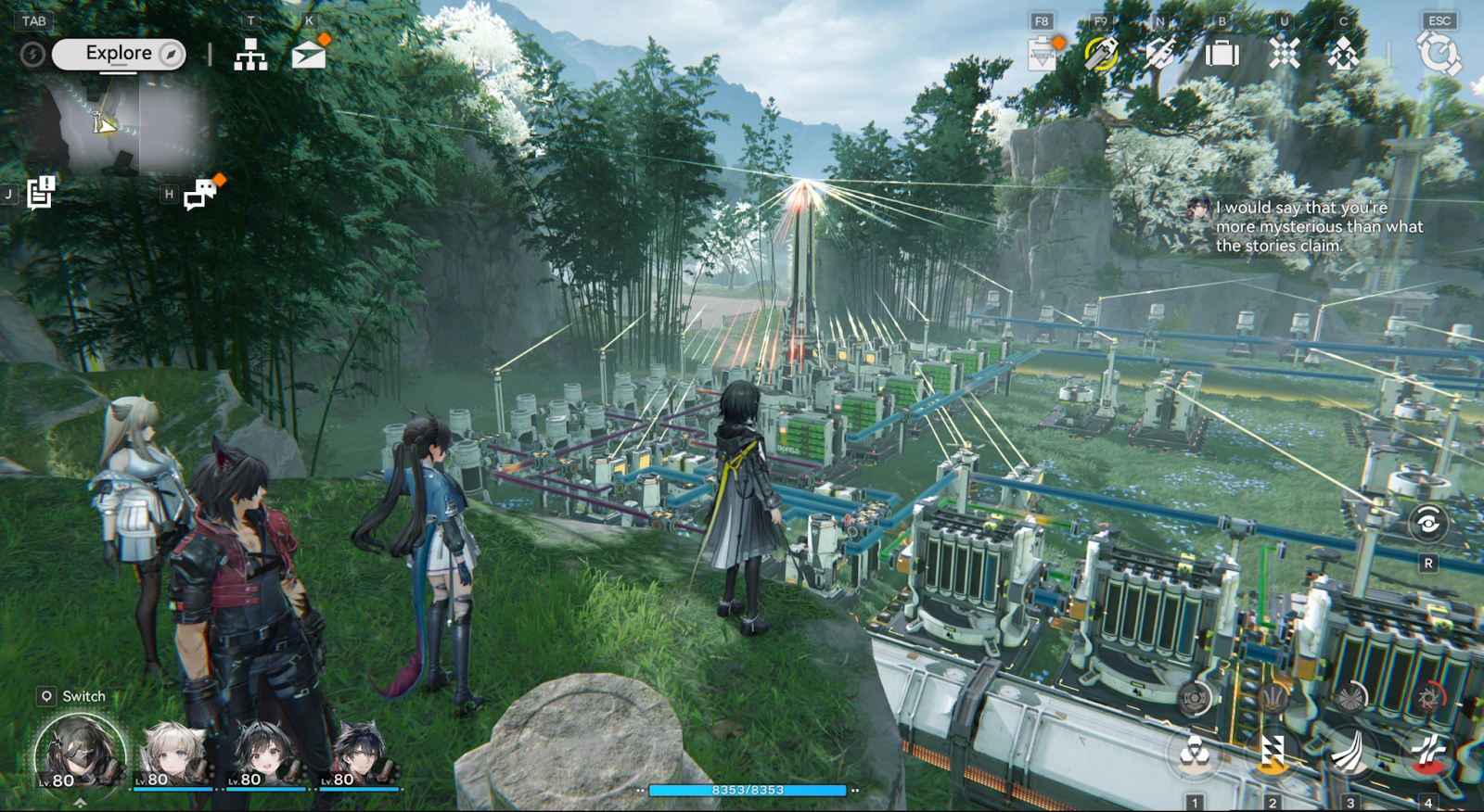
High ping in Arknights Endfield is rarely caused by a single factor. Even with powerful hardware, the game’s online systems depend on how data travels between your device and the game servers.
Common reasons include:
- Physical distance between your location and the game server, which increases data travel time
- Unstable routing from your internet service provider
- Server congestion during peak testing or launch periods
- Background applications are consuming bandwidth
- Incorrect network settings on your PC
- WiFi interference or packet loss
- Game server optimization issues during early release phases
Because Endfield combines action combat with persistent world systems, even small latency fluctuations can quickly turn into noticeable lag.
Part 2: How to Fix Arknights Endfield High Ping on PC—100% Work
Fixing arknights endfield high ping requires a combination of network optimization and system level adjustments. Below are both quick solutions and manual fixes that address the most common causes.
Solution 1: LagoFast – the most effective and all-in-one way to fix Arknights Endfield High Ping
LagoFast is one of the fastest ways to reduce ArkKnights end-of-field high ping without complicated manual configuration. It works by automatically selecting the optimal network route between your PC and the game servers, bypassing unstable ISP paths. This is especially useful when the game is lagging on a high-end PC due to network issues rather than hardware limitations. With one click optimization, players can stabilize ping, reduce packet loss, and maintain smooth combat performance across PC and mobile platforms.
Key features of LagoFast include:
- Intelligent server routing optimized for Arknights Endfield
- One click ping and packet loss reduction
- Support for PC, mobile, and console platforms
- Real-time network monitoring
- Automatic adaptation during peak server load
Tutorial to use LagoFast to fix high ping in Arknights Endfield on PC:
Step 1: Click the Free Trial button to download and install LagoFast.
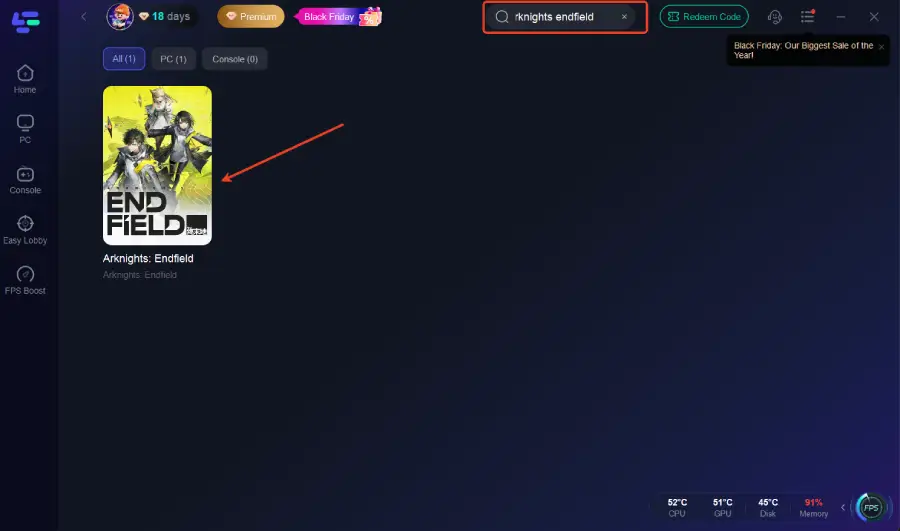
Step 2: Open LagoFast, then click the PC button on the left and search for Arknights Endfield in the search bar, and click it after it appears.
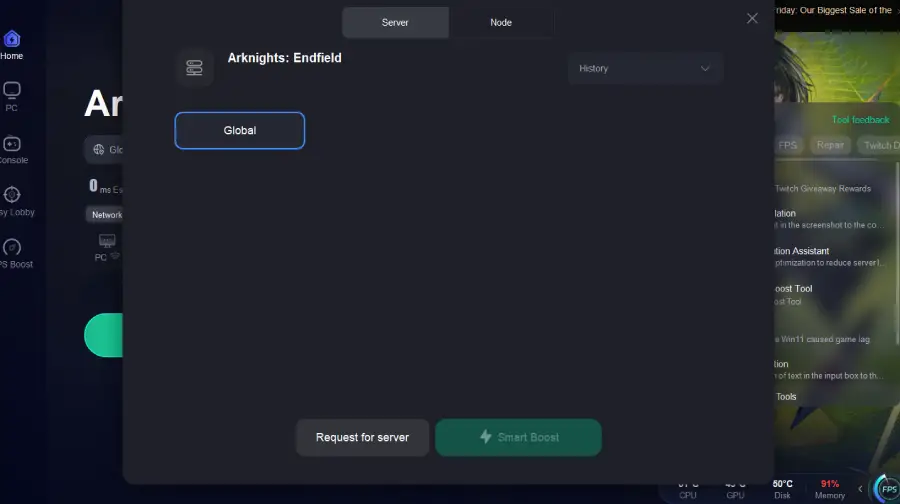
Step 3: Click on “Server” to change to a stable server that can ensure a smooth gaming experience and fix high ping, then click on “Smart Boost.”
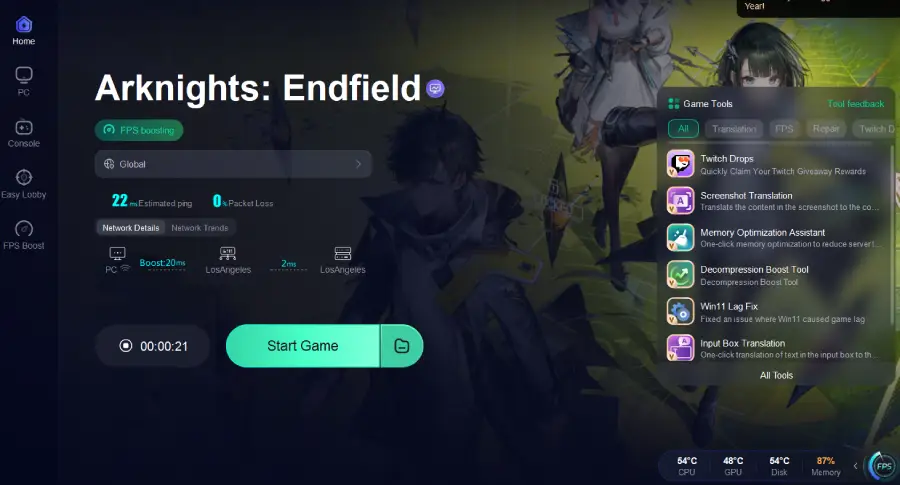
Step 4: Check the specific game ping, packet loss, and multiple path connections on the right side. Finally, click the “Start Game” to play the game.
Solution 2: Switch from WiFi to Wired Connection
Step 1. Power off your router and modem
Step 2. Connect your PC directly to the router using an Ethernet cable
Step 3. Power on the modem first, then the router
Step 4. Wait until the connection fully stabilizes
Step 5. Launch Arknights Endfield and test in combat scenarios
A wired connection reduces interference and packet loss, which is critical for real-time action games.
Solution 3: Close Background Applications Using Bandwidth
Step 1. Press Ctrl Shift Esc to open Task Manager
Step 2. Check the Network column for high usage programs
Step 3. Close streaming software, cloud sync tools, and downloads
Step 4. Disable auto updates temporarily
Step 5. Restart the game after freeing bandwidth
Background traffic is a hidden cause of ArkKnights Endfield high ping.
Solution 4: Change DNS Settings
Step 1. Open Control Panel and go to Network and Internet
Step 2. Click Network and Sharing Center
Step 3. Select Change adapter settings
Step 4. Right click your active network and choose Properties
Step 5. Set DNS to a faster public DNS such as Google or Cloudflare
Improved DNS resolution can reduce connection delays when accessing game servers.
Solution 5: Optimize Router Settings
Step 1. Log into your router admin panel
Step 2. Enable Quality of Service if available
Step 3. Prioritize gaming traffic or your PC device
Step 4. Disable bandwidth heavy features like guest networks
Step 5. Save settings and reboot the router
Proper router configuration ensures stable data flow during gameplay.
Solution 6: Update Network Drivers
Step 1. Right-click Start and open Device Manager
Step 2. Expand Network adapters
Step 3. Right-click your network device and select Update driver
Step 4. Choose automatic search or install the latest driver manually
Step 5. Restart your PC
Outdated drivers can cause latency spikes even on high end systems.
Solution 7: Select the Correct Game Server Region
Step 1. Open Arknights Endfield settings
Step 2. Locate server or region options if available
Step 3. Choose the region closest to your physical location
Step 4. Avoid auto selection during peak hours
Step 5. Reconnect and test ping stability
Incorrect region selection can instantly increase latency.
Part 3: How to Ensure a Stable Arknights Endfield Mobile Gaming Experience
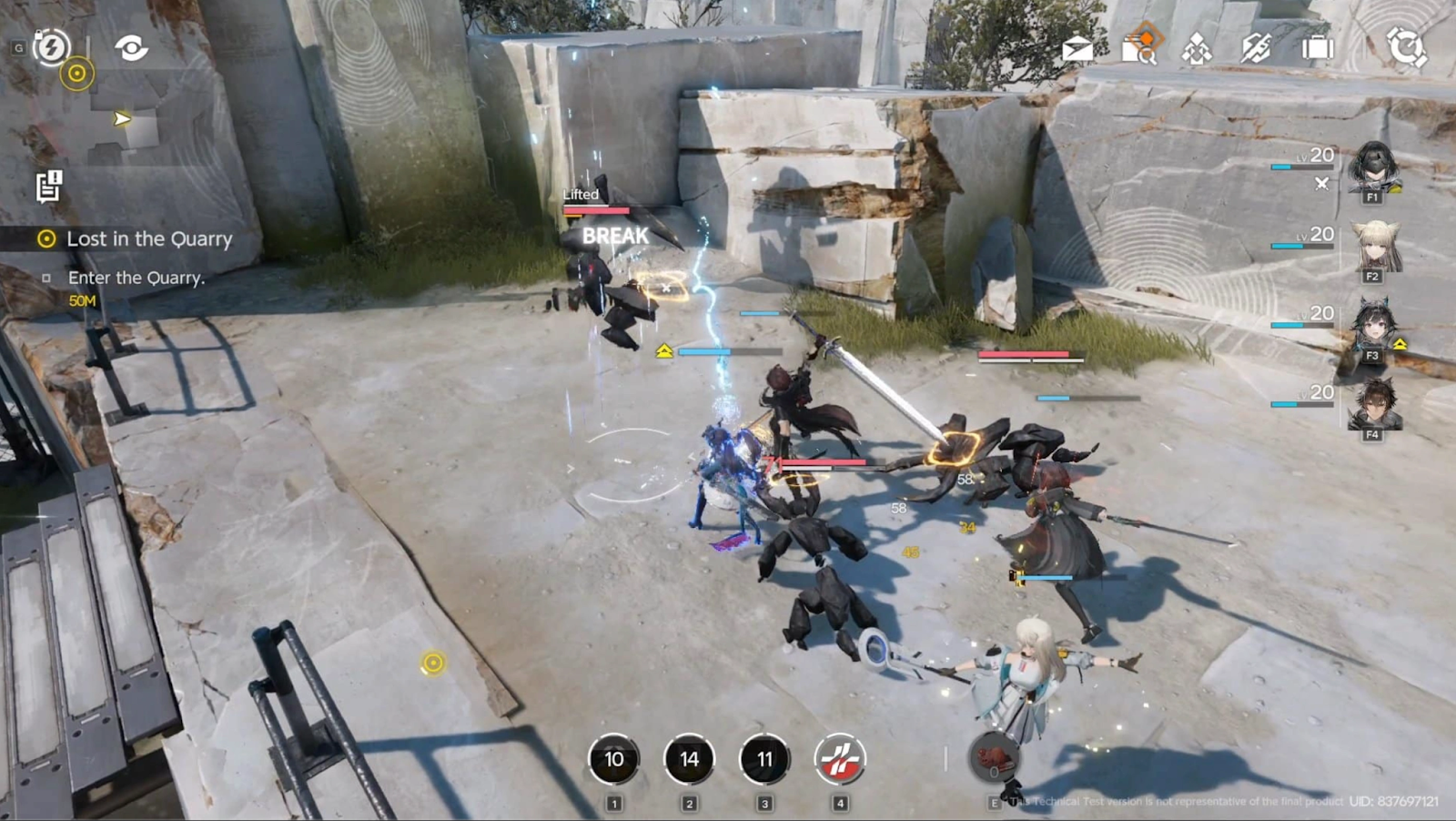
Mobile players are even more sensitive to network instability, making Arknights Endfield high ping a frequent issue on phones and tablets. LagoFast Mobile is one of the best game boosters for mobile devices, offering smart routing, packet stabilization, and real-time ping optimization. It works across different networks, including WiFi and mobile data, ensuring smoother combat and base management even in unstable environments.
Key features of LagoFast Mobile include:
- Mobile-optimized network acceleration
- Automatic route switching for unstable connections
- Reduced packet loss on cellular networks
- Low latency optimization for action RPG combat
- Easy one-tap activation
Tutorial: Use the LagoFast Mobile to enjoy a smooth mobile gaming experience:
Step 1: Search “LagoFast Mobile booster” in the Google App Store or Apple App Store. Alternatively, click here to download the APK File.

Step 2: Click the “Download” button, then install and launch “LagoFast Mobile Booster.”
Step 3: Start Arknights Endfield, then switch to LagoFast Mobile and search for it.
Step 4. Select and click Arknights Endfield in the interface.
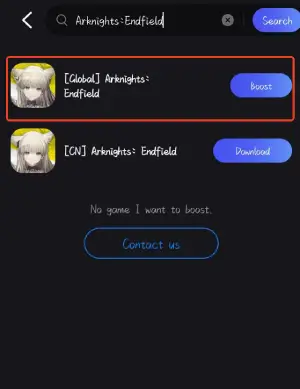
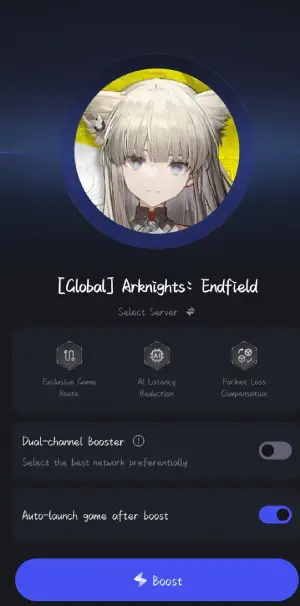
Step 5: Enter the server selection interface, where you can change to a stable server, then click the “Boost” button to fix lag and enhance the gaming experience
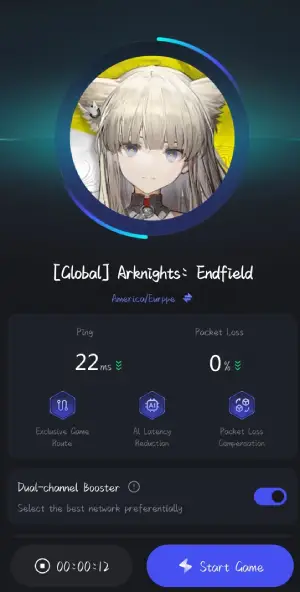
Step 6: Finally, go back to Arknights Endfield and start playing it without any lag.
Conclusion
Arknights Endfield sets a new standard for the franchise with its action-focused combat, deep factory simulation, and expansive world design. However, these systems demand more than just powerful hardware. Arknights endfield high ping can occur even when the game is lagging on a high end PC, primarily due to network instability rather than performance limitations. By understanding the root causes and applying both manual fixes and all-in-one solutions like LagoFast, players can significantly improve connection stability. Whether on PC or mobile, a stable network ensures smoother combat, faster responses, and a more immersive Endfield experience from day one.

Boost Your Game with LagoFast for Epic Speed
Play harder, faster. LagoFast game booster eliminates stutter and lags on PC, mobile, or Mac—win every match!
Quickly Reduce Game Lag and Ping!
Boost FPS for Smoother Gameplay!