

If you’ve been following Arknights: Endfield, the upcoming evolution of the franchise, now is the time to get ready: the Arknights: Endfield Beta Test 2 is about to go live. This second closed beta gives players on PC, Android, and iOS an early look at what’s coming — a fully refreshed world, reworked story, and plenty of new content. In this guide, you’ll find everything you need: how to sign up, check access, pre‑download, and optimize your gameplay experience during the beta.

Part 1: Arknights: Endfield Beta Test 2 Release Date And Platforms
Part 2: How To Get Access to Arknights: Endfield Beta Test II
Part 3: How To Check Your Beta Access
Part 4: What’s New In Beta Test 2
Part 5: How To Optimize Your Gameplay In Arknights: Endfield Beta Test 2
Part 1: Arknights: Endfield Beta Test 2 Release Date And Platforms
The Arknights: Endfield Beta Test 2 officially begins on November 28, 2025, for PC, Android, and iOS players. Approximate start times in some major time zones:
- Pacific Time (PT): 7:00 pm on November 28
- Eastern Time (ET): 10:00 pm on November 28
In addition, a PlayStation 5 Technical Test — with content identical to Beta Test 2 — will begin on December 12, 2025.
Important note: this is a data‑wipe test. All progress during the beta will be erased when the test ends.
During the beta, if you use the same account on PC and mobile (iOS or Android), your progress will sync across devices, which is convenient for players switching between platforms.
Part 2: How To Get Access to Arknights: Endfield Beta Test II
Unlike an open beta, this Beta Test II does not distribute public keys for everyone. Instead, access is granted through a “pre‑registration + official screening” system.
Pre‑Registration / Sign‑Up
To pre-register for Arknights: Endfield Beta Test 2, follow these simple steps:
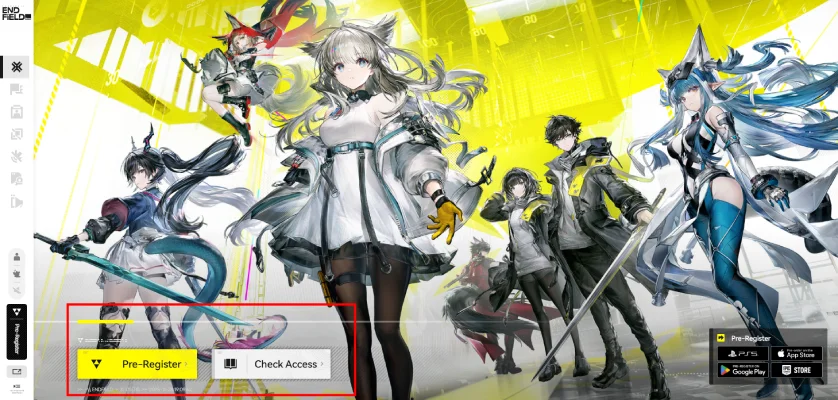
- Open the official Arknights: Endfield website.
- Click on the Pre-Registration button.
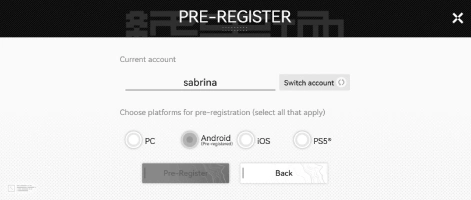
- Sign up using your Google, Apple, or Facebook account.
- Select the platform you plan to play on (PC, Android, or iOS).
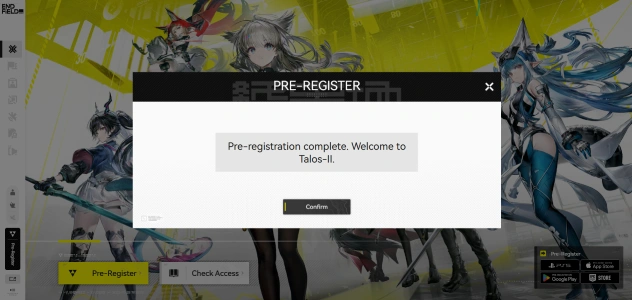
- Once completed, your pre-registration is successful.
Because there is no open distribution of beta keys, this pre‑registration + screening method is the only way to qualify.
Part 3: How To Check Your Beta Access — Access Check & Pre‑Download
Once the recruitment period ends and selection is completed, here is how to check whether you got access to the beta (i.e. perform an Arknights: Endfield beta access check):
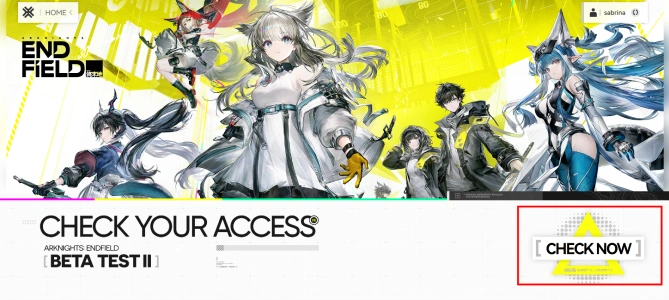
- Official Website Access Page: Log in to your game account on the official site and go to the Beta Test II “Check Access” page. Click “Check Now” to view if you have been selected.
- Email Notification: If you are granted access, an official email notice will be sent to the email tied to your account. That email will include instructions and a link for pre‑download.
- Pre‑Download Option: Once you receive access, you’ll be able to pre‑download the Beta Test II client. This ensures you’re ready to jump in as soon as servers open.
- Important Setup Note: If you have an older client from a previous test, you must uninstall it first. The Beta Test II requires a fresh download — old versions will not update properly.
This approach replaces the traditional “beta key” method and relies on pre‑registration, selection, and invitation via account + email.
Part 4: What’s New In Arknights: Endfield Beta Test 2
Beta Test II brings a substantial update from previous builds — here’s what you can expect:
- Fully Reworked Storyline: The narrative is significantly changed, with new cutscenes and dialogue animations. Player choices now influence story paths, giving more variation and depth.
- New Region — Wuling: Explore a brand new area called Wuling, blending traditional Eastern-style aesthetics with futuristic elements. The environment delivers a fresh feel compared to earlier zones.
- New Operators: Beta Test II adds nine new operators to the roster. Among them are three six-star characters: Ardelia, Last Rite, and Pogranichnik.
- Revamped Combat System: Combat mechanics are improved, including refined operator abilities, smoother combo skills, updated boss fights, better responsiveness, and more balanced skill interactions.
- Enhanced Base-Building / Automated Industry Complex (AIC): Players can build and expand facilities, craft items, and experiment with new features such as photo mode, teammate guidance, and crate detection.
- Cross-Device Sync: Players on PC and mobile using the same account can sync their data during the beta — helpful if you switch devices frequently.
- Substantial Playtime: 50–60 Hours: For a beta build, this is generous: you get 50–60 hours of content, including story, exploration, combat, and base building.
These upgrades make Beta Test II the most content-packed test for the game so far, offering players a solid preview of what to expect in the full release.
Part 5: How To Optimize Your Gameplay In Arknights: Endfield Beta Test 2
Because Beta Test II is still a work-in-progress build, performance and stability may vary depending on your device. To maximize your experience, using a game optimization tool such as LagoFast Game Booster can be very helpful.
Advantages Of Using LagoFast
- Lower Latency and Stabilized Network: Reduces lag and maintains smoother online gameplay.
- Performance Optimization: Frees system resources for higher frame rates and fewer stutters.
- Cross-Device Stability: Ensures smooth connectivity across PC and mobile devices.
- Easy Setup: Automatically optimizes network and system settings for better online performance.
How To Use LagoFast
Step 1: Start by clicking on the Free Trial button to download and install LagoFast Free Trial.
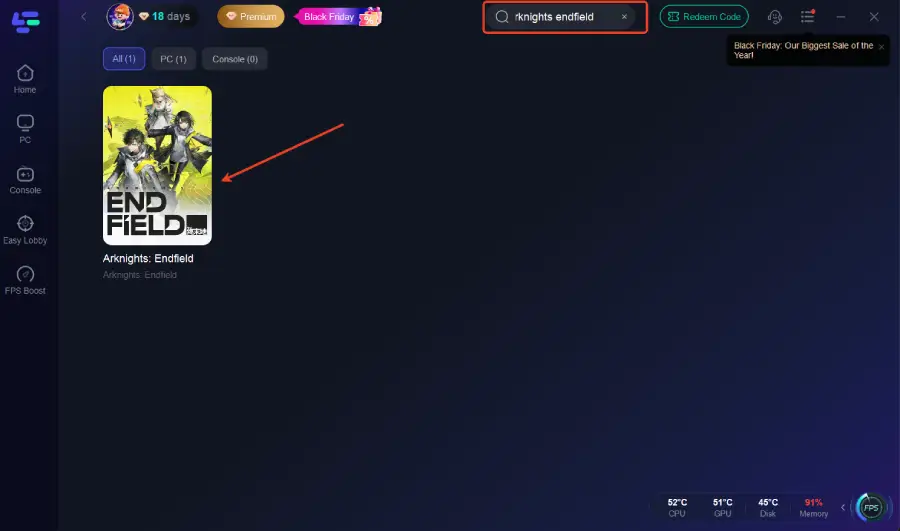
Step 2: Once the installation is complete, open the LagoFast application and use the search bar to find Arknights: Endfield. Select it from the list of games that appear.
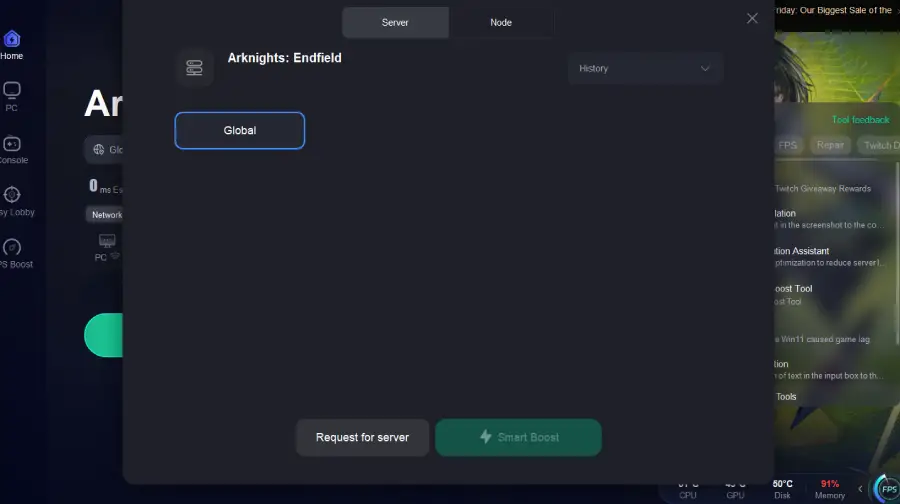
Step 3: Choose a server that is geographically closest to you, or pick the one with the lowest latency to ensure the best possible performance.
Step 4: Once LagoFast has optimized your connection, simply return to Arknights: Endfield and enjoy a significantly smoother and more responsive gaming experience.
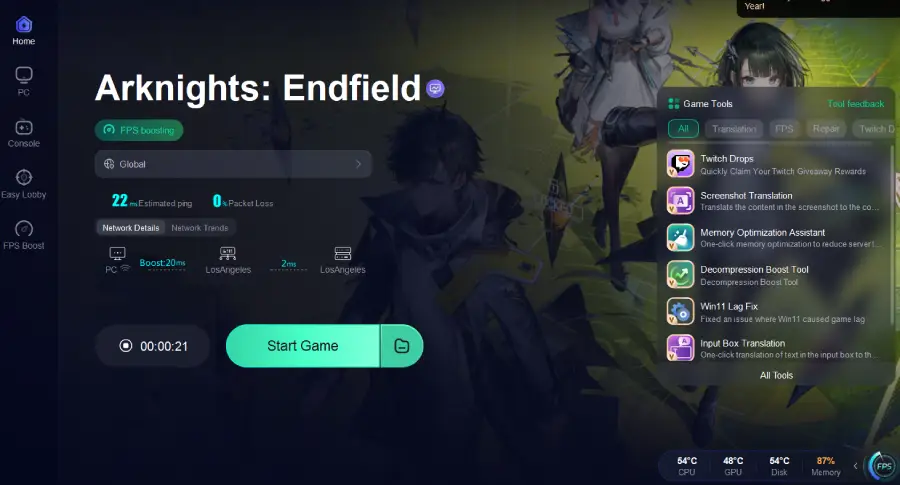
Using LagoFast or a similar tool can make a noticeable difference, especially if your device is mid-range or older, or if your network connection is unstable.
Conclusion
The Arknights: Endfield Beta Test 2 is your first chance to explore new storylines, operators, regions, and gameplay systems before the official release. Pre-register early, check your access via your Gryphline account, and make use of the pre-download option to be ready.
Optimizing your device and using tools like LagoFast Game Booster will help stabilize performance, reduce latency, and ensure smoother gameplay across platforms. Even though all progress will be wiped, Beta Test II is an ideal opportunity to dive in, experiment, and get a head start in the Endfield world.

Boost Your Game with LagoFast for Epic Speed
Play harder, faster. LagoFast game booster eliminates stutter and lags on PC, mobile, or Mac—win every match!
Quickly Reduce Game Lag and Ping!
Boost FPS for Smoother Gameplay!