

If you’ve been waiting for a dark fantasy RPG that combines survival, strategy, and world-building, Architect: Land of Exiles is finally here. But there’s one major hurdle—most players can’t understand the text. The game’s first release only supports Korean, leaving global players confused by untranslated menus, quests, and dialogues.
Don’t worry. You don’t have to wait for future language updates or struggle with phone translators. This guide shows how to use translation tools to instantly translate Architect: Land of Exiles while you play—making the game accessible, simple, and enjoyable in any language.

- ✅ Reduce Lag and High Ping.
✅ Boost FPS at the Same Time.
✅ Support 2000+ Popular Online Games.
✅ Stop Stuck & Black Screen Issues.
✅ Ensure Stable Connections.
Part 1: Architect: Land of Exiles Release Date
Part 2: What Languages Does Architect: Land of Exiles Support?
Part 3: Best Translation Tool for Architect: Land of Exiles
Part 1: Architect: Land of Exiles Release Date
Architect: Land of Exiles will officially launch in South Korea on October 22, 2025, for PC, iOS, and Android. This dark fantasy RPG combines base-building, survival, and strategy in a world full of chaos and ruins.
The concept is thrilling—rebuild civilizations, summon exiles, and fight for survival. But many players are already facing one big problem: they can’t fully understand the in-game text or interface.
If you want to enjoy the game smoothly from day one, you’ll need a quick and easy way to make sense of everything.
Part 2: What Languages Does Architect: Land of Exiles Support?
At launch, Architect: Land of Exiles only supports the Korean language across all platforms—PC, iOS, and Android.
For global players, this immediately becomes a huge problem. Menus, missions, dialogues, and even system pop-ups are entirely in Korean, leaving many unable to understand the gameplay or progress smoothly.
Common Player Struggles
- Can’t understand quest objectives or item effects
- Stuck in tutorials because the text isn’t translated
- Dialogue options make no sense without translation
- UI elements and notifications remain unreadable
This language limitation doesn’t just hurt immersion—it makes the game nearly unplayable if you don’t speak Korean. Many players have resorted to using Google Translate or mobile camera translation, but it’s slow, inaccurate, and completely breaks the flow of the game.
You shouldn’t have to pause every few seconds just to scan text manually. What you need is a faster, built-in solution that lets you translate directly inside the game.
Part 3: Best Translation Tool for Architect: Land of Exiles
If you’ve ever had to pause Architect: Land of Exiles, pull out your phone, or switch tabs just to figure out what a quest says—you know how painful that is.
If you’ve ever had to pause Architect: Land of Exiles, pull out your phone, or switch tabs just to figure out what a quest says—you know how frustrating that can be.
1. One-Click Screenshot Translation with LagoFast
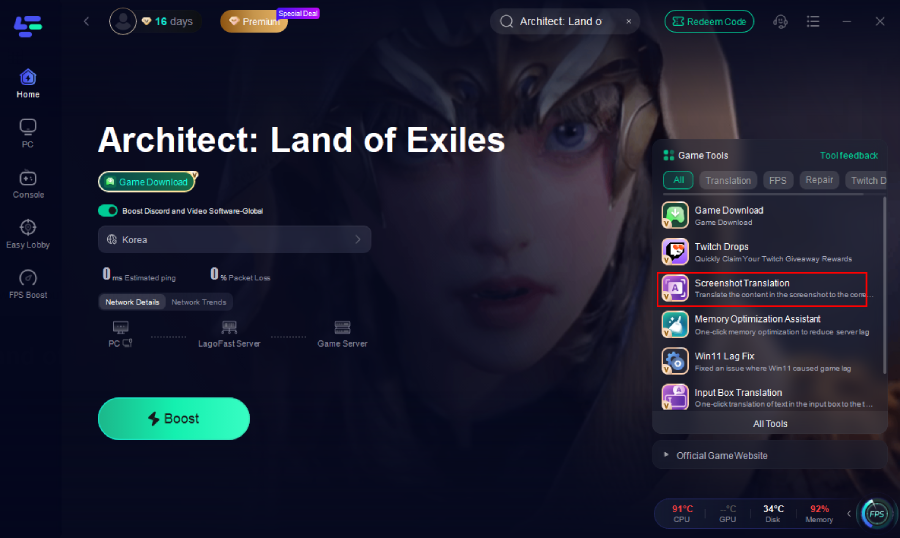
See a quest or item name you can’t read? Just hit Screenshot Translate in LagoFast, and it instantly captures and translates the section you’re viewing—from NPC conversations to inventory menus.
No copy-paste. No switching windows.
Clean, readable translations appear right on your screen in seconds, letting you play without interruptions.
2. Fast Download, Stable Gameplay, and Lower Ping
Before you start building your fortress or exploring the wastelands, LagoFast can help download and boost Architect: Land of Exiles faster and more stably. Its built-in download accelerator ensures smooth installation, while network optimization reduces ping, prevents packet loss, and keeps gameplay stable.
3. How to Use LagoFast Screenshot Translation
Want to translate the Architect: Land of Exiles text instantly? Just follow these simple steps:
Step 1: Click the Free Trial button on LagoFast’s official website to download and install the app.
Step 2: Open LagoFast and use the search bar to find Architect: Land of Exiles.
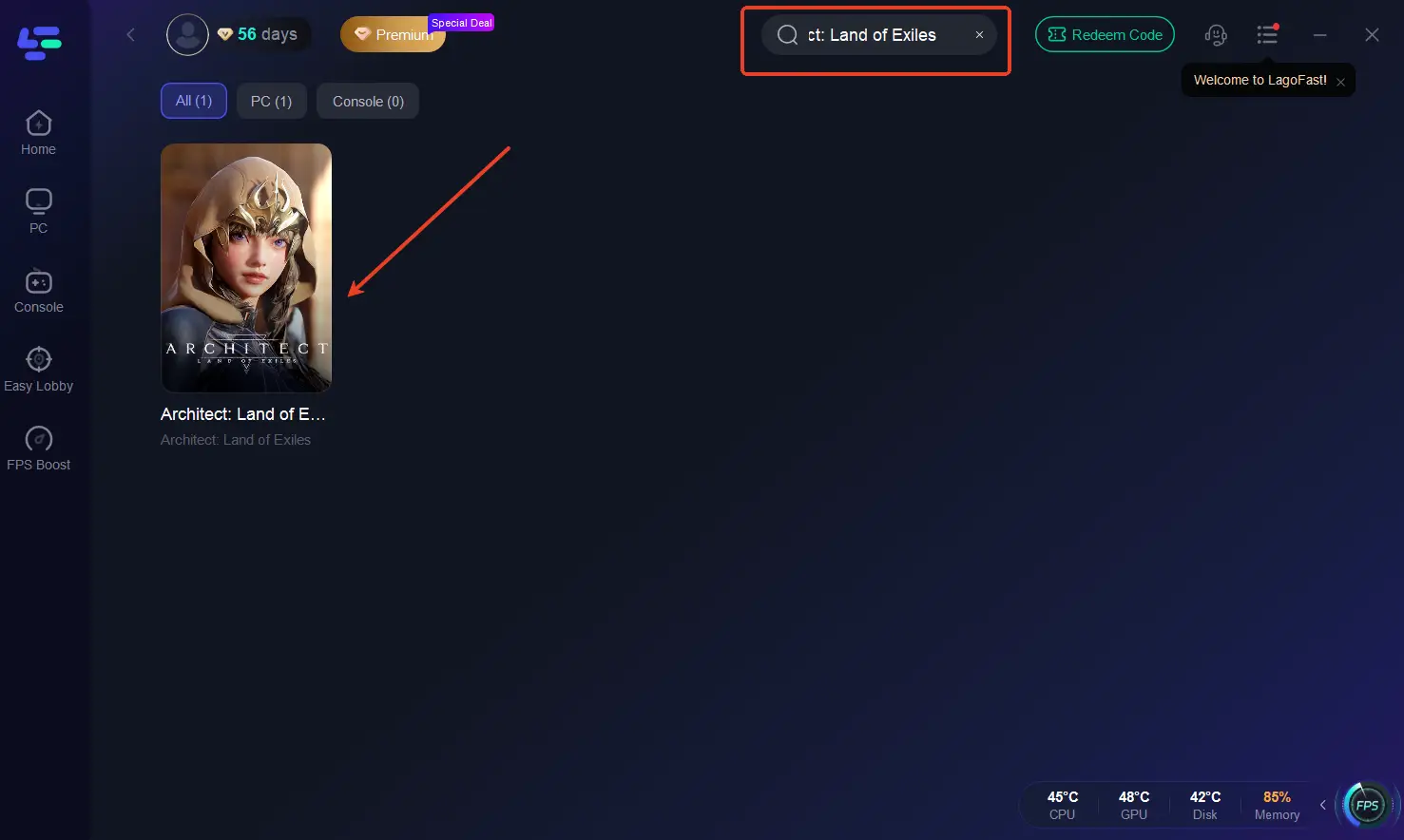
Step 3: On the right side of the interface, click Architect: Land of Exiles Translation Tool.
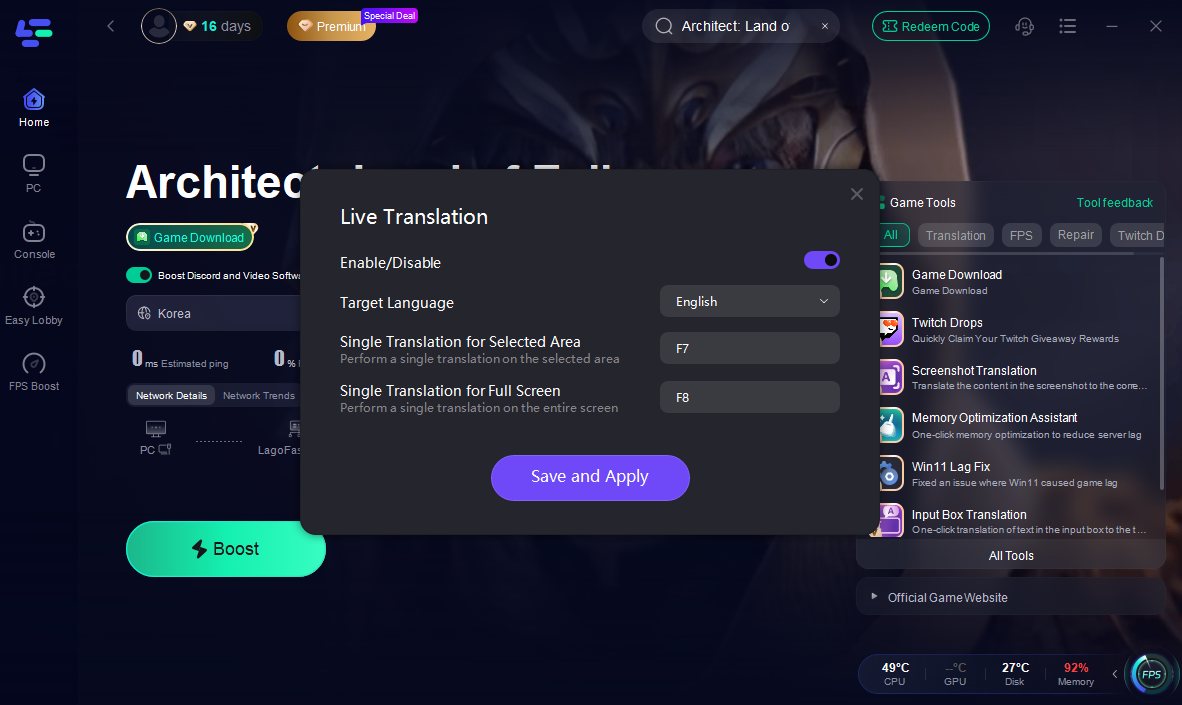
Step 4: Pick your desired language (like English, Japanese, Thai, or German), and set up your hotkeys for instant translation.
Step 5: LagoFast will automatically select the best server route to ensure smooth gameplay with lower latency and minimal packet loss.
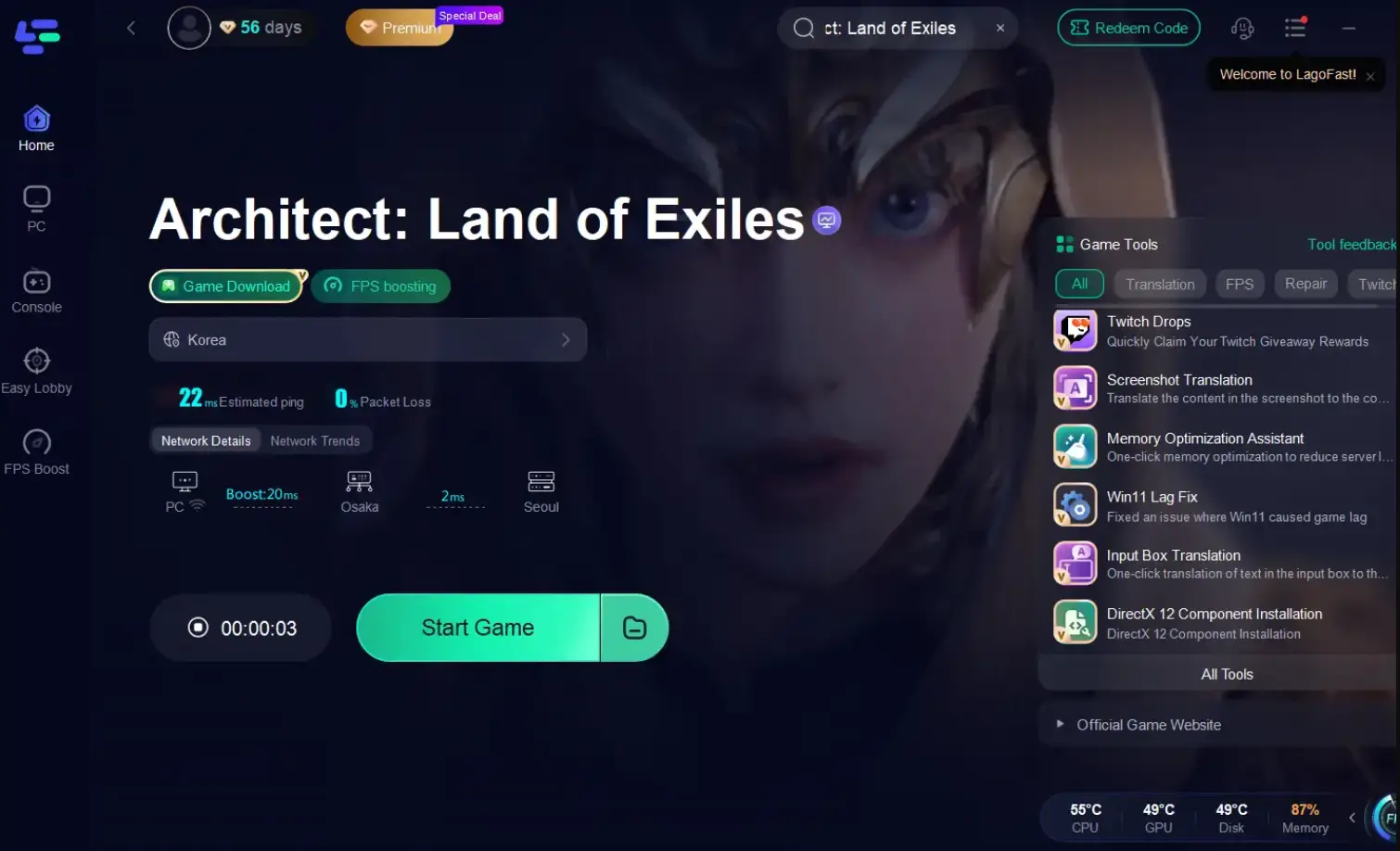
Step 6: Start Architect: Land of Exiles through LagoFast.
Whenever you see foreign text, just press Screenshot Translate—LagoFast will instantly detect, translate, and display the result right in your game overlay.
4. How to Use LagoFast Game Download Tool for Architect: Land of Exiles
Click the Game Download button on the interface to download Architect: Land of Exiles to your PC.
Final Thoughts
Architect: Land of Exiles looks like one of the most ambitious RPGs of 2025—but language should never be a barrier to enjoying it.If you’re not a Korean speaker, don’t waste time guessing or using your phone camera. With LagoFast, you can translate anything instantly and keep your focus on what matters: exploring, building, and surviving in the world of exiles.

Boost Your Game with LagoFast for Epic Speed
Play harder, faster. LagoFast game booster eliminates stutter and lags on PC, mobile, or Mac—win every match!
Quickly Reduce Game Lag and Ping!
Boost FPS for Smoother Gameplay!