

Apex Legends, the fast-paced battle royale from Respawn Entertainment, continues to attract millions of players around the world. Whether you’re planning to jump into the action for the first time or looking to upgrade your setup for smoother performance, knowing the game’s system requirements is crucial. Here’s a complete breakdown of the minimum and recommended system requirements to run Apex Legends on your PC.

- ✅ Reduce Lag and High Ping.
- ✅ Boost FPS at the Same Time.
- ✅ Support 1000+ Popular Online Games.
- ✅ Fix Game not Working Issues.
- Apex Legends Minimum System Requirements
- Apex Legends Recommended System Requirements
- What Makes Apex Legends Stand Out?
- Apex Legends Game Modes and Maps
- Is Apex Legends Free to Play?
- Tips to Improve Performance
- Boost Apex Legends Performance with LagoFast
1. Apex Legends Minimum System Requirements
If you’re aiming to get Apex Legends up and running on a budget or older machine, these are the minimum specifications you’ll need. This setup should let you play the game, though performance and visual quality may be limited.
- Operating System (OS): 64-bit Windows 10
- Processor (CPU): AMD FX 4350 or Intel Core i3 6300
- Memory (RAM): 6 GB DDR3 at 1333 MHz
- Graphics Card (GPU): AMD Radeon HD 7730 or NVIDIA GeForce GT 640
- DirectX: Version 11 or higher
- Storage: 75 GB (SSD or HDD)
2. Apex Legends Recommended System Requirements
For a smoother experience with higher resolution, better textures, and more consistent frame rates, aim for these recommended specs. This configuration is ideal for competitive players and those who want to experience Apex Legends as it was meant to be played.
- Operating System (OS): 64-bit Windows 10
- Processor (CPU): AMD Ryzen 5 or Intel Core i5 3570k
- Memory (RAM): 8 GB DDR3 at 1333 MHz
- Graphics Card (GPU): AMD Radeon R9 290 or NVIDIA GeForce GTX 970
- DirectX: Version 11 or higher
- Storage: 75 GB (SSD or HDD)
3. What Makes Apex Legends Stand Out?
Apex Legends isn’t just another battle royale. It combines the best elements of squad-based tactics, high-speed movement, and unique hero abilities. Each character—known as a “Legend”—comes with their own backstory and skillset, creating dynamic team compositions and gameplay strategies. The fluid movement system, including sliding and zip-lining, makes traversal as exciting as the combat.
4. Apex Legends Game Modes and Maps
Apex Legends offers more than just its classic battle royale mode. Limited-time events, arenas (3v3 mode), and rotating maps like Kings Canyon, World’s Edge, and Olympus keep the gameplay fresh. With each new season, Respawn adds updates, balancing changes, and sometimes even new weapons or permanent game modes.
5. Is Apex Legends Free to Play?
Yes, Apex Legends is completely free to play. It’s available on PC via Origin, Steam, and the EA App, as well as on consoles like PlayStation, Xbox, and Nintendo Switch. While the game does include optional in-game purchases for cosmetic items and battle passes, none of these offer gameplay advantages.
6. Tips to Improve Performance
Even if your system meets the minimum requirements, here are a few quick tips to boost performance:
- Lower in-game graphics settings to improve frame rates.
- Close background apps that may eat up RAM or CPU resources.
- Enable V-Sync or set frame rate limits to stabilize performance.
- Update your GPU drivers regularly for the latest optimizations.
7. Boost Apex Legends Performance with LagoFast
Lag spikes and connection drops can ruin a match in Apex Legends. If you’re experiencing unstable gameplay or high ping, LagoFast is a game accelerator designed to optimize your connection in real-time. It’s especially effective for online shooters where every millisecond counts.
How to Use LagoFast
Getting started is fast and simple:
Step 1: Click the Free Trial button to download and install LagoFast.
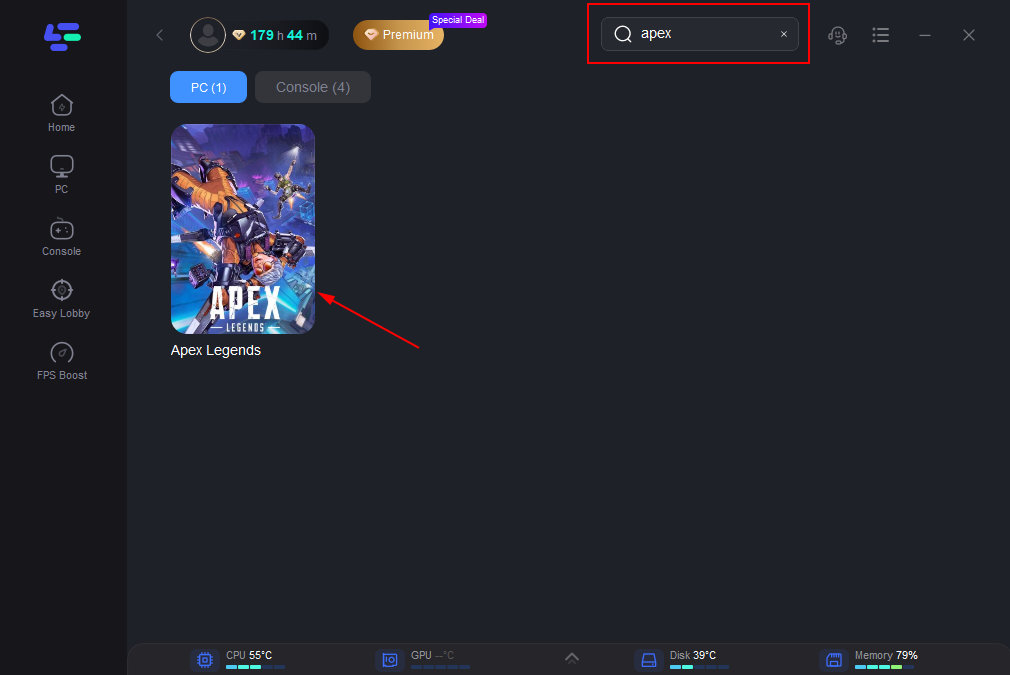
Step 2: Open LagoFast, click the PC icon on the left, and type Apex Legends in the search bar. Click on the game when it appears.
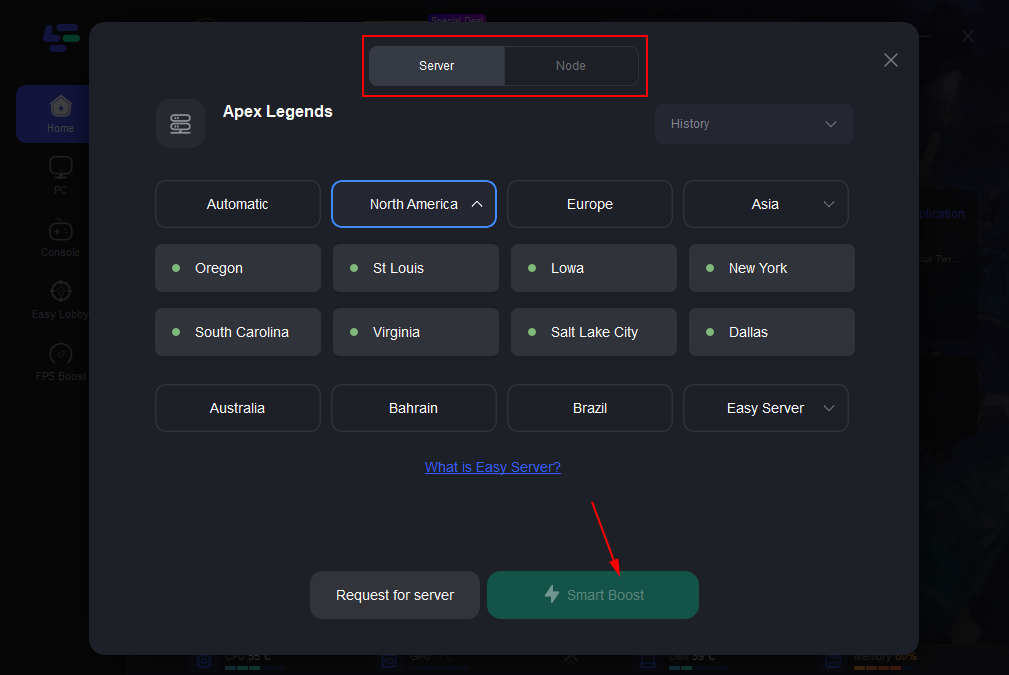
Step 3: Click “Server” to select the best server for a stable game, then click “Smart Boost”.
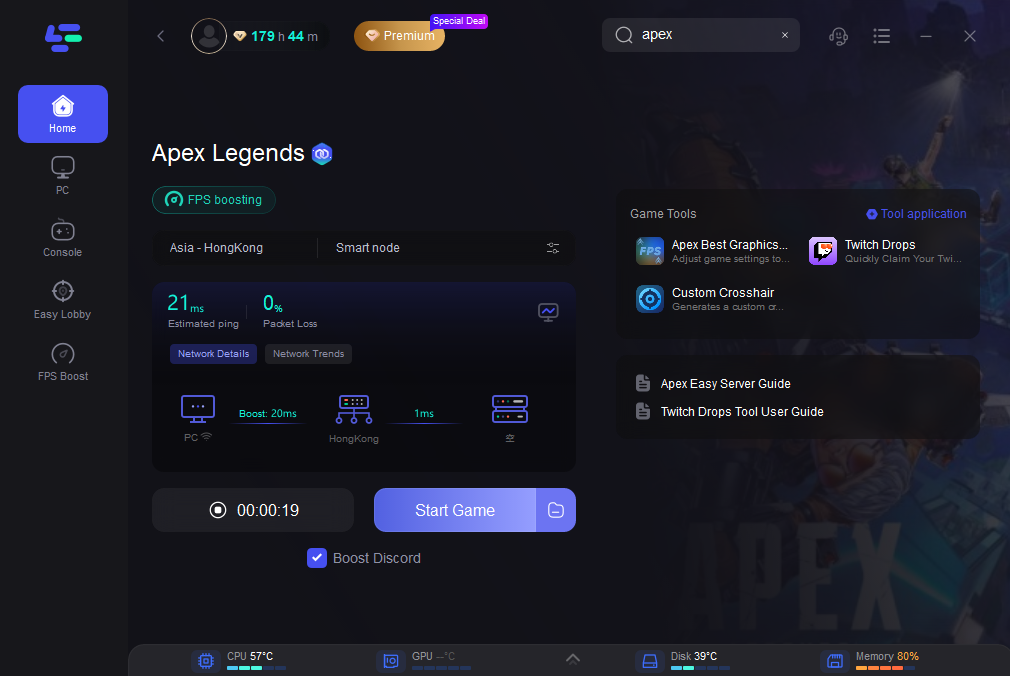
Step 4: On the right, check your ping, packet loss, and multi-path metrics. Then click “Start Game” to launch the game.
Key Benefits of LagoFast
- Lower ping and reduced lag
- Stable connection with fewer disconnects
- Real-time display of network status
- Lightweight and beginner-friendly interface
With LagoFast running in the background, you can focus on outplaying your opponents, not fighting your connection. Whether you’re solo queuing or climbing ranks, a stable network gives you the edge you need.
Conclusion
Before installing Apex Legends, make sure your system meets at least the minimum requirements. For players serious about performance—especially in a fast-paced game like this—upgrading to the recommended specs will make a significant difference in responsiveness and overall gameplay quality. Whether you’re dropping into the arena solo or squadding up with friends, a capable system ensures you can focus on outplaying your opponents instead of fighting your hardware.

Boost Your Game with LagoFast for Epic Speed
Play harder, faster. LagoFast game booster eliminates stutter and lags on PC, mobile, or Mac—win every match!
Quickly Reduce Game Lag and Ping!
Boost FPS for Smoother Gameplay!