With the release of the Pragmata demo and its integration into Capcom’s RE Engine ecosystem, many PC players have encountered a frustrating issue: “an unhandled exception occurred in Pragmata.” Similar instability patterns are also reported in other RE Engine titles, including RE9 crashing reports, which suggests a shared underlying engine behavior rather than a single isolated bug.
This guide is designed for PC players experiencing Pragmata crash problems such as startup failure, freezing during gameplay, or memory-related exceptions. It provides a structured breakdown of causes and fixes, moving from basic troubleshooting to advanced system-level solutions.

Best Game Booster!
- ✅ Reduce Lag and High Ping.
✅ Boost FPS at the Same Time.
✅ Support 8000+ Popular Online Games.
✅ Change Server without Latency.
✅ Boost Game Loading Speed.
Free Trial
Part 1. What Does “An Unhandled Exception Occurred in Pragmata” Mean
Part 2. Pragmata Crash and RE9 Crashing: Shared Engine Issues
Part 3. Why Pragmata Keeps Crashing on PC
Part 4. Best Way to Fix Pragmata Game Crash Fix (Step-by-Step)
Part 5. Fix Pragmata Crash on Startup or Loading Screen
Part 6. Advanced Troubleshooting (Often Overlooked)
Part 7. How to Enhance Your Game Experience with LagoFast Game Booster
Part 8. FAQs
Part 1: What “An Unhandled Exception Occurred in Pragmata” Means (Pragmata Bug Explained)
The error commonly described as “Pragmata unhandled exception crash” refers to a runtime failure where the game cannot properly handle an unexpected system or memory condition.
What is happening technically
The crash usually occurs when:
- The game attempts to access invalid or restricted memory
- A runtime process fails during execution
- A system-level conflict interrupts the game loop
This type of issue is not exclusive to Pragmata. It is commonly seen in modern PC games built on complex engines.
Why it happens specifically in Pragmata
Pragmata runs on Capcom’s RE Engine, which is highly optimized but sensitive to system variation. During early demo stages, instability is more common due to ongoing optimization.
Key triggers include:
- Driver inconsistencies across GPU models
- Background software interference
- Shader compilation interruptions
- Sudden memory allocation spikes
Because this is an early build, occasional Pragmata bug behavior is expected even on stable systems.
Part 2: Pragmata Crash and RE9 Crashing: Shared RE Engine Instability
Many users reporting Pragmata crash issues also mention RE9 crashing or freezing, which indicates a shared engine-level pattern.
Community-reported behavior
Players have noted:
- “Game runs smoothly, then suddenly freezes the entire system”
- “High FPS performance followed by unexpected shutdown”
- “Crashes occur even on high-end hardware”
What this suggests
- The issue is not always caused by weak hardware
- High-end PCs are still affected
- Stability problems often come from engine-level optimization gaps
This is important because it shifts the focus away from hardware upgrades and toward system and engine compatibility fixes.
Part 3: Why Pragmata Keeps Crashing on PC (Main Causes)
1. Corrupted or incomplete game files
Missing assets or interrupted downloads can trigger the Pragmata crash error during startup or loading screens.
2. GPU driver conflicts
Graphics driver instability is one of the most common causes of RE Engine crashes.
- Outdated drivers
- Recently updated unstable drivers
- Version mismatch with the game build
3. Shader cache and rendering pipeline issues
Problems often appear when:
- Shader compilation is incomplete
- DLSS or frame generation conflicts occur
- Cached shader data becomes corrupted
4. Memory and CPU instability
- RAM overload or instability
- Background applications consuming resources
- CPU spikes during asset streaming
5. DLL or third-party software conflicts
Mods, overlays, or injected DLL files may interfere with the game’s runtime environment.
Part 4: Best Way to Fix Pragmata Game Crash Fix (Step-by-Step Solutions)
This section outlines structured solutions for fixing Pragmata unhandled exception errors and related crashes.
Method 1: Stabilize Launch Environment with LagoFast Game Booster
If your Pragmata crash happens during:
- Startup authentication
- Online connection handshake
- Scene loading transitions
then routing instability or connection-related interruption may be involved.
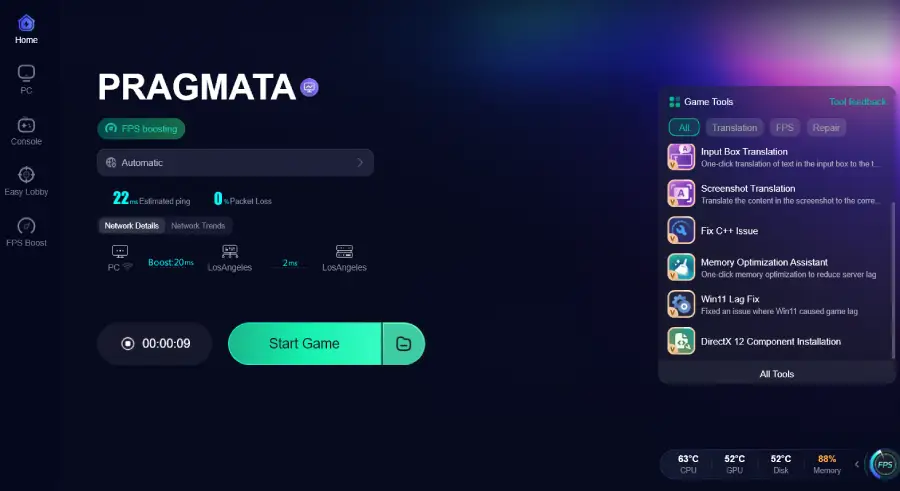
LagoFast Game Booster helps stabilize network routing paths and reduce initialization errors that can indirectly trigger crashes.
Steps:
Step 1: Click the Free Trial button to download and install LagoFast.
Free Trial
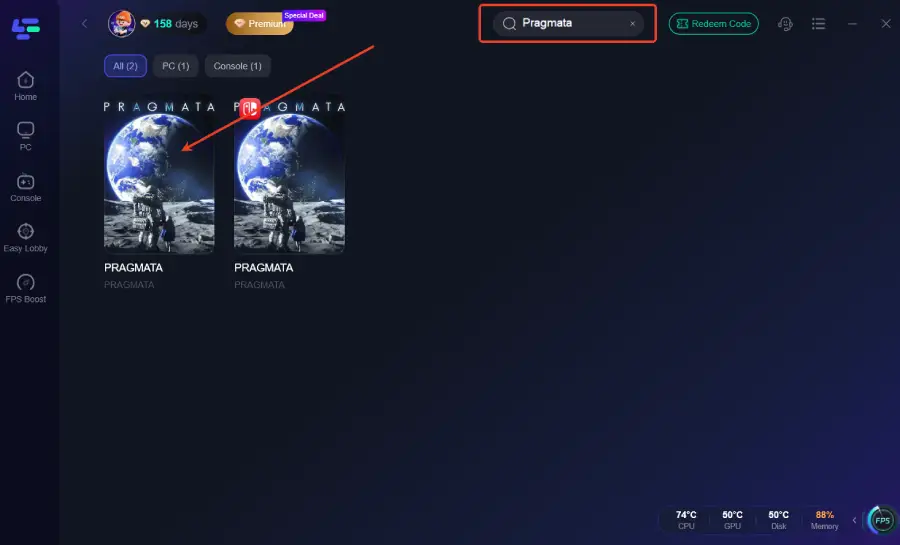
Step 2: After installation, search "Pragmata" in the search bar and select the game.
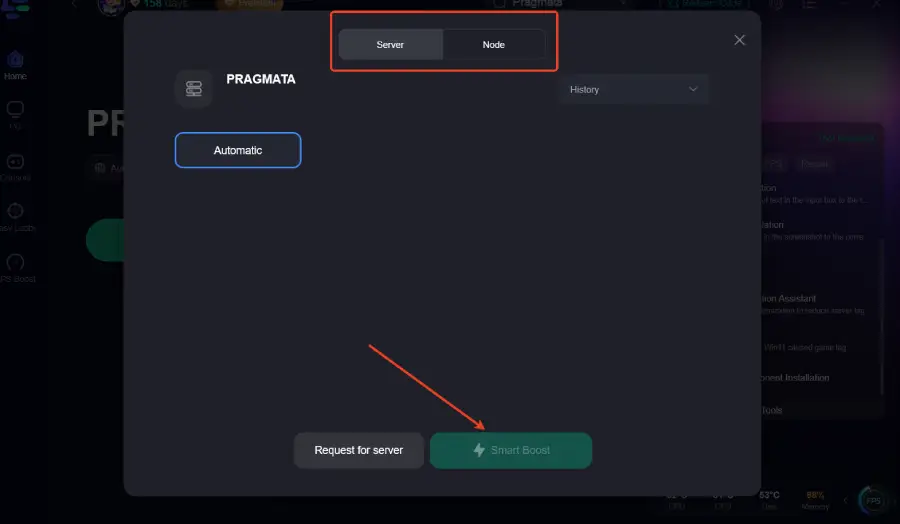
Step 3: Choose your preferred server node and click "Smart Boost" to start optimizing.
Step 4: Launch your game and enjoy smooth, optimized gameplay with lower ping and packet loss.
When this works best:
- Random startup failures
- Intermittent launch success
- Network-related crash patterns
Important note: this does not fix corrupted files or driver-level issues.
Method 2: Verify Game File Integrity
- Open Steam
- Run file verification
- Replace missing or corrupted files automatically
This is one of the fastest fixes for Pragmata bug-related crashes.
Method 3: Clean GPU Driver Installation
A clean driver reinstall is often essential.
Steps:
- Use DDU (Display Driver Uninstaller)
- Remove current GPU drivers completely
- Install latest stable driver version
This resolves many cases of Pragmata crash and RE Engine instability.
Method 4: Clear Shader Cache
- NVIDIA users: clear shader cache via control panel
- AMD users: reset shader cache in Adrenalin software
This helps resolve rendering-based crashes and freezing issues.
Method 5: Disable DLSS and Frame Generation
These features can cause instability in early builds of Pragmata, especially during shader compilation.
Method 6: Repair Visual C++ Redistributables
Missing runtime libraries may trigger unhandled exception errors during game initialization.
Method 7: Remove Conflicting Files and Overlays
Check game directory for:
- Mod files
- Injected DLLs
- Third-party overlays (Discord overlay, recording tools, etc.)
Part 5: Fix Pragmata Crash on Startup or Loading Screen
If the game crashes immediately after launch
- Verify game files
- Update GPU drivers
- Run the game as administrator
If the game freezes randomly
- Test RAM stability
- Monitor CPU/GPU usage
- Close background applications
If crash occurs during gameplay
- Lower graphics settings
- Disable ray tracing
- Reduce VRAM usage
These adjustments reduce pressure on the RE Engine rendering pipeline.
Part 6: Advanced Troubleshooting (Often Overlooked Fixes)
Check power supply stability
An unstable PSU under load may cause sudden shutdowns or unhandled exception crashes.
Test RAM modules individually
- Remove one RAM stick at a time
- Identify faulty or unstable memory modules
Use Windows Event Viewer
Check logs for:
- Application Error 1000
- .NET Runtime errors
These logs help pinpoint the exact cause of Pragmata crash issues.
Part 7: Enhancing Stability and Performance in Pragmata (Optional Optimization)
Even after fixing crashes, performance instability may still affect gameplay consistency.
Key benefits of optimization tools like routing boosters:
- Reduced packet loss
- More stable connection paths
- Improved session consistency
This can indirectly reduce situations where connection instability contributes to Pragmata unhandled exception errors during transitions or online checks.
Part 8: FAQs (Pragmata Crash & RE9 Crashing Issues)
What causes “an unhandled exception occurred in Pragmata”?
It is usually caused by runtime conflicts, corrupted files, or GPU driver instability.
Why does Pragmata crash on high-end PCs?
Because many crashes are engine-related, not strictly hardware limitations.
Is this related to RE9 crashing issues?
Yes. Both are tied to RE Engine behavior and may share similar instability patterns.
Can reinstalling the game fix it?
Only if the problem is file corruption. It will not fix driver or engine-level issues.
Does network stability affect crashes?
Yes. Some crashes happen during authentication or connection phases.
Conclusion: Pragmata Crash Fix Strategy Overview
The “an unhandled exception occurred in Pragmata” error is not a single simple bug. It is a combination of engine-level instability, system configuration conflicts, and early-stage optimization limitations.
Rather than focusing on one fix, the most effective approach is structured troubleshooting:
- Verify game files
- Perform clean GPU driver installation
- Clear shader cache
- Disable unstable rendering features
- Address potential system or network instability
Understanding the difference between local system issues and RE Engine-level behavior is key to solving Pragmata crash problems efficiently.
As Pragmata continues development toward full release, stability improvements are expected. For now, applying these fixes systematically provides the best chance of a smooth and consistent gameplay experience.