
You click Play, the launcher opens, and then the game suddenly crashes with the message “An unhandled exception occurred in Crimson Desert.” Instead of loading into the game, you're sent straight back to the desktop with little explanation. This usually happens when something goes wrong during startup, such as missing system components, outdated drivers, or corrupted game files. When the game encounters a problem it cannot properly handle during initialization, it may stop running and display this exception error.

- ✅ Reduce Lag and High Ping.
✅ Boost FPS at the Same Time.
✅ Support 2000+ Popular Online Games.
✅ Change Server without Latency.
✅ Boost Game Loading Speed.
Part 1: What “An Unhandled Exception Occurred in Crimson Desert” Actually Means
Part 2: Common Causes of the Crimson Desert Unhandled Exception Error
Part 3: How to Fix “An Unhandled Exception Occurred in Crimson Desert”
Part 1: What “An Unhandled Exception Occurred in Crimson Desert” Actually Means
The message “An unhandled exception occurred in Crimson Desert” is a generic crash error. It means the game encountered an unexpected problem in the code and didn’t have a built-in method to handle it properly. Instead of continuing to run, the program stops immediately and displays the error.
Players typically notice the error in situations like:
- The game crashes right after clicking Play
- A pop-up appears mentioning an unhandled exception
- The game closes during the loading screen
- Crimson Desert launches but crashes before reaching the main menu
In simple terms, the game tried to perform an operation—such as loading files, initializing graphics, or connecting to services—but something in the system environment prevented that process from completing successfully.
Part 2: Common Causes of the Crimson Desert Unhandled Exception Error
The “An unhandled exception occurred in Crimson Desert” error usually appears when something goes wrong while the game is starting up. Instead of handling the problem internally, the game simply stops running and shows a crash message. Several technical issues can lead to this situation, and the causes are often related to system components, drivers, or game files.
Missing or Corrupted Runtime Components
Modern PC games rely on several system frameworks to run correctly, including:
- DirectX
- Microsoft Visual C++ runtime libraries
- Windows system dependencies
If any of these components are missing, outdated, or corrupted, the game may fail during initialization and trigger an unhandled exception crash.
Common signs include:
- The game crashes immediately after launching
- Error messages mentioning missing DLL files
- The game closes before the loading screen finishes
Ensuring these components are properly installed often helps resolve startup crashes.
Outdated or Incompatible GPU Drivers
Graphics drivers allow the game engine to communicate with your GPU. If the driver is outdated or not fully compatible with the game, issues can occur when the game tries to initialize graphics during startup.
Possible symptoms include:
- Crashes during startup
- Rendering or graphics initialization errors
- The game closing shortly after launch
Updating your GPU drivers is often one of the quickest ways to improve stability.
Corrupted or Incomplete Game Files
Another common reason for exception crashes is damaged game files. This can happen if an update was interrupted, the installation was incomplete, or certain files became corrupted over time.
When important assets or configuration files cannot load correctly, the game may stop running and show an unhandled exception error.
Typical situations include:
- The game closes during loading
- Certain resources fail to load properly
- Startup crashes appear after an update
Verifying the game files through the launcher can usually repair these issues.
Software Conflicts During Startup
In some cases, the error may appear when other software interferes with the game during startup. Background applications, overlays, or system utilities can sometimes interrupt the initialization process.
Examples include:
- Game overlays
- Monitoring tools
- Security software
- Other background applications
If the game environment becomes unstable during launch, the client may crash and display an exception error.
Part 3: How to Fix “An Unhandled Exception Occurred in Crimson Desert”
Fix 1: Use LagoFast to Stabilize the Game Environment
In some cases, the “An unhandled exception occurred in Crimson Desert” error may appear when the game fails to initialize properly due to system instability or missing components during startup. Improving the overall game environment can help reduce these kinds of issues. LagoFast is a game performance platform designed to enhance gaming stability by reducing ping, fixing packet loss, stabilizing network connections, and optimizing routing between players and game servers, helping the game client run more smoothly during launch.
LagoFast also includes several practical system tools:
- Fix C++ Issue Tool—Repairs missing or damaged Visual C++ components that may stop games from launching.
- Win 11 Lag Fix Tool – Fixes issues where Windows 11 may cause game lag or instability.
- DirectX 12 Component Installation Tool – Installs required DirectX components needed by modern games.
- Upcoming Tools – Future utilities including DirectX 12 / C++ issue repair tools and FPS boost tools designed to further improve game stability and performance.
How to Use LagoFast for Crimson Desert
Step 1: Click the Free Trial button to download and install LagoFast.
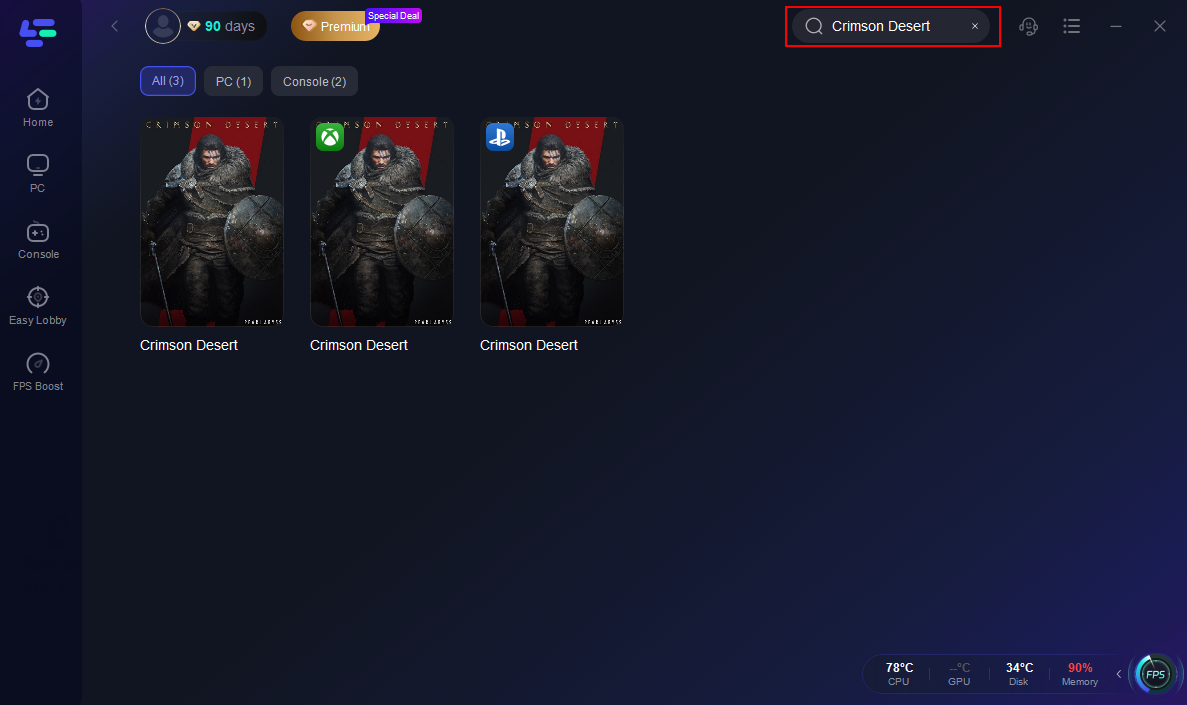
Step 2: After installation, search "Crimson Desert" in the search bar and select the game.
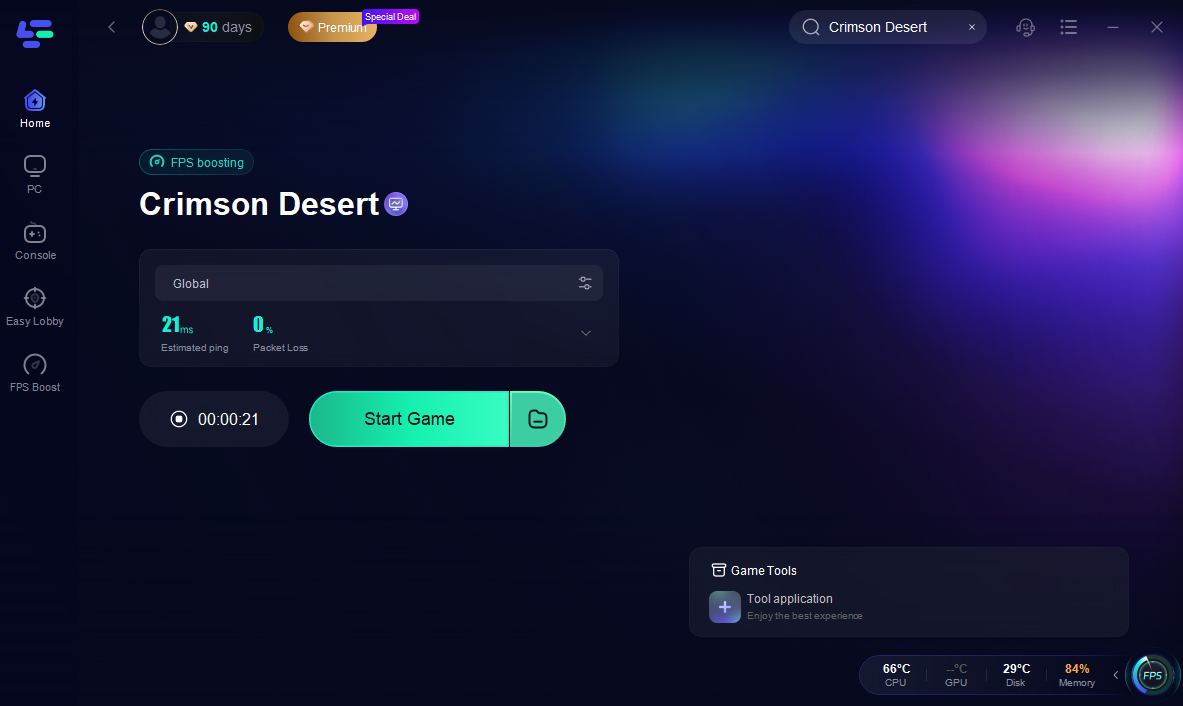
Step 3: Choose your preferred server node and click "Smart Boost" to start optimizing.

Step 4: Launch your game and enjoy smooth, optimized gameplay with lower ping and packet loss.
Fix 2: Update Your Graphics Drivers
Outdated GPU drivers are one of the most common causes of exception crashes.
To update your drivers:
- Visit the official website of NVIDIA, AMD, or Intel
- Download the latest driver for your GPU
- Install the update and restart your computer
This ensures your hardware fully supports modern game engines.
Fix 3: Verify Game Files
Corrupted files can trigger crash errors during startup.
To verify files:
- Open your game launcher (Steam or official launcher)
- Go to Game Properties
- Select Verify Integrity of Game Files
The launcher will automatically repair missing or damaged files.
Fix 4: Reinstall DirectX and Visual C++ Runtimes
If required system libraries are missing, reinstalling them can resolve the crash.
Steps:
- Download the latest DirectX Runtime from Microsoft
- Install the newest Visual C++ Redistributables
- Restart your computer
This restores essential dependencies needed by the game.
Fix 5: Update Windows
An outdated operating system can cause compatibility issues with modern games.
Make sure to install:
- Latest Windows updates
- Security patches
- Updated system libraries
Keeping Windows updated ensures the game can access all required system features.
Conclusion
The “An unhandled exception occurred in Crimson Desert” error usually appears when something goes wrong during the game’s startup process. In most cases, it’s related to missing system components, outdated drivers, corrupted files, or software conflicts. By updating your GPU drivers, verifying game files, reinstalling required runtimes, and keeping your system updated, many startup crashes can be reduced. Creating a more stable game environment with tools like LagoFast may also help the game launch more reliably. Once these issues are addressed, you should have a better chance of starting Crimson Desert without unexpected crashes.
Boost Your Game with LagoFast for Epic Speed
Play harder, faster. LagoFast game booster eliminates stutter and lags on PC, mobile, or Mac—win every match!
Quickly Reduce Game Lag and Ping!
Boost FPS for Smoother Gameplay!