
Nothing kills the hype of a high-stakes extraction shooter like a "Login Failed" screen. As ARC Raiders players dive into the scavenging wastes, many are met with the frustrating "An Error Occurred" message or persistent service interruptions. Whether you're dealing with a launch error or getting booted during a raid, these technical hiccups shouldn't keep you from the loot. In this guide, we’ll break down why these errors happen and provide the definitive solutions to get you back into the action immediately.

- ✅ Reduce Lag and High Ping.
- ✅ Boost FPS at the Same Time.
- ✅ Support 2000+ Popular Online Games.
- ✅ Fix High Ping Easily
- ✅ Change Server without Latency
Part 1: What Is "An Error Occurred" in ARC Raiders?
Part 2: How to Fix "An Error Occurred" in ARC Raiders?
Part 1: What Is "An Error Occurred" in ARC Raiders?
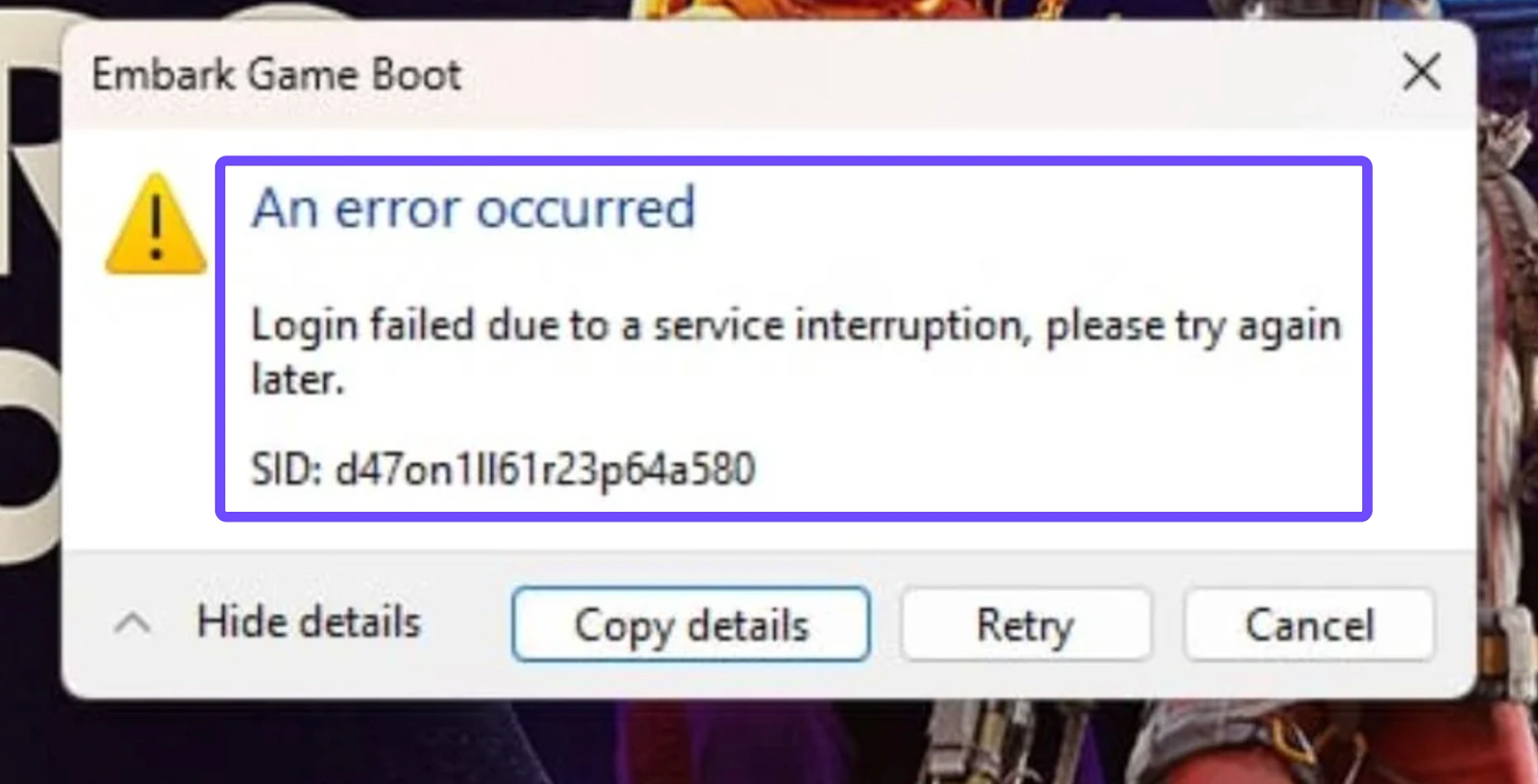
In ARC Raiders, the "An Error Occurred" message is a general catch-all for several backend issues. Often, it appears as "Login failed due to service interruption" or an "Unexpected error occurred." These typically stem from a breakdown in communication between your PC and Embark Studios' servers. Common culprits include unstable network routing, overloaded servers during peak playtests, or localized file corruption within the Steam or Epic Games installation. Understanding that this is usually a network-to-server handshake issue is the first step toward fixing it.
Common Causes of ARC Raiders Errors:
- Server Authentication Timeouts: The most common cause for "service interruption." If your connection takes too long to reach the Embark backend, the session token expires.
- ISP Throttling & Poor Routing: Your internet service provider may be routing your data through congested nodes, causing packet loss that the game interprets as a total disconnection.
- Corrupted Installation Files: Missing .dll files or interrupted updates can prevent the game from initializing correctly.
- Easy Anti-Cheat Conflicts: As a kernel-level service, EAC often conflicts with background apps or Windows security settings, triggering an "Unexpected error."
- Regional Mismatch: Attempting to play on servers far from your physical location without proper optimization can lead to persistent login loops.
Part 2: How to Fix "An Error Occurred" in ARC Raiders?
Solution 1: Use LagoFast Game Booster
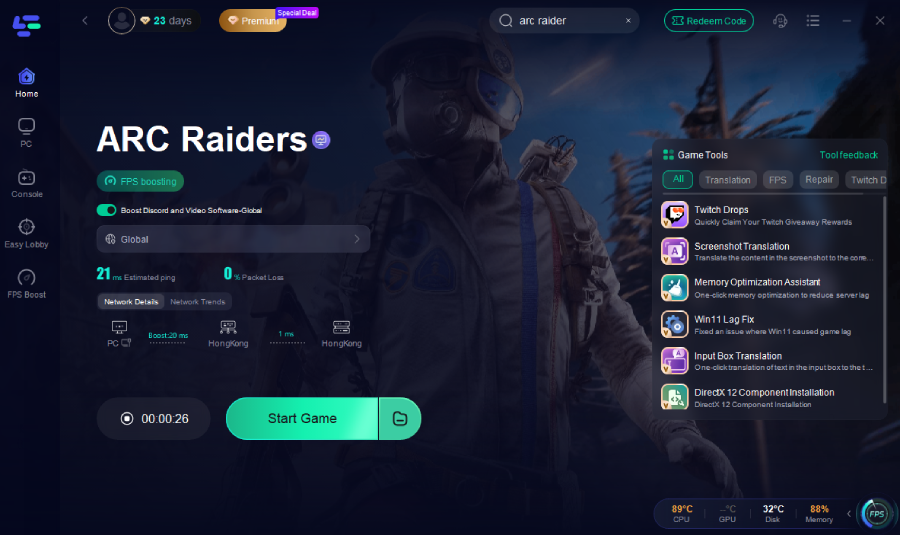
When standard troubleshooting fails, the most effective way to bypass "An Error Occurred" and launch issues is by using LagoFast. Unlike basic fixes, LagoFast addresses the root cause of service interruptions: poor ISP routing and packet loss. It functions as a dedicated gaming pathway that ensures your connection to ARC Raiders servers is prioritized and stable. With its unique multi-path connection technology, LagoFast eliminates the "login failed" loops by finding the most direct route to the game’s backend, ensuring you never miss a drop because of a timeout.
Key Features of LagoFast:
- Fixes Login Failures: Instantly resolves "service interruption" errors by stabilizing server handshakes.
- Multipath Connection: Uses multiple routes simultaneously to prevent packet loss and high ping.
- One-Click Optimization: Easy-to-use interface, just search for "ARC Raiders" and boost.
- Global Server Nodes: Connect to the fastest server regardless of your physical location.
- Real-time Lag Monitoring: See your actual ping and jitter in-game to ensure peak performance.
Tutorial to Use LagoFast to Fix "An Error Occurred" in ARC Raiders:
Step 1: Click the "Free Trial" button below to download and install LagoFast for free.
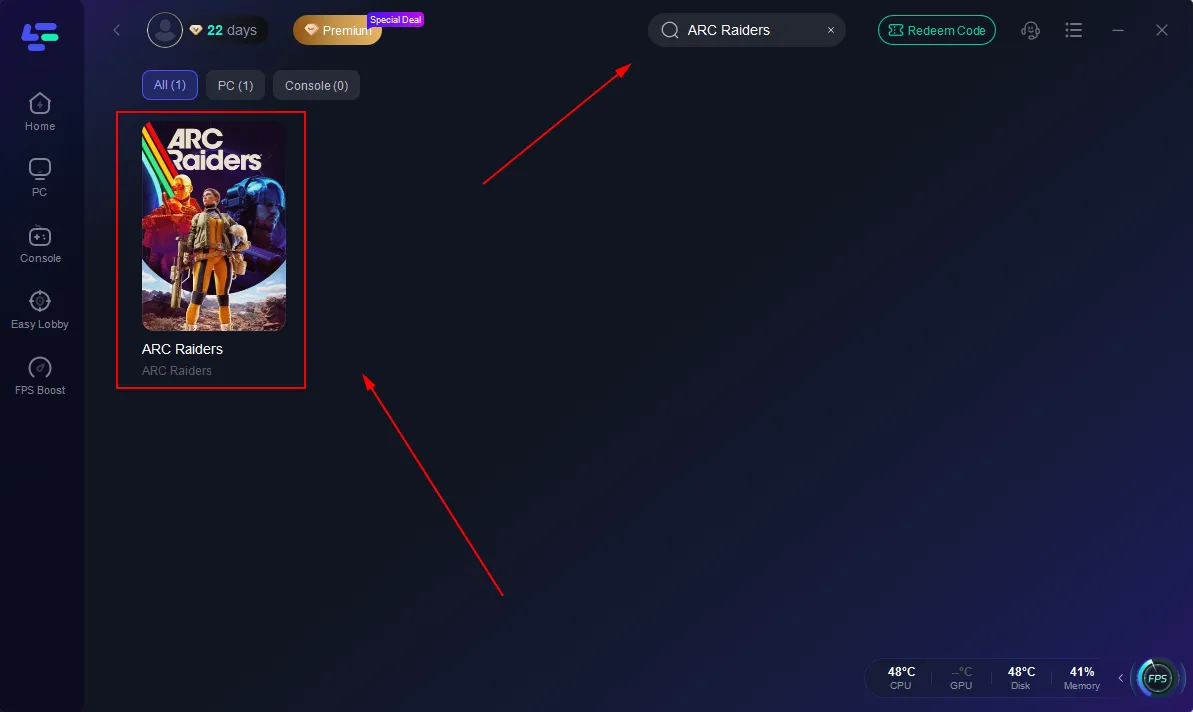
Step 2: Launch LagoFast, search for "ARC Raiders" in the search bar, and select the game.
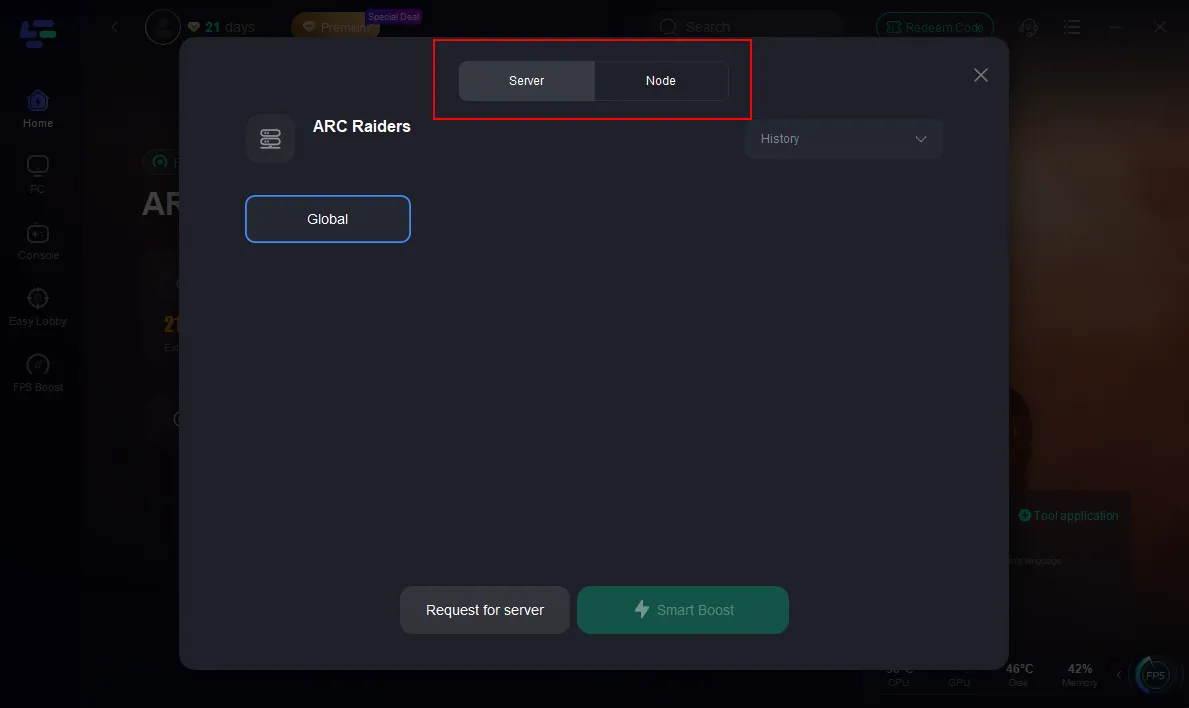
Step 3: Click the "Select Server" button to connect to a stable server node, then activate optimization via "Smart Boost".
Step 4: After enabling real-time optimization, check the live ping and packet loss rates, then click "Start Game" to begin playing.
Solution 2: Verify Integrity of Game Files
Sometimes, "An Error Occurred" is triggered by a single corrupted file in your installation directory. Steam’s built-in tool can scan and replace these missing pieces.
Step 1. Open your Steam Library.
Step 2. Right-click on ARC Raiders and select Properties.
Step 3. Navigate to the Installed Files tab.
Step 4. Click Verify integrity of game files.
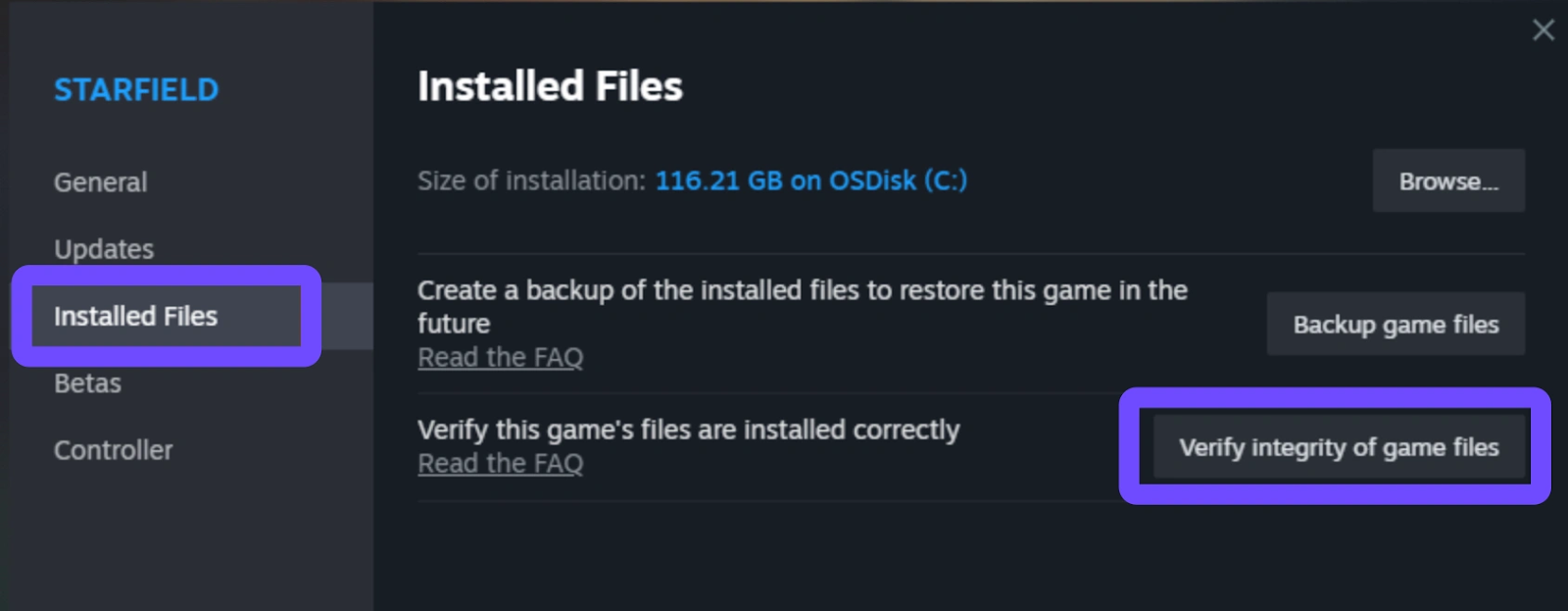
Step 5. Wait for the process to finish and relaunch the game.
Note: This can take 10-20 minutes depending on your disk speed and is often a "hit-or-miss" fix for network-related errors.
Solution 3: Flush Your DNS and Reset Winsock
If your PC is holding onto outdated network "maps," it might struggle to find the ARC Raiders servers, leading to login failures.
Step 1. Press the Windows Key and type cmd.
Step 2. Right-click Command Prompt and select Run as Administrator.
Step 3. Type ipconfig /flushdns and press Enter.
Step 4. Type netsh winsock reset and press Enter.
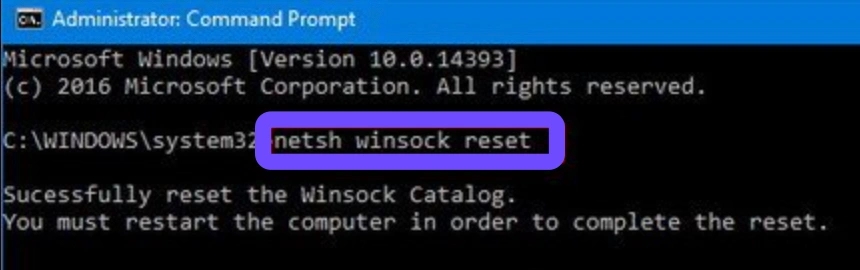
Step 5. Restart your computer.
Solution 4: Update GPU Drivers and Windows
ARC Raiders is a visually demanding title. If your drivers are out of date, the game may crash at launch or throw an unexpected error during the shader compilation phase.
Step 1. Open NVIDIA GeForce Experience or AMD Software.
Step 2. Check for the latest Game Ready Driver.
Step 3. Download and perform an "Express Installation."
Step 4. Go to Windows Settings and select Update & Security.
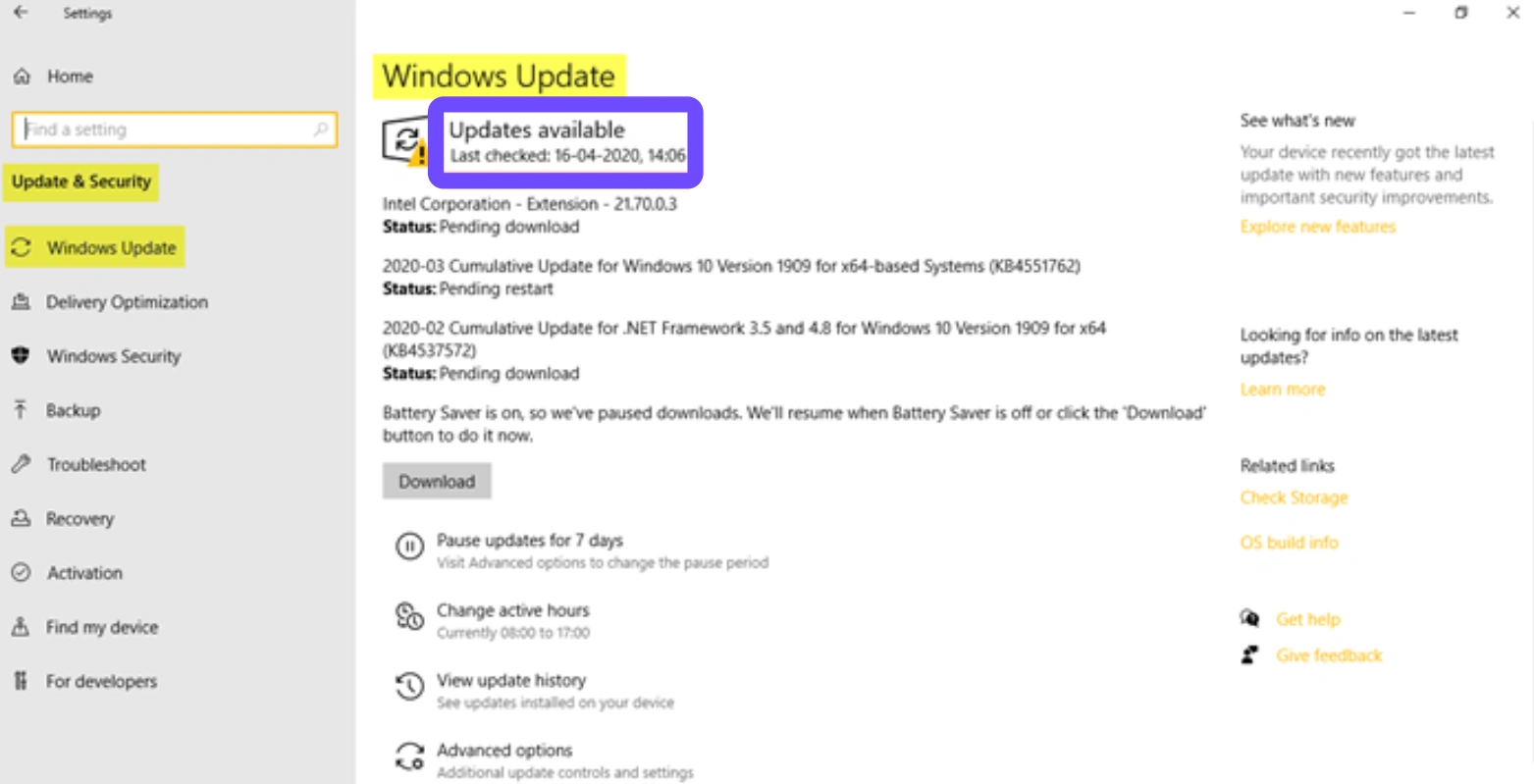
Step 5. Click Check for Updates and install any pending items.
Solution 5: Reinstall Easy Anti-Cheat
The "An Error Occurred" message can sometimes be an EAC initialization failure in disguise. Repairing the anti-cheat service can occasionally bridge the gap.
Step 1. Go to the ARC Raiders installation folder (usually under steamapps/common/ArcRaiders).
Step 2. Locate the EasyAntiCheat folder.
Step 3. Run the EasyAntiCheat_Setup.exe.
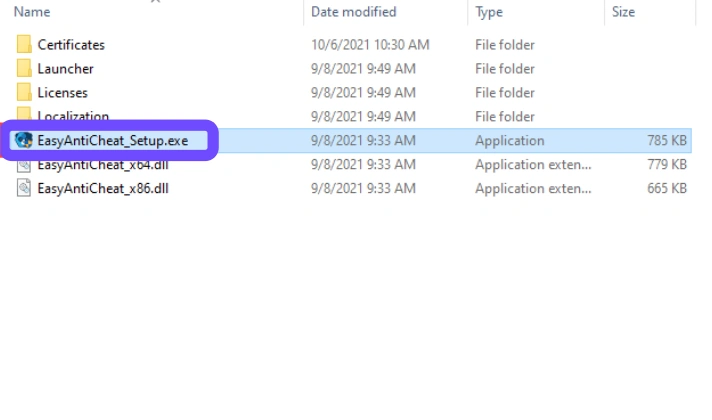
Step 4. Select ARC Raiders and click Repair Service.
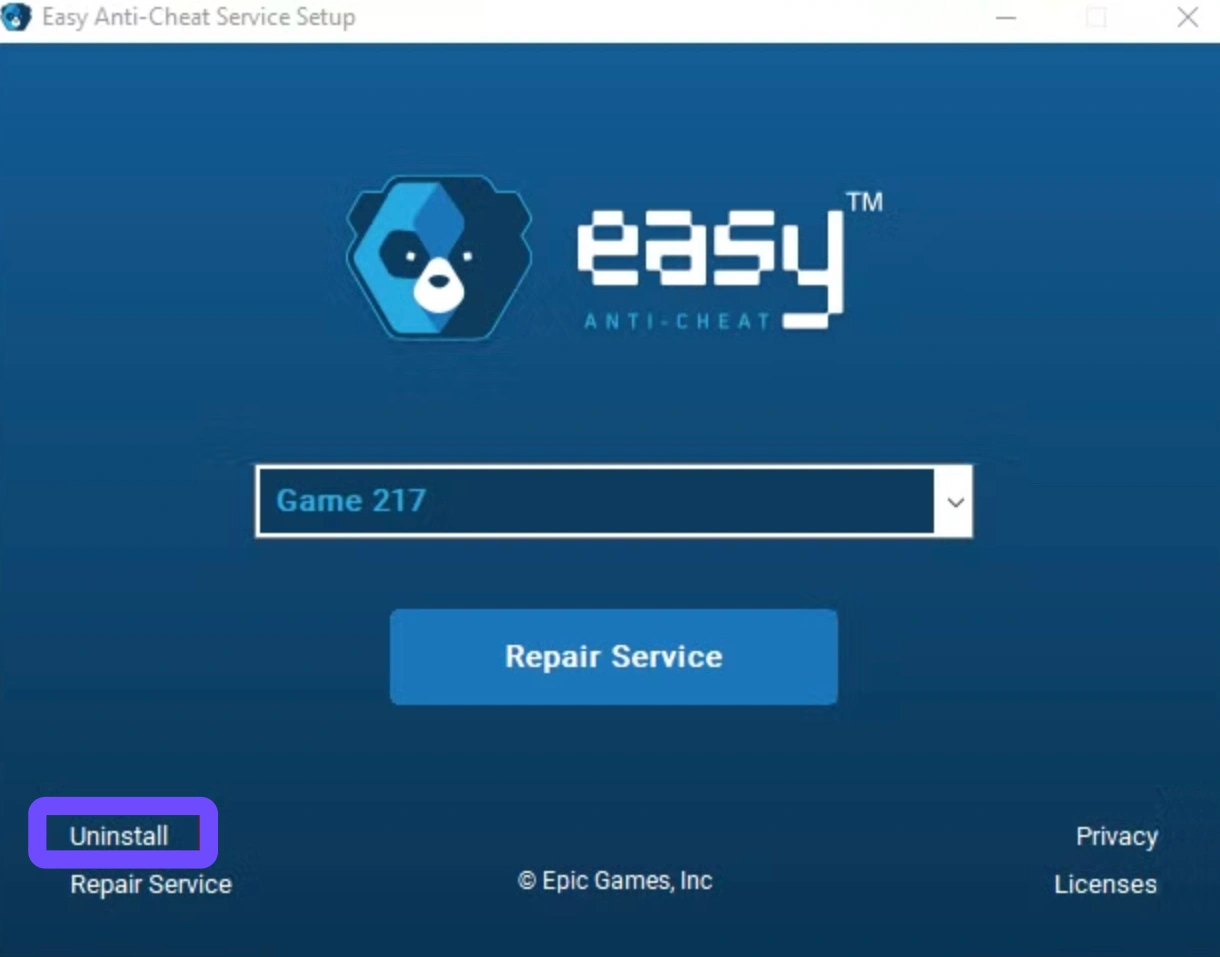
Step 5. Restart Steam and try to login again.
Solution 6: Disable Overlays and Background Apps
Third-party software like Discord, MSI Afterburner, or Steam Overlay can conflict with the game's engine, causing an unexpected launch error.
Step 1. Open Discord Settings and toggle off In-Game Overlay.
Step 2. Right-click ARC Raiders in Steam and disable the Steam Overlay.
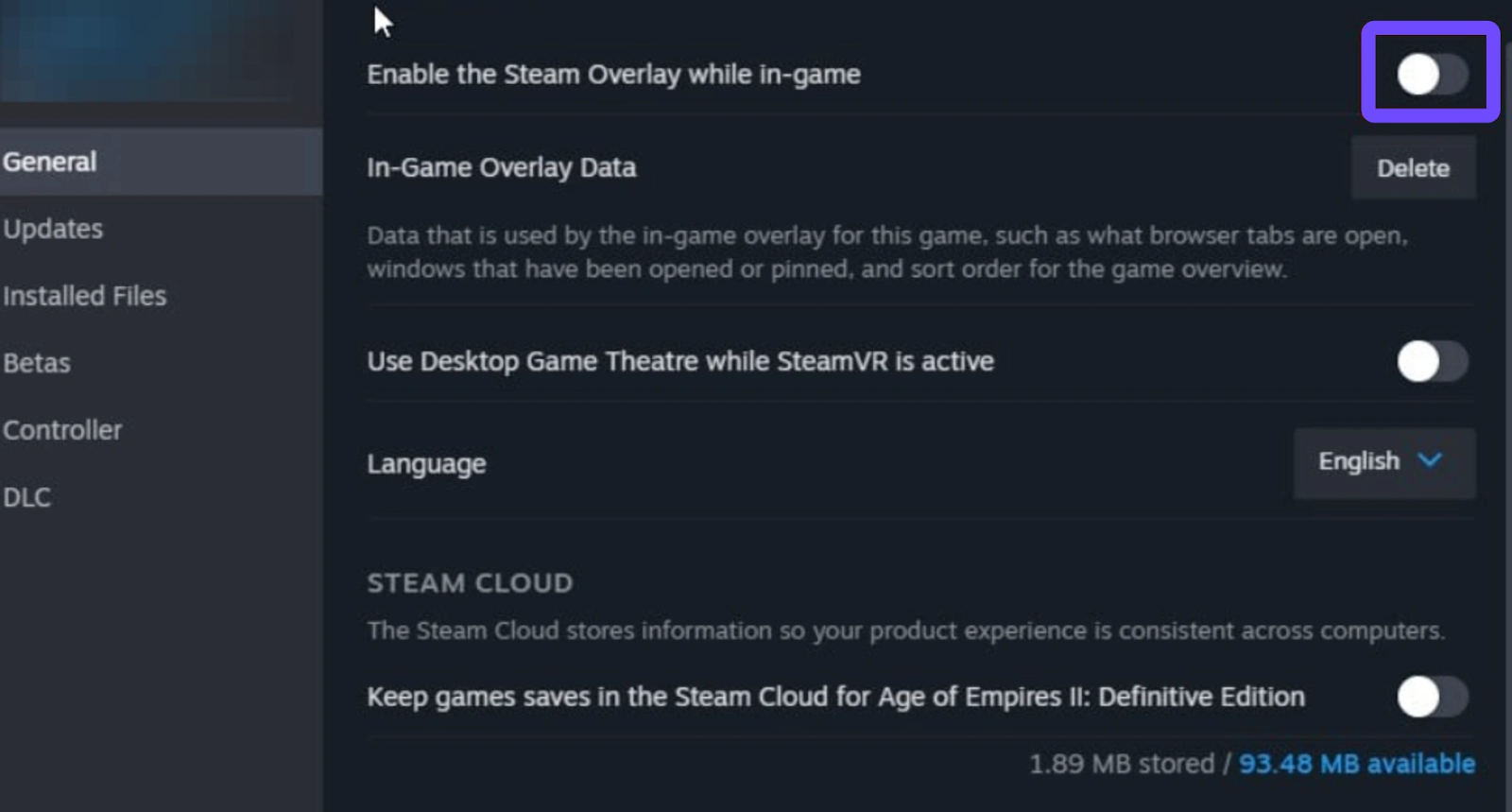
Step 3. Close monitoring tools like MSI Afterburner or RivaTuner.
Step 4. Open Task Manager (Ctrl+Shift+Esc) and end non-essential tasks.
Step 5. Relaunch the game as an Administrator.
Conclusion
Dealing with an ARC Raiders launch error or the dreaded "An Error Occurred" message is undeniably frustrating for any raider. While manual fixes like flushing your DNS or verifying game files are good "first aid" steps, they often fail to address the underlying network instability causing the service interruptions. If you want a seamless, frustration-free experience, LagoFast remains the superior choice, offering a specialized connection that ensures you stay in the raid rather than stuck at the login screen. Don't let technical errors steal your loot, optimize your setup, and get back to the surface.
Boost Your Game with LagoFast for Epic Speed
Play harder, faster. LagoFast game booster eliminates stutter and lags on PC, mobile, or Mac—win every match!
Quickly Reduce Game Lag and Ping!
Boost FPS for Smoother Gameplay!