
The long-awaited Aion 2 is finally on the horizon, promising next-gen visuals, large-scale PvP battles, and an expansive fantasy world powered by advanced technology. But with such graphical fidelity and complex online systems, many players are asking the same question—"Can my PC or mobile device run Aion 2 smoothly?"
In this guide, we’ll break down the Aion 2 system requirements, what kind of performance to expect on both PC and mobile, and most importantly, how tools like LagoFast can help you overcome lag, ping spikes, and stutters—even if your setup is not top-tier.

- ✅Less ping and crashes.
- ✅ Higher FPS and better PC performance.
- ✅ Support for 3000+ games.
- ✅ Stable connection and region switching.
Part 1. Aion 2 System Requirements
Part 2. Why You Might Face Performance or Lag Issues
Part 3. How LagoFast Helps You Play Aion 2 Smoothly
Part 4. LagoFast Game Tools for the Ultimate Aion 2 Experience
Part 1: Aion 2 System Requirements
While official specs are yet to be confirmed, early technical showcases suggest that Aion 2 will run on a high-end engine similar to Unreal Engine 5. That means you’ll need decent hardware to enjoy it at stable frame rates.
Minimum System Requirements
OS: Windows 10 64-bit
Processor: Intel Core i5-8400 / AMD Ryzen 5 2600
Memory: 8 GB RAM
Graphics: NVIDIA GTX 1060 / AMD RX 580
DirectX: Version 12
Storage: 50 GB SSD
Recommended System Requirements
OS: Windows 11 64-bit
Processor: Intel Core i7-10700K / AMD Ryzen 7 5800X
Memory: 16 GB RAM or higher
Graphics: NVIDIA RTX 3060 Ti / AMD RX 6700 XT
Storage: 100 GB SSD (preferably NVMe)
These specs are unofficial estimates compiled from early NCSoft technical presentations, internal test footage, and similar Unreal Engine 5 MMORPG benchmarks. Once NCSoft releases the official requirements, this section will be updated accordingly.
If your setup falls short, don’t worry—performance can still be improved through network and system optimization, which we’ll cover next.
Hot related: Aion 2 Server & Character Name Reservation Guide >
Part 2: Why You Might Face Performance or Lag Issues
Even with strong PCs, Aion 2 players may still face occasional lag or performance issues because of its massive online world. Here are the most common ones:
- High Ping/Network Delay: Cross-region connections can cause latency and input delay.
- FPS Drops in Crowded Areas: Intense PvP fights and particle effects can strain your GPU.
- Slow Loading or Texture Pop-ins: Limited RAM or slower SSDs lead to longer load times.
LagoFast helps solve these problems by reducing ping, stabilizing your connection, and keeping gameplay smooth across all environments.
Part 3: How LagoFast Helps You Play Aion 2 Smoothly
If you’ve experienced lag, frame drops, or high ping in Aion 2, LagoFast is built to handle exactly that. It combines smart network routing with system optimization for a seamless experience.
Intelligent Network Optimization
LagoFast automatically finds the fastest and most stable route to Aion 2 servers, minimizing ping and packet loss for smoother cross-region gameplay.
Stable Performance in Crowded Areas
During massive PvP battles, LagoFast balances network traffic and frees CPU/RAM resources to keep your FPS stable.
Faster Loading and Texture Streaming
By optimizing data routes and background processes, LagoFast reduces load times and prevents texture pop-ins—making exploration and combat feel fluid.
Tutorial to use LagoFast to ensure a smooth gaming experience:
Step 1: Click the Free Trial button on the official LagoFast website to download and install the software.
Step 2: Open LagoFast, click the PC icon on the left, and search Aion 2 in the search bar. Once it appears, click it to enter the optimization page.

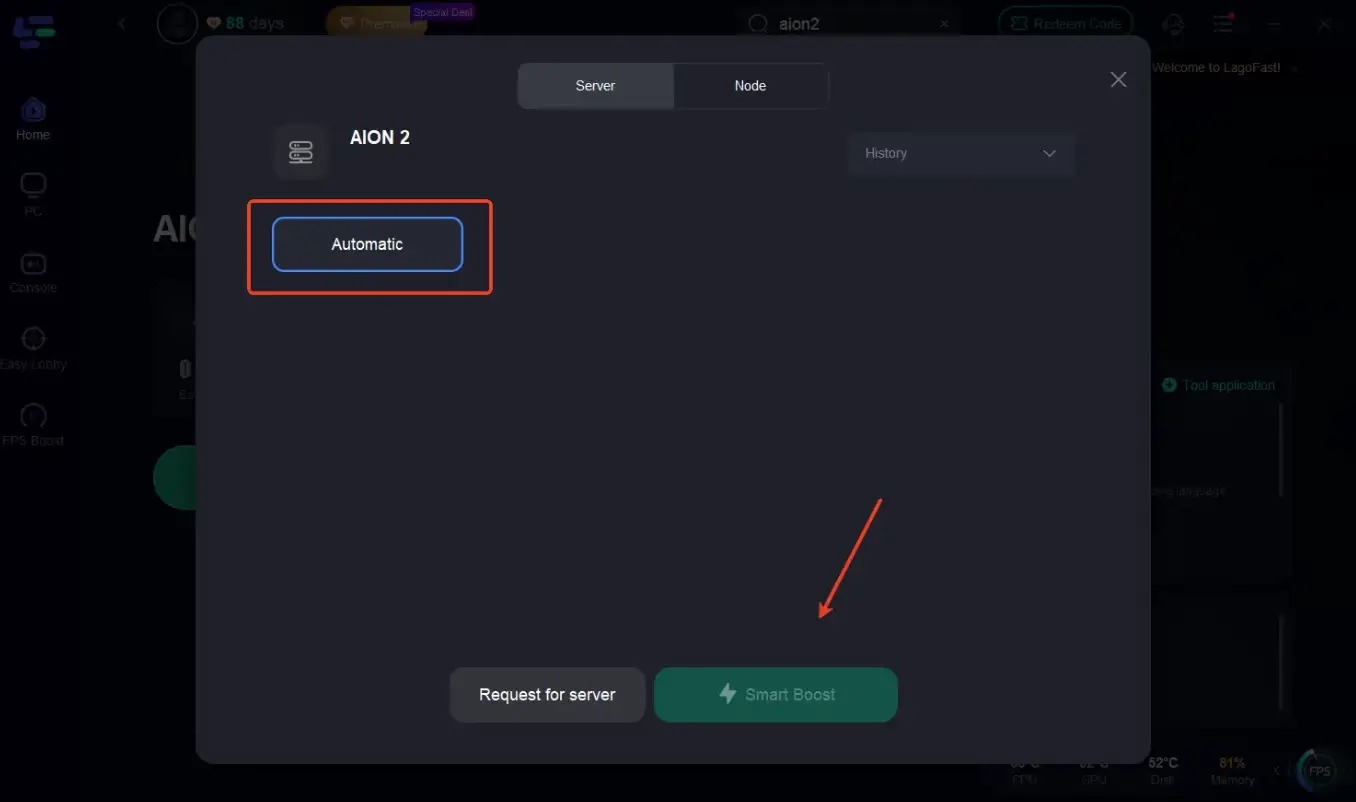
Step 3: Click on “Server” to select the best route for stable connectivity, then click “Smart Boost” to enable intelligent optimization.
Step 4: On the right panel, check your ping, packet loss, and multi-path connection status to ensure the best route is applied.
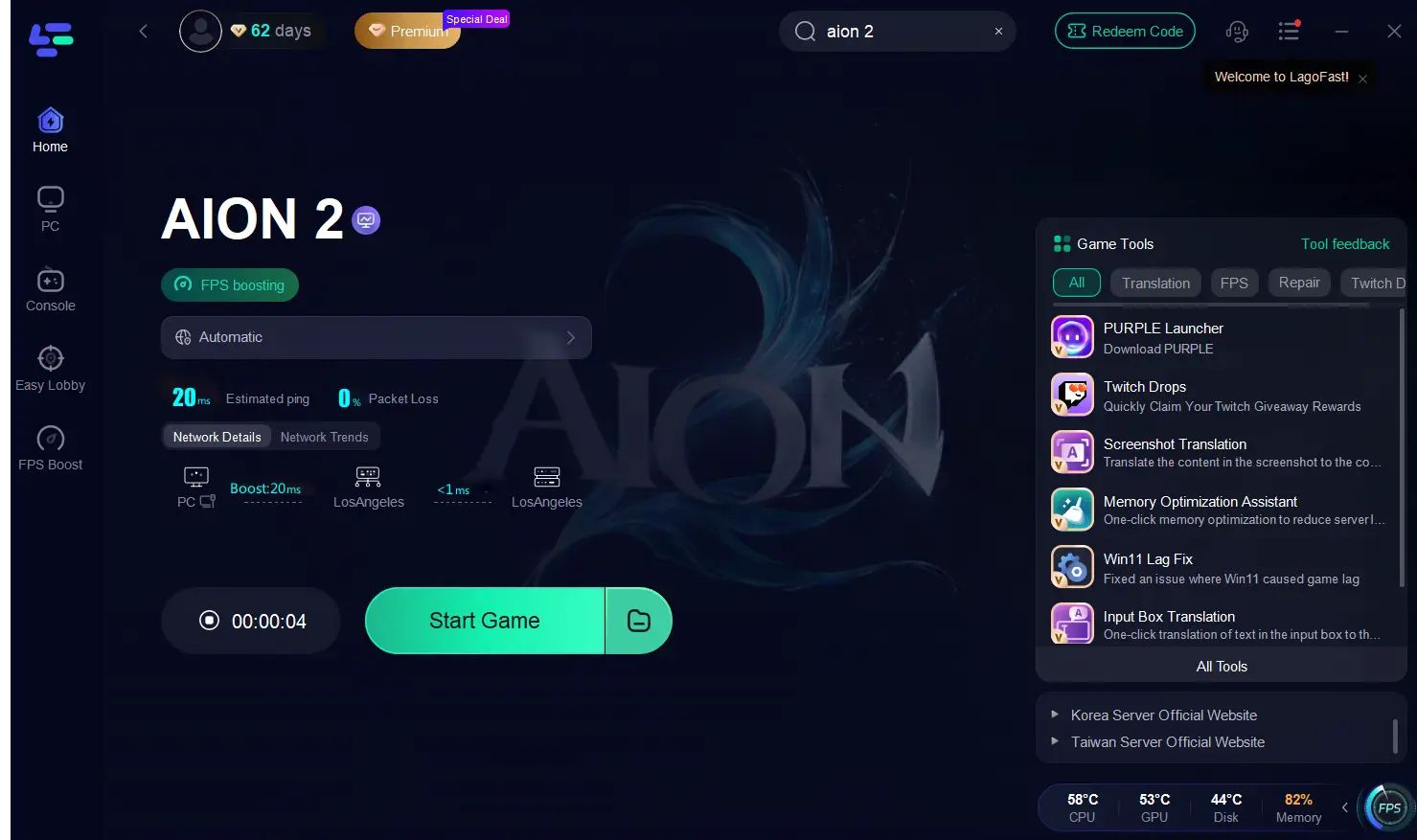
Step 5: Finally, click “Start Game” to launch Aion 2. LagoFast will continue optimizing your network in real time while you play.
These steps help instantly lower ping, avoid lag spikes, and keep gameplay smooth across both PC and mobile versions of Aion 2.
Part 4: LagoFast Game Tools for the Ultimate Aion 2 Experience
Beyond ping reduction, LagoFast includes a set of tools designed to make your Aion 2 experience faster, cleaner, and more efficient.
Key LagoFast Game Tools
LagoFast isn’t just about lowering ping—it also includes several quick tools to make your Aion 2 sessions smoother and easier:
- Memory Optimization Assistant
Clear background apps with one click to free up RAM and keep FPS stable during large-scale battles. - Win11 Lag Fix
Automatically adjusts system settings on Windows 11 to remove stutters and improve frame pacing. - DirectX 12 Installation
Ensures your system has the latest DirectX components for smoother, crash-free performance. - One-Click Translation
Instantly translate on-screen text, dialogues, quest logs, and chat messages from Korean or Taiwanese servers with just one tap in LagoFast. No file editing required — translations appear instantly as an overlay while you play. - Twitch Drops Integration
Track and claim Twitch rewards automatically without leaving your game or switching tabs.
Final Thoughts
Aion 2 is shaping up to be one of the most ambitious MMORPGs of the decade, combining breathtaking visuals with real-time combat. To truly enjoy it, you’ll need both strong hardware and a stable connection.
By using LagoFast Game Booster, you can eliminate lag, reduce ping, and enjoy the world of Atreia—on PC or mobile—just as it’s meant to be: smooth, responsive, and immersive.

Boost Your Game with LagoFast for Epic Speed
Play harder, faster. LagoFast game booster eliminates stutter and lags on PC, mobile, or Mac—win every match!
Quickly Reduce Game Lag and Ping!
Boost FPS for Smoother Gameplay!