
If you’ve found yourself locked out of your adventure in Aion 2 by sudden crashes or frustrating freezes, you’re hardly alone. As one of the most anticipated next-generation MMORPGs, the game delivers high-fidelity visuals, vast open-world battles, and intense network demands — but these same strengths can also push hardware and connections to their limits. Many players have reported issues such as unexpected client shutdowns, long loading times, or mid-game freezes.
While it’s tempting to assume “my PC just isn’t good enough,” the truth is more complex. Crashes in Aion 2 often arise from a combination of factors — ranging from outdated drivers, GPU overload, or corrupted files to unstable network conditions. In this guide, we’ll explore the key reasons why Aion 2 keeps crashing, provide step-by-step solutions to restore smooth gameplay, and show how a tool like LagoFast Game Booster can help you transform your experience from glitchy to seamless.

- ✅Less ping and crashes.
- ✅ Higher FPS and better PC performance.
- ✅ Support for 2000+ games.
- ✅ Stable connection and region switching.
Part 1: Why Aion 2 Keeps Crashing
Part 2: How to Fix Freezing and Crashing Issues in Aion 2
Part 3: How to Fix Aion 2 Crashing and Enhance Game Experience with LagoFast
Part 1: Why Aion 2 Keeps Crashing
Understanding why Aion 2 crashes or freezes is key to fixing it. Here are some of the most common causes:
Hardware or performance constraints
Aion 2 uses advanced graphics and large open-world systems built on Unreal Engine 5, which taxes CPUs, GPUs, memory, and storage. When a system is underpowered, crashes can occur due to overheating, memory exhaustion, or driver overload.
Outdated or missing drivers/system files
Many crashes are caused when graphics drivers, chipset firmware, or essential game components (DirectX, Redistributables) are missing or outdated. Without proper support, the game client may crash or fail to load certain modules.
Corrupted or damaged game files
If the game launcher fails to verify the integrity of the installation (or if patching has errors), the client may hang, freeze, or crash on loading screens. Repairing game files can often resolve such issues.
Excessive background apps and processes
Running too many applications, streaming tools, overlays, or download managers while playing can consume system resources and cause the game to freeze or drop out. Older threads from the original Aion even showed that programs like Razer Synapse could trigger consistent crashes.
Network instability or packet loss
Unstable network conditions — high ping, packet loss, routing issues, or WiFi dropouts — can cause the game to freeze or crash when the server or client cannot maintain connection.
Server-side issues or overloaded instances
At launch or during heavy events, game servers may become overloaded, leading to disconnects or freezes that appear as “crashes” from the player’s perspective. While you can’t fix server-side issues, knowing they may be the root cause helps avoid unnecessary troubleshooting.
Given these varied causes, a “crash” or “freeze” can stem from hardware, software, network, or server problems — or a combination of them. The next section explains how to address each scenario.
Part 2: How to Fix Freezing and Crashing Issues in Aion 2
Follow these step-by-step practices to reduce or eliminate crashes and freezing in Aion 2.
1. Update Drivers and System Software
- Graphics drivers: Visit NVIDIA, AMD, or Intel to download and install the latest GPU drivers.
- Chipset/motherboard drivers: Use your motherboard manufacturer’s site (ASUS, MSI, Gigabyte, etc.) to update BIOS, chipset, and network drivers.
- DirectX and Visual C++ Redistributables: Ensure these are up to date — many crash logs point to missing files in these libraries.
- Windows updates: Make sure you’re running the latest version of Windows 10 or 11 as required by the game.
2. Verify or Repair Game Files
- Use the game launcher or platform (e.g., Steam) to verify integrity or repair the game installation.
- If the launcher provides a “repair” tool, run it to fix corrupted or missing files.
- If problems persist, a full reinstall may be necessary — especially if crashes occur during startup or loading.
3. Close Background Apps and Optimize System Resources
- Open Task Manager (Ctrl + Shift + Esc) and check which processes consume CPU, memory, GPU, or network.
- Close high-usage apps such as web browsers, streaming software, and overlays.
- Disable unnecessary startup programs to free system resources for gameplay.
4. Improve Network Stability
- Use a wired Ethernet connection instead of WiFi for lower packet loss and latency.
- Restart your router or modem before playing.
- Pause downloads or streaming on other devices to free bandwidth.
- Ensure your firewall, antivirus, or VPN isn’t blocking game traffic.
- If high ping or packet loss persists, consider using a dedicated network optimizer (see Part 3).
5. Adjust Graphics and Performance Settings
- Lower heavy visual effects like ultra shadows, ambient occlusion, and ray tracing if your system is near the minimum requirements.
- Cap your frame rate at 60 FPS if you notice stutters at higher settings.
- Install the game on an SSD to prevent freezes during asset loading.
6. Check for Server or Region Issues
- Visit official forums or social channels to see if others in your region are experiencing crashes.
- If the issue occurs at login or during server loading, try switching to a less crowded server or wait until maintenance ends.
Part 3: How to Fix Aion 2 Crashing and Enhance Game Experience with LagoFast
While the above steps address most technical issues, one tool that can improve both network stability and system performance is LagoFast Game Booster.
LagoFast optimizes network routing, selecting the fastest and most stable path between your PC and the game server. This reduces ping spikes, packet loss, and routing inefficiencies — all of which can cause freezes or disconnections that look like crashes.
How to Use LagoFast to Fix Aion 2 Freezing on PC
Step 1: Begin by clicking the Free Trial button to download and install the LagoFast Free Trial.
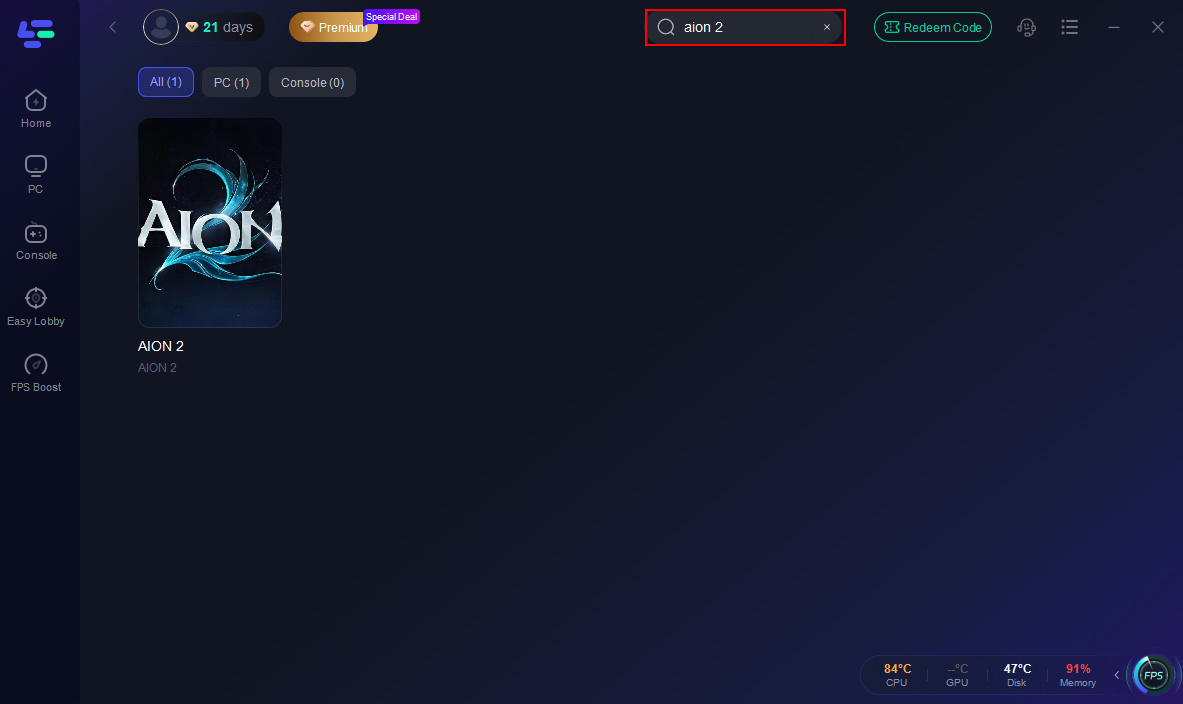
Step 2: Search for Aion2: Open LagoFast and use the search bar to find Aion2.
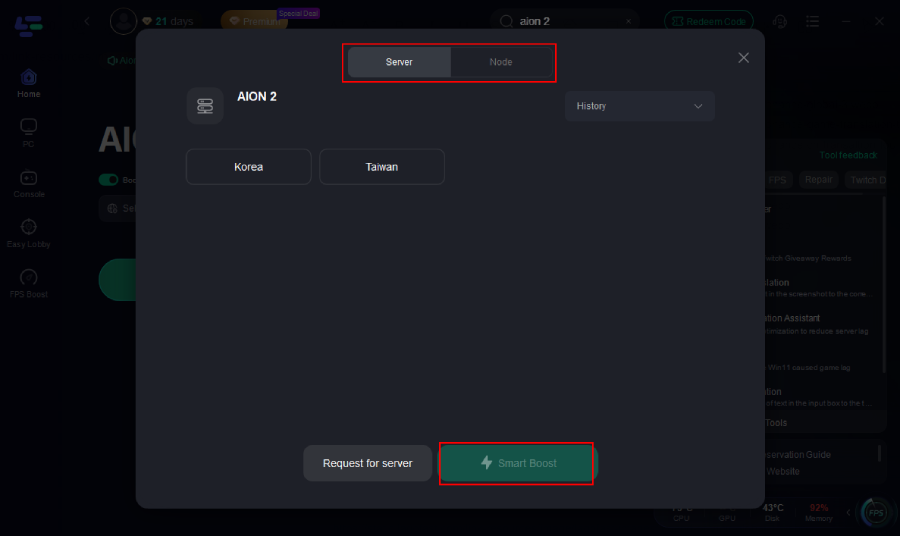
Step 3: Optimize Network Settings: LagoFast will automatically select the optimal server and settings to reduce latency and packet loss
Step 4: Launch the Game: Start Aion2 through LagoFast to enjoy improved performance and stability.
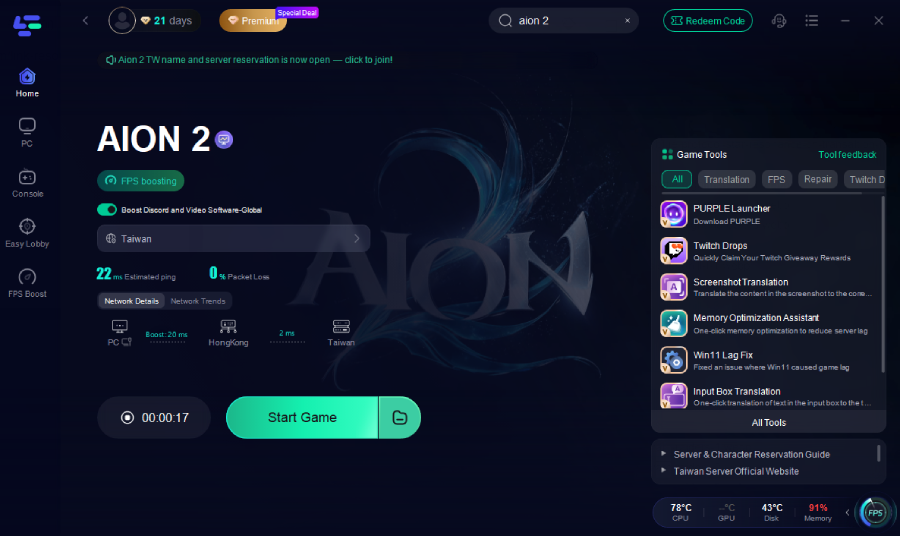
With this optimized setup, you should experience smoother gameplay, fewer freezes, and more consistent frame rates.
Part 4: FAQs
Q1: Does a crash always mean my PC is underpowered?
No. While hardware limitations can cause crashes, other factors like outdated drivers, network issues, corrupted files, or server instability can also be responsible.
Q2: Will reinstalling the game always fix the issue?
Not always. Reinstalling helps if your game files are damaged, but crashes caused by drivers or network problems won’t be resolved this way.
Q3: Can using a game booster actually prevent crashes?
Yes. If your crashes are due to network instability, packet loss, or poor routing, a booster like LagoFast can stabilize your connection and prevent related freezes.
Q4: Are WiFi connections bad for Aion 2 stability?
WiFi connections are more prone to interference, packet loss, and latency spikes. Using Ethernet or a high-quality router improves stability and reduces crash risks.
Q5: What if the crash happens to all players in my region simultaneously?
That likely indicates a server-side issue such as overload, DDoS attacks, or maintenance. Check official channels for updates or try connecting to another region.
Q6: Will reducing graphics settings help with crashes?
Yes. Lowering texture or shadow quality and disabling demanding effects can reduce GPU strain and prevent performance-related crashes.
Conclusion
Crashes and freezes in Aion 2 can be frustrating, especially when you’re eager to immerse yourself in its rich open world and combat system. But understanding that the issue often stems from a mix of hardware, drivers, system resources, and network conditions — not just “my PC isn’t strong enough” — is the key first step.
By keeping your drivers updated, repairing game files, closing unnecessary apps, optimizing network connections, fine-tuning graphics settings, and using a performance tool like LagoFast, you’ll significantly improve game stability. With a reliable setup, you can enjoy Aion 2’s beautiful world, intense battles, and Wuxia-inspired adventure — without worrying about crashes or freezes.
Boost Your Game with LagoFast for Epic Speed
Play harder, faster. LagoFast game booster eliminates stutter and lags on PC, mobile, or Mac—win every match!
Quickly Reduce Game Lag and Ping!
Boost FPS for Smoother Gameplay!