

Thousands of players opened the Purple launcher expecting a smooth login. Instead, they were hit with a sudden wave of problems:
accounts auto-logging into the wrong region, Taiwan disappearing from the region list, Aion 2 not showing up in the Store, and Purple refusing to load KR/TW accounts even with the correct password.
This is not a random bug — it comes directly from NCSoft’s new global Purple integration update. And yes, it broke login for many players overnight.
This article stitches together real player reports from Reddit, plus the full breakdown from the Purple integration notice, and gives you the fastest working fixes, including the simple method most players ended up using.
Let’s break down what’s happening.

- ✅Less ping and crashes.
- ✅ Higher FPS and better PC performance.
- ✅ Support for 2000+ games.
- ✅ Stable connection and region switching.
Part 1. What Players Are Reporting Right Now
Part 3. How LagoFast Can Fix Login Routing Faster
Part 4. Step-By-Step Fixes (Based on Player Solutions)
Part 1. What Players Are Reporting Right Now
Across Reddit, everyone describes the same symptoms:
Purple logs them into Global automatically, Aion 2 disappears, or Taiwan/KR cannot be selected no matter what they try.
“I went to the Store in Purple and can’t find Aion 2… when ‘See available games’ is checked.”
“I see Aion 2 in Purple but clicking it just opens the Taiwan browser page.”
“I can’t pick Taiwan anymore in Purple. My old account logs straight into Global.”
“Created a new Purple account with Taiwan selected — now everything works.”
“I was automatically transferred to NC America first and I couldn’t see Aion 2 on Purple.”
“Even with the correct password, Purple wouldn’t let me log in to Taiwan/Korea accounts.”
Part 2. Why This Happens?
1. NCSoft updated Purple globally
The platform now routes all logins through NC America (Global) first.
If your email exists in Global and Taiwan, Purple forces you into Global — even if you intend to play TW/KR.
2. Region conflicts break Aion 2 visibility
If your account was created with:
- the wrong region during sign-up, or
- an email previously used on any NC America title,
…then the TW/KR library will not show Aion 2.
Players saw Aion 2 only when “See available games” was unchecked because the launcher believed they weren’t in the correct region.
3. Taiwan option disappearing = merge behavior
Players confirmed:
“yup, they merged it last week”
This caused the Taiwan region selector to vanish, leaving people trapped in Global.
4. VPN does NOT fix it
The transcript confirms:
“You don’t need any VPN… Don’t use VPN. Everything is fine. There is no IP block.”
So players who tried Taiwan VPN still saw no Taiwan option.
5. Purple prioritizes Global login even with correct TW credentials
If Purple finds region conflict, it ignores your correct password and logs you into Global anyway.
Part 3. How LagoFast Can Fix Login Routing Faster
Even after selecting the correct region, many overseas players still can’t load the Taiwan login flow — the launcher times out or loops “NC login failed.”
This is because your ISP often routes TW traffic through slow overseas hops.
LagoFast fixes this with a tool specifically developed to address this issue, by:
- Creating a direct optimized route to Taiwan login servers
- Avoiding ISP-level detours or throttled peering
- Stabilizing the Purple → NC Taiwan authentication handshake
- Preventing timeouts and “can’t connect to server” loops
Additionally, LagoFast offers two helpful tools for Taiwan/Korea players:
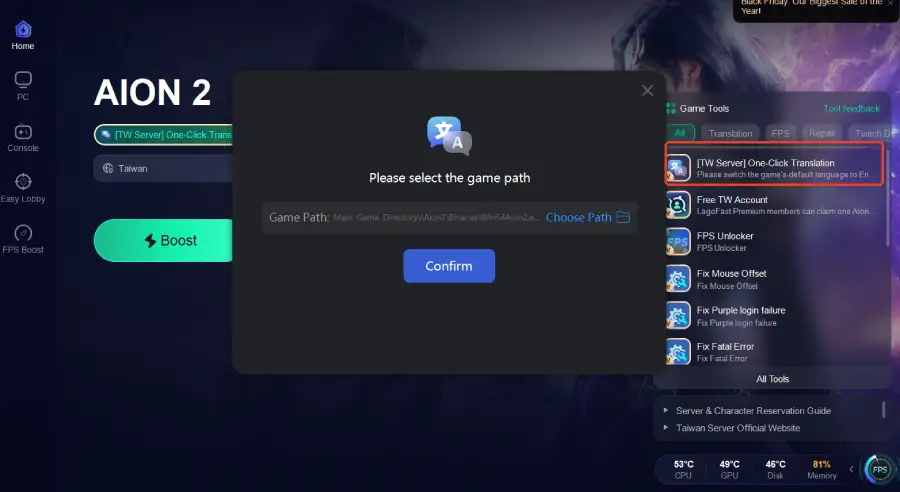
- One-Click Translation, which instantly translates Purple launcher UI and in-game text into your preferred language so you can understand login prompts and error messages.
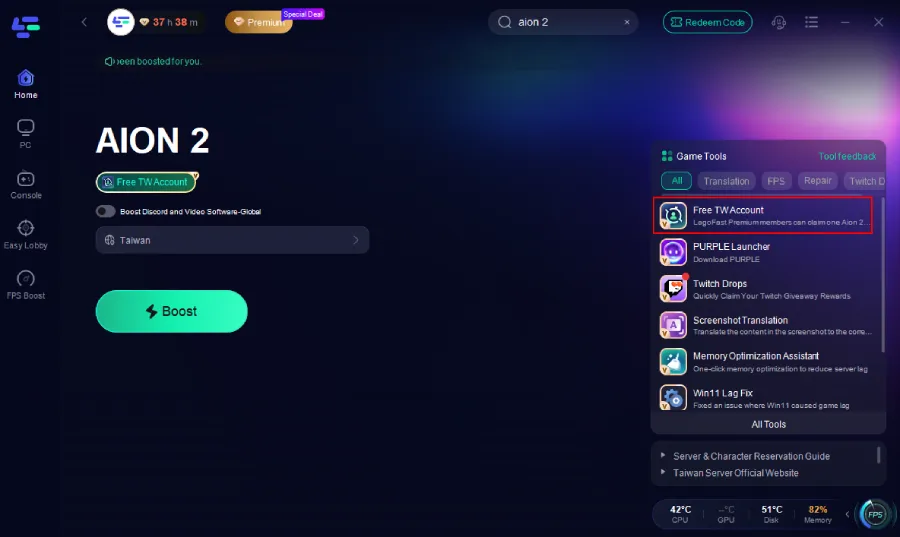
- Free TW Account Tool, useful if your original Taiwan account was merged into Global or no longer shows Taiwan in the region options.
How to Use LagoFast for Taiwan Login Issues
Step 1 — Download and install LagoFast
Open the client and create your account.
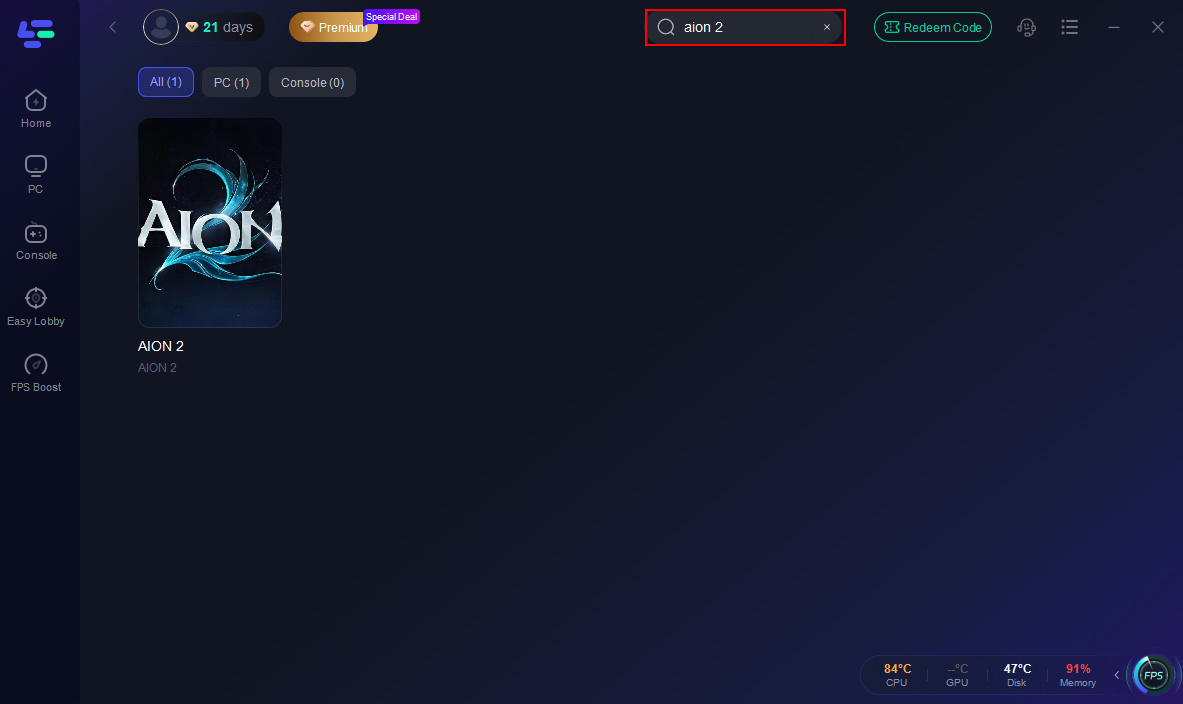
Step 2 — Search “Aion 2”
Add it. This loads all TW/KR routing nodes.
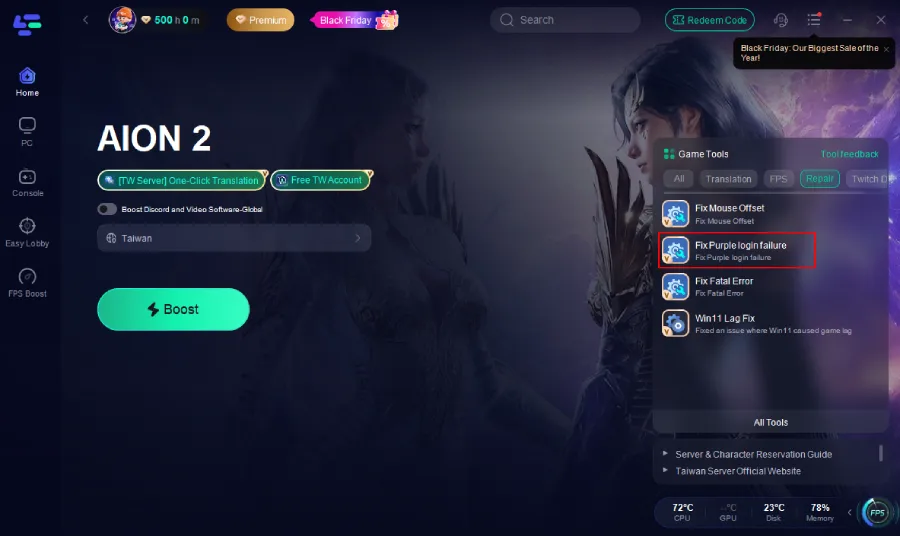
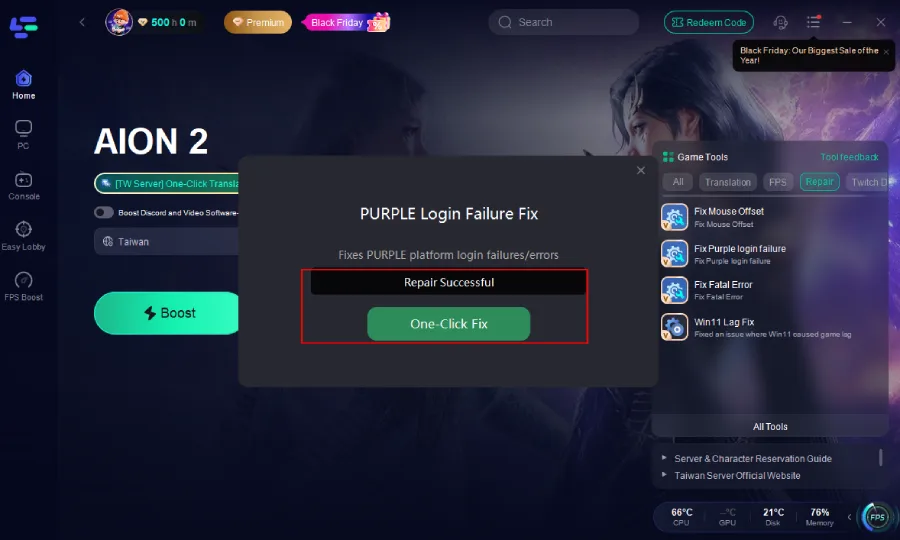
Step 3 — Click the Repair tool.
Click the Fix PURPLE Login Fail tool and click One-Click Fix.
Step 4—Click the One-Click Translation
Enable the One-Click Translation feature to translate the game into your preferred language.
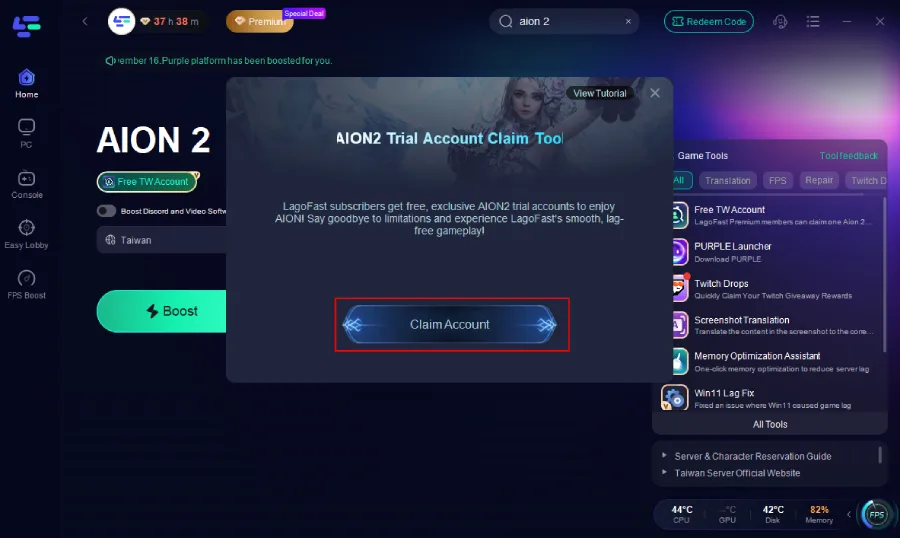
Step 5—On the right side, select the Free TW Account Tool.
Inside the tool, click Claim Account.An account will be automatically generated and assigned to you.
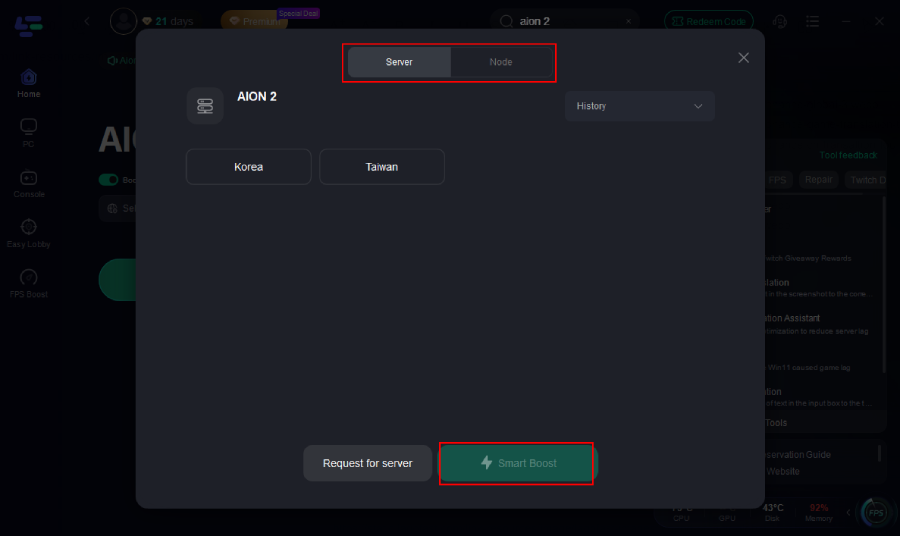
Step 6—Select a Taiwan node
Pick the TW node with the lowest ping and stable packet loss.
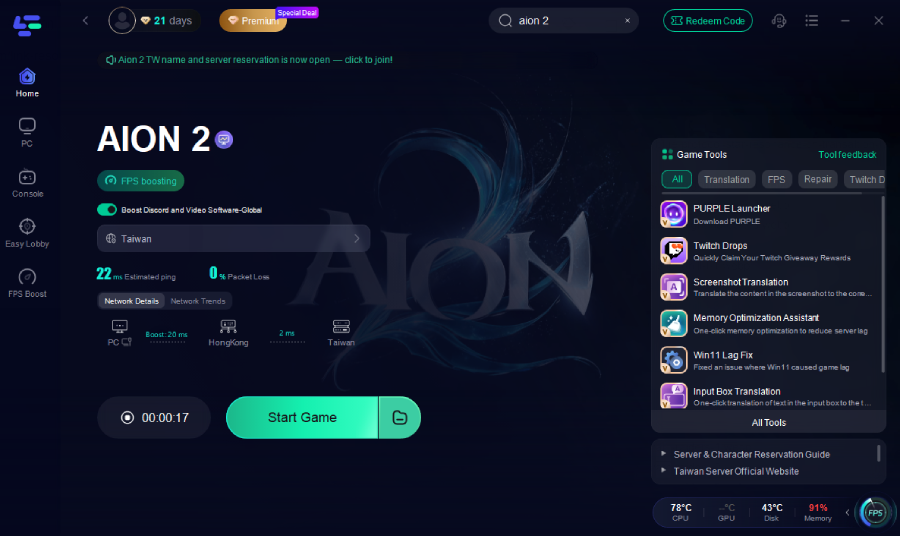
Step 7—Click Start Game
This forces Purple + Aion 2 traffic through an optimized Taiwan route.
Step 8 — Retry login
The Taiwan login flow should now load consistently without timeouts.
How to Fix Aion 2 PURPLE Fatal Error
Similarly, many players have encountered a frustrating issue when launching Aion 2 via the Purple Launcher. After clicking "Start Game," the game loads for roughly 2 seconds before immediately popping up a fatal error message: "The UE Aion 2 game has crashed and will close. Fatal error."
This issue persists even for players who have taken basic troubleshooting steps, such as running a full game file verification scan through the launcher and updating their GPU drivers to the latest available version. Fortunately, LagoFast Game Booster has developed a targeted optimization tool to address this specific crash problem.
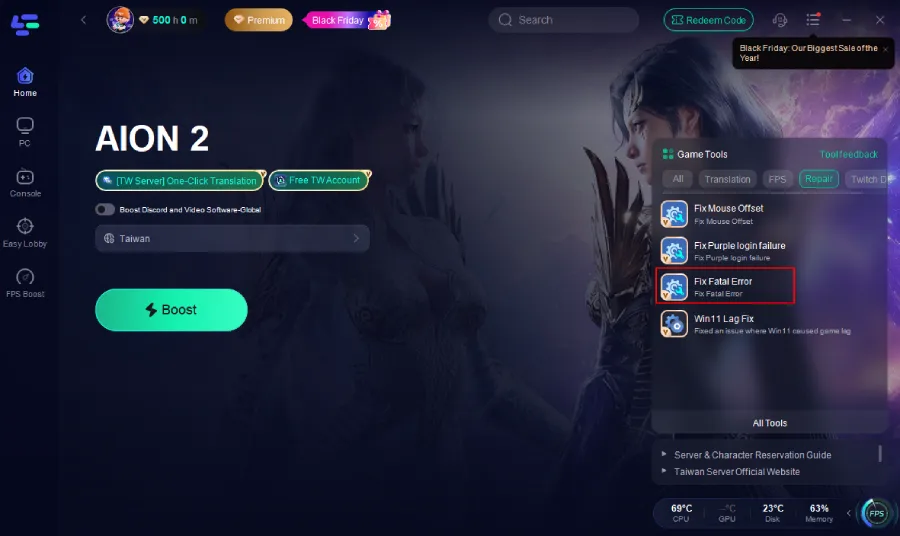
1. Click the Fix Fatal Error tool on the right.
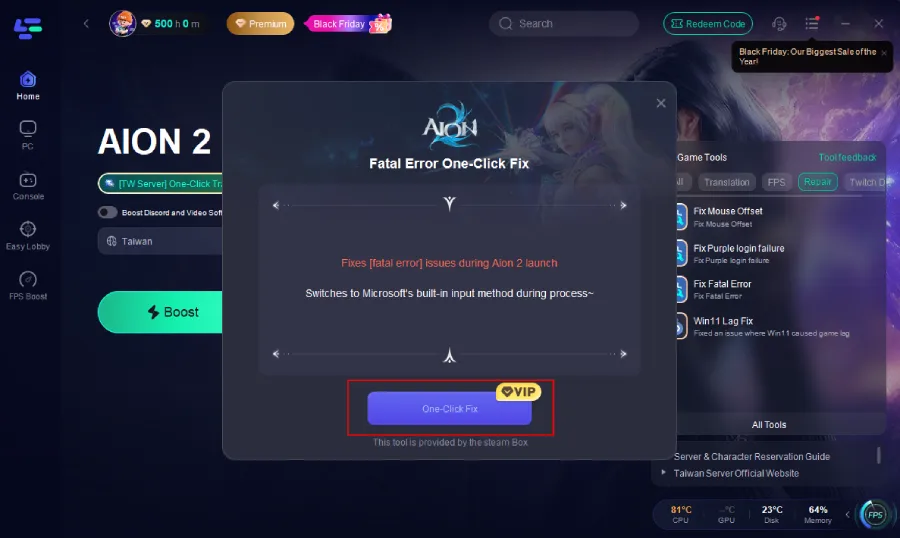
2. Click One-Click Fix.
Part 4. Step-By-Step Fixes (Based on Player Solutions)
These are the fixes that actually worked for real users.
Fix 1 — Make a brand-new email and create a fresh Purple account
This is the #1 community-verified fix.
“create account and select Taiwan as region. all it is to it friend.”
“make a new account with an email never used for purple before and make sure you select Taiwan as your region on creation.”
Fix 2 — Delete your old account and recreate it
Players said:
“You can also do account deletion with the immediate option and re-do.”
Only do this if the account has no purchases tied to it.
Fix 3 — Recreate account but select Taiwan during DOB/country step
The most common mistake.
“Ok, when creating an account on the website, I had selected my country… I selected Taiwan this time and now see Aion 2.”
The DOB page determines your region. If you choose your real country → Purple assumes Global, not Taiwan.
Fix 4 — Check for the “auto installation requested” status
If you see this, your region is correct.
“If in PURPLE you have that auto installation requested on the right button, then you're good, everything is set correctly.”
Fix 5 — Don’t use VPN
It won’t make Taiwan appear.
“I also tried to use VPN with Taiwan server. Still not showing the Taiwan option.”
Because the issue is account region, not IP region.
Part 5. FAQ
Q1: Why can I see Aion 2 only when “See available games” is unchecked?
Because Purple thinks your account isn't eligible for TW/KR games. Fix your region by recreating your account with Taiwan selected.
Q2: Can I play Aion 2 TW using the Global region?
Yes — but only if your account was originally created using Taiwan as the region. Global login + Taiwan-region account = works.
Q3: My old Taiwan account no longer shows Taiwan. Is it gone?
It was merged under the new integration. You must recreate the account if Purple forces you into Global.
Q4: Does VPN help?
No. The login flow ignores IP and prioritizes account region.
Final Thoughts
The “Can’t log-in Purple” disaster wasn’t caused by user mistakes — it came from NCSoft’s sudden global integration of Purple, which merged region data and broke the Taiwan login flow for thousands of players. The good news: every confirmed fix is simple and reproducible. Creating a fresh email + Taiwan region solves 99% of cases, and LagoFast ensures Purple can actually reach the TW servers reliably if you’re playing from abroad.

Boost Your Game with LagoFast for Epic Speed
Play harder, faster. LagoFast game booster eliminates stutter and lags on PC, mobile, or Mac—win every match!
Quickly Reduce Game Lag and Ping!
Boost FPS for Smoother Gameplay!