
Quick Answer
To fix 007 First Light not launching, first verify the integrity of game files on Steam or the Epic Games Store and update your graphics drivers. If you encounter black screens or loading issues, try disabling overlays or using LagoFast Game Booster. Its Fixed Load Failed and Stuttering tool can switch the game into High Performance Mode, while also helping reduce ping and fix packet loss for better launch stability.
Introduction
The release of IO Interactive's 007 First Light has been one of the most anticipated events for stealth-action fans. However, as with many high-profile PC launches, some players are finding themselves stuck before they can even earn their 00 status. Whether it's a game that refuses to open, a persistent black screen on startup, or an infinite loading loop, these technical hurdles can be incredibly frustrating. These issues are often tied to the game's evolved Glacier Engine, which demands significant hardware resources and precise software configurations.

- ✅ Lower ping and fewer disconnects.
- ✅ More FPS and better PC performance.
- ✅ Support for 2000+ games.
- ✅ Stable connections and region switching.
- ✅ Fix Game Crashing and Freezing
Part 1: Why is 007 First Light NOT LAUNCHING?
Part 2: Fix 1 — Verify Game Files and Installation
Part 3: Fix 2 — Update Graphics Drivers and Windows
Part 4: Fix 3 — Resolve 007 First Light Black Screen Issues
Part 5: Fix 4 — Bypass 007 First Light Stuck on Loading Screen
Part 6: Fix 5 — Disable Overlays and Background Apps
Part 7: How to Enhance Your Game Experience with LagoFast Game Booster
Part 1: Why is 007 First Light NOT LAUNCHING?
Understanding the root cause is the first step toward a permanent fix. 007 First Light utilizes a highly advanced version of the Glacier Engine, featuring complex lighting systems and dense AI environments. When the game fails to launch, it's usually due to one of the following reasons:
- Corrupted Game Data: A partial download or an interrupted update can leave the game with missing files.
- Outdated Drivers: The game requires the latest rendering APIs to initialize its advanced graphics features.
- Software Conflicts: Overlays, antivirus programs, or even background recording software can interfere with the game's boot sequence.
- Hardware Limitations: If your system doesn't meet the mandatory SSD or VRAM requirements, the game may fail to load initial assets.
- Network Synchronization: The game's "Living World" features require a stable handshake with the servers during the initial loading phase.
Part 2: Fix 1 — Verify Game Files and Installation
The most common cause of a game not working is corrupted data. Before trying more complex solutions, always start here.
On Steam:
- Right-click 007 First Light in your Library.
- Select Properties > Installed Files.
- Click Verify integrity of game files.
- Wait for the process to complete and redownload any missing data.
On Epic Games Store:
- Find the game in your Library.
- Click the three dots (...) next to the title.
- Select Manage and then click Verify.
Part 3: Fix 2 — Update Graphics Drivers and Windows
007 First Light is built for modern hardware. If your drivers are even a few months old, you might encounter a crash on startup.
- NVIDIA Users: Open GeForce Experience and check for the latest Game Ready Driver.
- AMD Users: Open Radeon Software and ensure you are on the latest Adrenalin version.
- Windows Update: Go to Settings > Update & Security > Windows Update and ensure your OS is fully patched. The game relies on specific DirectX 12 features that are only available in newer Windows builds.
Part 4: Fix 3 — Resolve 007 First Light Black Screen Issues
A black screen on launch usually indicates a failure to initialize the display mode or a conflict with the game's intro cinematics.
- Alt + Enter: As soon as the black screen appears, press Alt + Enter to force the game into windowed mode. If it loads, you can then change the resolution in the settings menu.
- Disable Fullscreen Optimizations: Right-click the game's .exe file, go to Properties > Compatibility, and check Disable fullscreen optimizations.
- Delete Config Files: Navigate to %LOCALAPPDATA%\IO Interactive\007 First Light\ and delete the settings.ini or pipeline_cache folder. The game will generate fresh, default settings on the next launch.
Part 5: Fix 4 — Bypass 007 First Light Stuck on Loading Screen
If you are stuck on the loading screen, the game is likely struggling to stream assets from your drive or synchronize with the game servers.
- Move to SSD: 007 First Light practically requires an SSD. If you have it installed on a traditional HDD, the loading times can be so long that the game appears to have frozen.
- Check Server Status: Sometimes the "stuck" feeling is actually a server-side timeout. Check the official IO Interactive social media channels to see if there are ongoing maintenance issues.
- The "Taskbar" Trick: Some players have found that pinning the game to the taskbar and launching it from there (rather than the launcher) can bypass certain loading hangs.
Part 6: Fix 5 — Disable Overlays and Background Apps
Third-party software is a frequent culprit for games not launching.
- Disable Overlays: Turn off the Steam Overlay, Discord Overlay, and NVIDIA ShadowPlay. These programs hook into the game's rendering pipeline and can cause it to crash before the first frame is drawn.
- Whitelist in Antivirus: Ensure the game's folder is added to the exclusions list in Windows Defender or your third-party antivirus. Overzealous security software often flags the game's anti-tamper technology as a threat.
Part 7: How to Enhance Your Game Experience with LagoFast Game Booster
Some 007 First Light launch issues may be related to system resource allocation or startup conflicts. To help with problems like load failed errors or severe stuttering, LagoFast has introduced a Fixed Load Failed and Stuttering tool that can switch the game into High Performance Mode with one click. This helps the game access system resources more efficiently, improve loading stability, and helps some players successfully enter the game.
LagoFast can also help stabilize network connections during the game's loading process, reduce ping, and fix packet loss issues, which is useful for players experiencing infinite loading screens or connection-related launch problems.
How to Use LagoFast Game Booster
Step 1: Click the Free Trial button to download and install LagoFast Free Trial.
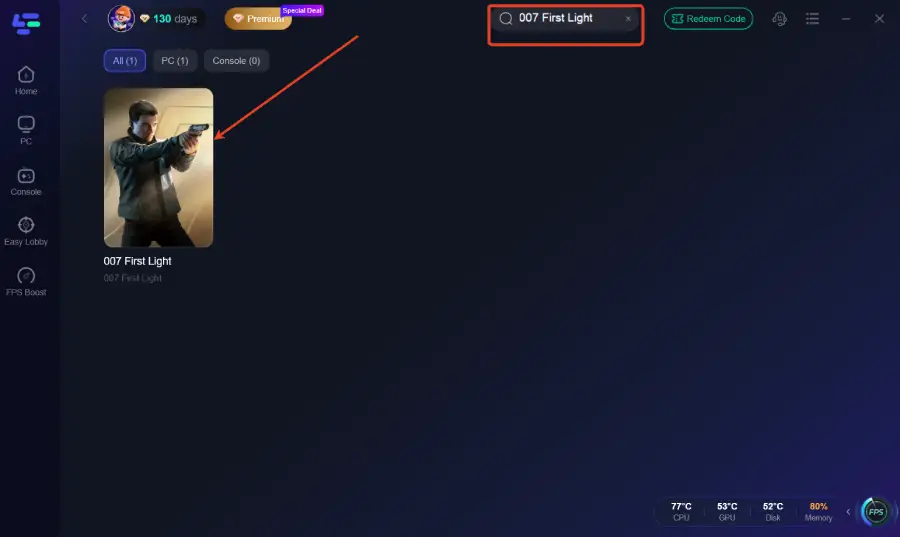
Step 2: Search for the Game: Open the app and type "007 First Light" into the search bar.
Step 3: After clicking Boost, click the Fixed Load Failed and Stuttering tool in the bottom-right toolbar.
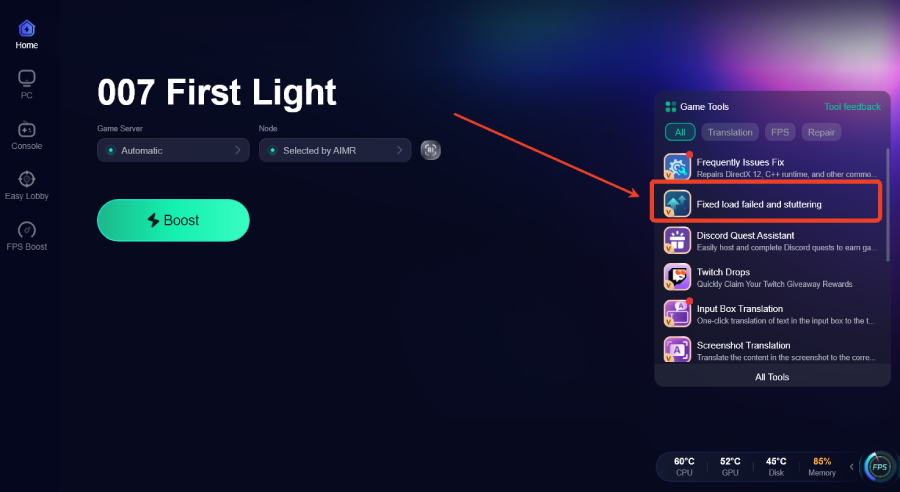
Step 4: The tool will switch the specified program to High Performance Mode to help fix load failed issues, stuttering, and launch problems.
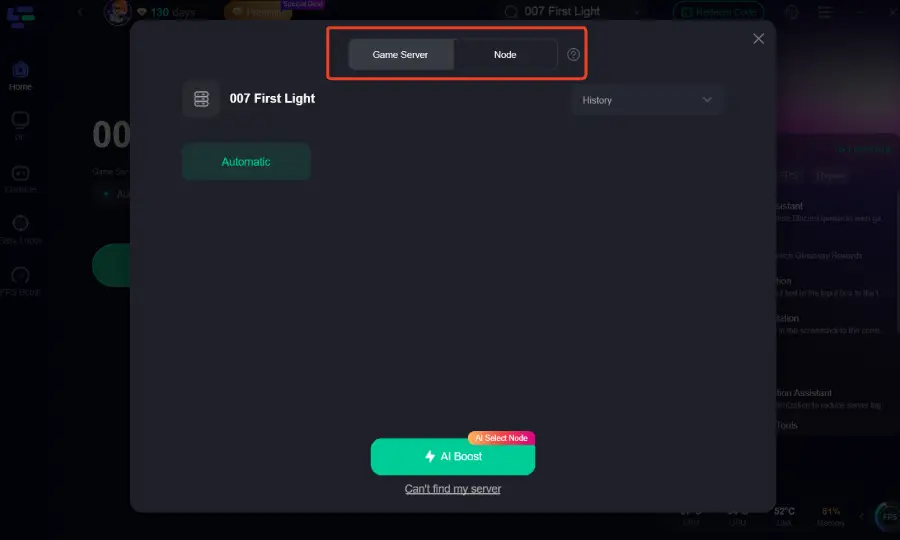
Step 5: Select Your Region: Choose the server node closest to you to ensure the lowest possible ping for any online features or leaderboards.
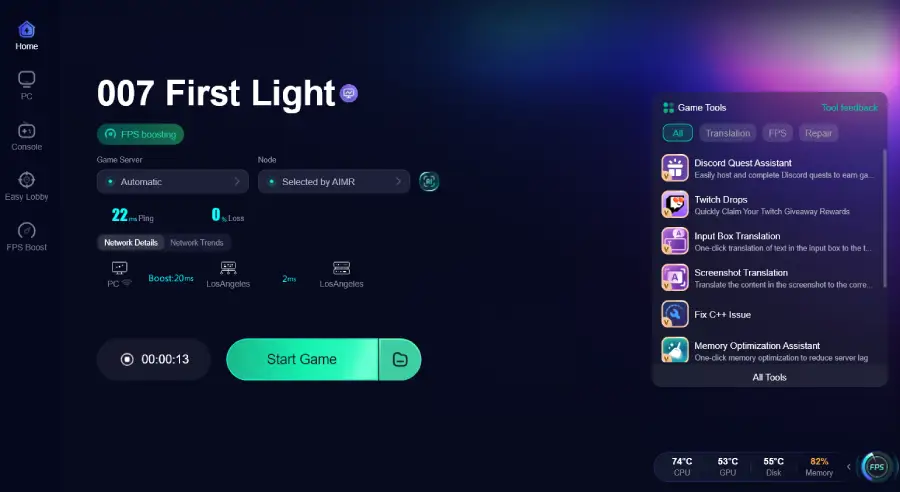
Step 6: Boost and Launch: Hit the "Boost" button and launch the game directly from the LagoFast interface. You'll notice a significant improvement in frame stability and overall responsiveness.
Part 8: FAQs
1. Why does 007 First Light crash immediately after the logo?
This is usually a sign of a missing dependency or a corrupted shader cache. Try verifying your game files and resetting your shader cache in your GPU control panel.
2. Can I run 007 First Light on 8GB of RAM?
While the minimum requirement might list 8GB, the game's advanced AI and environments really need 16GB for a stable launch. If you have 8GB, ensure all other background apps are closed.
3. Does the game support DLSS 4.5?
Yes, and using it can actually help with stability on higher resolutions. Ensure your drivers are updated to enable this feature.
4. Is a constant internet connection required to launch?
While the game has an offline mode, the initial launch often requires a one-time check-in with the servers. If your connection is unstable, the game may hang on the loading screen.
5. What should I do if the game is stuck at 99% loading?
This is often a network timeout. Try restarting your router or using LagoFast to stabilize your connection to the game's authentication servers.
Key Takeaways
- Verify First: Corrupted files are the #1 cause of launch failures.
- Update Everything: Modern games like 007 First Light demand the latest drivers and Windows updates.
- SSD is Mandatory: Don't expect a smooth launch or fast loading on an old HDD.
- Manage Overlays: Disable Discord and Steam overlays if you encounter black screens.
- Optimize with LagoFast: Use LagoFast Game Booster to resolve network-related loading hangs and ensure your system resources are fully dedicated to the game.
By following these steps, you'll be able to bypass the technical hurdles and immerse yourself in the high-stakes world of James Bond. Good luck, Agent!
Boost Your Game with LagoFast for Epic Speed
Play harder, faster. LagoFast game booster eliminates stutter and lags on PC, mobile, or Mac—win every match!
Quickly Reduce Game Lag and Ping!
Boost FPS for Smoother Gameplay!