
Quick Answer
To fix 007 First Light low FPS, start by enabling NVIDIA DLSS 4.5 or AMD FSR 3.1 with Frame Generation turned on. Lowering Shadow Quality, Reflection Resolution, and Volumetric Effects to "Medium" can provide a significant performance boost without a major loss in visual fidelity. Additionally, ensure your game is installed on an NVMe SSD and that you have at least 16GB of RAM to prevent stuttering. For a more stable experience, using LagoFast Game Booster can optimize your system resources and stabilize frame times by closing unnecessary background processes.
Introduction
IO Interactive's 007 First Light is a technical marvel, pushing the boundaries of the Glacier Engine with path tracing and advanced AI. However, this visual fidelity comes at a high hardware cost. Many players, even those with modern rigs, are reporting low FPS and inconsistent frame times, especially in dense urban environments like the Istanbul mission. The game's demand for VRAM and CPU cycles is unprecedented, making optimization not just a luxury, but a necessity for a smooth stealth-action experience.

- ✅ Lower ping and fewer disconnects.
- ✅ More FPS and better PC performance.
- ✅ Support for 2000+ games.
- ✅ Stable connections and region switching.
- ✅ Fix Game Crashing and Freezing
Part 1: Why is 007 First Light Having Low FPS?
Part 2: Best Graphics Settings for 007 First Light (High FPS)
Part 3: How to Fix Stuttering and Frame Drops in 007 First Light
Part 4: Leveraging DLSS 4.5 and Frame Generation
Part 5: System-Level Optimizations for 007 First Light
Part 6: How to Enhance Your Game Experience with LagoFast Game Booster
Part 1: Why is 007 First Light Having Low FPS?
The "Low FPS" issue in 007 First Light isn't just about having an old GPU. The game's evolved Glacier Engine introduces several heavy-hitting features that can cripple performance:
- Path Tracing: While beautiful, path tracing is incredibly demanding. Even on high-end cards, it can cut frame rates in half.
- CPU Bottlenecks: The game's "Living World" AI simulates hundreds of NPCs with complex routines, putting a massive load on your processor.
- VRAM Management: At 1440p or 4K, the game can easily exceed 12GB of VRAM, leading to severe stuttering if your card doesn't have enough memory.
- Shader Compilation: If shaders aren't fully compiled, you'll experience "stutter-struggle" every time you enter a new area.
- Background Resource Drain: Modern Windows environments often have dozens of background tasks that compete with the game for CPU and RAM priority.
Part 2: Best Graphics Settings for 007 First Light (High FPS)
If you want to maintain a stable 60+ FPS without sacrificing the game's atmosphere, use these optimized settings as a baseline:
|
Setting |
Recommended Value |
Performance Impact |
|
Display Mode |
Fullscreen |
High (Stability) |
|
Resolution Scale |
100% (Use DLSS/FSR) |
Extreme |
|
Shadow Quality |
Medium |
High |
|
Reflection Quality |
Medium |
High |
|
Volumetric Lighting |
Medium |
Medium |
|
Ambient Occlusion |
HBAO+ / SSAO |
Medium |
|
Texture Quality |
High (if 12GB+ VRAM) |
Low (if enough VRAM) |
|
Anisotropic Filtering |
16x |
Low |
|
Motion Blur |
Low / Off |
Personal Preference |
|
Ray Tracing / Path Tracing |
Off (unless using RTX 4080+) |
Extreme |
Tip: Lowering Shadow Quality from "Ultra" to "Medium" can often net you a 15-20% increase in FPS with minimal visual impact during fast-paced gameplay.
Part 3: How to Fix Stuttering and Frame Drops in 007 First Light
Stuttering is often more frustrating than low average FPS. In a stealth game like 007 First Light, a single hitch can ruin a perfect silent run.
- Enable Hardware-Accelerated GPU Scheduling: Go to Windows Settings > System > Display > Graphics settings and turn this on. It helps the GPU manage its own memory more efficiently.
- Set Power Plan to "High Performance": Ensure your PC isn't trying to save power while you're infiltrating a high-security facility.
- Clear Shader Cache: If you've recently updated your drivers, go to your NVIDIA or AMD control panel and reset the shader cache to force a clean compilation.
- Increase Page File Size: If you have 16GB of RAM or less, manually setting your Windows Page File to 1.5x your RAM size on an SSD can prevent "out of memory" stutters.
Part 4: Leveraging DLSS 4.5 and Frame Generation
007 First Light is one of the first titles to fully support NVIDIA DLSS 4.5. This isn't just about upscaling; it's about intelligent frame reconstruction.
- Dynamic Multi Frame Generation (6X): On RTX 50-series cards, this mode can quintuple your frame rate in path-traced scenes.
- NVIDIA Reflex: Always keep this enabled (On + Boost) to minimize the input latency that can sometimes be introduced by frame generation.
- DLSS Super Resolution: Set this to "Quality" for 1440p and "Balanced" for 4K. The Glacier Engine's implementation is exceptionally clean, making it hard to distinguish from native resolution.
Part 5: System-Level Optimizations for 007 First Light
Sometimes the bottleneck isn't the game, but the system it's running on.
- Update BIOS and Chipset Drivers: For Ryzen users especially, the latest AGESA updates can significantly improve the 1% low frame rates in CPU-heavy games.
- Disable Game Mode / Game Bar: While intended to help, these Windows features can sometimes cause erratic frame pacing in certain titles.
- Close Browser Tabs: Modern browsers like Chrome can eat up gigabytes of RAM and significant CPU cycles, which 007 First Light desperately needs.
Part 6: How to Enhance Your Game Experience with LagoFast Game Booster
Even with the best in-game settings, your PC's background environment can still cause performance dips. This is where LagoFast Game Booster becomes an essential tool for any serious PC gamer.
LagoFast is designed to ensure that your game gets 100% of your system's attention. Its FPS Boost feature works by temporarily suspending non-essential Windows services and background processes that often spike CPU usage during gameplay. For a game as CPU-intensive as 007 First Light, this can be the difference between a stuttery mess and a buttery-smooth 60 FPS.
How to Use LagoFast Game Booster
Step 1: Click the Free Trial button to download and install LagoFast Free Trial.
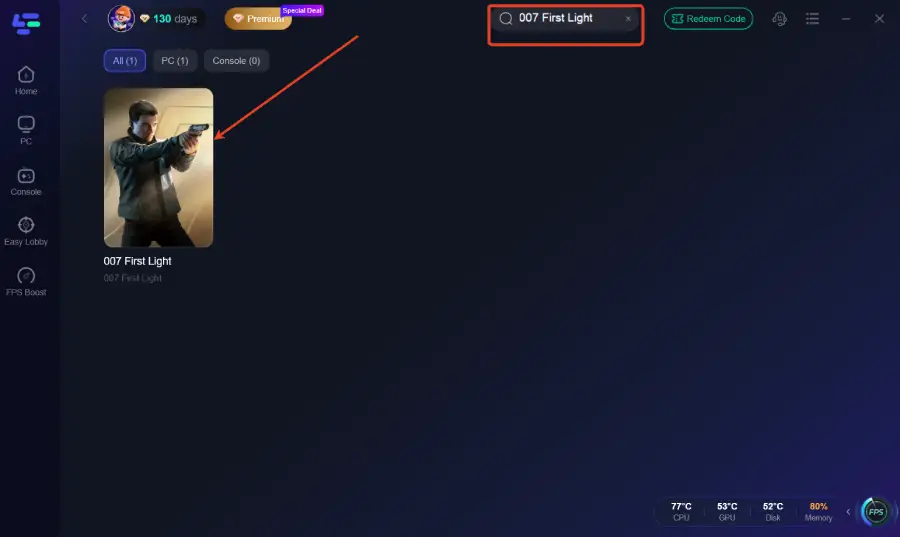
Step 2: Search for the Game: Open the app and type "007 First Light" into the search bar.
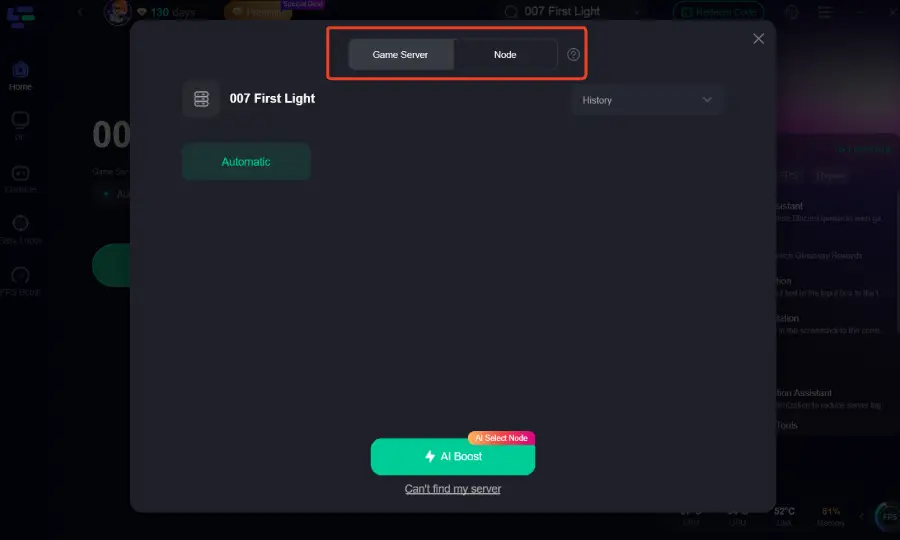
Step 3: Select Your Region: Choose the server node closest to you to ensure the lowest possible ping for any online features or leaderboards.
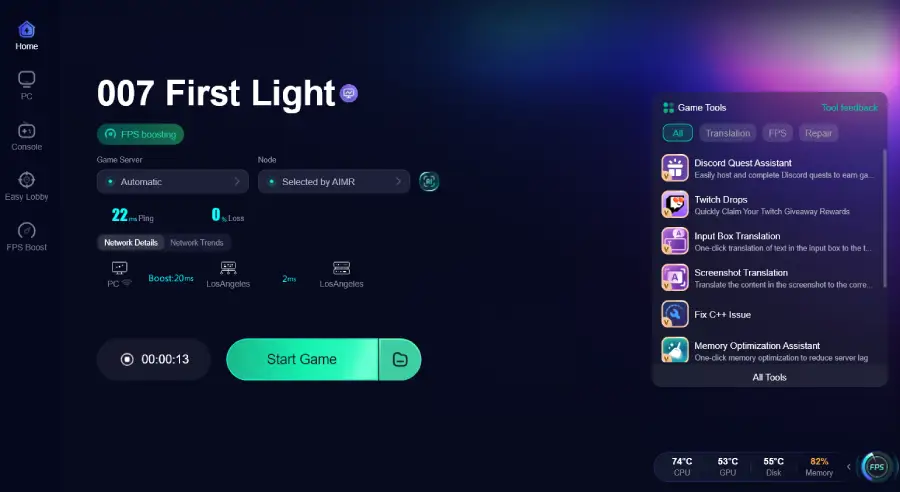
Step 4: Boost and Launch: Hit the "Boost" button and launch the game directly from the LagoFast interface. You'll notice a significant improvement in frame stability and overall responsiveness.
Part 7: FAQs
1. Why is my FPS so low even on an RTX 3080?
At 1440p or 4K, the RTX 3080 can run out of VRAM if "Ultra" textures and Ray Tracing are enabled. Try lowering textures to "High" and disabling Path Tracing.
2. Does 007 First Light support FSR 3?
Yes, the game includes full support for AMD FSR 3.1, including its own version of Frame Generation for non-NVIDIA users.
3. Is 16GB of RAM enough for 007 First Light?
It is the recommended minimum. However, for the best experience at high settings, 32GB is becoming the new standard for modern Glacier Engine titles.
4. Why does the game stutter when I turn around quickly?
This is usually a sign of "asset streaming" lag. Ensure the game is installed on a fast NVMe SSD (Gen 4 or higher is ideal).
5. Can I play 007 First Light at 60 FPS on a Steam Deck?
Currently, the game is very demanding. You'll likely need to use "Low" settings and FSR "Performance" mode to hit a stable 30-40 FPS on handhelds.
Key Takeaways
- Use Upscaling: DLSS 4.5 and FSR 3.1 are mandatory for high performance in this title.
- Optimize Shadows: Lowering shadow quality is the fastest way to gain FPS.
- SSD is Key: An NVMe SSD is required to prevent streaming-related stutters.
- CPU Matters: Close all background apps to give the game's AI more room to breathe.
- Boost with LagoFast: Use LagoFast Game Booster to stabilize your frame times and ensure your PC is fully dedicated to the mission.
By following this guide, you'll be able to push your hardware to its limits and enjoy 007 First Light the way it was meant to be played—smooth, responsive, and visually stunning. See you in the field, Agent!
Boost Your Game with LagoFast for Epic Speed
Play harder, faster. LagoFast game booster eliminates stutter and lags on PC, mobile, or Mac—win every match!
Quickly Reduce Game Lag and Ping!
Boost FPS for Smoother Gameplay!