
If you’re looking to download and play Chaos Zero Nightmare, you’re in the right place. This new dark-fantasy RPG from Smilegate Holdings, Inc. (in partnership with STOVE) is generating buzz across mobile and PC communities. In this guide, we’ll cover the release details, how to get the game on PC (including how to bypass regional issues like the Vietnam lock-out), how to download it on mobile, and a few tips to enhance your gameplay experience. You’ll see how to use the official STOVE launcher (stove download) as well as an easier alternative. Let’s get started.

Part 1. Chaos Zero Nightmare — Release Date, Platforms, and Overview
Part 2. How to Download Chaos Zero Nightmare on PC
Part 3. How to Download Chaos Zero Nightmare on Mobile
Part 1. Chaos Zero Nightmare — Release Date, Platforms, and Overview
Chaos Zero Nightmare is a free-to-play role-playing game developed by Super Creative and published by Smilegate. The official worldwide release date is October 22, 2025.
It is available on multiple platforms: Android, iOS (through Google Play Store and App Store), and PC/Mac via the STOVE launcher.
Set in a dark, post-apocalyptic world where humanity has fled Earth due to a mysterious “Chaos,” the game puts you in command of agents aboard the vessel SS Nightmare. You’ll explore singularities, build tactical decks, and dive into roguelike missions with high replay value.
If you’re ready to download and play Chaos Zero Nightmare, this is your complete guide.
Part 2. How to Download Chaos Zero Nightmare on PC
Normally, players need to download Chaos Zero Nightmare from the STOVE launcher, which is the official Korean game platform. However, many users have reported that the download process can be slow, unstable, or even inaccessible—especially in regions such as Vietnam, where the STOVE website and launcher are region-locked.
When you try to log in or access the game page directly, the site may fail to load, freeze during the launcher update, or show network errors. This makes downloading Chaos Zero Nightmare quite frustrating for international players.
A Better Way: Download Chaos Zero Nightmare via LagoFast
The simplest and most stable method is to use LagoFast Game Booster.
With LagoFast, you can bypass regional restrictions, access the official STOVE download page, and accelerate the entire installation process—all safely and smoothly.
Here are the key advantages of using LagoFast to download Chaos Zero Nightmare:
- Accessible from Anywhere – LagoFast connects you to the official STOVE servers from any region, even if the site is blocked or restricted in your country.
- Fast and Stable Download Speed – No more launcher freezing or slow patching. LagoFast ensures steady, low-latency connections throughout the installation.
- Official, Secure Game Files – LagoFast connects directly to the authentic STOVE servers, so you get the official installation package—no third-party risks involved.
Using LagoFast means you can download, install, and play Chaos Zero Nightmare with minimal effort, no matter where you are.
How to Use LagoFast to Download Chaos Zero Nightmare on PC:
Step 1: Click the Free Trial button to download and install LagoFast.
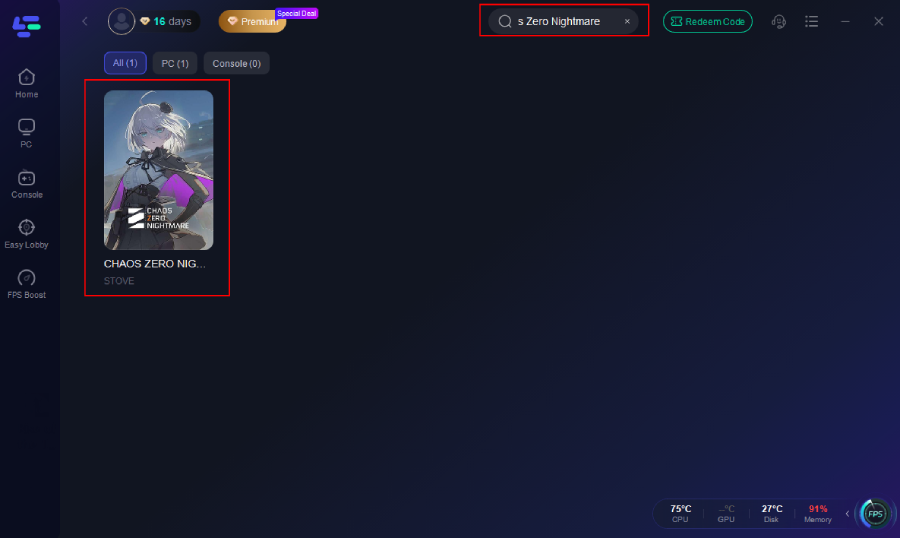
Step 2: Open LagoFast, then click the PC button on the left and search Chaos Zero Nightmare in the search bar, click it after it appears.
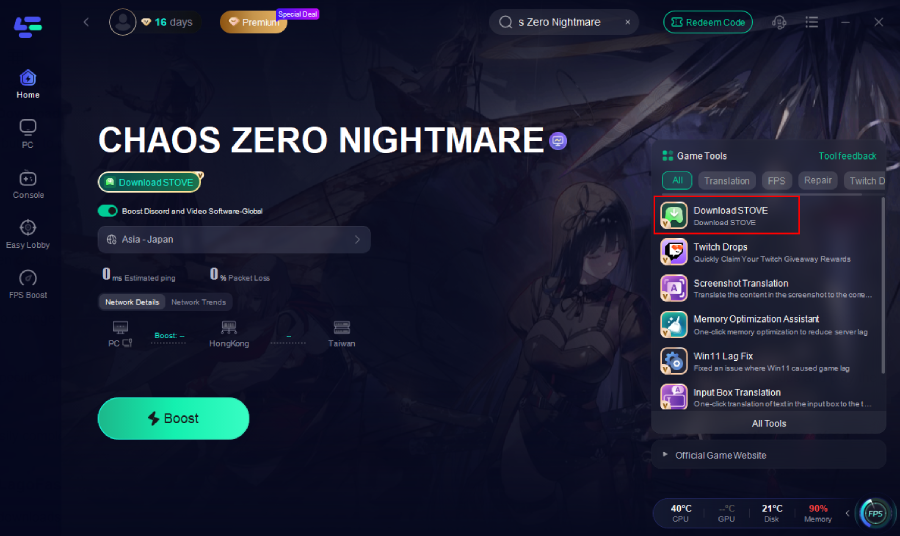
Step 3: Click the Download STOVE Tool on the right. It will automatically download the exe file of STOVE.
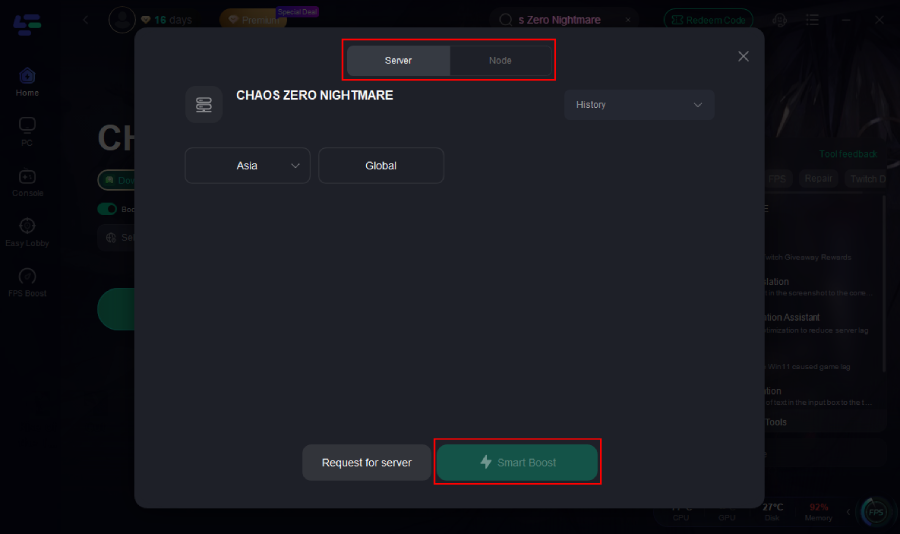
Step 4. If you download Chaos Zero Nightmare successfully. Click on “Server” to change to a better server that fixes connection issues and optimizes the Chaos Zero Nightmare gaming experience, then click on “Smart Boost.”
Step 5: Finally, check the specific game ping, packet loss, and multiple path connections on the right side. Finally, click the “Start Game” to fix all the game issues and play the game.
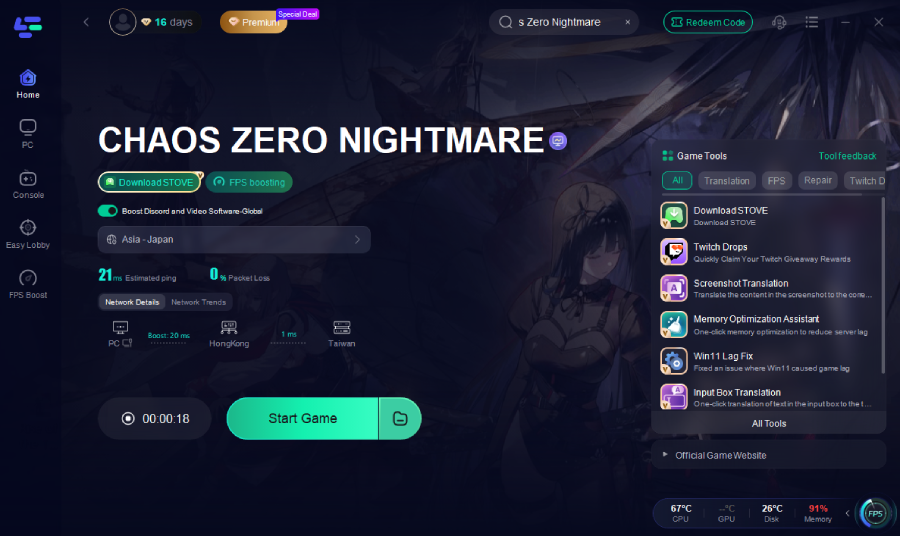
With LagoFast, you can easily complete your Chaos Zero Nightmare pc download, install the official version without restrictions, and enjoy a faster, smoother, and safer way to enter the world of Chaos Zero Nightmare.
Other Benefits of LagoFast
In addition to speeding up downloads, LagoFast also provides a complete set of game performance optimization tools.
- Dual-Platform Support – LagoFast works seamlessly on both PC and mobile, allowing you to optimize your gaming experience across devices.
- Real-Time Network Stabilization – It continuously monitors and routes your connection through the fastest available path.
- One-Click Game Acceleration – Simply select Chaos Zero Nightmare from the game list and start boosting instantly.
With this dual support and automatic optimization, LagoFast ensures you get the best experience whether you play on PC or mobile.
How to Enhance Chaos Zero Nightmare Gaming Experience on Mobile
If you also play Chaos Zero Nightmare on mobile, LagoFast can help you reduce mobile lag, lower ping, and stabilize the network connection for smoother gameplay.
By enabling mobile acceleration:
- You can connect to STOVE or game servers faster even under poor network conditions.
- Ping spikes and delays are significantly reduced during battles or co-op sessions.
- The app intelligently manages your device’s background processes, freeing up memory and ensuring better frame stability.
Step 1: Go to the LagoFast official website and download the LagoFast Mobile APK file.

Step 2: Search Chaos Zero Nightmare and click the Boost button.
Step 3: Choose the Server you like, then click the Boost button.
Step 4: Use LagoFast's optimization features to enhance network stability and reduce lag during gameplay.
Simply download LagoFast Mobile App, log in, choose Chaos Zero Nightmare, and tap Start Boost — within seconds, your connection will be optimized for the best performance.
Part 3. How to Download Chaos Zero Nightmare on Mobile
For mobile users, downloading Chaos Zero Nightmare is straightforward.
On Android (Google Play):
Open Google Play Store, search for “Chaos Zero Nightmare,” and install the game.
On iOS (App Store):
Open the App Store, search for “Chaos Zero Nightmare,” and tap “Get” to install.
Just like on PC, if you played a beta or test version, make sure to uninstall it before installing the full launch version.
That’s it — now you’re ready to dive into Chaos Zero Nightmare on mobile.
Conclusion
To sum up, if you want to download and play Chaos Zero Nightmare, you have several options. On PC, you can use the official STOVE launcher (via stove download) or choose LagoFast Game Booster for a faster, region-free experience. On mobile, simply install from Google Play or the App Store. Remember to uninstall any test versions before the full release, and use LagoFast for smoother gameplay across all devices.
Whether you play on PC or mobile, prepare to step into a thrilling dark-fantasy world filled with strategy, roguelike challenges, and epic battles. Get ready — the nightmare begins now.

Boost Your Game with LagoFast for Epic Speed
Play harder, faster. LagoFast game booster eliminates stutter and lags on PC, mobile, or Mac—win every match!
Quickly Reduce Game Lag and Ping!
Boost FPS for Smoother Gameplay!