เมนูการกำหนดค่า Mod (MCM)
ผู้แต่ง:Aragasปรับปรุงล่าสุด :2025-11-28 02:15:504.2M1.1MB

การพึ่งพาก่อน

ความสามัคคี
4.8M1.1MB
บาร์ทลีบ
3.8M4.0MB
UIExtenderEx
3.7M238KB

ตัวขยายซอฟต์แวร์แบนเนอร์ลอร์ด (BLSE)
1.3M5.3MB
การแนะนำ Mod
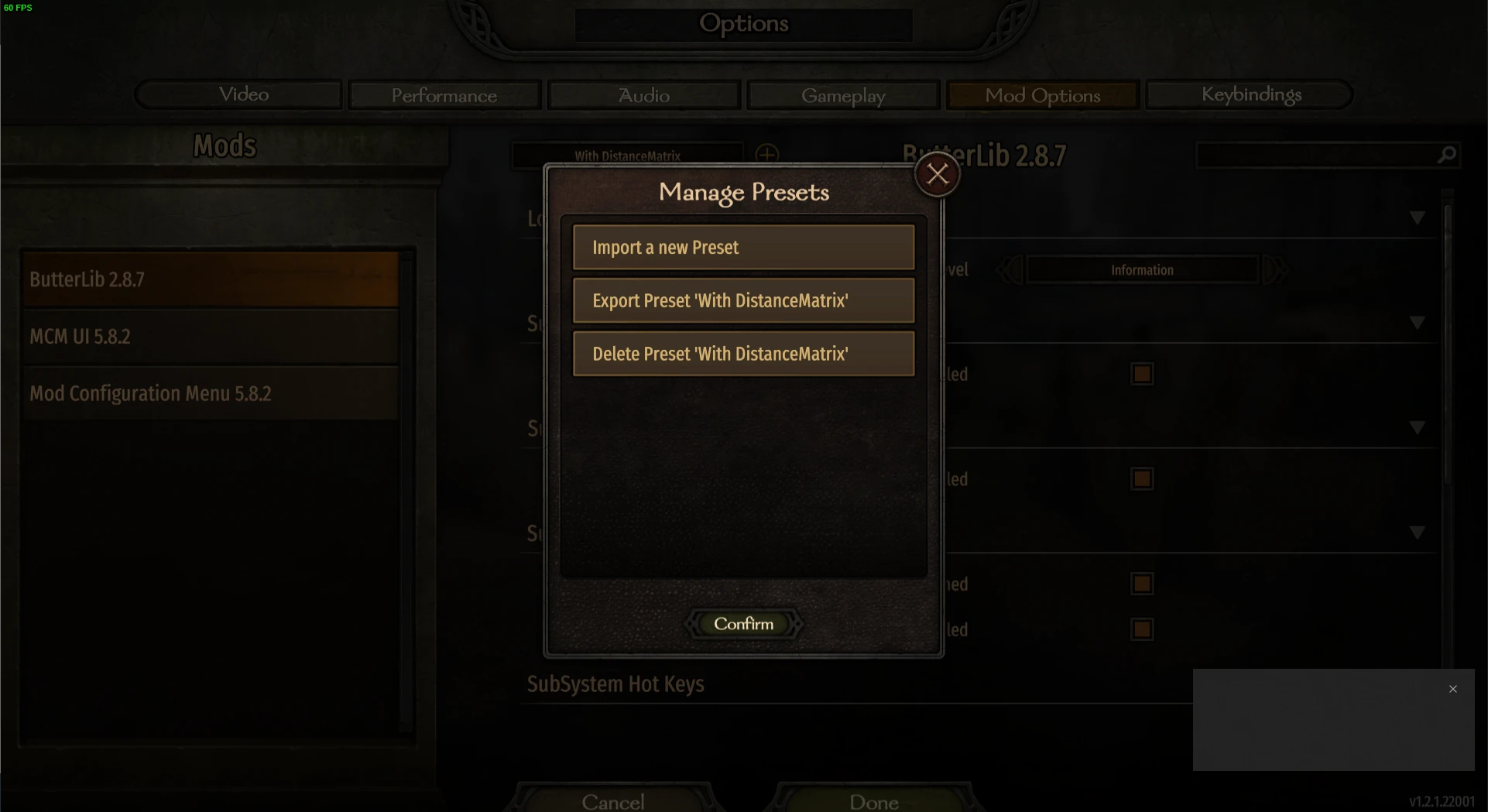
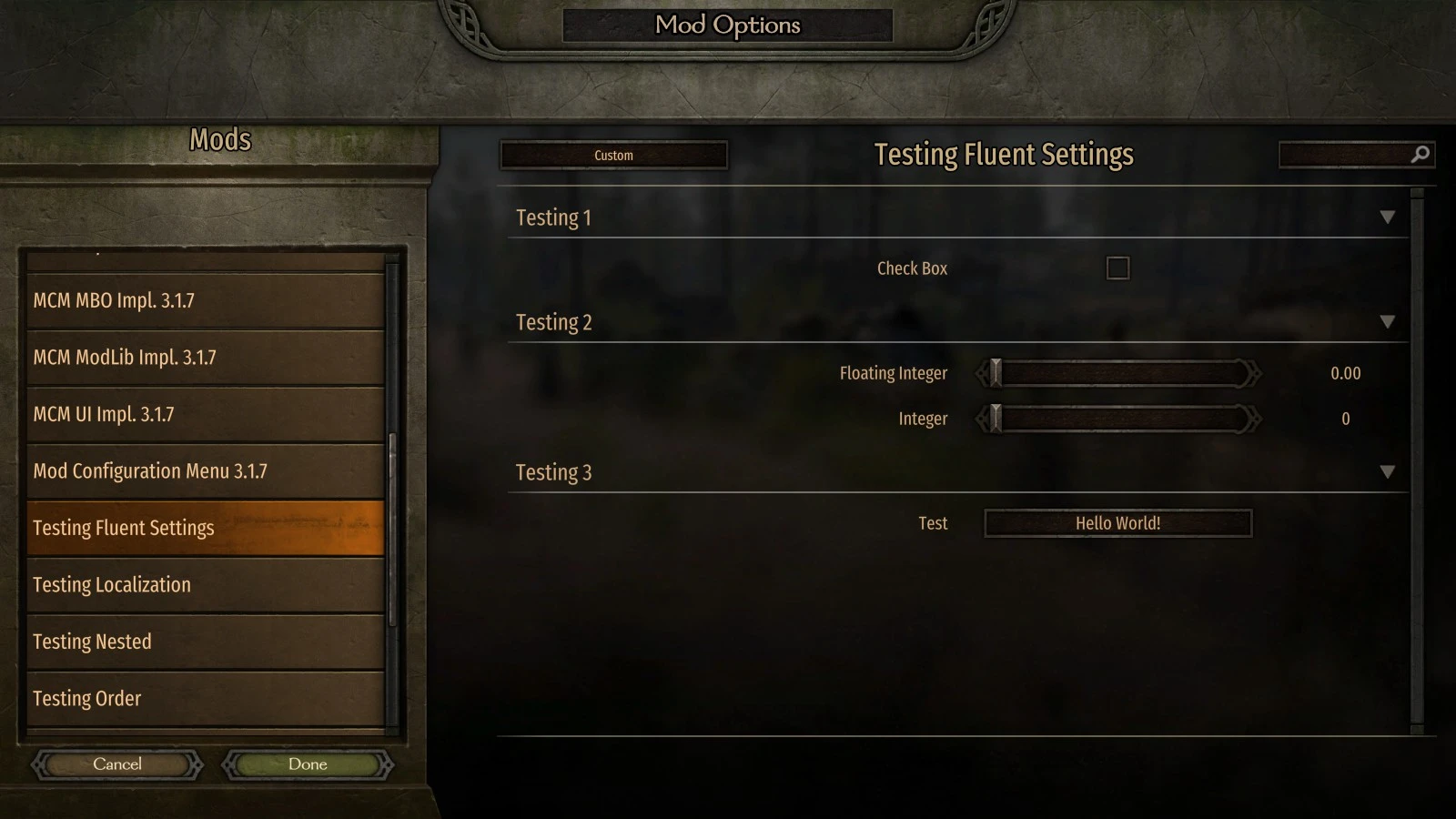
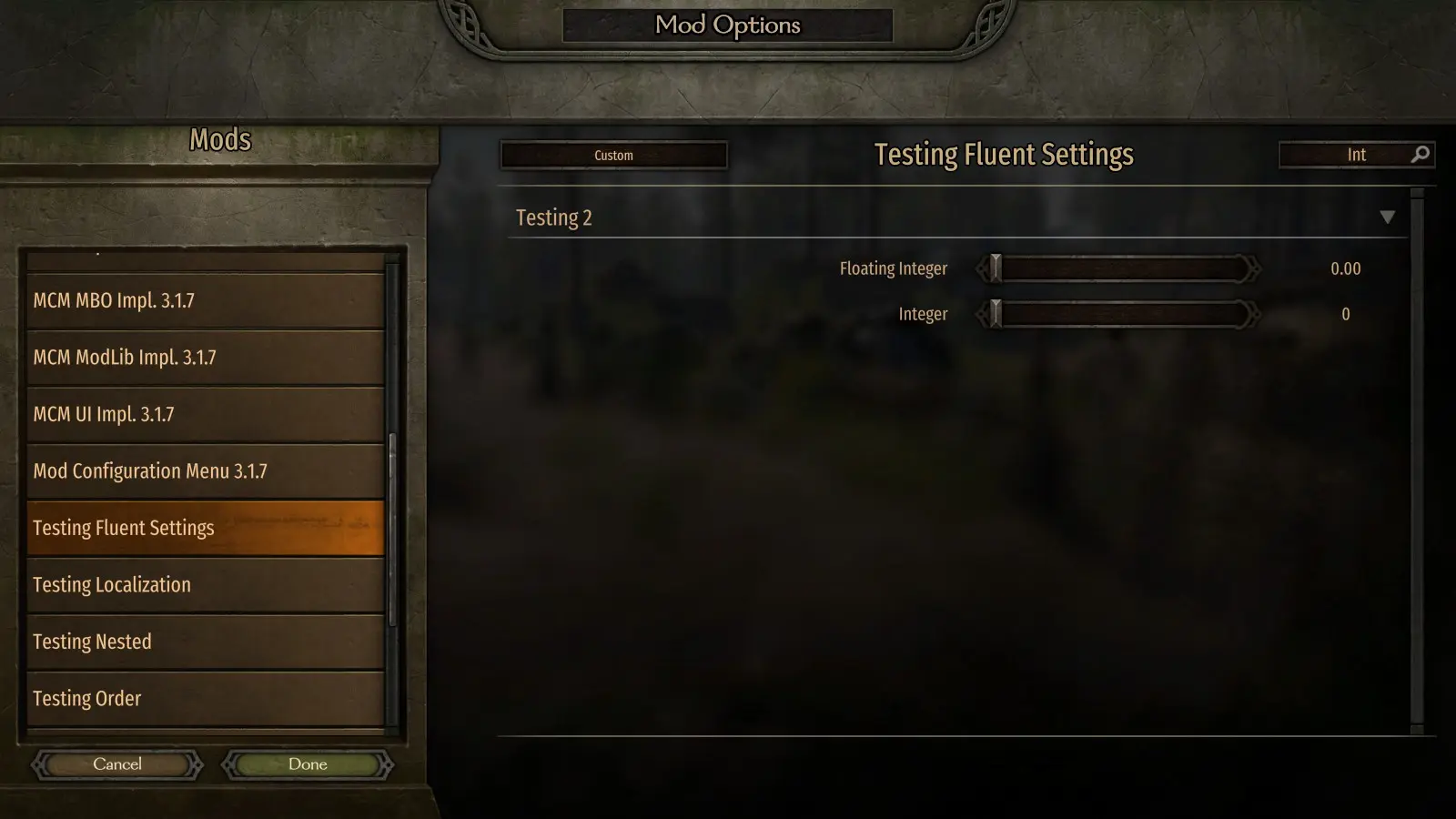
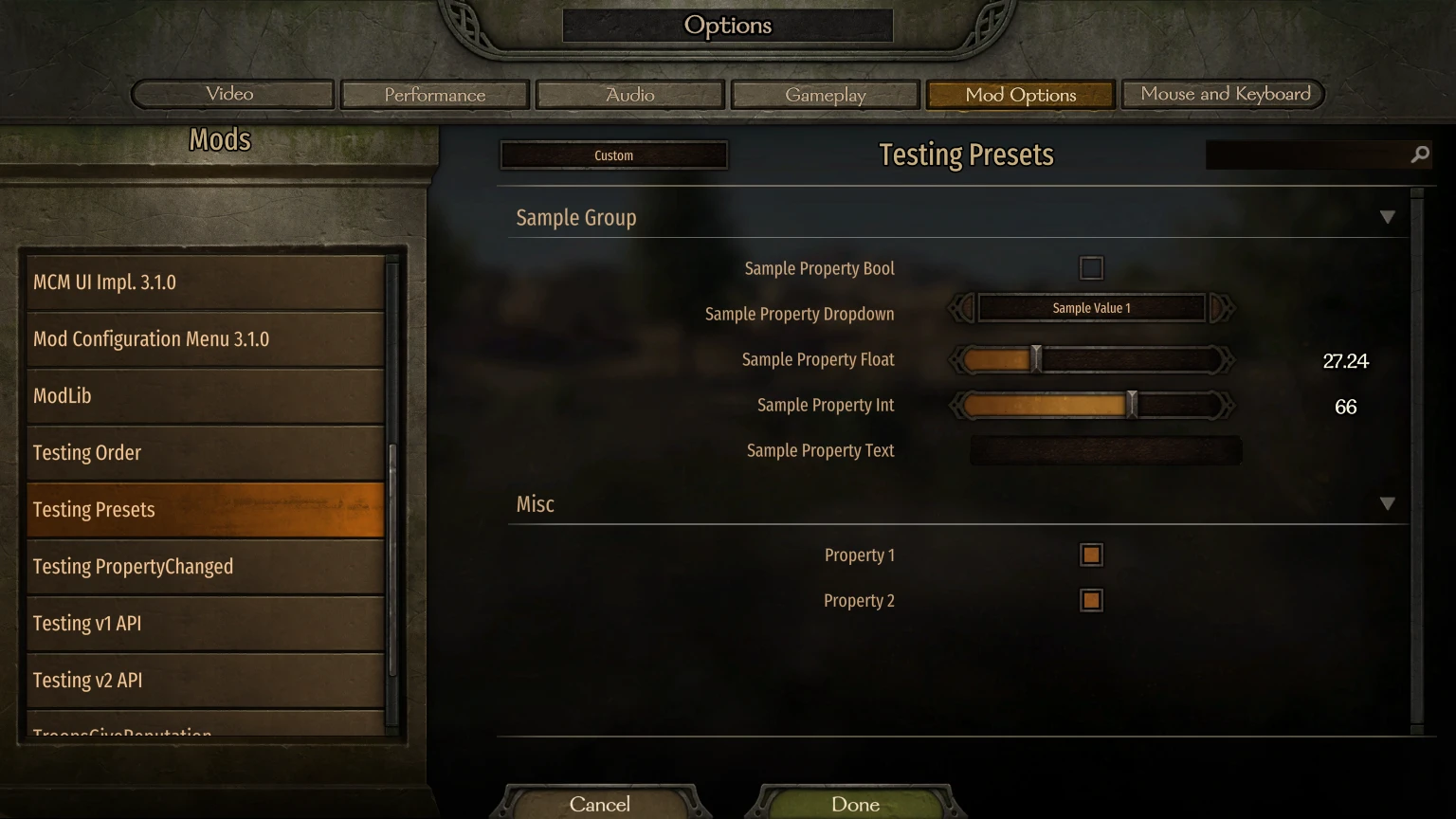
MCM คือไลบรารีหน้าจอตัวเลือก Mod ที่ออกแบบมาเพื่อให้ผู้ปรับแต่งสามารถใช้ API ในการกำหนดตัวเลือกต่างๆ ได้<div class="container mod_description_container condensed"><div align="center"><br/><div class="img-wrapper"><img src="https://raw.githubusercontent.com/Aragas/Bannerlord.MBOptionScreen/refs/heads/dev/resources/mcm-transparent.png"/></div><br/><a href="https://crowdin.com/project/mod-configuration-menu" rel="nofollow"><div class="img-wrapper"><img src="https://badges.crowdin.net/mod-configuration-menu/localized.svg"/></div><br/><a href="https://www.nuget.org/packages/Bannerlord.MCM" rel="nofollow"><div class="img-wrapper"><img src="https://img.shields.io/nuget/v/Bannerlord.MCM.svg?label=NuGet%20Bannerlord.MCM&colorB=blue"/></div><br/><a href="https://steamcommunity.com/sharedfiles/filedetails/?id=2859238197" rel="nofollow"><div class="img-wrapper"><img src="https://img.shields.io/badge/Steam-Mod%20Configuration%20Menu-blue.svg"/></div><a href="https://steamcommunity.com/sharedfiles/filedetails/?id=2859238197" rel="nofollow"><div class="img-wrapper"><img src="https://img.shields.io/steam/downloads/2859238197?label=Downloads&color=blue"/></div><a href="https://steamcommunity.com/sharedfiles/filedetails/?id=2859238197" rel="nofollow"><div class="img-wrapper"><img src="https://img.shields.io/steam/views/2859238197?label=Views&color=blue"/></div><a href="https://steamcommunity.com/sharedfiles/filedetails/?id=2859238197" rel="nofollow"><div class="img-wrapper"><img src="https://img.shields.io/steam/subscriptions/2859238197?label=Subscriptions&color=blue"/></div><a href="https://steamcommunity.com/sharedfiles/filedetails/?id=2859238197" rel="nofollow"><div class="img-wrapper"><img src="https://img.shields.io/steam/favorites/2859238197?label=Favorites&color=blue"/></div></div><br/><br/> หรือที่เรียกว่า MBOptionScreen แบบสแตนด์อโลน<br/> ก่อนหน้านี้เป็นการแยกฟอร์กของ <a href="https://github.com/mipen/ModLib" rel="nofollow">ModLib</a><br/> แหล่งที่มามีอยู่ที่ <a href="https://github.com/Aragas/Bannerlord.MBOptionScreen" rel="nofollow">GitHub</a> !<br/> เครดิต: <a href="https://www.nexusmods.com/users/79933" rel="nofollow">Drogean</a> สำหรับโลโก้ MCM!<br/><br/> MCM คือไลบรารีหน้าจอตัวเลือก Mod ที่ออกแบบมาเพื่อให้ผู้ปรับแต่งสามารถใช้ API ในการกำหนดตัวเลือกต่างๆ ได้<br/><br/> MCM รองรับการตั้งค่าสามแบบ ได้แก่ Global, PerCampaign และ PerSave โดย Global จะใช้ร่วมกันระหว่างตัวละครและไฟล์บันทึกต่างๆ ส่วน PerCampaign จะคงอยู่ภายในแคมเปญเดียว ส่วน PerSave จะถูกเก็บไว้ในไฟล์บันทึก!<br/><br/> โดยมีให้เลือก 5 ประเภท:<br/><ul class="disc"><li> บูล</li><li> Int Slider / Textbox</li><li> สไลเดอร์ลอย / กล่องข้อความ</li><li> กล่องข้อความ</li><li> ดรอปดาวน์</li><li> ปุ่ม<br/></li></ul><br/> การตั้งค่าต่างๆ สามารถกำหนดค่าได้ในเวลาคอมไพล์โดยใช้ Attribute API และในขณะรันไทม์โดยใช้ Fluent Builder<br/><br/> MCM ใช้ไลบรารีระดับเฟรมเวิร์ก 3 รายการต่อไปนี้:<br/><ul class="disc"><li> <strong>Harmony</strong> ถูกใช้เพื่อมี 0Harmony.dll เพียงตัวเดียวในเกม</li><li> <strong>ButterLib</strong> คือไลบรารี่สำหรับปรับแต่งทั่วไปที่ช่วยให้พัฒนาปรับแต่งได้ง่ายขึ้น</li><li> <strong>UIExtenderEx</strong> เป็นไลบรารีการจัดการ UI ทั่วไป<br/></li></ul><br/> ดู <a href="https://mcm.bannerlord.aragas.org/articles/index.html" rel="nofollow">เอกสาร</a> เพื่อดูรายละเอียดเพิ่มเติม!<br/><br/> <font size="5">การติดตั้ง</font><br/> <font size="4">ผู้เล่น</font><br/> ต้องใช้ <strong>Bannerlord.Harmony</strong> , <strong>Bannerlord.UIExtenderEx</strong> , <strong>Bannerlord.ButterLib</strong><br/> <font size="4">นักพัฒนา</font><br/> เพิ่มสิ่งนี้ลงในไฟล์ . <strong>csproj</strong> ของคุณ โปรดทราบว่า <strong>IncludeAssets="compile"</strong> สำคัญมาก!<br/> <code><br/><ItemGroup><br/><span class="wbbtab"></span> <PackageReference Include="Bannerlord.MCM" Version="4.3.16" IncludeAssets="compile" /><br/> </ItemGroup><br/></code><br/><br/> <font size="5">คำถามที่พบบ่อย</font><br/> <font size="4">ฉันจะติดตั้งได้อย่างไร?</font><br/><ul class="content_list content_list_ordered"><li> ค้นหาโฟลเดอร์ Modules ในตำแหน่งการติดตั้ง Bannerlord ของคุณ สำหรับผู้ใช้ Steam มักจะอยู่ที่นี่: <strong>C:\Program Files (x86)\Steam\steamapps\common\Mount & Blade II Bannerlord\Modules</strong></li><li> ดาวน์โหลด mod เวอร์ชันล่าสุดนี้และวางโฟลเดอร์ภายใน Modules จากไฟล์เก็บถาวรลงในโฟลเดอร์ <strong>Modules</strong> ของเกมของคุณ</li><li> เริ่มตัวเปิดใช้งาน Mount & Blade II: Bannerlord และเลือก Mod เมนูการกำหนดค่า Mod ทั้งหมดที่จะโหลด<br/></li></ul><div class="bbc_spoiler"> สปอยล์:<div class="bbc_spoiler_show"> แสดง</div><div class="bbc_spoiler_content"><br/> <strong>โครงสร้างโฟลเดอร์โมดูลของคุณควรมีลักษณะประมาณนี้:</strong> <br/><br/><div class="img-wrapper"><img src="https://cdn.discordapp.com/attachments/753640646253740073/858635739528429568/unknown.png"/></div><br/><br/></div></div><div class="bbc_spoiler"> สปอยล์:<div class="bbc_spoiler_show"> แสดง</div><div class="bbc_spoiler_content"><br/> <strong>ลำดับ mod ของคุณในตัวเรียกใช้งานควรมีลักษณะประมาณนี้:</strong> <br/><br/><div class="img-wrapper"><img src="https://cdn.discordapp.com/attachments/753640646253740073/858636433450729492/unknown.png"/></div><br/><br/></div></div><br/> <font size="4">การปลดบล็อก DLL</font><br/> คุณอาจต้องคลิกขวาที่ไฟล์ *.dll ทุกไฟล์ คลิก Properties และคลิก Unblock หากคุณแตกไฟล์ zip ด้วย Windows Explorer หรือโปรแกรมอื่นที่พยายามรักษาความปลอดภัยให้กับไฟล์ที่แตกออกมา<br/> <font size="4">ปัญหาการติดตั้ง Harmony:</font><br/> ตรวจสอบการแก้ไขปัญหาของ Harmony เพื่อดูข้อมูลเพิ่มเติมเกี่ยวกับวิธีการแก้ไข<br/> <font size="4">เกิดข้อผิดพลาดในเวอร์ชัน 1.0.0-v1.0.3 เมื่อใช้ Vortex</font><br/> ตรวจสอบ <a href="https://forum.nexusmods.com/index.php?showtopic=8605808/#entry118785353" rel="nofollow">ความคิดเห็นนี้</a></div>
เครื่องมือนี้จัดทำโดยบุคคลที่สาม [bufftool]

ดาวน์โหลด Mods ทันที
ติดตั้ง LagoFast เริ่มต้น Mount&BladeII:Bannerlord และเล่นกับ mod ที่คุณชื่นชอบ