
Bindlib di chiave
Autore:BULLETBOTUltimo aggiornamento:2025-11-22 03:39:5985.2K75KB
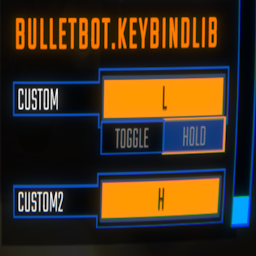

Introduzione alla mod
Una libreria che consente di aggiungere i propri keybinds ai controlli.
Bindlib di chiave
- Una libreria che ti permette di aggiungere i tuoi keybinds.
Aggiungere i tuoi binding tasti
Keybinds.Bind(string name, string binding) = > Keybind Keybinds.Bind(string category, string name, string binding) = > Keybind Keybinds.Toggle(Keybind.Toggle toggle) = > Keybind Keybinds.Toggle(string category, Keybind.Toggle toggle) = > Keybind Keybinds.Toggle(Keybind Keybind, Keybind.Toggle toggle) = > Keybind Keybind.toggle
Per registrare un keybind:
Keybinds.Bind ("Push", "<Keyboard>/b ");
Per registrare un keybind con una categoria:
Keybinds.Bind ("generale", "Push", "<Keyboard>/b ");
Per registrare un toggle:
Keybinds.Toggle(new Keybind.Toggle ())//questo è un toggle che sarà sotto la vostra intestazione modguid.
Per registrare un toggle con una categoria:
Keybinds.Toggle("generale ", nuovo keybind.toggle ())//questo è un toggle che sarà sotto la categoria specificata.
Se si desidera avere un toggle per il vostro keybind:
Keybind keybind = Keybinds.Bind ("Push", "<Keyboard>/b "); Keybinds.Toggle (keybind, new Keybind.Toggle () {defaultValue = false, falseText =" off ", trueText =" on "});//restituisce lo stesso keybind e applica il nuovo toggle da questo metodo.
Se si desidera usare il keybind:
SemiFunc.InputDown(keybind.inputKey); SemiFunc.InputUp(keybind.inputKey); SemiFunc.InputHold(keybind.inputKey); Semifunc.inputtogleget(keybind.inputKey); //usare questo solo quando hai impostato un toggle al tuo keybind altrimenti questo avrà un errore.
Ci sono molte più variabili nella classe"Keybind ". Controlla la classe in dnspy per ulteriori dettagli.
Questo strumento è fornito da terze parti [bufftool]

Scarica subito le mod
Installa LagoFast, avvia R.E.P.O. e gioca con le mod che ami.
Utilizziamo i cookie per rendere le interazioni con i nostri siti Web e servizi facili e significative. Per ulteriori informazioni sui cookie che utilizziamo o per scoprire come disabilitare i cookie, clicca qui.