
“I get kicked out every 5 minutes, almost exactly minute by minute.”
This is a common complaint from Battlefield 6 players experiencing a persistent disconnection issue linked to error code 85009S. In most cases, 0:85009S and 1:85009S indicate problems with connection stability or authentication, and they can appear at launch, during a match, or as sudden disconnections before a round ends.

- ✅ Reduce Lag and High Ping.
- ✅ Boost FPS at the Same Time.
- ✅ Support 2000+ Popular Online Games.
- ✅ Change Server without Latency.
- ✅ End Connection & Stuck Issues.
Part 1: What does error code 85009S mean in Battlefield 6
Part 2: Known causes of 0:85009S and 1:85009S
Part 3: How to Fix Battlefield 6 Error Code 85009S (Step-by-Step Guide)
Part 4: How to improve stability with LagoFast Game Booster
Part 6: When it may be a server-side issue
Part 1: What does error code 85009S mean in Battlefield 6
- “I CAN'T PLAY THE GAME FOR MORE THAN 5 MINUTES.“It even logs me off
- while in the menu after 5m or less.”
- “Same issue here after a fresh Win 11 install.”
These are recurring complaints from Battlefield 6 players reporting a highly frustrating issue: the game disconnects them within just a few minutes of joining a match, often around the 5-minute mark.
In many cases, players report that the problem persists across multiple systems and troubleshooting attempts. Even after reinstalling EA Anti-Cheat, changing DNS settings, switching networks, or disabling VPNs, the issue often remains unresolved. Some users even report that a clean Windows installation does not fix it. This has led to widespread frustration within the community, especially since other online games typically run without similar connection problems.
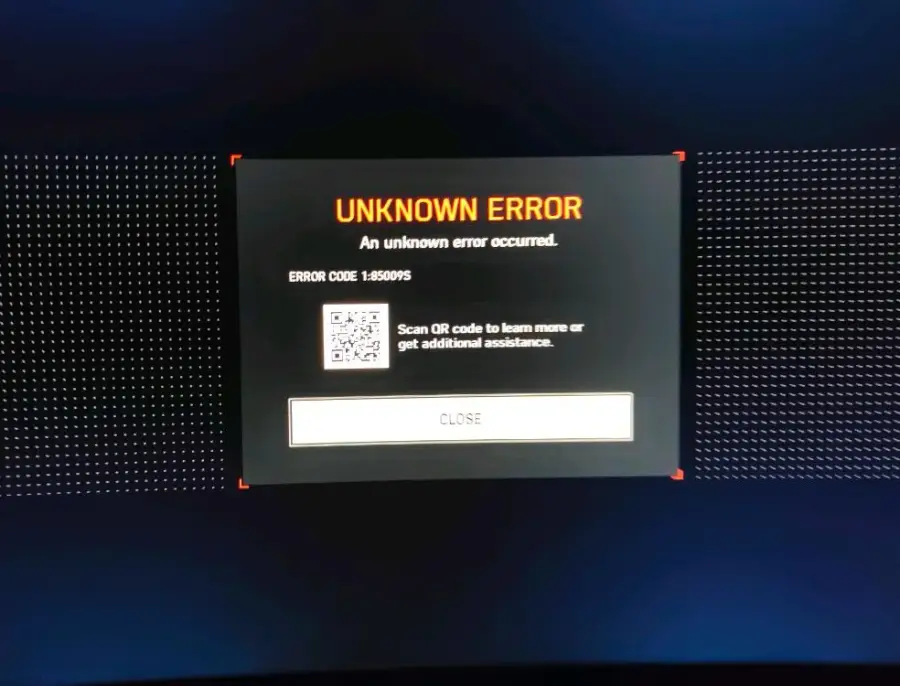
Error code 85009S in Battlefield 6 usually indicates a connection stability or authentication issue. Both 0:85009S and 1:85009S can appear at launch, during gameplay, or as sudden mid-match disconnections.
What players commonly report
- Getting kicked from matches after a few minutes
- Being disconnected before a round ends
- “Unknown error” messages with 85009S
- Being removed from servers even when the game initially launches fine
According to EA Help references and community discussions on EA Forums and Steam, 1:85009S is often associated with VPN usage and unstable DNS. However, both 0:85009S and 1:85009S generally share similar symptoms related to connection drops or authentication failures.
Part 2: Known causes of 0:85009S and 1:85009S
Likely network and routing issues
- VPN enabled (directly flagged by EA for 1:85009S)
- Unstable DNS affecting authentication
- ISP routing issues or packet loss
- Unstable Wi-Fi connections
Launcher or EA app-related issues
Even when launching via Steam or Epic Games Store, the EA app still handles authentication.
Possible issues include:
- Corrupted EA app cache
- Background service interruptions
- Permission-related errors
Anti-cheat or system-level causes
Some players report the issue began after system changes or updates.
Possible contributing factors:
- Secure Boot not enabled
- TPM 2.0 disabled
- Windows or driver updates
- EA Anti-Cheat compatibility issues after system changes
Part 3: How to Fix Battlefield 6 Error Code 85009S (Step-by-Step Guide)
Disable VPN or proxy
EA explicitly notes VPN usage can trigger 1:85009S.
Check and disable:
- VPN software
- Browser VPN extensions
- Router-level VPN
- Windows proxy settings
Restart EA app and try again.
Switch to a stable DNS
Recommended DNS:
- 1.1.1.1
- 1.0.0.1
Then:
- Restart PC
- Restart router
- Relaunch the game
Restart router and game
Perform a full power cycle:
- Close the game completely
- Close EA app / Steam / Epic
- Restart router
- Reopen everything
Switch to Ethernet (if possible)
Wi-Fi instability can cause mid-match disconnects. Ethernet provides a more stable connection and reduces packet loss.
Run EA app as administrator
Right-click EA app → Run as administrator → relaunch game.
Clear EA app cache
Clear cached data via EA app settings to fix potential authentication issues.
If the issue feels like routing instability
If the game works normally but disconnects after a few minutes during gameplay, the issue may be related to:
- ISP routing problems
- Packet loss
- Regional server instability
Part 4: How to improve stability with LagoFast Game Booster
LagoFast helps optimize routing paths and reduce packet loss by creating a more stable connection route to game servers.
How to use LagoFast Game Booster
Step 1: Download and install LagoFast using the Free Trial option
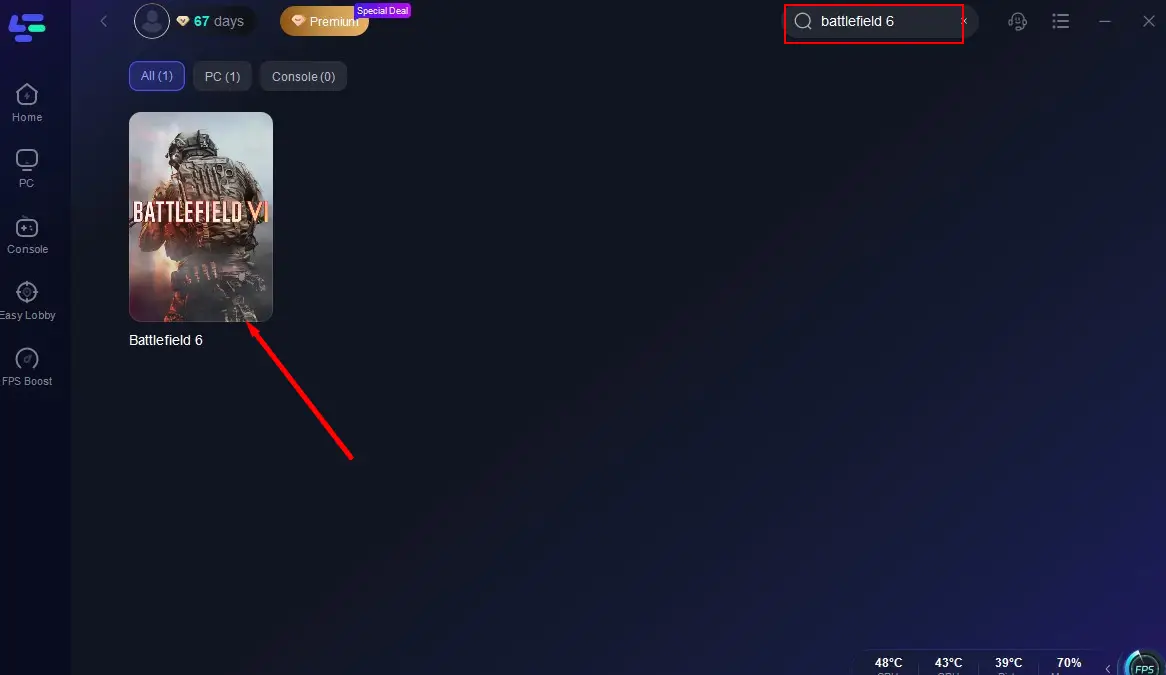
Step 2: Search for “Battlefield 6” in the app
Step 3: Select the nearest server region and best node

Step 4: Click “Boost” to activate optimized routing
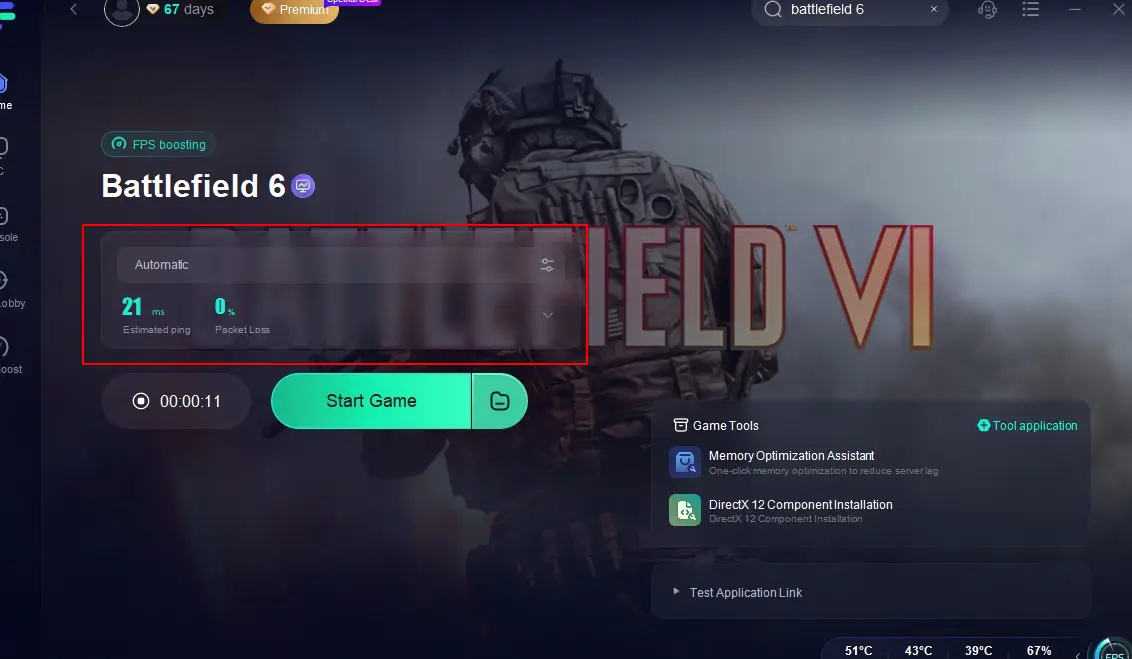
Step 5: Launch the game with the boosted connection enabled
Part 5: Advanced system fixes
Enable Secure Boot and TPM 2.0
Some users report improvements after enabling these in BIOS, especially if the issue started after:
- Windows reinstall
- BIOS reset
- Hardware or security updates
Try a clean boot of Windows
Useful if background software is interfering with EA services or anti-cheat.
Verify or reinstall the game
Use Steam, Epic, or EA app repair tools before considering full reinstall.
Part 6: When it may be a server-side issue
If many players report 85009S at the same time, especially after updates or during peak hours, it may be server-related.
Check:
- EA Forums
- Steam discussions
- EA server status pages
When to contact EA Support
If all steps fail:
- VPN disabled
- DNS changed
- Router restarted
- Ethernet tested
- EA cache cleared
- Admin mode tested
- BIOS checked
- Game files verified
Contact EA Support with full details:
- Exact error code
- Platform and launcher
- When it occurs
- Time until disconnect
- All troubleshooting steps already tried
Part 7: FAQs
Is 85009S a server or PC issue?
It can be both, but most cases are related to connection stability or authentication issues.
Difference between 0:85009S and 1:85009S?
Both are similar; 1:85009S is more directly associated with VPN and DNS instability.
Can VPN cause this error?
Yes, VPN is one of the most common confirmed triggers.
Does changing DNS help?
Sometimes, especially if ISP DNS is unstable.
Conclusion
Error code 85009S in Battlefield 6 is usually caused by connection instability or authentication failure rather than broken game files. Start with simple fixes like disabling VPN, changing DNS, restarting your router, and testing Ethernet. If the issue persists, move on to system-level checks and EA app troubleshooting. If many players report the issue simultaneously, it may also indicate a server-side problem.

Boost Your Game with LagoFast for Epic Speed
Play harder, faster. LagoFast game booster eliminates stutter and lags on PC, mobile, or Mac—win every match!
Quickly Reduce Game Lag and Ping!
Boost FPS for Smoother Gameplay!